
If you are looking for an ACEMAGIC K1 Mini PC review, the appeal is straightforward: it packs a Ryzen-based CPU, triple-display support, and a sensible port layout into a compact box.
It is best suited to buyers who want a small desktop for office work, media, light multitasking, or a simple home server rather than a gaming tower.
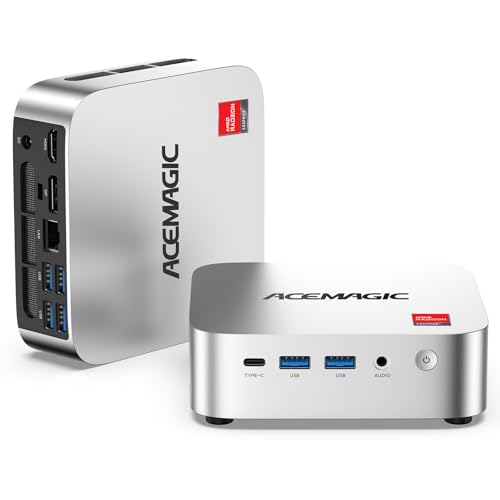
K1 Mini PC Review Summary
The ACEMAGIC K1 Mini PC makes sense for buyers who value flexibility more than raw desktop-class power.
Based on the listing, it combines a Ryzen R2544 processor, 8GB of DDR4 memory, a 256GB SSD, and a wide mix of display and connectivity options, which makes it a practical fit for a tidy home office, a student desk, a reception area, or a compact living-room PC.
Verdict: this is a good all-around mini PC for everyday computing if your workload stays in the productivity, streaming, and light-creation lane.
It is less compelling if you expect heavy creative work, serious gaming, or a machine that needs to start with more than 8GB of RAM.
Review Scorecard
| Category | Score | Why it matters |
|---|---|---|
| Everyday performance | 7/10 | Ryzen R2544 with 4 cores and 8 threads should handle office work, browsing, and streaming smoothly. |
| Multitasking headroom | 6/10 | 8GB RAM is usable, but it is the first limit many buyers will notice. |
| Connectivity | 9/10 | USB-C, six USB 3.2 ports, Gigabit Ethernet, WiFi 5, and Bluetooth 4.2 cover most desk setups. |
| Display flexibility | 9/10 | Triple 4K support is a strong advantage for productivity and multi-monitor use. |
| Upgrade potential | 8/10 | Dual DDR4 slots and expandable storage make future growth realistic. |
| Home server suitability | 8/10 | Auto Power On, RTC Wake, and Wake-on-LAN are useful for always-on use cases. |
| Value for the right buyer | 8/10 | The feature mix is well chosen for practical users, even if the base memory is modest. |
Key Features and Specifications of K1 Mini PC
The ACEMAGIC K1 Mini PC centers on an AMD Ryzen R2544 processor with 4 cores and 8 threads, a base clock of 3.35GHz, and boost speeds up to 3.7GHz.
The listing positions it as a responsive option for office productivity, web browsing, online learning, media playback, and light content creation, which is the right performance tier for this class of machine.
It ships with 8GB DDR4 memory and a 256GB M.2 SSD, which is enough for basic day-to-day use but also the clearest reason to think about upgrades early.
ACEMAGIC says the system has dual DDR4 SO-DIMM slots supporting up to 32GB RAM and storage expansion up to 4TB, so the platform looks better for long-term ownership than the starting spec alone suggests.
The port selection is one of the K1’s best features.
The listing calls out 6x USB 3.2 ports, a USB-C Gen 2 port with up to 10Gbps transfer speed, and Type-C support for DP 1.4 4K@60Hz output and PD power delivery.
That matters because a small desktop becomes much easier to live with when you can connect modern peripherals without relying on hubs for everything.
Display support is also unusually strong for a compact PC.
ACEMAGIC advertises up to three 4K monitors through HDMI 2.0, DP 1.4, and USB-C 3.2, which is a real productivity advantage for spreadsheet work, dashboards, content management, and multitasking.
If your desk setup depends on multiple screens, this spec is more useful than flashy benchmark talk.
For networking and always-on duties, the K1 includes Gigabit Ethernet, WiFi 5, and Bluetooth 4.2.
The smart features list also includes Auto Power On, RTC Wake, and Wake-on-LAN, which makes the system more interesting for NAS-style roles, simple firewall use, digital signage, or other low-footprint tasks that benefit from unattended startup.
The cooling design is another practical detail.
ACEMAGIC says the K1 uses an upgraded fan, a high thermal conductivity aluminum profile, and dual air outlets to support steady operation during extended workloads.
That does not make it a workstation, but it does suggest the machine is built with continuous daily use in mind.
Pros and Cons of K1 Mini PC
- Strong connectivity for a small desktop. The mix of USB-C, multiple USB 3.2 ports, Ethernet, wireless, and Bluetooth is more versatile than many bare-bones mini PCs.
- Excellent multi-monitor support. Triple 4K output makes it easier to build a serious productivity workstation without a large chassis.
- Good upgrade path. Dual memory slots and larger storage expansion reduce the risk of outgrowing the machine too quickly.
- Useful always-on features. Wake-on-LAN and related options help if you want a compact home server or low-maintenance desktop.
- Modest starting memory. 8GB RAM is fine for basics, but it narrows the margin once browser tabs, office apps, and background tasks pile up.
- Not the right choice for demanding workloads. The listing points to light creation and entertainment, not heavy rendering or premium gaming.
Who Should Buy K1 Mini PC?
The ACEMAGIC K1 Mini PC is a good fit if you want a small, practical Windows 11 Pro desktop for work and everyday use.
It is especially appealing for people who care about desk space, cable simplicity, and the ability to run multiple monitors from one compact box.
It also fits buyers who want a low-profile machine for home office, remote work, study, media playback, or light business tasks.
The port count and triple-display support make it more adaptable than many entry-level mini PCs that save space by stripping away expansion.
It is a reasonable option for someone building a home server, NAS-like setup, or always-on utility box if the workload is light and the hardware profile is sufficient.
The power-on and wake features are specifically relevant there.
You should probably skip it if you know you need more than basic multitasking from day one.
If your workflow regularly involves large spreadsheets, lots of browser tabs, frequent photo work, or multiple heavy background apps, 8GB RAM is likely too tight unless you plan to upgrade quickly.
Performance and Daily Use of K1 Mini PC
Office and Browsing
The Ryzen R2544 configuration is a sensible match for everyday desktop work.
The listing’s promise of responsive performance for productivity, browsing, and online learning lines up with the hardware class, so this should feel more capable than ultra-low-end mini PCs in normal office use.
Media and Multi-Display Work
Triple 4K support changes how useful a mini PC feels on a desk.
If you want one screen for communication, one for documents, and one for reference material or dashboards, the K1’s display options are the sort of feature that saves time every day.
Upgrades and Longevity
The base configuration is conservative, but the platform is not closed in.
Dual DDR4 slots and storage expansion up to 4TB mean the K1 can be shaped into a better long-term machine if you start to feel the limitations of the stock configuration.
Small-Server Potential
The smart power features are more than marketing filler.
Auto Power On, RTC Wake, and Wake-on-LAN make the K1 more attractive than a generic mini PC for simple always-on jobs where remote access and unattended recovery matter.
Alternatives to K1 Mini PC
If you want something in the same general category, look at the Beelink Mini S search results, the GMKtec mini PC lineup, or the Intel NUC-style mini PC options.
These are credible alternatives if you want to compare port layouts, memory configurations, and display support before buying.
If you need stronger out-of-the-box memory or a different processor family, the MINISFORUM mini PC range is also worth checking.
The right alternative depends on whether you prioritize display outputs, upgrade room, or a more aggressive starting spec.
Is K1 Mini PC Worth It?
The ACEMAGIC K1 Mini PC is worth it if your priority is a compact Windows desktop with useful ports, triple-display support, and realistic upgrade options.
It is a smart buy for office users, home workers, and light server use, especially if you value flexibility more than raw performance numbers.
If you want a mini PC that can grow with you, the K1 has a solid case.
If you need a machine that feels generously specced immediately, look for a model with more RAM from the start.
