
If you want desktop-class graphics from a laptop, mini PC, or handheld, an external GPU dock with Thunderbolt 5 can be a practical upgrade. The right setup can improve gaming, accelerate creative work, and keep your machine flexible for travel.
Below, we focus on current options that balance bandwidth, power delivery, enclosure support, and compatibility so you can choose a dock that fits your hardware and your budget.
Best 10 External GPU Dock with Thunderbolt 5 Picks for 2026
Best for Thunderbolt 5 Expansion

- Dual 80Gbps Thunderbolt 5 ports with 140W charging
- 64Gbps PCIe 4.0 x4 slot plus M.2 and SD expansion
- Includes 2.5G Ethernet, USB-A, and Thunderbolt 5 cable
Best For: Power users who want an eGPU dock with Thunderbolt 5 plus extra connectivity and storage expansion.
Best for Thunderbolt 5 Display Expansion
Dell Pro Thunderbolt 5 Smart Dock SD25TB5

- Thunderbolt 5 dock with modular upgrade-friendly design
- Supports up to four 4K 60Hz displays
- Broad port mix for modern workstation setups
Best For: Power users who need a Thunderbolt 5 dock for multi-monitor productivity and fast peripherals.
Best for Thunderbolt 4 Expansion
Dell SD25TB4 Pro Thunderbolt 4 Smart Dock
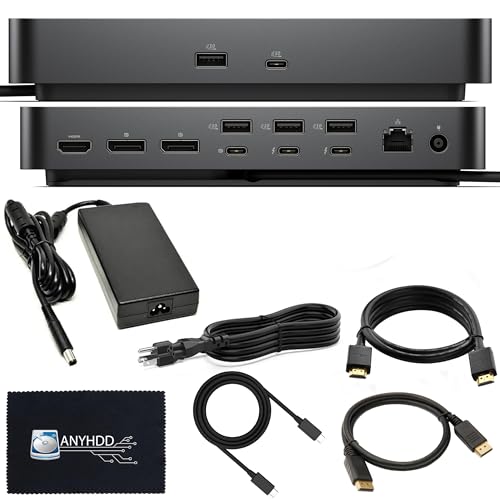
- Two Thunderbolt 4 ports and broad USB/Display outputs
- Supports up to 8K display setups
- Includes 180W power adapter and Dell modular dock design
Best For: Dell and Windows users needing a high-connectivity Thunderbolt 4 desktop dock.
Best for Thunderbolt 5 Performance
TREBLEET 80Gbps eGPU Enclosure
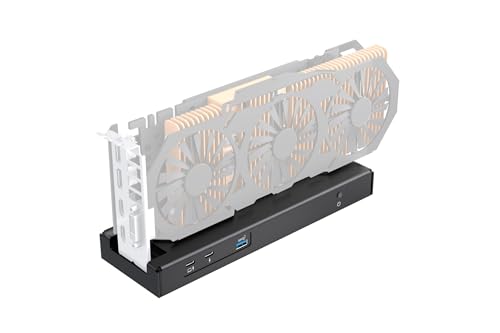
- 80Gbps Thunderbolt 5 / USB4 support
- 140W PD charging with daisy chaining
- Flexible SFX, ATX, FLEX, and DC power support
Best For: Gamers and creators who want a high-bandwidth eGPU enclosure for Thunderbolt 5 or USB4 systems.
Best for Everyday Use
Dell WD22TB4 Thunderbolt 4 Dock

- 40Gbps Thunderbolt 4 docking for peripherals and displays
- Supports dual or triple-monitor setups, including 4K
- Includes 180W power adapter and useful cable bundle
Best For: Users who want a reliable Thunderbolt 4 dock for a tidy multi-monitor workspace.
Best for Creators

- 80Gbps USB4v2 / Thunderbolt 5-compatible throughput
- 7000MB/s NVMe slot for fast project storage
- CFexpress Type A, SD 4.0, and microSD readers
Best For: Creators who prioritize ultra-fast storage, media ingest, and compact 8K-ready expansion.
Best for Mac mini Expansion
80Gbps Dock with NVMe & Card Readers
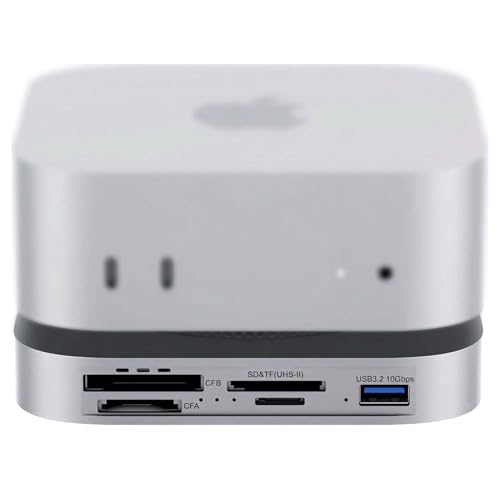
- 80Gbps USB4 2.0 with Thunderbolt 5/4 support
- M.2 NVMe slot for fast internal storage expansion
- CFexpress Type A/B and UHS-II card readers for creators
Best For: Mac mini M4/M4 Pro users who need a fast dock for storage expansion and media offload.
Best Oculink Pick

- Oculink 4i / PCIe 4.0 x4 connection
- Supports ATX and SFX power supplies
- Fits high-end GPUs like RTX 4090 and RX 7900 XTX
Best For: Oculink-enabled mini PC owners who want a flexible, standard-PSU eGPU dock.
Best for Thunderbolt 5 Expansion – PELADN S-3 eGPU Dock
If you want an external gpu dock with thunderbolt 5 that does more than just hold a graphics card, the PELADN S-3 stands out with dual 80Gbps Thunderbolt 5 ports, a 64Gbps PCIe 4.0 x4 slot, and extra storage and network expansion built in. It is a strong fit for users who want a high-bandwidth dock that can power a laptop, connect peripherals, and keep a modern GPU setup flexible.
Best For: Power users with Thunderbolt 5 laptops or mini PCs who want an eGPU dock plus extra I/O and storage expansion.
Pros:
- Dual Thunderbolt 5 ports with up to 140W input charging and 30W downstream power
- PCIe 4.0 x4 slot for modern GPU performance, plus PCIe 3.0 M.2 and SD 4.0 expansion
- Broad compatibility across Thunderbolt 5, Thunderbolt 4, and USB4 systems
- Includes 2.5G Ethernet, USB-A, and a Thunderbolt 5 cable in the box
Cons:
- Requires a separate ATX or SFX power supply
- Feature-rich design may be more than casual users need
- Physical GPU and PSU fit limits add setup considerations
This is a compelling external gpu dock with thunderbolt 5 if you want high-speed connectivity and expansion in one enclosure. It is less about minimalism and more about giving a desktop-class GPU setup extra bandwidth, charging, and accessory support.
Best for Thunderbolt 5 Display Expansion – Dell Pro Thunderbolt 5 Smart Dock SD25TB5
If you want an external gpu dock with thunderbolt 5 that can also clean up a multi-monitor desk, the Dell Pro Thunderbolt 5 Smart Dock SD25TB5 is built for high-bandwidth peripheral setups. It adds plenty of display and USB connectivity, supports up to four 4K 60Hz displays, and includes a solid port mix for modern workstations.
Best For: Power users who want one Thunderbolt 5 dock to handle displays, fast peripherals, and a tidy single-cable setup.
Pros:
- Thunderbolt 5 connectivity with swappable modular dock design for easier upgrades
- Supports up to four 4K 60Hz displays for serious multi-monitor productivity
- Strong port selection including DP 2.1, HDMI 2.1, Thunderbolt 5, and USB-A
Cons:
- More dock than casual users need if you only want basic laptop expansion
- Power adapter is 180W, so it may not suit every charging-heavy workflow
As a dock-first option, it makes the most sense for users who care more about expandability and display support than raw eGPU-only use. If your goal is an external gpu dock with thunderbolt 5 that also functions as a full workstation hub, this is a strong, future-facing pick.
Best for Power-Heavy Builds – AOOSTAR AG03 eGPU Dock
If you want an external gpu dock with thunderbolt 5 that can handle a serious desktop-class card, the AOOSTAR AG03 stands out for its built-in 800W PSU, OCuLink support, and dual TB5 connectivity. It’s built for Windows 11 laptops, mini PCs, and handhelds that need a cleaner, high-power expansion setup without extra power bricks.
Best For: Users building a high-wattage eGPU setup who want flexible OCuLink or Thunderbolt 5 connectivity and an integrated power supply.
Pros:
- Built-in 800W server-grade PSU simplifies the setup
- Supports up to 500W GPU power output for demanding cards
- Includes both OCuLink and dual Thunderbolt 5 ports
- Active cooling helps stabilize performance under load
Cons:
- GPU is not included
- Compatibility can vary by host device, GPU, cable, and BIOS
- Some high-end cards may need an extra adapter or cable
As an external gpu dock with thunderbolt 5, the AG03 is less about portability and more about power, flexibility, and a cleaner high-performance desktop replacement path. If your host device is confirmed compatible, it’s a compelling dock for gaming, AI, editing, and other GPU-heavy workloads.
Best for Thunderbolt 4 Expansion – Dell SD25TB4 Pro Thunderbolt 4 Smart Dock
If you want a dock that can anchor a busy desk without overcomplicating setup, the Dell SD25TB4 Pro is a strong fit. It is not a true external gpu dock with thunderbolt 5, but it delivers the kind of high-bandwidth, multi-device expansion many users want from a modern Thunderbolt dock, including 8K display support and a broad port mix.
Best For: Dell and Windows users who want a reliable Thunderbolt 4 dock for dual displays, fast charging, and lots of wired peripherals.
Pros:
- Two Thunderbolt 4 ports plus HDMI, DisplayPort, USB-A, USB-C, and Ethernet
- Supports 8K display output and multi-monitor productivity setups
- 180W power adapter included for stronger laptop charging support
- Modular Dell dock design is built for easier upgrades over time
Cons:
- Thunderbolt 4, not Thunderbolt 5, so it is not the newest bandwidth tier
- Best fit for Dell-focused workflows rather than universal plug-and-play buyers
- Bulkier than a simple travel dock or minimal hub
Overall, the SD25TB4 Pro is a practical choice if you care more about dependable desktop expansion than chasing the latest spec sheet. For shoppers comparing an external gpu dock with thunderbolt 5, it is better viewed as a capable productivity dock with strong display and peripheral support rather than an eGPU-first solution.
Best for Thunderbolt 5 Performance – TREBLEET 80Gbps eGPU Enclosure
If you want an external gpu dock with thunderbolt 5 that’s built around top-end bandwidth, the TREBLEET 80Gbps eGPU enclosure is a strong fit. Its JHL9480 controller targets Thunderbolt 5 and USB4 systems, while 140W PD and daisy chaining make it practical for a one-cable desktop setup.
Best For: Gamers, creators, and power users who want a high-bandwidth eGPU enclosure for Thunderbolt 5 or USB4 laptops, mini PCs, and handhelds.
Pros:
- 80Gbps Thunderbolt 5 / USB4 bandwidth for higher-end GPU performance
- Up to 140W Power Delivery for charging a compatible laptop through the same cable
- Supports SFX, ATX, FLEX, and DC power options for flexible builds
- Works with both NVIDIA and AMD PCIe graphics cards
Cons:
- Requires compatible host hardware and the right drivers to work properly
- More of a DIY enclosure than a plug-and-play accessory
- DC input is only suited to lower-power PCIe devices
This is a capable pick if you specifically want an external gpu dock with thunderbolt 5 and value bandwidth, charging, and power-supply flexibility over simplicity. It’s best for buyers comfortable checking compatibility before they build.
Best for Everyday Use – Dell WD22TB4 Thunderbolt 4 Dock
If you’re shopping for an external gpu dock with thunderbolt 5, the Dell WD22TB4 is better understood as a high-bandwidth Thunderbolt 4 docking station for displays, USB peripherals, and wired networking. It’s a practical choice for users who want one-cable desk setup convenience, dual or triple-monitor support, and a bundle that already includes the key cables you need to get started.
Best For: Laptop users who want a reliable Thunderbolt 4 dock for multi-monitor work, fast charging, and a cleaner desktop setup.
Pros:
- 40Gbps Thunderbolt 4 connectivity with strong expansion for everyday productivity
- Supports dual or triple displays, including 4K setups, for flexible workstation builds
- Includes a 180W adapter plus HDMI, DisplayPort, and USB-C cable bundle
- Broad compatibility across macOS, Windows 10/11, and Ubuntu
Cons:
- Not a true Thunderbolt 5 dock, so it won’t satisfy users specifically seeking TB5 bandwidth
- Less suitable for high-end external GPU workflows than a dedicated TB5-ready solution
- Bulkier than simpler USB-C hubs
For most buyers, this is a dependable docking station rather than an external gpu dock with thunderbolt 5, but it still covers the essentials well: display output, data, charging, and wired connectivity in a single package. If your priority is desktop convenience over cutting-edge Thunderbolt 5 performance, it’s a solid, practical pick.
Best for Creators – 80Gbps USB4v2 Mini Dock
If you want an external gpu dock with thunderbolt 5-style bandwidth for fast storage, media cards, and high-end display output, this 8-in-1 USB4v2 hub is built for demanding creator workflows. It combines an internal NVMe slot, pro-grade card readers, and 8K video support in a compact aluminum enclosure.
Best For: Editors, photographers, and power users who need blazing-fast transfers, strong monitor support, and portable expansion in one dock.
Pros:
- Up to 80Gbps USB4v2 / Thunderbolt 5-compatible bandwidth for very fast data movement
- Internal NVMe M.2 slot rated up to 7000MB/s for scratch disks, backups, and project files
- CFexpress Type A, SD 4.0, and microSD slots streamline pro photo and video ingestion
- 8K@60Hz output plus dual-fan cooling help it handle demanding workstation use
Cons:
- Not a true discrete GPU enclosure, so it won’t add graphics acceleration by itself
- Best performance depends on a compatible high-bandwidth USB4v2/Thunderbolt 5 host
- Port selection is creator-focused rather than broad desktop expansion
This is a strong pick if you want an external gpu dock with thunderbolt 5 compatibility in the broader sense of next-gen I/O, especially for fast storage and media workflows. It’s less about GPU power and more about turning a laptop into a high-speed creator station.
Best for Dual-Interface Flexibility – AOOSTAR EG02 Dual TB5 eGPU Dock
If you want an external gpu dock with thunderbolt 5 that also leaves room for OCuLink, the AOOSTAR EG02 is built for flexible builds rather than a one-cable-only setup. Its PCIe 4.0 x4 x16-slot design, dual Thunderbolt 5 ports, and ATX/SFX PSU support make it a strong fit for users who want to mix and match desktop GPUs with mini PCs or compact systems.
Best For: Builders who want a versatile eGPU dock for Thunderbolt 5 systems, OCuLink devices, and full-size desktop power supplies.
Pros:
- Dual Thunderbolt 5 plus OCuLink gives you broad host-device compatibility.
- Supports both ATX and SFX power supplies for higher-wattage GPU setups.
- Metal chassis and integrated stand help with durability and desktop organization.
Cons:
- Requires you to supply your own desktop PSU.
- Bulkier than simpler plug-and-play eGPU enclosures.
As an external gpu dock with thunderbolt 5, the EG02 stands out most for users who care about connection flexibility and real GPU power options. It’s not the smallest or simplest dock, but it does a lot for people building a more serious compact-GPU setup.
Best for Mac mini Expansion – 80Gbps Dock with NVMe & Card Readers
If you want an external gpu dock with thunderbolt 5-adjacent bandwidth for a Mac mini M4 setup, this 80Gbps dock is really about turning one fast port into a full media workstation. It combines an internal NVMe slot, pro card readers, and extra USB ports in a compact, actively cooled enclosure designed for heavy file transfer workflows.
Best For: Mac mini M4/M4 Pro users, photographers, and creators who need fast storage expansion and convenient card offload in one dock.
Pros:
- 80Gbps USB4 2.0 performance with Thunderbolt 5/4 compatibility
- Built-in M.2 NVMe slot rated up to 7000MB/s for fast project storage
- CFexpress Type A/B plus UHS-II SD and microSD readers cover pro cameras
- Dual PWM fans and auxiliary power support help with sustained transfers
Cons:
- Not a universal eGPU enclosure, so GPU support depends on your setup and host
- Best value is tied to Mac mini M4/M4 Pro and media-heavy workflows
For buyers comparing an external gpu dock with thunderbolt 5 features, this is strongest as a storage and media hub rather than a pure graphics enclosure. If your priority is fast SSD expansion, camera card ingestion, and stable high-speed connectivity, it delivers a very focused and practical package.
Best Oculink Pick – MINISFORUM DEG1 eGPU Dock
MINISFORUM’s DEG1 is a straightforward external GPU dock for builders who want PCIe 4.0 x4 Oculink bandwidth and a flexible ATX/SFX power setup. If you’re comparing an external gpu dock with thunderbolt 5, note that this model is not Thunderbolt-based and is meant for Oculink-compatible systems instead.
Best For: Users with Oculink-enabled mini PCs or desktops who want a bare-bones eGPU dock with standard PSU support.
Pros:
- Oculink 4i input with PCIe 4.0 x4 link for direct GPU expansion
- Supports ATX and SFX power supplies for more build flexibility
- Works with large cards like RTX 4090 and RX 7900 XTX
- Compact dock-style design keeps the setup simple
Cons:
- Does not support Thunderbolt or USB4
- No power supply included
- No hot-plug support; the system must be powered off to connect
This is a strong pick if your priority is Oculink performance and PSU compatibility rather than plug-and-play convenience. For anyone shopping an external gpu dock with thunderbolt 5, it’s important to look elsewhere, but for Oculink ecosystems this is a practical, no-frills expansion dock.
How We Picked the Best External GPU Dock with Thunderbolt 5
We prioritized docks and enclosures that are relevant to buyers searching for an External GPU Dock with Thunderbolt 5, with emphasis on interface speed, real-world GPU compatibility, charging support, and the quality of the included I/O. We also looked for options that make sense for different use cases, from portable performance boosts to more fixed desktop-style setups.
Because not every product in this category is a true GPU enclosure, we also considered whether each item is best suited for graphics expansion, docking, or hybrid expansion with storage and peripherals.
Quick Comparison
In broad terms, the strongest picks split into three groups: dedicated eGPU enclosures for the best graphics upgrade path, high-power docks for users who also need charging and peripherals, and hybrid docks that add NVMe or card-reader features. If your main goal is gaming or GPU compute, focus on enclosure design, PSU support, and lane bandwidth. If your main goal is a cleaner desk setup, look at docking features first.
Key Buying Factors for an External GPU Dock with Thunderbolt 5
Bandwidth and Link Type
Thunderbolt 5 can offer more headroom than older Thunderbolt generations, but the actual performance you get still depends on the dock design, controller, and the GPU workload. For best results, look for a dock that clearly states Thunderbolt 5 support and, if relevant, PCIe lane details or OCuLink support.
Power Delivery and PSU Support
Check whether the dock includes its own power supply, supports ATX or SFX units, or simply passes power to the host device. A strong power setup matters for stability, especially with high-end GPUs and power-hungry laptops. If you plan to use the dock as a single-cable workstation, charging wattage is a major deciding factor.
GPU Size, Compatibility, and Form Factor
Measure the cards you actually want to use. Some enclosures are better for mainstream GPUs, while others are built to handle larger models. Also confirm whether the dock supports your operating system and device class, since Windows laptops, mini PCs, gaming handhelds, and Mac systems can have different compatibility limits.
Ports and Extra Features
Not every buyer needs only graphics. USB ports, Ethernet, display outputs, NVMe storage, and card readers can turn a dock into a more complete workstation hub. If you want a clean multi-purpose setup, these extras may matter as much as raw GPU performance.
Who Should Buy Which External GPU Dock with Thunderbolt 5?
Choose a dedicated eGPU enclosure if your top priority is graphics performance and upgrade flexibility. Choose a high-power smart dock if you want charging, displays, and peripherals in one hub. Choose a hybrid Thunderbolt 5 or USB4 v2 dock if you want some GPU-adjacent expansion, plus storage and media tools, but do not need a full-size graphics card enclosure.
If you are shopping for your first External GPU Dock with Thunderbolt 5, the safest move is to start with your device’s compatibility, then match the dock to your GPU size, power needs, and the amount of desk setup simplification you want.
