
If you need fast portable storage that also protects sensitive files, an encrypted external SSD with hardware encryption is one of the smartest upgrades you can buy. It gives you speed, convenience, and stronger data protection in a single drive.
Below, we focus on the best options for work files, backups, and travel-ready security so you can choose a drive that fits your speed, capacity, and access needs.
Best 10 Encrypted External SSD with Hardware Encryption Picks for 2026
Best for Fast Secure Transfers
WD My Passport 1TB Portable SSD
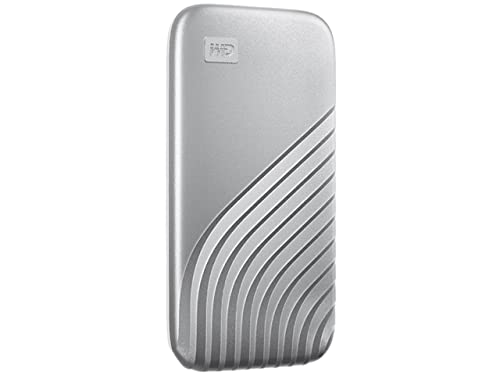
- Fast NVMe performance up to 1050MB/s read
- 256-bit AES hardware encryption with password protection
- Rugged, compact, and cross-compatible USB-C/USB-A
Best For: People who want speedy portable storage with built-in hardware encryption.
Best for Plausible Deniability

- AES-256-XTS hardware encryption with PIN + second password
- Decoy VHD for plausible deniability
- Bootable virtual ODD/HDD with write-protect and USB-C
Best For: Security-minded users who want encrypted storage plus bootable utility features.
Best for Hardware-Based Lockdown
Kingston IronKey Vault Privacy 80 1.92TB
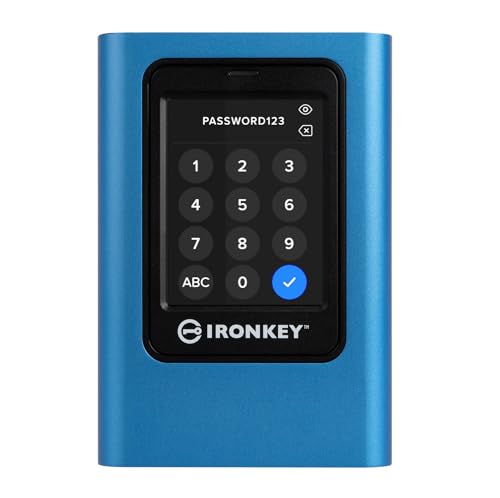
- FIPS 197 certified XTS-AES 256-bit hardware encryption
- Touch-screen PIN and passphrase access
- Dual read-only modes for added malware protection
Best For: Security-conscious users who need a portable SSD for confidential data and controlled access.
Best for PIN-Only Protection
iStorage diskAshur2 1TB Secure HDD
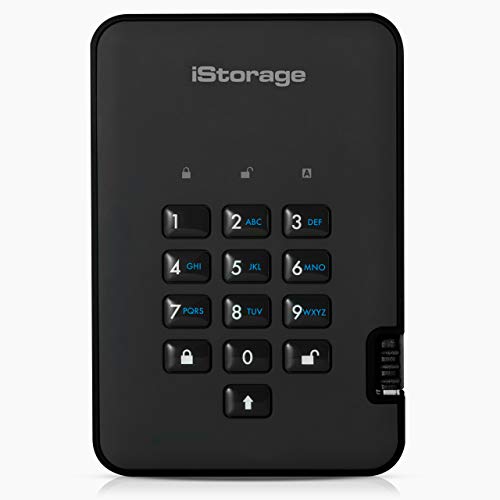
- AES-XTS 256-bit hardware encryption
- PIN unlock with no software needed
- IP56 dust and splash resistance
Best For: People who need a rugged, PIN-protected portable drive for sensitive files.
Best for Speed

- Up to 1,050MB/s read speeds
- Compact aluminum build with drop protection
- Broad compatibility with included cables
Best For: Creators and professionals who want fast, portable storage for media and backups.
Best for Hardware-Encrypted Access
Apricorn Aegis Padlock 2TB USB 3.0

- 256-bit AES XTS hardware encryption
- PIN keypad with admin and user access
- Software-free setup across USB systems
Best For: People who want a portable drive with hardware encryption and simple PIN-based access.
Best for Hardware Encryption
- AES-XTS 256-bit hardware encryption
- PIN-protected access with no software needed
- Rugged IP56 dust/splash-resistant build
Best For: Professionals and security-focused users who need portable encrypted storage with simple PIN access.
Best with Extra Features
Apricorn Aegis Padlock 1TB USB 3.0
- AES-XTS 256-bit hardware encryption
- Physical keypad with brute-force protection
- USB 3.0 and no-software setup
Best For: Travelers and business users who need rugged, keypad-secured data protection.
Best for Speed and Security
Western Digital My Passport SSD 2TB

- NVMe speeds up to 1050MB/s read and 1000MB/s write
- Password-enabled 256-bit AES hardware encryption
- Durable metal design with drop resistance up to 6.5ft
Best For: Users who want fast portable storage with built-in hardware encryption and broad compatibility.
Best Simple Pick
- Up to 1,050MB/s read speeds
- 256-bit AES hardware encryption
- Rugged, drop-resistant portable design
Best For: Fast, secure portable storage for travel and sensitive files.
Best for Fast Secure Transfers – WD My Passport 1TB Portable SSD
If you want an encrypted external ssd with hardware encryption that still feels quick in daily use, this WD My Passport 1TB model is a strong fit. It combines NVMe speeds, password protection, and 256-bit AES hardware encryption in a compact drive that’s easy to carry for backups, media, and sensitive work files.
Best For: Users who need fast portable storage with built-in hardware encryption for everyday security.
Pros:
- Up to 1050MB/s read and 1000MB/s write speeds for fast transfers
- 256-bit AES hardware encryption with password protection
- Compact, shock- and vibration-resistant design
- USB 3.2 Gen-2 with USB-C plus USB-A compatibility
Cons:
- Not the cheapest option in the portable SSD category
- Best speeds depend on host device and connection type
Overall, this is a practical encrypted external ssd with hardware encryption for buyers who want a balance of speed, portability, and simple data protection. It’s especially appealing if you move large files often and want security built in rather than added later.
Best for Plausible Deniability – iodd ST400 512GB USB-C SSD
If you want an encrypted external ssd with hardware encryption that goes beyond basic password protection, the iodd ST400 is built for security-focused workflows. It combines AES-256-XTS encryption, a long PIN/secondary password system, and a decoy volume for plausible deniability, while also doubling as a bootable virtual ODD/HDD tool for ISO-based installs and recovery tasks.
Best For: Security-minded users who need encrypted storage plus bootable ISO, write-protect, and portable IT utility features in one drive.
Pros:
- AES-256-XTS hardware encryption with PIN and device-bound second password support
- Decoy VHD volume adds plausible deniability for sensitive data
- Bootable virtual ODD/HDD support is useful for installers, maintenance, and recovery
- USB-C connectivity and write-protect mode improve everyday flexibility
Cons:
- More complex than a standard external SSD for casual users
- Security and boot features may require a learning curve
- 512GB capacity may feel limited if you store large media libraries
Overall, this is a specialized encrypted external ssd with hardware encryption for users who care about both data protection and advanced utility features. If you need a simple plug-and-play backup drive, this is probably more than you need; if you want secure storage with real admin-style tools, it stands out.
Best for Hardware-Based Lockdown – Kingston IronKey Vault Privacy 80 1.92TB
If you need an encrypted external ssd with hardware encryption for sensitive files, the Kingston IronKey Vault Privacy 80 stands out for its FIPS 197 certification, XTS-AES 256-bit protection, and dedicated touch-screen PIN entry. It’s built for people who want serious security without relying on software alone, plus simple on-drive controls for everyday use.
Best For: Users who want a highly secure portable SSD for confidential work, backups, and data protection on the go.
Pros:
- FIPS 197 certified with XTS-AES 256-bit hardware encryption
- Touch-screen PIN and passphrase support with admin/user profiles
- Dual read-only modes help protect against malware and accidental writes
Cons:
- Security-focused design may be overkill for casual file storage
- Premium protection usually comes at a higher price
For buyers who prioritize data protection first, this is a strong encrypted external ssd with hardware encryption because it combines certified encryption, physical access controls, and write-protect options in one travel-friendly drive.
Best for PIN-Only Protection – iStorage diskAshur2 1TB Secure HDD
If you want an encrypted external ssd with hardware encryption-style security for sensitive files, the iStorage diskAshur2 is built around one thing: locking data down before anyone can access it. You unlock it with a 7–15 digit PIN, and the drive encrypts everything on the fly with AES-XTS 256-bit hardware encryption. It’s a practical choice for travelers, field work, or compliance-heavy environments where software-based security isn’t enough.
Best For: Users who want a rugged, PIN-protected portable drive for confidential business or personal data.
Pros:
- AES-XTS 256-bit hardware encryption with no software required
- PIN authentication keeps the drive locked when unplugged
- Rugged, IP56 dust- and splash-resistant design
- Wide compatibility across Windows, macOS, Linux, Android, and more
Cons:
- It’s an HDD, so it’s slower than a true SSD
- Bulkier than slim portable solid-state drives
- Security features add cost compared with standard external drives
Overall, the diskAshur2 is a strong fit if security matters more than speed and you want hardware-enforced protection without relying on installed software. For buyers comparing an encrypted external ssd with hardware encryption, this model stands out for its PIN-based workflow and rugged build.
Best for Speed – Samsung T7 Portable SSD 1TB
If you want a fast, compact encrypted external ssd with hardware encryption options in a portable form factor, the Samsung T7 is an easy drive to shortlist. It’s built for quick file transfers, creative work, and everyday backups, with USB 3.2 Gen 2 performance that can handle large media files without feeling bulky.
Best For: Creators, students, and mobile professionals who need speedy portable storage for photos, video, games, and backups.
Pros:
- Up to 1,050MB/s read speeds for fast transfers and editing workflows
- Compact aluminum design with 6-foot drop protection
- Works with PC, Mac, Android devices, and game consoles
- Includes USB-C to C and USB-C to A cables in the box
Cons:
- Security features are not the main reason to buy this drive
- Peak speeds require a compatible USB 3.2 Gen 2 setup
- 1TB may feel limiting for very large video libraries
The T7 stands out as a speed-first portable SSD rather than a security-first model, so it’s a strong fit if you care more about performance and durability than a fully featured encrypted external ssd with hardware encryption setup. For shoppers who want dependable everyday storage with a polished design, it remains one of the easiest drives to recommend.
Best for Hardware-Encrypted Access – Apricorn Aegis Padlock 2TB USB 3.0
If you want an encrypted external ssd with hardware encryption style setup for sensitive files, the Apricorn Aegis Padlock is built around self-contained PIN access rather than software-based unlock tools. Its 256-bit AES XTS hardware encryption, keypad authentication, and software-free design make it a practical pick for locked-down workstations, travel, or shared environments.
Best For: Users who need a hardware-encrypted portable drive that works without admin rights or extra software.
Pros:
- 256-bit AES XTS hardware encryption with PIN keypad access
- Software-free design works across USB-enabled systems
- Supports multiple user PINs plus an admin PIN
- USB 3.0 connection helps keep transfers reasonably fast
Cons:
- It is a hard drive, not a true SSD
- 5400 RPM performance will trail faster solid-state options
- Bus-powered portability is convenient, but capacity and speed are not class-leading
This is a strong security-first choice if your priority is dependable hardware encryption over top-end speed. For buyers searching for an encrypted external ssd with hardware encryption, it stands out as a straightforward, admin-friendly alternative when rugged access control matters more than SSD performance.
Best for Hardware Encryption – iStorage diskAshur2 SSD 1TB
If you want an encrypted external ssd with hardware encryption that works without extra software, the iStorage diskAshur2 is built around PIN-based access and AES-XTS 256-bit protection. It’s a practical choice for people who need portable storage for sensitive files, compliance-minded workflows, or everyday carry security.
Best For: Business users, professionals, and anyone who wants strong on-device encryption with simple PIN access.
Pros:
- Hardware-based AES-XTS 256-bit encryption with no software required
- PIN authentication helps keep data protected if the drive is lost or stolen
- Rugged, IP56 dust- and splash-resistant design for travel
- Fast USB 3.2 performance with broad device compatibility
Cons:
- PIN entry adds a little friction compared with plug-and-play drives
- Bulkier and pricier than standard portable SSDs
- Security-focused design may be more than casual users need
As an encrypted external ssd with hardware encryption, the diskAshur2 stands out for users who value security and durability over convenience-first features. It’s a strong fit when data protection matters more than having the lightest, cheapest drive.
Best with Extra Features – Apricorn Aegis Padlock 1TB USB 3.0
If you want an encrypted external ssd with hardware encryption-style security in a portable drive format, the Apricorn Aegis Padlock is built for straightforward, no-software protection. It uses onboard AES-XTS 256-bit encryption, a physical keypad for PIN access, and USB 3.0 for faster everyday transfers, making it a practical choice for mobile work and sensitive file storage.
Best For: Travelers, business users, and teams that need rugged, password-protected data storage without installing encryption software.
Pros:
- Hardware-based AES-XTS 256-bit encryption protects data in real time
- Physical keypad and brute-force protection improve access security
- USB 3.0 support offers much faster transfers than USB 2.0
- No software installation needed, so it’s easy to deploy across systems
Cons:
- It’s a portable hard drive, not a true SSD
- Security features add cost compared with basic external drives
- Keypad-based unlock can feel slower than plug-and-play drives
Overall, this is a strong pick if your priority is drive-level protection over raw flash performance. It’s especially appealing when you want an encrypted external ssd with hardware encryption-like simplicity, but in a rugged, field-ready hard drive designed for serious data security.
Best for Speed and Security – Western Digital My Passport SSD 2TB
If you want an encrypted external ssd with hardware encryption that still feels fast enough for large photo libraries, video transfers, or daily backups, the WD My Passport SSD is a strong fit. It combines NVMe performance with password-enabled 256-bit AES protection, so you get both speed and built-in security in one portable drive.
Best For: Creators, professionals, and everyday users who want fast portable storage with hardware-based file protection.
Pros:
- Up to 1050MB/s read and 1000MB/s write speeds for quick transfers
- Password-enabled 256-bit AES hardware encryption for added data security
- Compact metal build that is shock-, vibration-, and drop-resistant up to 6.5ft
- Cross-compatible USB-C support with USB-A compatibility for older systems
Cons:
- Premium pricing compared with basic portable SSDs
- Security features depend on password setup and software use
Overall, this is a practical encrypted external ssd with hardware encryption if you care about both performance and peace of mind. It is especially compelling for users who move sensitive files often and want a drive that is ready to work across Mac and PC right out of the box.
Best Simple Pick – WD My Passport SSD 1TB
If you want an encrypted external ssd with hardware encryption that also feels genuinely fast in day-to-day use, the WD My Passport SSD is a strong pick. It combines NVMe performance with password protection and 256-bit AES hardware encryption, making it a practical choice for moving sensitive files quickly without adding much setup friction.
Best For: Users who want a compact, secure portable SSD for fast backups, file transfers, and travel.
Pros:
- Up to 1,050MB/s read and 1,000MB/s write speeds for quick transfers
- 256-bit AES hardware encryption with password protection
- Durable build with shock/vibration resistance and drop resistance up to 6.5 ft
- USB-C with USB 3.2 Gen-2 support, plus USB-A compatibility for older systems
Cons:
- Premium pricing compared with basic portable SSDs
- Security features may require extra setup on some systems
Overall, this WD drive hits a smart middle ground for buyers who need an encrypted external ssd with hardware encryption and don’t want to sacrifice speed for security. It’s especially appealing if you carry sensitive work files and want a rugged, travel-friendly drive that’s easy to recommend for everyday portable storage.
How We Picked the Best Encrypted External SSD with Hardware Encryption
We prioritized drives that combine strong hardware-based encryption with practical everyday use. That means secure access methods, dependable build quality, sensible capacities, and transfer performance that makes sense for real-world file moves, not just spec sheets.
We also looked for models suited to different buyers, from compact encrypted SSDs for frequent travel to higher-capacity options for media, business data, and long-term archiving.
Quick Comparison
The main tradeoff is usually speed versus security features versus capacity. Standard portable SSDs can be faster and simpler, while security-focused models often add PIN pads, FIPS-level validation, or tougher physical protection. If you want the most balanced everyday choice, a mainstream Encrypted External SSD with Hardware Encryption is often enough. If your files are highly sensitive, a keypad or PIN-based model may be worth the added cost and size.
Key Buying Factors for Encrypted External SSD with Hardware Encryption
Encryption Standard and Access Method
Look for AES 256-bit hardware encryption, secure PIN entry, or certified implementations where available. Hardware encryption keeps the security process on the drive itself, which is typically more convenient than relying only on software.
Capacity and File Size Needs
Choose capacity based on what you actually store. 1TB works well for documents, photos, and mixed use, while 2TB or more is better for video, backups, and large project libraries.
Speed and Interface
USB 3.2 and USB-C are ideal for modern laptops and desktops. If you regularly move large files, make speed a priority; if you mostly store sensitive documents, security and reliability may matter more than peak throughput.
Durability and Portability
Travel users should consider compact drives with sturdy shells, dust or water resistance, and cable protection. A rugged build can matter just as much as encryption if the drive leaves your desk often.
Who Should Buy Which Encrypted External SSD with Hardware Encryption?
If you want the simplest secure option for daily use, pick a mainstream encrypted SSD with hardware encryption and a familiar password workflow. If you need stronger access control, choose a keypad or touch-screen model that does not depend on software on the host device. If your priority is maximum capacity for backups or archival storage, a secure external SSD or protected portable drive with 2TB or more is the better fit.
For most people, the best Encrypted External SSD with Hardware Encryption is the one that matches your workflow: fast and lightweight for commuting, rugged for field work, or feature-rich for sensitive business data.
