
If you’re building a creator-focused PC, ASUS ProArt GPU workstations are designed to balance graphics power, reliability, and clean expandability. They’re especially appealing for editing, 3D work, color-critical design, and AI-accelerated workflows.
This roundup highlights the strongest options for 2026, plus the supporting parts that help a ProArt build stay cool, stable, and easy to work with.
Best 10 Asus Proart GPU Workstations Picks for 2026
Best for Easy GPU Support
ASUS ROG Herculx GPU Anti-Sag Holder
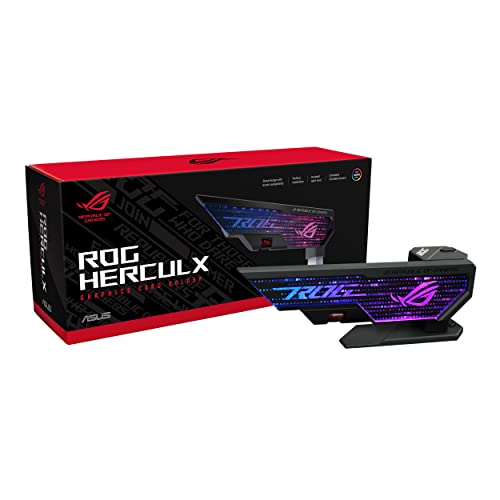
- Solid zinc alloy construction
- 72-128 mm adjustable height
- Toolless install with spirit level
Best For: Builders who want a sturdy, easy-to-install anti-sag support for heavy GPUs.
Creator-Grade Connectivity
ASUS ProArt X870E-Creator WiFi Motherboard

- PCIe 5.0 x16 for next-gen GPU support
- Dual USB4 and 10 GbE for fast creator workflows
- Four M.2 slots with DDR5 and WiFi 7
Best For: Creators and professionals building future-ready AM5 GPU workstations.
Best Color-Accurate Choice
ASUS ProArt PA278QV 27” WQHD Monitor

- Calman Verified Delta E < 2 accuracy
- 100% sRGB / Rec. 709 for creators
- Ergonomic stand with Eye Care support
Best For: Photographers, editors, and designers who need dependable color accuracy on a 27-inch monitor.
Best for Creator Connectivity
ASUS ProArt Z890-CREATOR WIFI Motherboard

- Dual Thunderbolt 5 and WiFi 7 for fast creator I/O
- PCIe 5.0 x16 plus five M.2 slots for modern builds
- 16+2+1+2 power stages support demanding workloads
Best For: Creators and workstation builders who need high-bandwidth connectivity, strong power delivery, and next-gen GPU support.
Best for Color-Critical Work
ASUS ProArt PA278CV 27" WQHD Monitor

- Delta E < 2 and Calman Verified for accurate color
- USB-C with 65W power delivery simplifies setups
- 27-inch WQHD IPS panel with ergonomic adjustments
Best For: Creators who need dependable color accuracy and a clean, flexible workspace.
Best for Large GPUs
ASUS ProArt PA602 Wood Edition

- 440 mm GPU clearance for oversized cards
- 420 mm radiator support for high-end cooling
- Three pre-installed fans for strong airflow
Best For: Creators and workstation builders with large graphics cards and heavy cooling needs.
Best for High-End Creator Builds
ASUS ProArt RTX 4080 Super OC 16GB (Renewed)

- RTX 4080 Super performance for demanding creative apps
- 16GB GDDR6X for heavier projects and multitasking
- Renewed ProArt card with modern HDMI and DisplayPort outputs
Best For: Creators building a powerful, ProArt-style workstation for rendering, editing, and AI-accelerated workflows.
Best for Airflow-Cooled GPU Builds

- Dual 200mm fans for strong front-to-back airflow
- 420mm radiator and large-GPU support
- Tool-less PCIe mounting with included GPU holder
Best For: Creators and professionals building high-heat GPU workstations who want easy cooling and installation.
Best for High-Airflow GPU Builds
ASUS ProArt PA602 Wood Edition PC Case

- 440 mm GPU clearance for oversized graphics cards
- Three pre-installed fans with high-airflow front intake
- 420 mm radiator support for advanced cooling
Best For: Creators building a premium ASUS ProArt workstation with a large GPU and strong cooling needs.
Best for Creator Workflows – ASUS ProArt RTX 5080 OC Graphics Card
If you want a workstation GPU that balances high-end speed with creator-friendly connectivity, the ASUS ProArt GeForce RTX 5080 OC is a strong fit for asus proart gpu workstations. It combines NVIDIA Blackwell performance, 16GB of GDDR7 memory, and a 2.5-slot cooling design that aims to stay practical in more builds than a full-thickness flagship card.
Best For: Creators, editors, and 3D users who want a powerful RTX 5080 with USB-C and refined thermal design for a production-focused desktop.
Pros:
- USB Type-C adds useful flexibility for creative peripherals and displays
- Vapor chamber, MaxContact heatsink, and phase-change thermal pad support cooler operation
- 2.5-slot size offers a more manageable fit than many larger enthusiast cards
- OC tuning and Blackwell architecture deliver strong modern GPU performance
Cons:
- Premium pricing is likely for this class of card
- 2.5-slot cooling still requires a fairly roomy case
- 16GB VRAM may not be enough for every ultra-heavy AI or 8K workflow
For asus proart gpu workstations, this card stands out as a polished choice when you want serious rendering and editing power without sacrificing too much build compatibility. It is especially appealing if USB-C support and strong thermals matter as much as raw frame rates.
Best for Easy GPU Support – ASUS ROG Herculx GPU Anti-Sag Holder
If you want a simple way to keep a heavy graphics card from sagging, the ASUS ROG Herculx is a practical add-on for asus proart gpu workstations. Its wide compatibility, adjustable height, and tool-free setup make it easy to fit into a polished build without occupying a PCIe slot.
Best For: Builders who want a sturdy, easy-to-install anti-sag support for large GPUs in clean workstation or gaming rigs.
Pros:
- Solid zinc alloy build feels secure for heavy graphics cards
- 72-128 mm adjustable height offers flexible fitment
- Toolless installation and removal keeps setup fast
- Included spirit level helps you align the support accurately
Cons:
- RGB lighting may be unnecessary for strictly utilitarian builds
- Only supports the GPU, so it doesn’t improve cooling or performance
For asus proart gpu workstations, this is a smart pick if your priority is protecting an expensive card from long-term sag and stress. It’s not flashy in function, but it delivers exactly what a support bracket should: stability, easy adjustment, and a cleaner-looking build.
Creator-Grade Connectivity – ASUS ProArt X870E-Creator WiFi Motherboard
If you’re building asus proart gpu workstations, this ProArt X870E board stands out for creators who need serious GPU headroom plus high-end I/O in one platform. The PCIe 5.0 x16 slot, strong 16+2+2 power design, DDR5 support, and dual USB4 make it a practical foundation for AI, 3D, video, and multi-drive workflows.
Best For: Creators and professionals who want a future-ready AM5 motherboard with top-tier connectivity for demanding GPU builds.
Pros:
- PCIe 5.0 x16 support for next-gen GPUs
- Dual USB4, 10 GbE, 2.5 GbE, and WiFi 7 for fast data and networking
- Four M.2 slots plus DDR5 for flexible creator storage and memory builds
- Robust 16+2+2 power stages for heavy workloads and tuning
Cons:
- Premium feature set likely puts it above budget-oriented AM5 boards
- ATX size and connectivity focus may be more than casual builders need
For asus proart gpu workstations, this motherboard is less about gaming extras and more about making a high-end creator system easier to build, connect, and expand. It’s a strong pick if you want modern GPU support now and enough bandwidth and storage flexibility to grow with future projects.
Best Color-Accurate Choice – ASUS ProArt PA278QV 27” WQHD Monitor
If you’re building a workspace around asus proart gpu workstations, the ASUS ProArt PA278QV is a practical monitor pick for reliable color, sharp 1440p detail, and a comfortable all-day setup. It’s designed to give creators accurate output without needing much calibration work.
Best For: Photographers, video editors, and designers who want a color-accurate 27-inch monitor for dependable creative work.
Pros:
- Calman Verified with Delta E < 2 accuracy for trustworthy color out of the box
- 100% sRGB and Rec. 709 coverage for photo, design, and video workflows
- 27-inch WQHD IPS panel balances screen space with crisp 1440p detail
- Fully adjustable stand plus Eye Care features for long editing sessions
Cons:
- Not a 4K display, so ultra-high-resolution workflows may want more pixels
- Built-in USB hub and connectivity are useful, but not especially premium
Overall, this is a strong fit for asus proart gpu workstations where accurate color matters more than flashy gaming features. It gives creative users a dependable, well-rounded display that supports professional editing without adding unnecessary complexity.
Best for Creator Connectivity – ASUS ProArt Z890-CREATOR WIFI Motherboard
If you’re building one of the more demanding asus proart gpu workstations, this ProArt Z890 board is aimed squarely at creators who need strong CPU power, fast storage, and next-gen connectivity in one platform. It pairs an LGA1851 Intel Core Ultra-ready design with PCIe 5.0 support, five M.2 slots, dual Thunderbolt 5 ports, and WiFi 7 for a highly capable content-creation foundation.
Best For: Video editors, 3D artists, and developers who want a creator-focused motherboard with high-bandwidth I/O and room for multiple drives and a modern GPU.
Pros:
- Dual Thunderbolt 5 Type-C ports and WiFi 7 for fast, flexible connectivity
- PCIe 5.0 x16 slot plus five M.2 slots for a powerful storage and GPU setup
- 16+2+1+2 stage power design supports demanding creator workloads
- AI tuning tools help simplify performance and cooling optimization
Cons:
- Premium creator-board pricing may exceed basic workstation builds
- Requires newer Intel Core Ultra platform parts, so it is not a drop-in upgrade for older systems
For builders comparing asus proart gpu workstations, this board stands out for its mix of workstation stability and modern I/O rather than gaming-first features. It makes the most sense when your workflow depends on heavy storage, fast external transfers, and a high-end GPU feeding creative software.
Best for Color-Critical Work – ASUS ProArt PA278CV 27" WQHD Monitor
If you’re building asus proart gpu workstations for design, photo editing, or video work, the ASUS ProArt PA278CV is a practical 27-inch monitor that prioritizes accuracy over flash. Its 1440p IPS panel, factory calibration, and USB-C connectivity make it a clean fit for creators who want dependable color and a tidy desk setup.
Best For: Creators who need reliable color accuracy, a sharp WQHD workspace, and simple single-cable connectivity for Mac or PC setups.
Pros:
- Calman Verified with Delta E < 2 and 100% sRGB/Rec. 709 coverage
- USB-C with 65W power delivery helps reduce cable clutter
- 27-inch QHD IPS panel gives plenty of room for multitasking and editing
- Ergonomic stand plus daisy-chaining support improve workstation flexibility
Cons:
- 75Hz is fine for work, but not a major advantage for fast-paced gaming
- Not as resolution-dense as 4K options for highly detailed premium workflows
This is a strong pick if your asus proart gpu workstations need a dependable color-accurate display that balances office comfort, creator features, and easy expansion. It’s especially appealing for users who value practical workflow upgrades over flashy specs.
Best for Large GPUs – ASUS ProArt PA602 Wood Edition
If you’re building one of the more demanding asus proart gpu workstations, the ASUS ProArt PA602 Wood Edition is a practical case choice thanks to its 440 mm GPU clearance, 420 mm radiator support, and strong stock airflow. It’s aimed at creators who want a roomy, cool-running tower with a more refined, wood-accented look.
Best For: Creators and workstation builders using oversized graphics cards, heavy cooling hardware, and E-ATX components in a stylish chassis.
Pros:
- Fits GPUs up to 440 mm for high-end workstation and render builds
- Supports 420 mm radiators for powerful air or liquid cooling setups
- Includes three pre-installed fans for strong out-of-the-box airflow
- Wood finish and tempered glass give it a more premium creator-focused look
Cons:
- Large mid-tower footprint may be too bulky for compact desks
- Style and features make it more expensive than basic performance cases
- Not the simplest pick if you only need a minimal, no-frills PC shell
For asus proart gpu workstations, this case stands out when your priority is fitting a serious GPU and cooling it properly without sacrificing presentation. It’s a strong match for creators who want workstation-level practicality with a cleaner, design-forward finish.
Best for High-End Creator Builds – ASUS ProArt RTX 4080 Super OC 16GB (Renewed)
If you’re building one of the more demanding asus proart gpu workstations, this renewed ASUS ProArt GeForce RTX 4080 Super OC Edition is a strong fit thanks to its workstation-friendly ProArt branding, 16GB of GDDR6X memory, and modern display outputs. It’s a practical choice for creators who need serious GPU horsepower for 3D rendering, video editing, AI-assisted workflows, and multi-monitor setups without moving all the way into ultra-expensive flagship territory.
Best For: Creators and professionals who want high-end RTX 4080 Super performance in a ProArt-oriented card for demanding workstations.
Pros:
- Powerful RTX 4080 Super performance for editing, rendering, and GPU-accelerated apps
- 16GB GDDR6X offers plenty of headroom for large creative projects
- HDMI 2.1a and DisplayPort 1.4a support flexible monitor hookups
Cons:
- Renewed condition may not suit buyers who want a brand-new card
- High-end card that may be overkill for lighter workstation tasks
For asus proart gpu workstations, this model makes sense when you want premium graphics performance and creator-focused hardware in a card that still leaves some budget room versus top-tier flagship options. It’s a sensible pick if speed, VRAM capacity, and display flexibility matter more than buying new at all costs.
Best for Airflow-Cooled GPU Builds – ASUS ProArt PA602 E-ATX Case
If you’re building asus proart gpu workstations that need strong cooling and room for a high-end graphics card, the ProArt PA602 is built around airflow first. Its dual 200mm intake fans, front grill design, and 420mm radiator support make it a practical choice for workstation rigs that run heavy renders, AI workloads, or long editing sessions.
Best For: Creators and professionals who want a spacious, well-ventilated case with easy GPU installation and modern front-panel connectivity.
Pros:
- Dual 200mm front fans and open-front airflow design help keep workstation components cool
- Supports 420mm radiators and large GPUs, including horizontal or vertical mounting
- Tool-less PCIe mounting, GPU holder, and integrated fan hub simplify the build
- Front USB-C 20Gbps and power lock add useful everyday convenience
Cons:
- Large E-ATX footprint may be too big for smaller desks or rooms
- Premium features can push it above basic case budgets
- Focused on cooling and utility rather than a minimalist compact design
For asus proart gpu workstations, this case stands out when thermals, GPU support, and build convenience matter more than saving space. It’s a strong fit for creators who want a workstation chassis that can handle demanding hardware without feeling cramped.
Best for High-Airflow GPU Builds – ASUS ProArt PA602 Wood Edition PC Case
If you’re comparing asus proart gpu workstations and want a case that can physically handle oversized cards, strong cooling, and a refined studio look, the ProArt PA602 Wood Edition stands out. It gives you room for serious hardware without sacrificing airflow, making it a practical fit for workstation builds that need to stay cool under long rendering or AI sessions.
Best For: Creators and professionals building a high-end ASUS ProArt workstation with a large GPU, aggressive cooling, and a premium wood-accented finish.
Pros:
- Supports GPUs up to 440 mm for large workstation or gaming-class graphics cards
- Includes three pre-installed fans and a high-porosity front panel for strong intake airflow
- Fits a 420 mm radiator for advanced AIO or custom liquid-cooling setups
- Wood-accented E-ATX design adds a distinctive, studio-friendly look
Cons:
- Mid-tower size may be bulkier than simpler workstation cases
- Premium styling and features likely push it above basic-budget options
- Large airflow-focused design may be more than casual office builders need
For asus proart gpu workstations that need both headroom and cooling discipline, this case is a strong match. It balances GPU clearance, radiator support, and airflow in a way that makes it especially appealing for high-power creator rigs.
How We Picked the Best Asus Proart GPU Workstations
We focused on the features that matter most in real creative workloads: GPU horsepower, motherboard compatibility, thermal design, case clearance, display accuracy, and creator-friendly connectivity. For Asus Proart GPU Workstations, the best choice is usually the one that matches your software stack and upgrade path, not just raw specs.
Quick Comparison
In broad terms, the RTX 5080 ProArt card is the strongest choice for high-end builds, while the RTX 4080 Super remains a smart value option if you want proven performance. The ProArt X870E and Z890 creator boards are ideal foundations for modern AMD and Intel systems, and the PA602 cases are built to handle large GPUs and sustained airflow. For monitors, the PA278QV and PA278CV are dependable if your priority is accurate 1440p work.
Key Buying Factors for Asus Proart GPU Workstations
GPU Performance and VRAM
Choose the GPU based on your workloads. Heavy 3D rendering, GPU effects, and AI tools benefit from more headroom, while general photo and video editing can often be handled well by a lower tier card if the rest of the system is balanced.
Motherboard Platform
Pick AMD or Intel based on your CPU preference, software behavior, and upgrade plans. The ProArt creator boards matter because they offer PCIe 5.0 support, strong power delivery, and the storage and I/O needed for fast project workflows.
Case Clearance and Cooling
Large modern GPUs need room to breathe. Check the case’s GPU length support, radiator support, and front intake design before buying. The PA602 line is especially useful for oversized cards and long work sessions.
Display Accuracy
A workstation is only as good as the monitor you see it through. If you work in color-sensitive tasks, prioritize IPS panels with wide color gamut coverage and factory calibration or verification.
Workspace Stability
Accessories like a GPU anti-sag bracket can help protect the slot and keep large cards aligned over time, especially in systems that move often or run heavy tower-mounted components.
Who Should Buy Which Asus Proart GPU Workstations?
If you want the fastest creator build, start with the ProArt RTX 5080 and pair it with a ProArt creator motherboard and PA602 case. If you’re optimizing for value, the RTX 4080 Super option can still deliver excellent results for demanding editing and design work.
If your priority is a polished all-around workstation, choose one of the creator motherboards plus an accurate ProArt monitor. If you need the chassis first, the PA602 models are the safest foundation for high-end Asus Proart GPU Workstations with large GPUs and strong airflow.
