
If you’re looking to streamline your workspace and enhance your MacBook Pro experience, vertical docks can be a game changer. These docks not only maximize desk space but also improve airflow and connectivity. With various options available, from compact designs to those with multiple display capabilities, you’ll find the perfect fit for your setup. Let’s explore the top choices that can elevate your workspace efficiency and style.
Vertical USB C Docking Station for MacBook Pro Air
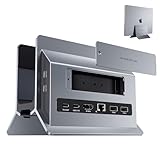
If you’re looking for a compact and efficient docking solution for your MacBook Pro or Air, the Vertical USB C Docking Station by PULWTOP is an excellent choice. This 11-in-1 dock features an M.2 SSD expansion slot, 4K HDMI output, and multiple USB ports for fast data transfer. Weighing just 1.21 pounds and measuring 2.32 x 1.63 x 1.8 inches, it fits seamlessly into any workspace. Compatibility spans various MacBook models, making it versatile. While some users report stability issues with NVMe SSDs, its overall design and functionality make it a reliable option for enhancing your productivity.
Best For: Users of MacBook Pro and Air who need a compact and multi-functional docking station for enhanced connectivity and productivity.
Pros:
- Compact Design: Small and lightweight, making it easy to fit into any workspace.
- Versatile Connectivity: Offers 11 ports including 4K HDMI, multiple USB A/C ports, and M.2 SSD expansion slot.
- High-Speed Data Transfer: Supports fast transfer rates with USB C at 10Gbps and USB A at 5Gbps.
Cons:
- Stability Issues: Some users report problems with NVMe SSD stability and disconnections during power delivery.
- Customer Support: Limited customer support options available for troubleshooting.
- Kernel Panics: Occasional kernel panics reported when multiple devices are connected simultaneously.
Docking Station for 16″ Apple MacBook Pro (2021-2024)

For users with the 16″ Apple MacBook Pro (2021-2024), the ideal docking station combines sleek design with robust functionality. This elegant unit, crafted from premium alloys in space gray, seamlessly transforms your MacBook into a desktop setup. It features two Thunderbolt 4 USB-C ports, offering 40Gbps speeds and dual display support for 4K monitors. Users appreciate its plug-and-play capability and precise engineering that guarantees secure connections and efficient heat dissipation. While some find the price steep and functionality limited, this docking station remains a stylish choice for enhancing your workspace. Just remember, you might need to remove your MacBook cover while docking.
Best For: Users of the 16″ Apple MacBook Pro (2021-2024) seeking a stylish and functional docking station to enhance their desktop experience.
Pros:
- Sleek design crafted from premium alloys in space gray, elevating workspace aesthetics.
- High-speed connectivity with two Thunderbolt 4 USB-C ports, allowing for fast data transfer and dual display support.
- Plug-and-play functionality ensures ease of use, making setup quick and hassle-free.
Cons:
- Limited ports with only two available, potentially requiring additional hubs for more peripherals.
- High price point may be considered steep for some users, given the functionality provided.
- Potential compatibility issues as some users need to remove MacBook covers for proper docking.
UGREEN Vertical Laptop Stand Holder for Desk

The UGREEN Vertical Laptop Stand Holder is an ideal choice for professionals seeking to maximize their workspace efficiency. Weighing just 6.2 ounces, this sleek silver-gray stand fits laptops up to 17.3 inches, including MacBook Pro and Air. Its space-saving design allows for vertical storage, freeing up desk space for other tasks. Made from premium aluminum alloy, it provides stability without wobbling. The adjustable width accommodates various laptop thicknesses, while non-slip silicone pads protect your device from scratches. Rated 4.6 stars by over 5,300 users, it’s highly praised for keeping workstations tidy and organized. Consider it for your office setup!
Best For: Professionals seeking to maximize desk space and keep their laptops organized while working.
Pros:
- Space-saving design allows for vertical storage, optimizing desk area.
- Sturdy aluminum alloy construction ensures stability and prevents wobbling.
- Adjustable width accommodates various laptop thicknesses, enhancing versatility.
Cons:
- Limited to laptops up to 17.3 inches, which may not accommodate larger models.
- The sleek design might not appeal to those preferring bulkier stands.
- Non-slip pads may wear out over time, potentially affecting grip.
OMOTON Vertical Laptop Stand (Fits Laptops Up to 17.3 Inch)

Designed to accommodate a range of laptops, the OMOTON Vertical Laptop Stand is ideal for users who need stability and versatility. This updated double version supports two laptops, fitting models up to 17.3 inches, including MacBooks and gaming laptops. Its adjustable width allows you to secure laptops between 0.55 and 1.65 inches thick. With non-slip silicone mats and pads, it protects your devices from scratches while ensuring a stable hold. Made from scratch-resistant anodized aluminum, the sleek design complements your MacBook’s aesthetics, making it a stylish yet functional addition to your workspace. Optimize your setup effortlessly!
Best For: Users seeking a stylish and stable solution for organizing multiple laptops in a compact space.
Pros:
- Supports two laptops simultaneously with a width adjustable for various thicknesses.
- Non-slip silicone mats and pads provide excellent protection against scratches and enhance stability.
- Sleek anodized aluminum design matches MacBook aesthetics, adding elegance to any workspace.
Cons:
- Limited to laptops up to 17.3 inches, which may not accommodate larger devices.
- May require adjustment for different laptop thicknesses, which could be inconvenient for frequent changes.
- Higher price point compared to basic laptop stands without dual support features.
HumanCentric Vertical Laptop Stand for MacBook Pro and Air

Looking for a sleek and space-saving solution for your MacBook Pro or Air? The HumanCentric Vertical Laptop Stand is designed specifically for your device, fitting models from 2016 to 2022. Its minimalist design not only enhances your desk’s aesthetics but also allows for closed clamshell mode with external monitors. Weighing just 14 ounces, it’s sturdy with silicone pads to prevent slips while ensuring airflow for cooling. Customer ratings highlight its durability and effectiveness in creating a tidy workspace. With easy returns and a reasonable price, this stand is perfect for anyone wanting both style and functionality in their setup.
Best For: Users looking for a stylish and functional vertical stand for their MacBook Pro or Air that optimizes desk space and enhances airflow.
Pros:
- Sleek, minimalist design that improves desk aesthetics.
- Durable aluminum construction with silicone pads for stability and slip prevention.
- Compatible with multiple MacBook models and includes exchangeable rubber fittings.
Cons:
- Not suitable for MacBooks with cases due to the stand’s tapered fit.
- Some users report minor issues with rubber inserts getting stuck.
- Limited to MacBook Pro and Air models from 2016 to 2022 only.
HumanCentric Vertical Laptop Stand for Desks

For MacBook Pro users seeking to maximize their desk space while maintaining a sleek aesthetic, the HumanCentric Vertical Laptop Stand is an excellent choice. Crafted from anodized aluminum alloy, this stand complements your Apple devices perfectly. It securely holds laptops up to 1 inch thick and supports closed-clamshell mode, allowing seamless connection to external monitors and peripherals. The sturdy design features silicone pads for grip and stability, ensuring your laptop stays in place. Weighing just 14 ounces, it’s easy to set up without tools. With high customer ratings and a satisfaction guarantee, it’s a smart addition to any workspace.
Best For: MacBook Pro users looking to optimize desk space with a stylish and functional laptop stand.
Pros:
- Sleek design made from anodized aluminum alloy that matches Apple devices.
- Supports closed-clamshell mode for easy connection to external monitors and peripherals.
- High customer satisfaction with a rating of 4.4 out of 5 stars and a satisfaction guarantee.
Cons:
- Some users reported minor rub marks on laptops and silicone feet occasionally sliding out of their channel.
- There are concerns about the stand loosening during movement.
- Limited to laptops up to 1 inch thick, which may exclude thicker models or cases.
MacBook Pro Docking Station Dual Monitor HDMI Adapter (12 in 1 USB C)
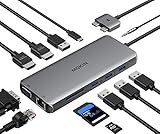
The MacBook Pro Docking Station Dual Monitor HDMI Adapter is an excellent choice for professionals who need to maximize their workspace with multiple displays. This 12-in-1 USB-C adapter offers 2 HDMI ports supporting 4K at 60Hz, VGA, Gigabit Ethernet, and multiple USB ports, ensuring you’ve got all the connections you need. Weighing just 3.6 ounces, it’s portable and convenient. Enjoy fast data transfer speeds of up to 5Gbps and 100W Power Delivery for efficient charging. While some users report overheating, the overall performance and practicality make this adapter a valuable tool for enhancing your MacBook Pro experience.
Best For: Professionals and users who require multiple display connections and fast data transfer for their MacBook Pro or Air (2018-2020).
Pros:
- Versatile Connectivity: Offers 12 ports including dual 4K HDMI, VGA, Gigabit Ethernet, and multiple USB options.
- High-Speed Data Transfer: Supports data transfer speeds up to 5Gbps and features a fast SD card reader.
- Portable Design: Lightweight and compact, making it easy to carry for on-the-go work.
Cons:
- Overheating Issues: Some users have reported overheating during prolonged use.
- Compatibility Limitations: Not compatible with M1/M2 chip MacBook models.
- Customer Service Concerns: Mixed experiences reported regarding warranty claims and customer support responsiveness.
iVANKY 12-in-2 FusionDock 2 Vertical Docking Station Stand for MacBook Pro

With its impressive 12-in-2 connectivity options, the iVANKY FusionDock 2 is ideal for MacBook Pro users who demand versatility and performance. This sleek docking station features a 150W power adapter, enabling efficient charging while supporting dual 4K@60Hz displays for compatible models. You’ll find ample ports, including 2x HDMI, 6 USB ports, an SD/TF card reader, and Ethernet for seamless connectivity. Users appreciate its solid build quality and space-saving vertical design, making setup a breeze. While some may encounter limitations with dual monitor support, overall, the FusionDock 2 is a reliable solution for optimizing your workspace.
Best For: Users of MacBook Pro models looking for a versatile docking solution with multiple connectivity options and dual display support.
Pros:
- Solid build quality and stability, ensuring durability and a professional look.
- Efficient charging capabilities with a 150W power adapter, supporting both laptops and USB-C devices.
- Space-saving vertical design that simplifies workspace organization and setup.
Cons:
- Limitations with dual monitor support on specific MacBook models, particularly M1/M2 versions.
- Some users reported issues with HDMI cables and latency with USB devices, leading to product returns.
- Short Thunderbolt cable may require additional purchase for optimal use.
Dock for 14 Apple MacBook Pro (Dual Display Thunderbolt 4 Docking Station)
Designed specifically for the 14-inch Apple MacBook Pro, this Dual Display Thunderbolt 4 Docking Station offers unmatched convenience for professionals who rely on multiple peripherals. Crafted from premium alloys in space gray, it enhances your workspace while reducing cable clutter. With dimensions of 11 x 5 x 5 inches and weighing just 3.13 pounds, it’s both sleek and portable. Enjoy lightning-fast 40Gbps speeds through two Thunderbolt 4 USB-C ports, supporting dual 4K displays with additional adapters. Users love the ease of sliding in their MacBook for instant connectivity, making it a top choice for your productivity setup.
Best For: Professionals using the 14-inch Apple MacBook Pro who need a reliable and efficient docking solution for multiple peripherals.
Pros:
- Convenient vertical design allows for easy sliding in of the MacBook, ensuring instant connectivity.
- Lightning-fast 40Gbps speeds through two Thunderbolt 4 USB-C ports, enhancing data transfer and charging capabilities.
- Sleek aesthetics crafted from premium materials in space gray, reducing cable clutter and enhancing workspace organization.
Cons:
- Limited compatibility as it is designed exclusively for the 14-inch MacBook Pro and does not support other MacBook models.
- Some users report power delivery limitations, affecting charging performance when using multiple peripherals.
- Potential issues with dual display setup, requiring additional adapters that may not be included.
Twelve South BookArc Vertical Desktop Stand for MacBook
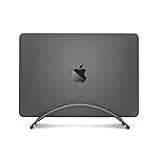
For MacBook users seeking a sleek and efficient workspace solution, the Twelve South BookArc Vertical Desktop Stand is a standout choice. Its low-profile design cradles your MacBook, elevating it to keep it safe from spills while enhancing airflow. You can easily connect it to an external monitor, keyboard, and mouse for a desktop setup in closed-clamshell mode. The integrated Cable Catch guarantees your connections stay accessible. With three interchangeable silicone inserts, it accommodates various MacBook models, though it’s crucial to check compatibility, especially with thicker cases. Overall, it combines functionality with an aesthetic touch, earning high praise from users.
Best For: MacBook users who want to maximize their workspace efficiency while maintaining a sleek aesthetic.
Pros:
- Sleek, low-profile design elevates MacBook and enhances airflow, keeping it safe from spills.
- Transforms MacBook into a desktop setup with closed-clamshell mode when connected to external devices.
- Integrated Cable Catch ensures easy access to connections and prevents cable clutter.
Cons:
- Not compatible with M1 models, requiring users to check specific MacBook version compatibility.
- Fit issues may arise when using thicker cases, necessitating removal for proper use.
- Some users find the price high relative to the functionality offered.
Factors to Consider When Choosing Vertical Docks for Macbook Pro
When choosing a vertical dock for your MacBook Pro, you should consider several key factors. Think about compatibility with your specific model, the types of ports you need, and how the dock’s design fits your workspace. Don’t forget to evaluate charging capabilities, stability, and durability to guarantee it meets your daily demands.
Compatibility With Macbook Models
Understanding compatibility with your MacBook model is essential before choosing a vertical dock, as not all docks work with every version. Some are designed specifically for MacBook Pro models with M1, M2, M3, and M4 chips, while others may not support older versions or even MacBook Air models. When selecting a dock, check if it accommodates your MacBook’s size, as some support up to 17.3 inches, but have thickness restrictions. Look for docks that feature exchangeable inserts or adjustable designs for a snug fit. Finally, confirm that the dock’s functionality, like power delivery and dual display support, aligns with your specific model to guarantee peak performance and usability.
Port Availability and Types
Choosing the right vertical dock for your MacBook Pro hinges on the availability and types of ports it offers. Look for docks that feature a variety of ports, including USB-A, USB-C, HDMI, Ethernet, and SD/TF card readers, ensuring compatibility with multiple devices. High-speed data transfer is essential, so opt for USB-C ports capable of up to 10Gbps for quick file transfers. If you need to connect to high-resolution monitors, make sure the HDMI ports support 4K@60Hz. Power delivery (PD) capabilities are also vital, ideally providing at least 100W charging to keep your laptop powered while using accessories. Finally, consider docks with multiple ports to accommodate various devices without needing extra hubs.
Design and Aesthetics
With the right ports in mind, the design and aesthetics of vertical docks for your MacBook Pro play a significant role in enhancing your workspace. Many vertical docks boast sleek, minimalist designs crafted from premium materials like aluminum, adding both style and durability. Their space-saving features elevate your laptop, helping to keep your desk organized and free from cable clutter. Look for docks that color-match your MacBook, such as space gray, to create a cohesive and polished look. Some designs include integrated cable management solutions, ensuring accessibility while preventing tangles. Compact dimensions allow for seamless integration into various desktop setups, making these docks perfect for both professional and home office environments. Choose wisely to elevate your workspace.
Charging Capabilities and Speed
When it comes to vertical docks for your MacBook Pro, charging capabilities and speed are critical factors that can greatly impact your workflow. Look for docks with power delivery (PD) options ranging from 65W to 100W, ensuring efficient charging while you work. Fast charging support is essential, too—some models can provide up to 96W or more, which helps maintain battery health, especially when using multiple peripherals. Additionally, check the data transfer speeds of the USB ports; USB C can offer up to 10Gbps while USB A typically offers 5Gbps. Docks that support simultaneous charging and data transfer can enhance productivity, allowing you to charge your MacBook while connecting to external displays and devices. Compatibility with your specific MacBook model is a must.
Stability and Durability
Ensuring your MacBook Pro is both secure and stable while docked is just as important as having efficient charging capabilities. When choosing a vertical dock, look for high-quality materials like aluminum that provide durability. A wide base design considerably enhances stability, preventing tipping when you insert or remove your laptop. Non-slip silicone pads are essential—they grip your MacBook securely and prevent scratches, boosting both stability and longevity. Additionally, consider docks with adjustable width features; they accommodate various laptop thicknesses for a snug fit, minimizing wobble. Finally, opt for scratch-resistant finishes to keep your dock looking great over time, ensuring it remains visually appealing and functional despite regular use. Your MacBook deserves the best support!
Ease of Setup
Setting up your vertical dock shouldn’t be a hassle, and many options on the market make it easy. Most vertical docks offer plug-and-play functionality, so you can connect your MacBook Pro without any extra software or complicated configurations. Look for designs that allow for easy slide-in connectivity, giving you quick access to ports and minimizing your setup time. Adjustable widths and interchangeable inserts cater to various laptop sizes, simplifying the process even further. Premium materials guarantee stability, reducing the need for constant adjustments. Plus, user feedback often emphasizes the value of clear setup instructions and intuitive designs, making installation straightforward and tool-free. With these factors in mind, you’ll find a vertical dock that suits your needs perfectly.
