
Shopping for a PC enthusiast can be easier when you focus on how they use their desk: gaming, repairs, remote work, or everyday audio. These gifts range from small setup refreshes to substantial equipment upgrades.
Christmas Tech White Elephant Gift Ideas
1. AV Access Dual-Monitor KVM Dock for Two Laptops
The Shared-Desk Switcher
AV Access Dual-Monitor KVM Dock for Two Laptops

- Connects two USB-C laptops to one dual-monitor setup and shared peripherals.
- Combines KVM switching with 12-in-1 connectivity, including HDMI, USB, Ethernet and SD.
- Check compatibility first: laptops need USB-C DP Alt Mode and DP MST; Mac models mirror displays.
Best For: Someone who switches between a work laptop and personal computer at one desk
2. WAVLINK Wi-Fi 6E PCIe Card with Magnetic Antennas
The Desktop Connectivity Upgrade
WAVLINK Wi-Fi 6E PCIe Card with Magnetic Antennas

- Adds tri-band Wi-Fi 6E and Bluetooth 5.3 to a desktop with a compatible PCIe slot.
- Includes two antennas, a magnetic base, and standard and low-profile brackets.
- Listed for Windows 10/11 and Linux; check the desktop’s slot and operating system.
Best For: A desktop PC owner adding wireless networking
3. Quntis Curved Monitor Light Bar with RGB Backlight
The Ultrawide Desk Glow-Up
Quntis Curved Monitor Light Bar with RGB Backlight

- Designed for 34-inch-and-larger curved monitors or large flat screens; extends up to 26 inches.
- Offers adjustable front brightness and color temperature, plus 15 RGB backlight modes.
- Its clamp is listed for screens up to 3.35 inches thick; check the monitor’s shape and thickness.
Best For: A gamer or desk enthusiast with a large curved monitor
4. Powered Desktop Speakers, White Pair
The Headphone Break
Powered Desktop Speakers, White Pair
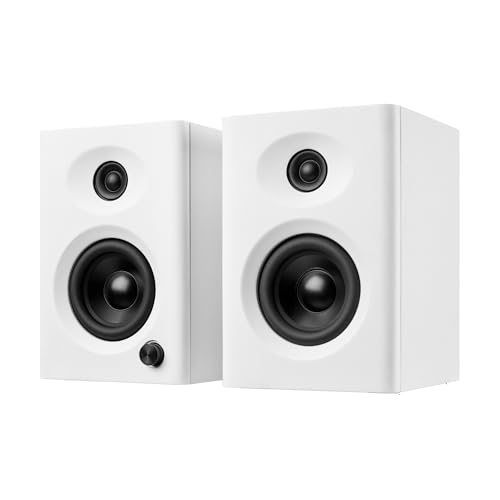
- A compact powered stereo pair with 3-inch drivers and a wooden enclosure.
- Connect by Bluetooth 5.3 or use the included RCA, USB-C, and 3.5mm cables.
- The front dial controls power and volume; the listing names computers, TVs, and consoles as uses.
Best For: A PC user who wants speakers for music, games, or video calls
5. STREBITO 142-Piece Precision Electronics Screwdriver Set
The PC Repair Kit
STREBITO 142-Piece Precision Electronics Screwdriver Set
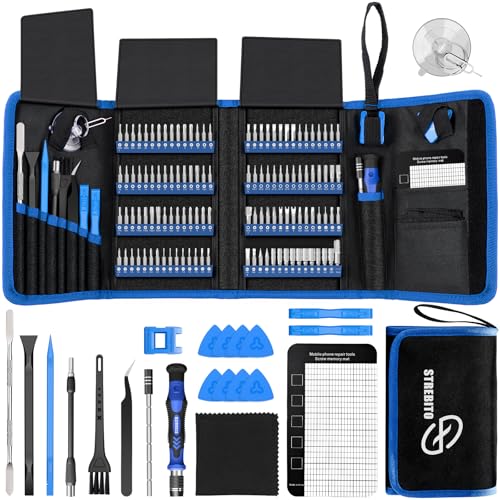
- Includes 120 driver bits and 22 accessories, including tweezers, a suction cup, and a magnetic mat.
- The listing names computers, laptops, SSDs, tablets, and game consoles among its repair uses.
- Bits and accessories store in a marked holder and a portable tool bag.
Best For: A PC builder or electronics repair hobbyist
6. Redragon K668 108-Key Hot-Swap RGB Keyboard
The Customizable Typing Upgrade
Redragon K668 108-Key Hot-Swap RGB Keyboard

- Full-size wired keyboard with hot-swap sockets for compatible 3-pin or 5-pin switches.
- Includes two sets of mixed-color keycaps and up to 19 preset RGB lighting modes.
- Four dedicated shortcut keys default to mute, calculator, screen lock, and desktop.
Best For: A PC gamer or typist who enjoys changing keyboard switches and looks
7. UG-08S Wireless Gaming Headset
The Multiplayer Audio Pick
UG-08S Wireless Gaming Headset
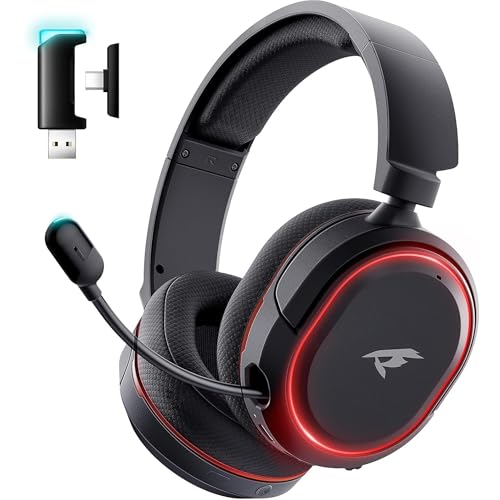
- Supports 2.4GHz wireless, Bluetooth 5.4, and wired 3.5mm connections.
- The listing names PC, Mac, PS5, PS4, and Nintendo Switch compatibility.
- Includes a retractable microphone, one-touch mute, and memory-foam ear cushions.
Best For: A gamer who chats with teammates across supported devices
8. ErGear Adjustable Single Monitor Arm
The Flexible Screen Stand
ErGear Adjustable Single Monitor Arm

- Fits listed 13–34-inch flat or curved monitors up to 19.8 pounds with 75x75mm or 100x100mm VESA patterns.
- Provides height adjustment, tilt, swivel, and rotation; cable clips help organize wires.
- Check screen size, weight, VESA pattern, and desk thickness before choosing a clamp or grommet mount.
Best For: A desk user who wants more control over monitor position
9. 12-in-1 USB-C Dock with Dual-Monitor Support
The Laptop Desk-Setup Hub
12-in-1 USB-C Dock with Dual-Monitor Support

- Adds dual HDMI, USB-A, USB-C, Ethernet, and SD/TF card readers through USB-C.
- Windows laptops with supported USB-C can extend displays; Mac displays mirror according to the listing.
- Requires a USB-C laptop that supports DisplayPort Alt Mode and Power Delivery.
Best For: A laptop user who wants a multi-monitor desk and more ports
10. Redragon M810 PRO Wireless RGB Gaming Mouse
The Cable-Free Control
Redragon M810 PRO Wireless RGB Gaming Mouse

- Connects wirelessly through a 2.4GHz receiver and has eight programmable buttons.
- Offers five adjustable DPI levels and customizable RGB lighting through the listed software.
- The listing specifies right-hand orientation and up to 45 hours of battery life in eco mode.
Best For: A right-handed PC gamer who wants programmable wireless controls
11. 31.5 × 15.7-Inch Extended Gaming Desk Mat
The Desk Refresh
31.5 × 15.7-Inch Extended Gaming Desk Mat
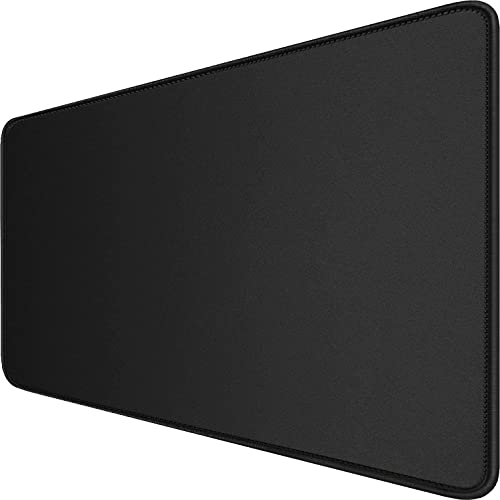
- Large surface can fit a keyboard, mouse, and other desk items together.
- Has a non-slip natural rubber base, stitched edges, and a smooth tracking surface.
- The listing describes a waterproof coating and says the mat can be rolled for storage.
Best For: A PC user refreshing a gaming or work desk
12. AOC 27-Inch QHD High-Refresh Gaming Monitor
The Big Screen Upgrade
AOC 27-Inch QHD High-Refresh Gaming Monitor

- 27-inch IPS display with 2560 × 1440 resolution and a listed 240Hz refresh rate via DisplayPort.
- Includes Adaptive-Sync, tilt adjustment, and Game Mode presets.
- Has one DisplayPort 1.4 and two HDMI 2.0 ports; check the PC’s output and gaming needs.
Best For: A PC gamer considering a substantial display upgrade
Choosing a Gift for a PC User
Start with the recipient’s routine, rather than guessing which component they want. A gamer who plays with friends may get more use from a headset with a microphone, while someone who prefers open-room audio may appreciate the powered speaker pair. A repair hobbyist has a different kind of fun: a precision driver kit offers tools for small electronics projects. For a desk that supports both work and play, consider a light bar, desk mat, monitor arm, or KVM dock.
Think about what the recipient already owns, too. A new mouse or keyboard is easy to enjoy, but it may overlap with a favorite peripheral. A desk mat or tool kit can complement an existing setup. Larger upgrades such as a monitor or docking station are most rewarding when they solve a clear need, like wanting a sharper display or connecting a laptop to several peripherals.
Match the Gift to Your Budget
For a lower-commitment gift, focus on an accessory that refreshes a space or supports a hobby: the extended desk mat, screwdriver kit, or wireless mouse. The light bar and keyboard offer more visible setup changes, while speakers and a headset change the everyday audio experience. A monitor arm or docking station may be especially useful for someone who already has the screen or laptop but wants a tidier, more flexible desk.
The AOC monitor is the largest equipment step in this group. It makes sense when the recipient wants a display upgrade and their computer can connect to it. Avoid treating a premium-sounding feature list as a substitute for knowing their preferences. Some people prioritize wireless convenience, others want wired connections, and many have a specific keyboard feel or mouse shape they prefer.
Check Compatibility and Personalization
Compatibility matters most for the KVM, dock, wireless card, monitor arm, and monitor. The AV Access KVM is intended for USB-C laptops with DP Alt Mode and DP MST for extended dual displays; its notes say Mac models mirror displays. The separate 12-in-1 dock also requires USB-C with DisplayPort Alt Mode and Power Delivery, and its notes distinguish Windows extended mode from Mac mirror mode. These are different products, so confirm the recipient’s computer ports and display setup before selecting either.
For the WAVLINK PCIe Wi-Fi card, check that the desktop has a compatible PCIe slot and runs a listed operating system. For the ErGear arm, compare the monitor’s weight, screen size, VESA pattern, and desk thickness with the listed mounting limits. For the AOC display, make sure the PC has DisplayPort or HDMI output and consider whether its games can take advantage of a high refresh rate. The curved-monitor light bar also deserves a quick fit check: its notes specify large screens and a range of screen thicknesses.
Personal touches can make a practical gift feel chosen for its recipient. The keyboard includes two keycap sets, while its switch sockets let the owner customize compatible switches. The desk mat gives a broad canvas for a setup refresh, and the RGB lighting on the light bar, mouse, and keyboard lets recipients adjust the visual style. Choose these options when you know the person likes to personalize their desk.
Timing and Last-Minute Decisions
For a late shopping decision, favor items whose fit is easy to establish from what you already know. A repair kit, mouse mat, or speaker pair may be straightforward when you know the recipient’s hobby and desk needs. For computer-specific equipment, check their device model or ask a discreet question about ports, screen size, or mounting holes before ordering. Product compatibility can matter more than choosing a gift based on a broad label such as “gaming.”
If you cannot verify a monitor or laptop detail, choose a gift that works alongside existing equipment, such as the precision toolkit or desk mat. If you can confirm the setup, a KVM, dock, monitor arm, or display can be a more targeted surprise. Keep the choice tied to a real habit: what they play, repair, listen to, or need to connect. That makes a practical Christmas gift feel personal without requiring seasonal styling.
