
Graduate study can mean long days between a desk, classroom, library, and commute. These tech gifts offer practical ways to support focused work, connected devices, and small moments of creativity.
Christmas Tech Gifts for Graduate Students
1. KODAK Step Smartphone Photo Printer
A Little Printer for Campus Memories
KODAK Step Smartphone Photo Printer

- Prints 2×3-inch sticky-back color photos from compatible iOS or Android phones over Bluetooth or NFC.
- The KODAK app offers filters, borders, stickers, text, and collage tools for personalizing photos.
- Pocket-sized design and rechargeable battery make it portable for projects or get-togethers.
Best For: A student who enjoys turning campus, travel, and friend-group photos into keepsakes.
2. INIU 20,000mAh 65W Laptop Power Bank
Portable Power for Long Days
INIU 20,000mAh 65W Laptop Power Bank

- Provides 20,000mAh capacity and three ports: two USB-C and one USB-A.
- The listed 65W output is intended for compatible laptops and other devices.
- Compact design includes a detachable USB-C cable that doubles as a carry handle.
Best For: A student who spends long days on campus with compatible USB-C devices.
3. EPOMAKER x Aula F75 Wireless Mechanical Keyboard
A Compact Keyboard for Study Sessions
EPOMAKER x Aula F75 Wireless Mechanical Keyboard

- The 75% layout keeps essential keys in a smaller footprint for a streamlined desk.
- Connects by Bluetooth, 2.4GHz wireless, or wired USB-C.
- Hot-swappable sockets and a multimedia knob let the user customize switches and adjust media.
Best For: A writer or coder who wants a compact, customizable keyboard for a desk or mobile setup.
4. Tenda AX3000 Wi-Fi 6 Router
5. Tonfarb Digital Voice Recorder
A Pocket Recorder for Ideas and Interviews
Tonfarb Digital Voice Recorder

- One-touch recording and voice-activated recording help capture audio during permitted sessions.
- Includes 8GB built-in storage and a 128GB TF card, for 136GB total listed storage.
- Transfers recordings to a computer over USB-C and includes an A-B repeat function.
Best For: A student who records research interviews or spoken notes when recording is permitted.
6. LYMAX Monitor Light Bar with Wireless Controller
Focused Light for a Crowded Desk
LYMAX Monitor Light Bar with Wireless Controller

- Adjustable color temperature ranges from 2900K to 6000K, with four color modes.
- The light directs illumination down toward the keyboard and desktop to reduce screen reflection.
- A gravity-damper bracket is designed for monitors 0.2 to 1.8 inches thick.
Best For: A student who wants adjustable task lighting without a separate desk lamp footprint.
7. ProtoArc EM11 NL Vertical Wireless Mouse
A Different Grip for Daily Navigation
ProtoArc EM11 NL Vertical Wireless Mouse

- The vertical shape is designed to keep the wrist and forearm in a more natural position.
- Connects to up to three devices using Bluetooth or a USB-A receiver.
- Rechargeable design has adjustable 1000, 1600, and 2400 DPI settings.
Best For: A right-handed student with small to medium hands seeking an ergonomic mouse for computer work.
8. 313-Piece Desktop Cable Management Kit
Tidy Cables for a Small Workspace
313-Piece Desktop Cable Management Kit

- The 313-piece set includes adhesive clips, cable sleeves, reusable straps, zip ties, and mounting bases.
- Clips are designed for clean desks, walls, and other surfaces; sleeves bundle multiple cables.
- The kit is intended for organizing power, charging, audio, and video cables.
Best For: A student organizing chargers and peripherals in a dorm or apartment workspace.
9. 15W LED Desk Lamp with USB Charging Ports
Adjustable Light for Reading and Study
15W LED Desk Lamp with USB Charging Ports

- Choose from three color temperatures and five brightness levels using touch controls.
- The flexible gooseneck directs light, and the lamp includes 30-, 60-, 90-, and 120-minute timers.
- USB-A and USB-C ports can charge devices; the listing notes they are not compatible with fast-charge devices.
Best For: A student who wants flexible study lighting and convenient standard USB charging at a desk.
10. TOZO PM1 Mini Clip-On Speaker
Hands-Free Audio for Work and Walks

- The built-in clip attaches to clothing or a backpack for portable listening and calls.
- The listing describes up to 20 hours of playtime and Bluetooth 5.4 connectivity.
- The TOZO app supports AI chat and meeting recording and transcription features.
Best For: A student who prefers a clip-on speaker for audio, calls, and hands-free assistance.
11. Lenovo Idea Tab with Pen and Folio Case
A Tablet for Notes and Planning
Lenovo Idea Tab with Pen and Folio Case
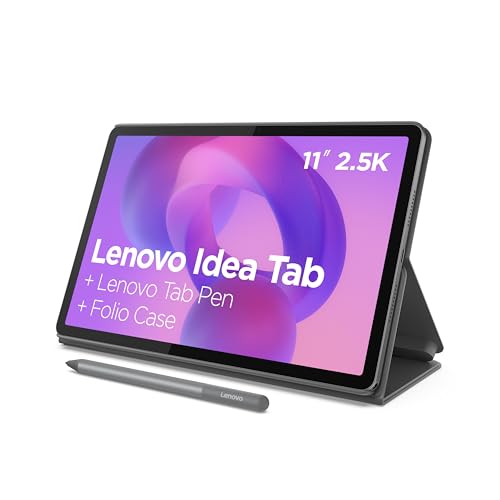
- The 11-inch 2.5K touchscreen supports touch and stylus input; a Tab Pen and folio case are included.
- Four listed learning apps include Lenovo AI Note, Squid, Nebo, and MyScript Calculator.
- The listing gives up to 12 hours of YouTube playback and includes a 20W charger.
Best For: A student who takes handwritten notes, annotates documents, sketches, or plans on a tablet.
12. Anker 8-in-1 USB-C Laptop Docking Station
More Connections from One USB-C Port
Anker 8-in-1 USB-C Laptop Docking Station

- Ports include USB-C PD-IN, two USB-A data ports, two HDMI ports, Ethernet, and microSD/SD readers.
- Supports one HDMI display up to 4K at 60Hz or two displays up to 4K at 30Hz; macOS mirrors the displays.
- Compatible USB-C Power Delivery pass-through supports up to 85W; charger and USB-C cable are required.
Best For: A student with a compatible laptop who wants to connect displays, storage, and wired peripherals.
13. Beats Studio Pro Wireless Headphones
A Quieter Focus Zone for Study and Travel
Beats Studio Pro Wireless Headphones
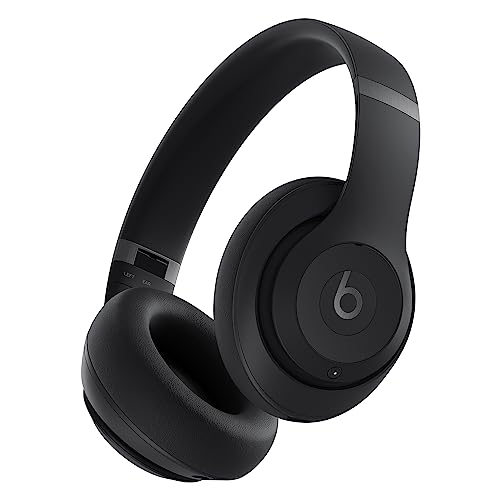
- Active Noise Cancelling and Transparency modes offer options for different listening environments.
- Supports Apple and Android pairing, USB-C lossless audio, and a 3.5mm wired connection.
- The listing states up to 40 hours of battery life and includes a travel case and cables.
Best For: A student who wants over-ear headphones for focus time, commuting, or travel.
Choosing Tech Gifts for Graduate Students
Graduate students often move between several kinds of work: reading, writing, research, calls, data analysis, and travel between campus and home. Start with the recipient’s routine. Someone who spends hours at a fixed desk may appreciate a monitor light bar, adjustable lamp, keyboard, mouse, or cable kit. A commuter or library regular may get more use from the power bank, tablet, headphones, or compact recorder. The most useful Christmas tech gift is one that fits a real part of their day rather than adding another device they must find space and time to learn.
Consider whether the gift adds a new capability or improves something they already use. A tablet with pen and folio can support handwriting and document markup. A docking station can make a laptop desk more flexible, while a router may help in a shared home where several people connect at once. Smaller accessories are easier to fit into an existing setup, but their value still depends on the recipient having a suitable device and workspace.
Match the Gift to the Budget
For modest budgets, desk organization and lighting can make a workspace more comfortable without asking the student to replace a main device. The cable management kit helps with an established collection of chargers and peripherals. The monitor light bar saves surface space, while the desk lamp has a base and adds USB charging ports. The compact keyboard, mouse, and photo printer are more specialized gifts that can feel personal when they match a hobby or work habit.
A power bank, headphones, router, or tablet tends to be a larger purchase. Before choosing one, think about how often the student would use it and whether it solves a recurring inconvenience. A tablet is more useful if they enjoy annotating or writing by hand; headphones suit frequent travel or shared study spaces; a router may be most relevant when they control or help manage the home network. If you are unsure, a small accessory that complements their current routine can be a thoughtful choice without guessing at a major device preference.
Check Compatibility and Personalization
Compatibility is especially important for computer accessories. The docking station requires a laptop with a compatible USB-C, USB4, or Thunderbolt connection and DisplayPort Alt Mode and Power Delivery support; the listing says it is not compatible with Linux. Its two external displays mirror each other on macOS. Check the laptop’s ports and operating system before gifting it. Likewise, the USB-C power bank’s laptop support depends on the device, and the desk lamp’s ports are not described as fast charging.
For the vertical mouse, the listing recommends measuring hand length: it is designed for hands under 7.5 inches and for right-handed use. It may take time to adjust to the shape, so it is a more personal pick than a basic mouse. A monitor light bar should fit monitor thickness between 0.2 and 1.8 inches. The Wi-Fi 6 router is most relevant if the recipient can use or configure the home network. For a photo printer, consider whether they take and share phone photos; the product connects to compatible iOS and Android devices.
Personalization can come from use, not appearance. The printer’s app offers tools for customizing photos; the keyboard has hot-swappable sockets; the tablet comes with a pen for notes and sketches. Match these features to known interests, and avoid assuming that every graduate student wants the same study setup.
Plan Christmas Timing and Last-Minute Decisions
For a planned gift, verify the recipient’s setup early and leave room to confirm laptop ports, operating system, hand size, or monitor dimensions. For a last-minute decision, choose a product whose fit is easier to establish from what you already know: a desk lamp for someone with a study space, a cable kit for a desk with visible cords, or a portable speaker for someone who enjoys listening on the move. Avoid making timing claims based on a product listing; check current retailer details separately before ordering. A practical Christmas gift can be useful right away when it suits the student’s routine and works with the devices they already own.
