
Business students move between lectures, group projects, study spaces, and internships. A practical tech gift can make those everyday tasks easier, whether it improves a desk setup or helps keep essential devices ready on the go.
These Christmas gift ideas for business students focus on study, organization, and portable work. Check device compatibility and the recipient’s routines before choosing.
13 Useful Tech Gifts for Business Students
1. Plaud NotePin S Wearable AI Voice Recorder
For Lecture and Meeting Notes
Plaud NotePin S Wearable AI Voice Recorder

- Wear it as a necklace, wristband, clip, or pin with the included accessories.
- Records audio and can create transcripts and summaries through the Plaud app and web tools.
- Use its physical record button to capture permitted lectures or brainstorming sessions.
Best For: A student who wants help reviewing permitted lectures and project discussions.
2. TRALT Ergonomic Mesh Office Chair
For a More Supportive Study Desk
TRALT Ergonomic Mesh Office Chair

- Adjustable lumbar support and a height-adjustable seat let the user tailor the fit.
- The breathable mesh backrest and cushioned seat are designed for desk sessions.
- Rolling casters and a 360-degree swivel support movement around a workspace.
Best For: A student who studies for long stretches at a desk.
3. JLab JBuds Lux ANC Wireless Headphones
For Focus on the Move
JLab JBuds Lux ANC Wireless Headphones

- Hybrid active noise cancellation and Be Aware Mode support different listening environments.
- Bluetooth Multipoint connects to two devices, and an included USB-C cable offers wired listening.
- Over-ear design, app-adjustable sound settings, and a sage finish make this a personal daily-use gift.
Best For: A student working in shared housing, commuting, or listening to online lectures.
4. Acer 11-in-1 USB-C Docking Station
For a Multi-Screen Desk
Acer 11-in-1 USB-C Docking Station
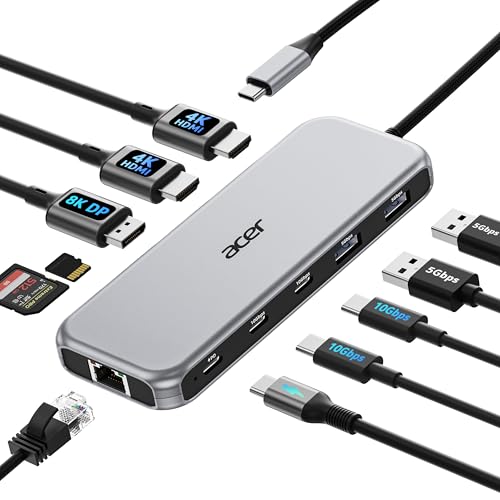
- Provides HDMI and DisplayPort outputs, USB ports, Ethernet, and SD and microSD card slots.
- Supports triple display output, with resolution limits depending on the display setup.
- Requires a Thunderbolt 3/4/5 or full-featured USB-C port; power adapter and cable are not included.
Best For: A student with a compatible laptop who wants to connect desk peripherals and monitors.
5. INIU 20,000mAh 65W Laptop Power Bank
For Campus Days Away from Outlets
INIU 20,000mAh 65W Laptop Power Bank

- Offers 20,000mAh capacity and up to 65W charging through three ports.
- Can charge a laptop, phone, and other small devices at the same time, subject to compatibility.
- The detachable USB-C cable doubles as a carry handle.
Best For: A student who carries compatible devices through long campus days or travel.
6. Nulaxy Adjustable 18-Inch Laptop Stand
For a Flexible Study Setup
Nulaxy Adjustable 18-Inch Laptop Stand

- Raises a laptop up to 18 inches and adjusts for sitting or standing positions.
- The stand rotates 360 degrees to make screen sharing easier during group work.
- Fits laptops and tablets up to 17 inches; the maker suggests using an external keyboard and mouse.
Best For: A student who wants to raise a laptop screen at a desk or share it with a project group.
7. Redragon K673 PRO Wireless Mechanical Keyboard
For Comfortable Report Writing
Redragon K673 PRO Wireless Mechanical Keyboard

- The 81-key keyboard connects by USB-C, Bluetooth, or 2.4GHz wireless.
- A control knob adjusts backlighting and media playback, while RGB lighting is customizable.
- Gasket mounting and five layers of noise dampening are designed for a cushioned typing feel.
Best For: A student who writes reports and emails at a PC, laptop, or tablet.
8. Yodoit 15.6-Inch Portable FHD Monitor
For a Second Screen Anywhere
Yodoit 15.6-Inch Portable FHD Monitor

- The 15.6-inch display has 1920×1080 resolution and a matte screen finish.
- Connects by USB-C or Mini HDMI, depending on the device and setup.
- Its smart cover, built-in speakers, and portable format suit study away from a fixed desk.
Best For: A student who wants a second screen for research, spreadsheets, or online courses.
9. Acer 9-in-1 USB-C Multiport Adapter
For Presentations and Peripherals
Acer 9-in-1 USB-C Multiport Adapter

- Includes HDMI, VGA, Ethernet, USB-A, SD and microSD card slots, and pass-through charging.
- HDMI supports up to 4K at 30Hz; HDMI and VGA can support dual displays up to 1080p at 60Hz.
- The laptop must support USB-C DP Alt Mode; a 100W adapter and cable are recommended for maximum charging.
Best For: A student who connects a compatible laptop to classroom projectors, wired networks, or accessories.
10. ProtoArc EM11 NL Vertical Wireless Mouse
For a More Relaxed Mouse Grip
ProtoArc EM11 NL Vertical Wireless Mouse

- Vertical design positions the hand in a more natural grip; adjustment to the shape may take time.
- Connects with Bluetooth or the included USB-A receiver and can pair with up to three devices.
- Rechargeable battery, quiet left and right clicks, and three DPI settings suit everyday work.
Best For: A right-handed student with small to medium hands who wants a vertical mouse for laptop work.
11. YEELIGHT Monitor Light Bar with Remote
For Late-Night Desk Lighting
YEELIGHT Monitor Light Bar with Remote
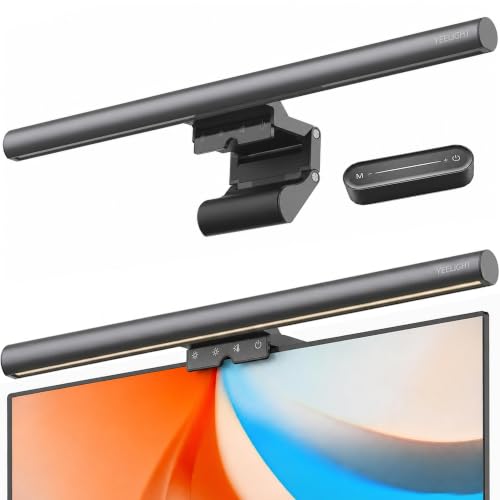
- Clips to compatible flat or curved monitors and uses USB power.
- Remote control supports stepless dimming and color temperature adjustment from 2700K to 6500K.
- The low-profile bar is designed to illuminate a desk while keeping the monitor area clear.
Best For: A student who studies at a monitor and wants adjustable workspace lighting.
12. Portable 20W Bluetooth Speaker
For Breaks and Group Study
Portable 20W Bluetooth Speaker
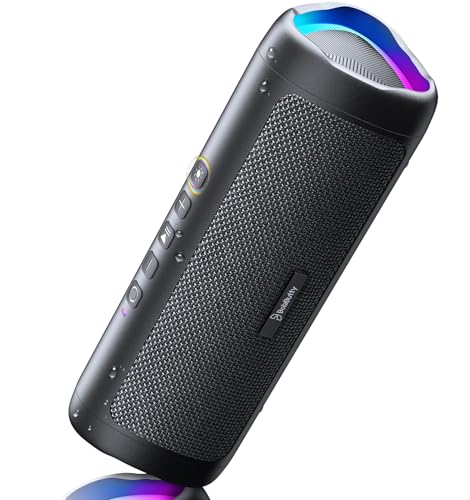
- Portable speaker with Bluetooth 5.3, built-in microphone, and an AUX input.
- IPX5 water resistance and up to 24 hours of playtime are listed by the maker; actual playtime varies.
- Two compatible speakers can pair for stereo sound, and the multicolor lights can be turned off.
Best For: A student who enjoys music during breaks, at home, or in a group study setting.
13. MATEIN 17-Inch Laptop Backpack
For Carrying Campus Essentials
MATEIN 17-Inch Laptop Backpack

- Separate laptop compartment fits most standard 17-inch laptops, plus a tablet compartment.
- 30-liter capacity, multiple pockets, and side bottle pockets help organize class and work items.
- Water-resistant fabric, padded shoulder straps, and a trolley sleeve suit commuting and travel.
Best For: A student carrying a laptop, books, and chargers between classes or study locations.
Choosing Christmas Tech Gifts for Business Students
Start with the recipient’s routine, since business programs combine more than laptop work. They may take notes in lectures, build spreadsheets, present in class, coordinate group assignments, and travel between campus and home. A portable monitor or multiport adapter is useful when they regularly work with reports and presentations. A backpack or power bank suits someone who is often on the move. For a student already set up with a capable laptop and desk, headphones, a mouse, or a keyboard can improve daily use without changing the whole setup.
Consider what they already own before choosing a large accessory. A second screen helps only if they have space to use it, and a comfortable chair is most useful if they study at a fixed desk. Smaller add-ons such as a light bar, mouse, or speaker can fit a student’s existing routine with fewer changes. If they often work in groups, a rotating laptop stand or portable speaker can support shared work and breaks.
Set a Budget That Fits the Gift
A thoughtful gift does not need to be a full workstation upgrade. Decide your budget first, then prioritize the one daily friction point the gift could address. A compact adapter, mouse, speaker, or monitor light bar can offer a practical change without requiring a major desk purchase. A laptop stand, backpack, keyboard, or headphones may suit a midrange gift budget, while a chair, monitor, or docking station can represent a larger investment.
Think about any extra items that may be needed. The Acer triple-display dock, for example, does not include its power adapter and cable. A laptop stand is more comfortable for typing when paired with an external keyboard and mouse, while a second screen may require the right connection cable. Considering the full setup helps keep the gift within budget and makes it ready for the recipient’s actual use.
Check Compatibility and Personal Fit
Accessories are only useful when they work with the student’s devices. Before buying a docking station or adapter, check the laptop’s USB-C capabilities, including display output and charging support. The 11-in-1 dock specifies Thunderbolt 3, 4, or 5, or a full-featured USB-C port, and its display behavior varies by operating system. The 9-in-1 adapter also requires USB-C DP Alt Mode. Confirm the laptop model and operating system if the recipient needs multiple screens or classroom projector connections.
Personal fit matters for desk and travel gear. The vertical mouse is designed for right-handed users with small to medium hands, and its shape can take time to get used to. The chair’s seat height and dimensions should suit the student and fit their workspace. For a backpack, check the laptop’s actual size and thickness: the listed compartment accommodates most standard 17-inch laptops but may not fit oversized or extra-thick models. Headphones, keyboard, and monitor connectivity should also match the devices they use most.
Personalization can be practical. A student who commutes may appreciate a color, size, or style that works with everyday carry. For a home study setup, coordinate accessories with the available desk space rather than assuming every student wants a multi-screen arrangement. You can also pair an accessory with a handwritten note suggesting a use, such as keeping the power bank in their class bag or using the portable monitor for research alongside a paper draft.
Plan Timing and Last-Minute Choices
Start with items that need compatibility checks or a personal fit decision. A monitor, dock, chair, backpack, or ergonomic mouse benefits from confirming details before ordering, especially if the student needs it for a specific laptop or room. For a simpler last-minute choice, consider a small desk accessory or portable audio gift, provided it suits the recipient’s routine. Avoid choosing a device solely because its specifications sound impressive; the right connection, workspace, and habits matter more.
If holiday timing is tight, verify the seller’s current delivery information yourself rather than relying on a gift guide for arrival dates. A digital card explaining a planned gift can preserve the surprise if you still need to confirm a laptop model or desk measurement. For a business student, a well-matched practical tool can be a welcome Christmas present even when it has no festive styling: usefulness through the semester is what gives the gift staying power.
