
A thoughtful tech gift basket can make a PC enthusiast’s desk, workflow, or home network more useful. These picks range from everyday accessories to tools for building and maintaining electronics.
Choose around how the recipient uses their computer, then check fit and compatibility before gifting.
Christmas Tech Gift Basket Ideas
1. Anker Prime 14-in-1 Laptop Docking Station
A More Connected Desk
Anker Prime 14-in-1 Laptop Docking Station

- Combines 14 ports for charging, data, and display connections.
- Supports dual HDMI displays, with output depending on laptop DisplayPort version.
- Works with supported USB-C, USB4, and Thunderbolt laptops; not compatible with Linux.
Best For: Laptop users connecting multiple displays or accessories at a home desk.
2. Quntis Curved Monitor Light Bar with RGB Backlight
Lighting for an Ultrawide Setup
Quntis Curved Monitor Light Bar with RGB Backlight

- Designed for curved monitors over 34 inches or large flat screens.
- Adjustable front light offers stepless brightness and 3000K–6500K color temperature.
- Includes 15 RGB backlight modes and a foldable dual-light design.
Best For: Desk setup enthusiasts with a large curved monitor who want task lighting.
3. HUANUO Adjustable Single Monitor Arm
A Flexible Monitor Position
HUANUO Adjustable Single Monitor Arm

- Fits supported 13–32-inch monitors weighing 4.4–19.8 pounds with VESA 75x75 or 100x100 patterns.
- Offers tilt, swivel, and rotation adjustments, with clamp or grommet mounting.
- Check tabletop thickness and underside clearance before choosing a mounting location.
Best For: PC users looking to adjust monitor placement and clear desk space.
4. Kisnt KN85 Wireless 75% Mechanical Keyboard
A Compact Typing Upgrade
Kisnt KN85 Wireless 75% Mechanical Keyboard

- The 85-key layout keeps function keys and arrows while omitting the number pad.
- Connects by USB-C, 2.4GHz wireless, or Bluetooth, with three Bluetooth channels.
- Hot-swappable switches and adjustable RGB lighting let users customize the setup.
Best For: Typists or gamers with limited desk space who enjoy keyboard customization.
5. STREBITO 142-Piece Precision Screwdriver Set
A Handy Electronics Toolkit
STREBITO 142-Piece Precision Screwdriver Set
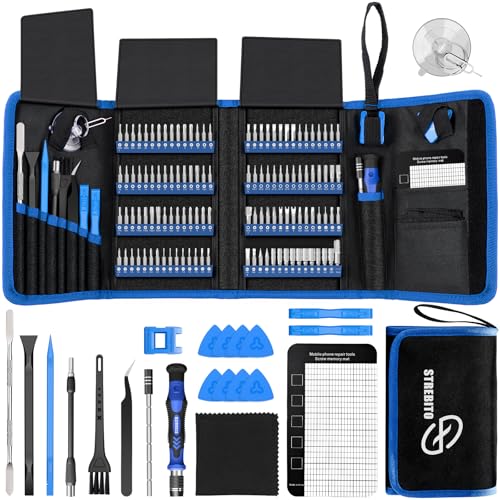
- Includes 120 screwdriver bits and 22 accessories, including tweezers and a magnetic mat.
- The listed uses include computers, laptops, SSDs, tablets, and game consoles.
- A carry bag and labeled bit storage help keep the kit organized.
Best For: PC builders and electronics hobbyists who repair or assemble devices.
6. HARDELL 6-Inch Digital Caliper
For Precise Small Measurements
HARDELL 6-Inch Digital Caliper

- Measures up to 6 inches or 150 mm and switches between metric and imperial units.
- Includes inside, outside, depth, and step measurement modes.
- The package includes a case, batteries, mini screwdriver, and stainless steel ruler.
Best For: Makers and PC builders measuring small parts or workshop projects.
7. SanDisk 2TB Extreme Portable SSD
Portable Space for Large Files
SanDisk 2TB Extreme Portable SSD

- Provides 2TB of portable storage with USB 3.2 Gen 2 connectivity.
- The listed maximum speeds are up to 1050MB/s read and 1000MB/s write; results depend on the host device and other factors.
- Includes a carabiner loop, password protection with 256-bit AES hardware encryption, and IP65 water and dust resistance.
Best For: Students, creators, or PC enthusiasts moving large files between devices.
8. Logitech Blue Yeti USB Microphone
A Clearer Voice Setup
Logitech Blue Yeti USB Microphone

- Offers cardioid, omni, bidirectional, and stereo pickup patterns.
- Onboard controls include headphone volume, mute, gain, and pattern selection.
- Connects by USB and includes a desktop stand; compatible with Mac and PC.
Best For: Streamers, remote workers, gamers, or hobby podcasters recording at a computer.
9. Logitech G502 Lightspeed Wireless Gaming Mouse
Wireless Control for PC Gaming
Logitech G502 Lightspeed Wireless Gaming Mouse

- Uses Logitech LIGHTSPEED wireless connectivity and has 11 customizable buttons.
- The optical sensor supports adjustable sensitivity through Logitech G HUB software.
- The Powerplay wireless charging system is sold separately.
Best For: PC gamers who want programmable controls and wireless movement.
10. TP-Link Deco XE75 Wi-Fi 6E Mesh System, 3-Pack
A Home Network Refresh
TP-Link Deco XE75 Wi-Fi 6E Mesh System, 3-Pack

- The three-pack is designed for mesh coverage of up to 7,200 square feet, according to the listing.
- Tri-band Wi-Fi 6E includes a 6 GHz band for compatible devices and mesh backhaul.
- Most internet service providers require a modem; check home and device compatibility before setup.
Best For: Households looking to improve Wi-Fi coverage across more of the home.
11. VSD M18 Programmable Macro Pad
Shortcuts at a Touch
VSD M18 Programmable Macro Pad

- Includes 15 customizable LCD keys and three physical buttons for 18 programmable controls.
- Can trigger macros, enter text, open files, control media, or switch OBS scenes.
- Connects by USB-C and supports Windows 11 or newer and macOS 11 or newer; native Linux plug-and-play is not available.
Best For: Creators, gamers, or power users who repeat desktop shortcuts and workflows.
Choose Gifts Around Their PC Routine
Start with the recipient’s daily habits. A laptop user who plugs into monitors and accessories may appreciate the docking station, while someone with a large curved display may get more use from the monitor light bar. For a desk that feels crowded, consider the compact keyboard or adjustable monitor arm. Think about what they mention needing: more storage, clearer voice audio, better-organized repair tools, or faster access to repeated commands.
A practical basket can combine a central gift with a small complementary item from this list. For example, a PC builder might use the precision screwdriver set and digital caliper for device work and measuring small parts. A creator could pair the USB microphone with the programmable macro pad for recording and workflow shortcuts. Keep each gift tied to a real need so the basket feels considered rather than simply full.
Set a Budget That Fits the Gift
The supplied products cover different kinds of spending, from a single desk accessory or tool to larger upgrades such as a multi-port dock or mesh network system. Decide on a total budget first, then choose one main item and add another only if it contributes something useful. For a lower-cost approach, a tool or measurement accessory can still feel personal when it matches a hobby. A larger purchase works best when you know the recipient has asked for that kind of upgrade.
Avoid judging a product by its number of features alone. An 18-key macro pad may suit a person who edits or streams often, but have little value to someone who rarely uses shortcuts. Likewise, a mesh Wi-Fi system is a household purchase rather than a small desk accessory, so consider whether the recipient manages their home network and would welcome a change.
Check Compatibility and Personalization
PC accessories have fit and connection details that are easy to overlook. Before choosing the monitor arm, check the screen’s size, weight, VESA pattern, and the desk’s thickness and underside clearance. For the curved light bar, confirm that the display’s size and shape fit its stated design. For a docking station, check the laptop’s USB-C, USB4, or Thunderbolt support, display mode, operating system, and external monitor needs. Its macOS display behavior differs from other platforms, and the listing says it does not support Linux.
For storage, confirm the recipient has a compatible USB connection and enough space for a portable drive. The microphone and macro pad connect over USB, but their supported systems and software needs differ. For Wi-Fi equipment, consider the home’s layout, internet service, modem needs, and whether devices can use Wi-Fi 6E. Personalize the gift with a short note explaining why you chose it, such as its fit for a compact desk or a recurring creative task.
Plan for Christmas and Last-Minute Choices
If you are shopping close to Christmas, favor gifts whose compatibility you can verify quickly. A repair kit, caliper, or microphone may be easier to select when you already know the recipient’s interests and setup. A docking station, monitor arm, or mesh network system requires more checking, so avoid guessing about ports, mounting space, or household networking needs.
Use the product listing to confirm current details and timing before ordering, since stock and delivery dates can change. If a key compatibility detail is unknown, choose a gift with a broader use for the recipient’s known hobbies, or include a note that invites them to confirm their setup. Thoughtful Christmas tech gifts come from matching the item to the person’s real routine, whether that means building PCs, creating content, gaming, or making a desk more comfortable.
