
Help a PC user make everyday work more comfortable and organized with gifts built for a real desk setup. These Christmas productivity gift ideas span workspace upgrades, creative tools, and practical accessories.
13 Useful Gifts for a More Productive PC Setup
1. Anker Prime 14-in-1 Docking Station
A One-Cable Desk Hub
Anker Prime 14-in-1 Docking Station

- Brings together 14 connections for charging, data, and dual displays.
- Offers up to 160W total output and data transfer speeds up to 10Gbps.
- Check laptop and display support: Linux is not supported, and macOS mirrors both external displays.
Best For: A laptop worker building a flexible desk setup
2. TRALT Ergonomic Mesh Office Chair
A Desk Comfort Upgrade
TRALT Ergonomic Mesh Office Chair

- Depth-adjustable lumbar support and a breathable mesh back suit long desk sessions.
- The seat is 19.7 inches wide, with a listed height range of 17.7–21.7 inches.
- Assembly is required; the listing describes a 330 lb capacity and a two-year warranty.
Best For: Someone who spends long hours working at a desk
3. JOYUSING Scanpad100 Pro Document Scanner
A Paperwork-to-Digital Helper
JOYUSING Scanpad100 Pro Document Scanner
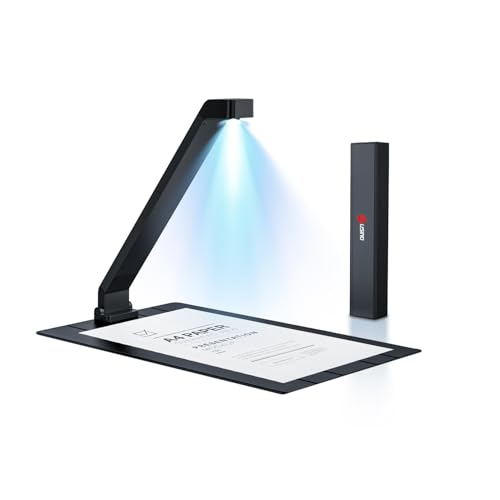
- Captures documents up to A4 size at 16MP and 380 DPI, with OCR text recognition.
- Folds into a slim shape for storage or carrying and connects through USB-C.
- Works with Windows and Mac; the listing says it is not for books and is not recommended for glossy paper.
Best For: Someone organizing receipts, forms, or paper records
4. ErGear 48 × 24-Inch Electric Standing Desk
A Sit-Stand Workspace Centerpiece
ErGear 48 × 24-Inch Electric Standing Desk

- Electric height adjustment runs from 28.35 to 46.46 inches.
- Stores up to four preferred height settings for one-touch adjustments.
- The 48 × 24-inch desk has a steel frame and a listed 176 lb capacity; assembly is required.
Best For: Someone setting up a dedicated home office
5. EMEET NOVA 4K Webcam
A Clearer Video Call Gift

- Supports video up to 4K at 30 fps, though the default resolution is 1080p.
- Includes two microphones, PDAF autofocus, and a physical privacy cover.
- Connects over USB-A and supports Windows 10/11, macOS 10.14+, and Android TV 7.0+.
Best For: A remote worker who joins frequent video calls
6. Redragon K745 PRO Wireless Keyboard
A Shortcut-Ready Typing Upgrade
Redragon K745 PRO Wireless Keyboard

- The 108-key layout includes four default shortcut keys for mute, calculator, screen lock, and desktop.
- Connects by USB-C, Bluetooth, or 2.4GHz wireless and works with PC, laptop, and tablet.
- Its software can remap hotkeys and program macros; translucent PBT keycaps show RGB lighting.
Best For: A writer, programmer, or enthusiastic typist
7. ComfiLife Memory Foam Under-Desk Footrest
A Softer Place to Rest Your Feet
ComfiLife Memory Foam Under-Desk Footrest

- Memory foam cushioning and adjustable height offer under-desk foot support.
- The cover removes for machine washing, and the foam can also be used as a rocker.
- No assembly is required; the listing says it fits standard desks and gaming stations.
Best For: A person furnishing a desk for long work sessions
8. LYMAX Dimmable Monitor Light Bar
Focused Light for Evening Work
LYMAX Dimmable Monitor Light Bar

- Provides adjustable color temperature from 2900K to 6000K and directs light onto the desk.
- A wireless controller offers touch and remote control, with the CR2450 battery included.
- USB-C powered; the bracket is listed for monitors 0.2 to 1.8 inches thick.
Best For: A computer user who works into the evening
9. HUION Keydial Mini Bluetooth Keypad
A Custom Shortcut Companion
HUION Keydial Mini Bluetooth Keypad

- Its 18 programmable keys and dial can be assigned to supported software shortcuts.
- Bluetooth 5.0 provides wireless use, and the one-handed keypad works for either hand.
- Compatible with Windows and Mac; shortcut setup requires the Huion driver and supporting software.
Best For: A creative power user who repeats shortcuts or workflows
10. ZealSound K66 USB Podcast Microphone
A Voice-First Desk Upgrade
ZealSound K66 USB Podcast Microphone

- Includes a noise reduction mode, mute button, and dedicated microphone and monitoring controls.
- A built-in headphone jack supports real-time monitoring while recording.
- Connects by USB and includes USB-C and Lightning adapters for listed computer and mobile devices.
Best For: A remote professional, podcaster, or online presenter
11. ProtoArc EM11 NL Vertical Mouse
A Different Kind of Mouse Gift
ProtoArc EM11 NL Vertical Mouse

- The vertical shape is designed for small to medium hands under 7.5 inches long.
- Connects to up to three devices using Bluetooth and a USB-A receiver; it is rechargeable by USB-C.
- Has three DPI levels; the listing notes a learning curve and says side buttons are not compatible with Mac.
Best For: A desk worker interested in trying a vertical mouse
12. LG 34-Inch UltraWide WQHD Monitor
More Room for Open Windows
LG 34-Inch UltraWide WQHD Monitor

- The curved 3440 × 1440 display provides a 21:9 workspace for multiple windows.
- Supports up to 100Hz refresh, Reader Mode, and Picture-by-Picture from two input sources.
- Connections include USB-C with up to 65W power delivery, two HDMI ports, DisplayPort, and USB ports.
Best For: A multitasker working across apps or documents
13. SanDisk 2TB Portable SSD
Portable Space for Large Projects

- Provides 2TB of external storage with read speeds up to 1000MB/s.
- Its pocket-sized design includes drop protection up to 2 meters, according to the listing.
- Connects over USB-C with no drivers or setup required.
Best For: A student or professional handling large files
Choosing a Christmas productivity gift for a PC user
Start with the friction they mention most often. A laptop user who reconnects a monitor, keyboard, and other accessories every day may appreciate the docking station, provided its connection and display behavior match their computer. Someone who spends hours at a desk may benefit more from an adjustable chair, footrest, or standing desk. For people whose work involves documents, images, audio, or large files, a scanner, programmable keypad, microphone, or portable SSD can address a specific task.
Think about the whole workspace before choosing a large item. A standing desk changes the furniture layout; a monitor needs enough desk space and a suitable connection; a chair needs to fit the recipient. Smaller gifts such as the mouse, light bar, and keypad can be easier to add to an existing setup, but still have compatibility and fit details worth checking.
Match the gift to their budget
Set a comfortable spending range, then compare items that solve similar problems. A footrest or light bar can make a useful desk-focused present without replacing major furniture. A webcam, microphone, or keyboard is a more involved upgrade for someone who works or creates from a PC. Larger items such as the chair, standing desk, monitor, and docking station may be a centerpiece gift, particularly when the recipient has already said they want a better workstation.
Useful Christmas productivity gift ideas do not need holiday styling. Prioritize the feature that makes the item relevant to this person: a dedicated shortcut dial for repetitive creative work, a wide display for side-by-side documents, or portable storage for projects that travel with them. Avoid paying for capabilities they will not use; match the gift to an actual routine.
Check compatibility and personalize the choice
For electronics, identify the recipient’s computer model and operating system if possible. The docking station requires a compatible USB-C, USB4, or Thunderbolt connection with supported display and power features, and its external display behavior differs on macOS. The monitor offers several input types, while the webcam, microphone, scanner, keyboard, and keypad each have their own connection or software requirements. Confirm those details against the recipient’s setup before purchasing.
Ergonomic gifts are personal, too. The vertical mouse is designed for small to medium hands and right-hand use; the chair has a listed seat-height range and dimensions that may help assess fit. For a desk or monitor, check the available room and how the existing setup is arranged. A thoughtful personalization can be as simple as choosing a tool that supports a hobby or task they already do, such as photo editing, streaming, writing, or studying.
Plan timing and last-minute decisions
For a Christmas purchase, leave time to check the product details and any needed computer or desk measurements. Furniture may require assembly and space planning, while a scanner or keypad may need software setup. A smaller accessory can be simpler to wrap, but it still needs the right ports, operating system, or physical fit.
If time is short, choose based on information you already know. A portable SSD is a straightforward category for someone who regularly moves large files, assuming USB-C suits their devices. A footrest or monitor light bar may fit an established desk more easily than a new chair or desk, though dimensions still matter. When compatibility is uncertain, discreetly checking the computer model or asking which connection they use can help make the gift useful from the start.
