
Tech recruiting often means juggling candidate profiles, calendars, video calls, and notes. Useful gifts can make that daily setup more comfortable, organized, or flexible.
11 Christmas Gifts for Tech Recruiters
1. Anker Prime 14-in-1 Docking Station
A More Connected Desk
Anker Prime 14-in-1 Docking Station

- Brings laptop peripherals and power together through a 14-in-1 dock.
- Offers up to 160W total output and charges up to four devices at once.
- Dual HDMI display support depends on the laptop; macOS mirrors the two displays, and Linux is unsupported.
Best For: A recruiter with a compatible laptop and a permanent multi-device desk.
2. TRALT Ergonomic Mesh Office Chair
A Comfort-Focused Workspace Upgrade
TRALT Ergonomic Mesh Office Chair

- Adjustable lumbar support lets the user change its depth.
- Breathable mesh backrest and molded foam seat are designed for extended sitting.
- Seat height adjusts from 17.7 to 21.7 inches.
Best For: A home-office recruiter who spends long stretches at a desk.
3. ErGear 48 × 24-Inch Electric Standing Desk
A Sit-Stand Workstation
ErGear 48 × 24-Inch Electric Standing Desk

- Electric height adjustment ranges from 28.35 to 46.46 inches.
- Four memory presets can save preferred desk heights.
- Steel frame and engineered wood top form a 48 × 24-inch work surface.
Best For: A recruiter who wants the option to alternate between sitting and standing.
4. INIU 20,000mAh 65W Laptop Power Bank
Portable Power for Busy Days
INIU 20,000mAh 65W Laptop Power Bank

- 20,000mAh capacity and 65W output are suited to compatible laptops and devices.
- Three ports let it charge a laptop, phone, and another device simultaneously.
- The USB-C cable detaches and doubles as a carry handle.
Best For: A recruiter who works while traveling or away from an outlet.
5. Univivi 36-Inch Under-Desk Cable Tray
A Tidy Desk Detail
Univivi 36-Inch Under-Desk Cable Tray

- 36-inch fabric tray can hold and hide adapters, sockets, and cords.
- Installs with clamps or screws, depending on the desk and preference.
- Measure first: the desk edge needs at least 5.3 inches of clear space for clamps.
Best For: Someone setting up a fixed desk with multiple cables and adapters.
6. ProtoArc EM01 NL Wireless Trackball Mouse
7. Redragon K689 PRO Wireless 108-Key Keyboard
A Customizable Typing Upgrade
Redragon K689 PRO Wireless 108-Key Keyboard

- Full-size 108-key layout includes four dedicated shortcut keys.
- Connects by USB-C, Bluetooth, or 2.4GHz wireless.
- Gasket-mounted design has three-layer noise dampening and adjustable RGB lighting.
Best For: A recruiter who types frequent notes, outreach, and scheduling messages.
8. Lamicall Adjustable Aluminum Laptop Stand
A Flexible Laptop Riser
Lamicall Adjustable Aluminum Laptop Stand

- Fits laptops from 10 to 17.3 inches, according to the product details.
- Height and angle adjust, and the base rotates 360 degrees.
- Folds for storage or travel.
Best For: A recruiter who wants to raise a laptop screen or share it during collaboration.
9. Dimmable LED Desk Lamp with USB Ports
Flexible Light for Focused Work
Dimmable LED Desk Lamp with USB Ports

- Offers three color temperatures and five brightness levels.
- Flexible gooseneck directs light toward a desk or reading area.
- USB-A and USB-C ports are output-only and do not support fast charging.
Best For: A recruiter who reviews documents or works in a dim home office.
10. Amazon Echo Dot Smart Speaker
Hands-Free Home-Office Help
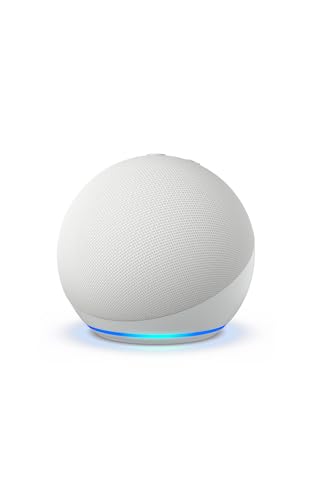
- Plays music, audiobooks, and podcasts through supported services or Bluetooth.
- Voice assistant can set timers, answer questions, and provide weather updates.
- Compatible smart-home controls and a microphone-off button are included.
Best For: A recruiter who would enjoy voice controls and background audio at home.
11. LG 34-Inch UltraWide WFHD Monitor
More Room for Open Windows
LG 34-Inch UltraWide WFHD Monitor
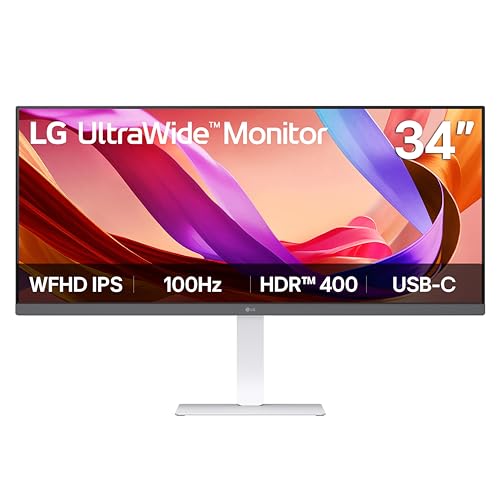
- 34-inch 21:9 display has a 2560 × 1080 resolution.
- HDMI, DisplayPort, and USB-C provide connection options; USB-C supports display output and data transfer.
- Stand adjusts for height, tilt, and swivel.
Best For: A recruiter who often keeps calendars, candidate records, and notes open together.
Choosing a Gift for a Tech Recruiter
Start with the recipient’s actual work setup. A recruiter who spends most of the day on a laptop at the kitchen table may appreciate a stand, lamp, or compact input device. Someone with a dedicated office and multiple screens may get more from the docking station, monitor, or cable tray. A chair or standing desk is a larger commitment, so consider whether you know the person’s available space and preferences before choosing one.
Think about the workday, too. Candidate sourcing and scheduling involve frequent typing, tab switching, and video calls. The keyboard, trackball, ultrawide monitor, and dock each address a different part of that routine. A portable power bank fits a travel-heavy schedule, while an Echo Dot is better suited to a home office where hands-free timers or background audio would be welcome. The best Christmas gift ideas for tech recruiters connect to a real daily habit rather than simply adding another gadget.
Match the Gift to Your Budget and the Desk
For a smaller desk refresh, consider the lamp, laptop stand, cable tray, or trackball. These change a specific part of the setup without replacing major furniture. A power bank is another practical choice for someone who works on the move. Larger gifts such as an office chair, standing desk, monitor, or docking station can reshape a workspace, but they take more room and usually benefit from a little advance coordination.
Avoid guessing at a person’s comfort preferences when buying furniture. Chair fit depends on body dimensions and preferred support. A standing desk requires enough floor and cable space, and a large display needs a desk that can accommodate its footprint. When a surprise matters, a smaller accessory may be easier to choose confidently than a substantial workstation upgrade.
Check Compatibility and Personalization
For computer accessories, check the recipient’s laptop ports, operating system, and monitor setup. The Anker dock supports USB-C, USB4, and Thunderbolt connections, but its display behavior varies: on macOS the two external displays mirror one another, and the dock is not compatible with Linux. The LG monitor offers USB-C, HDMI, and DisplayPort, but the connection method should suit the computer. A power bank’s charging output also needs to match the devices it will serve.
Personalization can be as simple as choosing a useful detail. A trackball may appeal to someone who wants a different desk-navigation style, but its thumb control takes adjustment. The keyboard offers remappable shortcut keys and lighting customization. A laptop stand folds and rotates for screen sharing, while a lamp’s brightness and color settings let the user adjust the light. If possible, notice what the recipient already owns so the gift complements their setup rather than duplicating it.
Desk measurements matter for items that attach or occupy substantial space. The 36-inch cable tray needs a clear edge area for its clamps; the product notes call for at least 5.3 inches. Measure the desk before choosing it, and confirm the table construction suits the clamp or screw installation. For the monitor, desk width and viewing distance are useful checks. For a laptop stand, confirm the computer is within its stated 10-to-17.3-inch range.
Timing and Last-Minute Decisions
Begin with gifts that require compatibility checks or measuring, especially desks, chairs, monitors, and docking stations. These are more personal and take more effort to fit into a workspace. If time is short, choose from the recipient’s known routines: a lamp for a dim desk, a power bank for regular travel, or a stand for someone who works directly from a laptop. Avoid promises about arrival dates; check current product details and delivery estimates when ordering.
A useful Christmas gift does not need holiday styling. For tech recruiters, practical comfort, fewer desk distractions, and smoother everyday work can make ordinary quality gear feel thoughtfully chosen. Tie the gift to a specific need, verify the relevant fit or connection, and let the recipient’s work habits guide the decision.
