
League sessions can stretch from a quick match into an evening at the desk. These gift ideas focus on useful upgrades for the gaming setup, from input gear to workspace comfort.
Christmas Gifts for League of Legends Players
1. FLEXISPOT EN1 Electric Standing Desk, 48 x 24 in
A Sit-Stand Setup Upgrade
FLEXISPOT EN1 Electric Standing Desk, 48 x 24 in
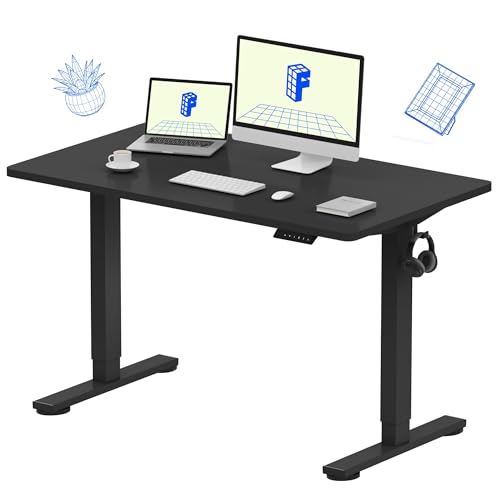
- The seamless 48 x 24-inch desktop offers room for monitors and accessories.
- Electric height adjustment supports sitting or standing, with four memory presets.
- The listed weight capacity is 176 pounds; cable clips and a headphone hook are included.
Best For: A player looking to reorganize a home gaming or work desk.
2. Univivi 36-Inch Under-Desk Cable Tray
For a Tidier Gaming Desk
Univivi 36-Inch Under-Desk Cable Tray

- The 36-inch tray is designed to hold and conceal power strips, adapters, and cables.
- Choose clamp-on or screw-in installation, depending on the desk.
- Measure first: the listing calls for at least 5.3 inches of edge space if drawers or a back rod are present.
Best For: A player who wants to organize cables beneath a desk.
3. HUANUO Adjustable Single Monitor Arm
A More Flexible Screen Position
HUANUO Adjustable Single Monitor Arm

- Fits listed monitors from 13 to 32 inches and weighing 4.4 to 19.8 pounds.
- Supports 75 x 75 mm and 100 x 100 mm VESA patterns.
- Offers tilt, swivel, and rotation, with clamp and grommet mounting options.
Best For: A player with a compatible monitor who wants more desk space and adjustability.
4. LYMAX Dimmable Monitor Light Bar
Focused Light for Late Sessions
LYMAX Dimmable Monitor Light Bar

- Adjustable color temperature ranges from 2900K to 6000K, with touch and remote controls.
- Its downward lighting is designed to illuminate the desk while limiting screen reflection.
- USB-C powered; check that the USB port provides 5V/1A as the listing requests.
Best For: A player who studies, works, or games at a screen-lit desk.
5. SABRENT 4-Port USB 3.0 Hub with Switches
Extra Ports at a Reach
SABRENT 4-Port USB 3.0 Hub with Switches

- Adds four USB 3.0 ports, with individual on/off switches and LED indicators.
- The two-foot cable can help position the hub for easier access.
- Supports USB 2.0 and 1.1 devices too; the listing says it is not for charging.
Best For: A player whose PC setup needs more accessible USB connections.
6. Large Extended Gaming Mouse Pad, 31.5 x 15.7 in
Room to Move and Play
Large Extended Gaming Mouse Pad, 31.5 x 15.7 in
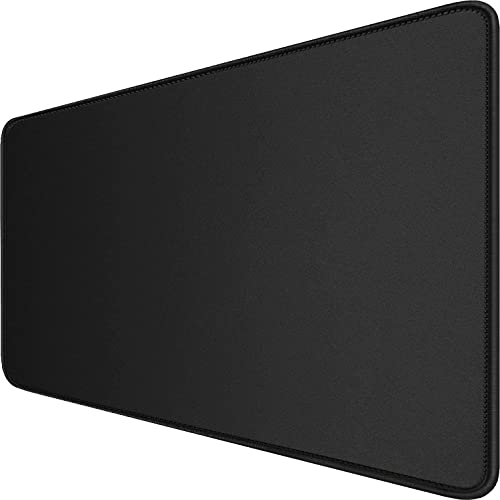
- The 31.5 x 15.7-inch surface can fit a mouse and keyboard together.
- A nonslip rubber base and stitched edges help keep the mat in place and finished.
- The smooth surface is described for mouse tracking, and its coating is designed to resist spills.
Best For: A player who wants a broad, continuous mouse surface.
7. GTPLAYER Big and Tall Gaming Chair
A Supportive Seat for Long Games
GTPLAYER Big and Tall Gaming Chair

- The chair is listed with a 400-pound capacity and a high back.
- Features include spring lumbar support, a 3D saddle-shaped cushion, and a footrest.
- The backrest reclines from 90 to 135 degrees, and the seat is upholstered in faux leather.
Best For: A big-and-tall player seeking an adjustable gaming chair.
8. Razer DeathAdder V3 HyperSpeed Wireless Mouse
Lightweight Control for Summoner’s Rift
Razer DeathAdder V3 HyperSpeed Wireless Mouse

- The right-handed wireless mouse weighs 55 grams and has a 26K optical sensor.
- It has five buttons and USB-C charging, with battery life listed up to 100 hours.
- The listing describes eight programmable controls; check operating-system support before gifting.
Best For: A PC player who wants a lightweight wireless mouse for precise input.
9. ASUS TUF 27-Inch 1440p 300Hz Gaming Monitor
A High-Refresh Display Upgrade
ASUS TUF 27-Inch 1440p 300Hz Gaming Monitor

- The 27-inch display has QHD 2560 x 1440 resolution and a 300Hz refresh rate.
- Fast IPS technology and a listed 0.3 ms response time are aimed at fast-moving visuals.
- Connections include HDMI and DisplayPort; built-in speakers are also included.
Best For: A player with a PC that can support a high-refresh 1440p display.
10. ASUS ROG Strix Scope II 96 Wireless Keyboard
Compact Keys with a Number Pad
ASUS ROG Strix Scope II 96 Wireless Keyboard

- The 96% layout keeps a number pad while taking less desk space than a full-size keyboard.
- Connect by Bluetooth, 2.4GHz wireless, or USB cable; it supports PC and Mac.
- The switches are hot-swappable, and the keyboard has per-key RGB lighting and a detachable wrist rest.
Best For: A player who wants a customizable mechanical keyboard with a compact layout.
11. KAFRI Dual Headphone Stand with USB Charging
A Home for Two Headsets
KAFRI Dual Headphone Stand with USB Charging

- The stand holds two headphones with headbands up to 2.1 inches wide.
- It has RGB lighting with nine listed effects, plus two USB-A ports and one USB-C port.
- The base also includes two AC outlets; check the devices’ power needs before connecting them.
Best For: A player sharing a desk or keeping a spare headset close by.
12. NexiGo N930AF 1080p Autofocus USB Webcam
For Streams and Friend Calls
NexiGo N930AF 1080p Autofocus USB Webcam
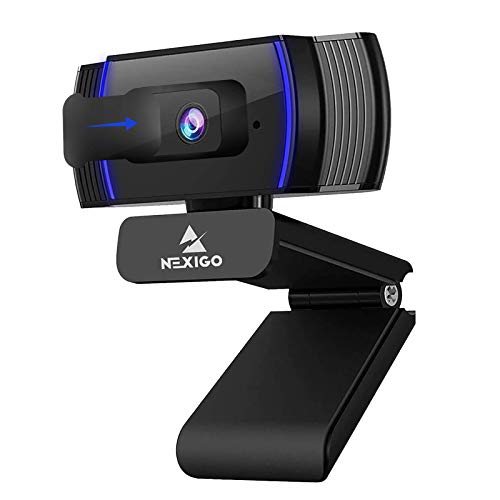
- Records up to 1080p at 30fps, with autofocus that can be switched off for manual focus.
- Includes a built-in noise-canceling microphone and a lens privacy cover.
- The USB webcam has a folding design and a 6.5-foot cable; compatibility varies by device and software.
Best For: A player who streams, records gameplay, or joins video calls.
Choosing a Gift for a League of Legends Player
Start with how the recipient uses their setup. Someone who plays ranked matches most evenings may appreciate a mouse, keyboard, or monitor that affects everyday interaction. A friend who already likes their core gear might get more use from a mouse pad, light bar, cable tray, or headset stand. For a streamer, a webcam can support calls and recordings as well as gaming. Think about what currently causes small annoyances: crowded USB ports, tangled cables, a screen at an awkward height, or nowhere to put a headset.
League of Legends is not especially demanding of desk accessories, so choose around the person’s habits rather than assuming every player needs competitive hardware. A broad desk mat can be a practical gift for someone who makes wide mouse movements. A monitor arm is useful when the display and desk meet its size, weight, VESA, and mounting requirements. For bigger changes, such as a desk, chair, or monitor, consider whether the recipient has room and wants to adjust their setup.
Set a Budget That Fits the Upgrade
Small accessories can make thoughtful gifts without requiring a full setup overhaul. A USB hub, desk light, cable tray, or mouse pad can address one specific need. Mice and keyboards are more personal because shape, hand preference, layout, and switch feel matter. A chair or monitor is a major purchase and takes up more space, so it is best suited to a recipient whose preferences and setup you know.
A useful approach is to identify one problem the gift should solve, then compare the options in that category. For example, if a player complains about a messy desk, a cable tray or headphone stand may be more relevant than another input device. If they want better screen positioning, an adjustable arm may be appropriate when the monitor and desk are compatible. Avoid treating a higher specification as automatically better: the player’s existing PC, room, and preferences determine whether an upgrade will help.
Check Compatibility and Personal Preferences
Before buying a monitor, check the recipient’s graphics hardware and available connections. The ASUS display listed here is 1440p and 300Hz, so the computer and cable connection need to support the resolution and refresh rate they want to use. For a monitor arm, compare the monitor’s size, weight, VESA pattern, and the desk’s edge or grommet setup with the mount’s stated limits.
For peripherals, find out whether the player uses a right-handed mouse and whether their computer supports the listed connection and operating system. The Razer mouse is right-handed; the keyboard offers multiple connection modes and PC/Mac support. Mechanical keyboard sound and feel are subjective, so hot-swappable switches are a useful customization feature, but they do not guarantee a particular typing preference. For USB accessories, confirm the computer has an available port and that the intended device can use it. The SABRENT hub specifically is not for charging.
Personalization can be as simple as matching the recipient’s existing setup color or choosing an accessory that suits their routine. A light bar helps illuminate a desk, while a webcam is more useful to someone who streams or often calls friends. If you are unsure about an expensive upgrade, ask about the specific category they are considering without spoiling the gift, or choose a smaller accessory that complements what they already own.
Plan Timing and Last-Minute Decisions
Larger items require extra planning. Measure desk space for a chair, monitor, or standing desk, and check whether the recipient can assemble or position it. For clamp-mounted accessories, inspect the desk edge and any drawers or supports that could interfere. These checks are especially helpful when buying for someone else because an otherwise suitable item can fail to fit the furniture.
For a last-minute Christmas gift, choose something with fewer setup dependencies, such as a mouse pad, USB hub, or webcam, after checking the needed connection and use case. Do not rely on a delivery date unless it is confirmed at checkout. Keep the product details and packaging available in case the recipient needs to verify fit or exchange an unsuitable item. A good Christmas gift for a League of Legends player is one that suits the way they actually play and makes their time at the desk more convenient.
