
Digital illustration blends hands-on drawing with a computer workflow, so useful gifts can range from a new drawing surface to tools that help organize files or refine color. The right pick depends on how and where the artist likes to work.
Christmas Gifts for Digital Illustrators
1. INNOCN 27-Inch 4K 120Hz Monitor
A Color-Focused Creative Display
INNOCN 27-Inch 4K 120Hz Monitor

- 27-inch 4K display with HDR500 and factory DeltaE <1 calibration, according to the product details.
- USB-C provides video, data, and up to 90W laptop power delivery.
- Includes HDMI and DisplayPort connections alongside USB-C for multiple devices.
Best For: An illustrator who edits color-sensitive artwork at a desktop workstation.
2. XPPen Artist 16 3rd Drawing Display
A Spacious Screen for Drawing
XPPen Artist 16 3rd Drawing Display
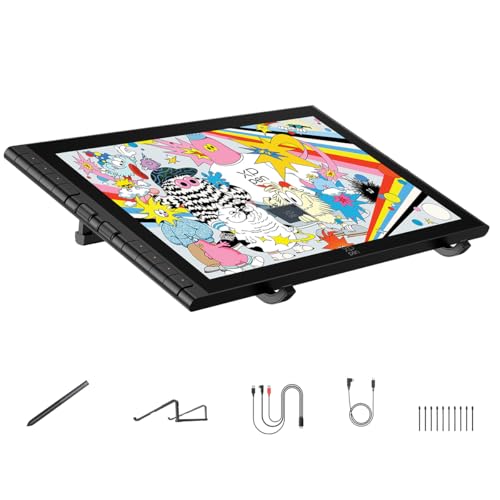
- 15.4-inch FHD pen display with anti-glare etched glass and a foldable stand.
- Includes a stylus with 16,384 pressure levels, plus two scroll wheels and eight shortcut keys.
- Listed compatibility includes Mac, Windows, Android, ChromeOS, and Linux.
Best For: An illustrator who wants a larger screen-based drawing area at a workstation.
3. HUION Kamvas Slate 11 Standalone Tablet
A Portable All-in-One Art Station
HUION Kamvas Slate 11 Standalone Tablet

- Standalone 10.95-inch tablet runs Android 14 and does not require a computer connection to draw.
- Includes an H-Pencil with 4,096 pressure levels and 60° tilt recognition.
- Product details list 8GB RAM, 128GB storage, and pre-installed Clip Studio Paint and ibisPaint X.
Best For: An illustrator who wants to sketch or paint without connecting to a computer.
4. XPPen Artist 12 Pro Pen Display
A Compact Screen-Based Drawing Setup
XPPen Artist 12 Pro Pen Display

- 11.6-inch fully laminated display with an anti-glare screen and reduced parallax.
- Battery-free stylus supports 8,192 pressure levels and up to 60° tilt.
- Requires connection to a host device; listed systems include Windows, macOS, ChromeOS, and Linux.
Best For: An illustrator who wants a compact pen display for a desk or travel workspace.
5. XPPen Deco Pro LW 2nd Wireless Tablet
A Cable-Free Drawing Surface
XPPen Deco Pro LW 2nd Wireless Tablet

- 11-by-7-inch drawing area and a stylus with 16,384 pressure levels.
- Supports Bluetooth wireless connections with Windows 10+ and macOS 10.10+; wired compatibility is broader.
- Includes a wireless shortcut remote with a scroll wheel and programmable keys.
Best For: An illustrator who draws on a computer and prefers a screenless tablet.
6. HUION Keydial Mini Bluetooth Keypad
Shortcuts Within Easy Reach
HUION Keydial Mini Bluetooth Keypad

- Offers 18 programmable keys and a dial that can be assigned up to three functions.
- Bluetooth 5.0 connection and a one-handed layout for left- or right-handed use.
- Listed compatibility includes Mac and Windows; custom shortcuts require software support and setup.
Best For: An illustrator who uses keyboard shortcuts in creative software.
7. Urmust Adjustable Tablet Stand
A Flexible Desk Positioning Stand
Urmust Adjustable Tablet Stand

- Adjustable height and angle, with a rotating base and foldable arm.
- Designed for flat, stable surfaces and devices from 4.7 to 15.6 inches.
- Includes cable clips and supports devices up to 2.42 pounds, according to the listing.
Best For: An illustrator who uses a tablet at a desk and wants to adjust its position.
8. OTraki Four-Pack Drawing Gloves
A Smoother Hand Glide
OTraki Four-Pack Drawing Gloves
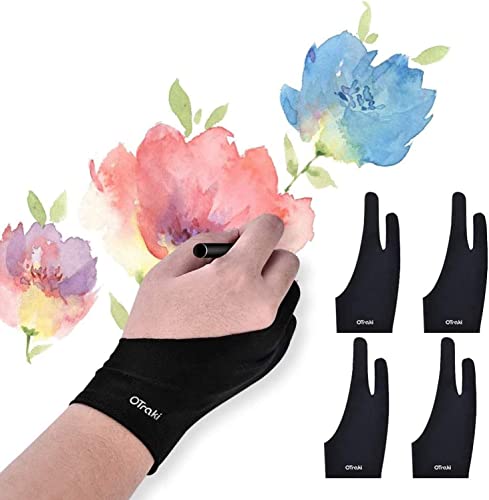
- Set includes four two-finger gloves made from stretchy Lycra fiber.
- Designed to reduce friction as a hand slides over a tablet or drawing surface.
- The listing notes that the gloves do not replace a device’s palm-detection setting.
Best For: An illustrator who prefers a smoother hand glide while drawing on a tablet.
9. CASEMATIX 22-Inch Drawing Tablet Case
Protection for Art on the Move
CASEMATIX 22-Inch Drawing Tablet Case

- Semi-rigid EVA case with padded foam inserts for select large pen displays and tablets.
- Interior measures 22.5 by 13.5 by 2.75 inches; compare device dimensions before choosing.
- Includes a carry handle and adjustable shoulder strap; the device is not included.
Best For: An illustrator who transports a large drawing tablet between workspaces.
10. Canon imagePROGRAF PRO-310 Photo Printer
Artwork Ready for the Print Shelf
Canon imagePROGRAF PRO-310 Photo Printer

- 13-inch wireless inkjet photo printer with a nine-color pigment ink system.
- Includes a 3-inch color LCD monitor for checking printer settings and status.
- Listed paper sizes include up to 13 by 19 inches and custom lengths up to 129 inches.
Best For: An illustrator who wants to make physical proofs or prints of digital artwork.
11. SanDisk 2TB Extreme Portable SSD
Portable Space for Project Files
SanDisk 2TB Extreme Portable SSD

- Provides 2TB of portable storage with USB-C and USB 3.2 Gen 2 connectivity.
- Listed read speed is up to 1,050MB/s; actual performance can depend on the host device.
- Product notes list IP65 water and dust resistance, drop protection, and password protection with hardware encryption.
Best For: An illustrator with a growing library of projects and reference files.
12. Datacolor Spyder X Pro Monitor Calibrator
A Tool for More Consistent Color
Datacolor Spyder X Pro Monitor Calibrator

- Designed to calibrate laptop and desktop monitors, including multiple displays.
- Software includes 12 predefined calibration targets and a before-and-after comparison feature.
- Room-light monitoring and automatic profile changing are listed features.
Best For: An illustrator who wants to calibrate screens for artwork or print preparation.
13. WD 20TB Elements Desktop External Drive
High-Capacity Desktop Storage
WD 20TB Elements Desktop External Drive

- Provides 20TB of external storage and connects over USB 3.0.
- Listed as plug-and-play ready for Windows PCs; Mac use requires reformatting.
- Package contents listed include a USB 3.0 cable and AC adapter.
Best For: An illustrator who keeps a large archive of artwork and project files.
14. 18W Adjustable LED Clamp Desk Lamp
Flexible Light for the Art Desk
18W Adjustable LED Clamp Desk Lamp

- Clamp-mounted lamp has a 24.6-inch flexible gooseneck and a 360° adjustable arm.
- Offers three color modes and 16 brightness levels per mode, controlled by touch or remote.
- The listing specifies a 95 CRI and a clamp opening of up to 2.1 inches.
Best For: An illustrator who works at a physical art desk or wants adjustable light nearby.
Choosing a Christmas Gift for a Digital Illustrator
Start with the recipient’s current setup and the part of their process that could use support. If they already draw directly on a screen, a larger pen display may add working room; if they use a regular monitor, a screenless tablet can offer a drawing surface without replacing that display. A standalone tablet suits someone who wants to sketch away from a computer. Check whether the artist prefers a portable device or a permanent desk station before choosing among them.
Color and output tools serve a different need. A monitor calibrator is relevant when consistent screen color matters, while a photo printer can help an illustrator make physical proofs or finished prints. A color-focused monitor may be a substantial workspace upgrade. These gifts make the most sense when the recipient has mentioned color matching or printing as a priority; otherwise, a glove, keypad, lamp, stand, or storage drive can support everyday work with fewer workflow changes.
Set a Budget That Fits the Use
For a modest gift, consider the four-pack of drawing gloves or a shortcut keypad. They add a small comfort or workflow aid, though the keypad’s custom controls need setup in its driver and the artist’s software. A desk stand or adjustable lamp can be a more noticeable workspace accessory if it fits the recipient’s device and table.
Pen tablets, storage devices, and color tools are larger purchases with distinct purposes. Before spending on a display, printer, or monitor, consider whether the artist has expressed a need for that specific upgrade. A useful gift need not be the biggest item: extra storage may relieve a full project drive, while a portable SSD may suit someone who moves files between devices. The 20TB desktop drive is intended for a stationary setup; the 2TB SSD is portable.
Check Compatibility and Personalization
For any drawing tablet, identify the recipient’s computer or mobile device, operating system, and preferred drawing software. Some tablets need a host computer, while the Kamvas Slate 11 is described as standalone. Compatibility can vary by connection method: the Deco Pro LW lists different system support for Bluetooth and wired use. Confirm that the intended device supports the connection and software before choosing a tablet or keypad.
Physical fit matters too. Compare a drawing display’s dimensions with a case’s stated interior, and check that a tablet falls within the stand’s size and weight limits. For the INNOCN monitor, consider whether the computer has a compatible USB-C, HDMI, or DisplayPort connection. The WD desktop drive is listed for Windows plug-and-play use and requires reformatting for Mac. A little setup knowledge can make a practical gift feel personal without guessing at the artist’s preferences.
Plan for Christmas Timing and Last-Minute Decisions
For a close-to-Christmas choice, favor gifts whose fit is easy to check from the recipient’s setup: gloves, a lamp with a suitable desk clamp, or a shortcut keypad for supported software. Storage can also be a straightforward choice if you know whether they need a portable drive or a desktop archive. Product delivery dates and availability are not established by these descriptions, so check current details when ordering.
For larger equipment, a conversation or discreet check of the workstation can prevent a mismatch. Confirm screen size, operating system, available ports, desk space, and whether the artist prefers drawing on-screen. If those details are unclear, choose a compatible accessory that supports their existing routine. A thoughtful Christmas gift for a digital illustrator is one that fits the way they already create and gives them a useful reason to enjoy their workspace in the new year.
