
Design students often move between hands-on sketching, screen-based work, and class presentations. Useful gifts can support that mix, whether they make a workspace more comfortable or help with a specific creative task.
14 Christmas Gifts for Design Students
1. XPPen Artist 13.3 Pro V2 Drawing Tablet
For Drawing Directly on Screen
XPPen Artist 13.3 Pro V2 Drawing Tablet
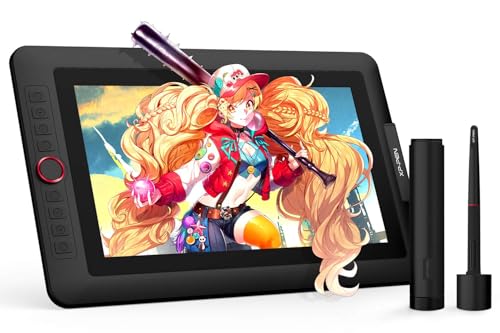
- Connects to a computer or laptop; the 3-in-1 cable is included.
- The 13.3-inch laminated display supports tilt and has eight customizable shortcut keys.
- Includes a battery-free stylus, stand, replacement nibs, glove, and cleaning cloth.
Best For: Students who illustrate, sketch, or retouch digitally.
2. Acer 11-in-1 USB-C Docking Station
For a More Connected Desk
Acer 11-in-1 USB-C Docking Station
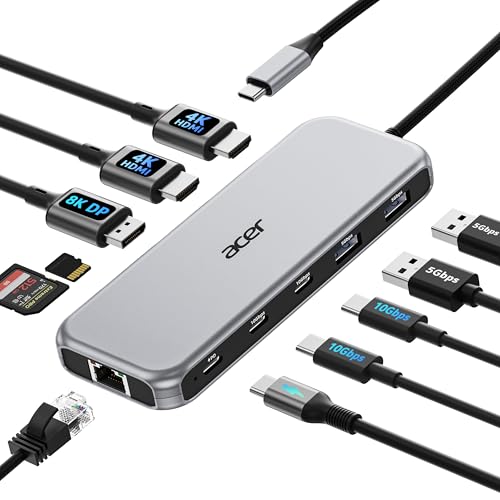
- Offers HDMI, DisplayPort, USB-C, USB-A, Ethernet, and SD and MicroSD slots.
- Supports up to three displays, with resolution limits depending on the display setup.
- Requires a compatible Thunderbolt or full-featured USB-C port; power adapter and cable are not included.
Best For: Laptop users connecting displays, storage, and desk peripherals.
3. tounee Adjustable Swivel Laptop Stand
For a Flexible Study Position
tounee Adjustable Swivel Laptop Stand

- Adjusts from 2.1 to 21 inches and swivels 360 degrees.
- Folds for storage and fits laptops from 10 to 17 inches.
- The aluminum stand is listed to support up to 22 pounds.
Best For: Students who want to adjust laptop height while working at a desk.
4. Philips Ergonomic Wireless Mouse
5. Beechmore A4 Mixed Media Sketchbook
For Sketches Worth Keeping
Beechmore A4 Mixed Media Sketchbook

- Includes 156 perforated ivory pages at 160 GSM.
- The Smyth-sewn binding opens flat for full-page or double-page drawings.
- Comes in a gift box with an elastic closure, ribbon bookmark, and back pocket.
Best For: Students who sketch concepts, lettering, or visual research by hand.
6. ErGear Adjustable Single Monitor Arm
For a Clearer, More Open Desk
ErGear Adjustable Single Monitor Arm

- Fits most 13–34-inch monitors up to 19.8 pounds with listed VESA patterns.
- Offers height, tilt, swivel, and rotation adjustments, plus cable clips.
- Check monitor size, weight, VESA pattern, and desk thickness before buying.
Best For: Students with a compatible monitor who want to free up desk space.
7. Glendan Portable 12-Inch Photo Light Box
For Small-Object Portfolio Photos
Glendan Portable 12-Inch Photo Light Box

- Includes dimmable LED lighting and six colored PVC backdrops.
- Multiple openings allow different shooting angles; a diffuser and reflection boards are included.
- Folds for transport and comes with a carry bag and USB power cable.
Best For: Students photographing small prototypes, crafts, or portfolio pieces.
8. ASUS ProArt 27-Inch 4K Monitor
For a Larger Creative Workspace
ASUS ProArt 27-Inch 4K Monitor
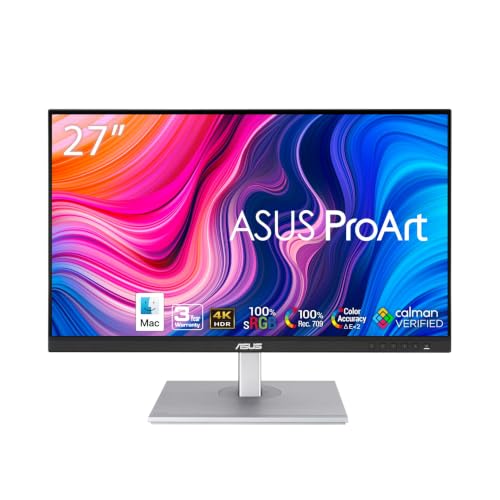
- The product title specifies a 27-inch 4K UHD display with USB-C.
- Listed connectivity includes USB-C with 65W power delivery, DisplayPort, HDMI, and a USB hub.
- Includes DisplayPort, HDMI, and USB-C cables.
Best For: Students who want a larger screen for visual design and editing work.
9. Doxie Pro Duplex Document Scanner
For Digitizing Paper Work
Doxie Pro Duplex Document Scanner

- Scans documents, photos, sketches, drawings, and classwork, including two-sided pages.
- Software features include text recognition, cropping, rotation, and contrast adjustment.
- The compact wired scanner includes USB and USB-C cables and works with Mac and PC.
Best For: Students building digital archives of sketches, notes, and references.
10. Calibrite Display 123 Colorimeter
For More Consistent Screen Color
Calibrite Display 123 Colorimeter

- Guided software walks through a 1-2-3 monitor calibration workflow.
- Supports calibration for up to two displays and includes a before-and-after comparison.
- Connects via USB-C.
Best For: Students who edit images or want steadier color across two screens.
11. Pantone Capsule Signature Edition Color Guide
12. Crucial X9 2TB Portable SSD
For Carrying Project Files

- Provides 2TB of portable storage for files, photos, videos, and backups.
- Connects over USB-C; the supplied notes list compatibility with Windows, Mac, tablets, and more.
- The product is listed as drop resistant up to 7.5 feet and IP55 water and dust resistant.
Best For: Students moving large design files between devices or keeping backups.
13. cocopar 15.6-Inch Portable Touchscreen Monitor
For Design Work Away From a Desk
cocopar 15.6-Inch Portable Touchscreen Monitor
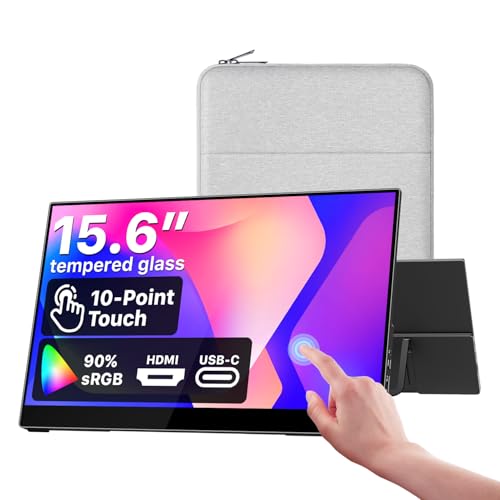
- Adds a 15.6-inch 1080p IPS screen with a listed 90% sRGB color gamut.
- Supports touch and includes HDMI and USB-C connections; single-cable use requires compatible USB-C video output.
- Includes an adjustable kickstand, protective sleeve, power adapter, and cables.
Best For: Students who want a second screen for references and layouts on the go.
14. AULA F75 Pro Hot-Swappable Mechanical Keyboard
For a Personalized Typing Setup
AULA F75 Pro Hot-Swappable Mechanical Keyboard

- The compact 75% layout has 81 keys and a multifunction knob.
- Connects by Bluetooth, 2.4GHz wireless, or USB-C cable and can pair with up to five devices.
- Hot-swappable sockets support 3-pin or 5-pin switches.
Best For: Students who spend long sessions writing, editing, or using design software.
How to Choose for a Design Student
Start with the kind of work they do most often. An illustration student may appreciate the XPPen pen display, while someone focused on branding or print could make frequent use of the Pantone color guide. A sketchbook suits a student who thinks on paper; the scanner can help bring those drawings and notes into digital project files. For product, craft, or prototype work, the light box supports small-object photography.
Workspace gifts are most useful when they fit the student’s current setup. A monitor arm, laptop stand, mouse, or keyboard can make repeated desk sessions more comfortable and organized. For a student who works across a laptop and other devices, a dock can connect compatible peripherals, while the portable monitor creates an extra screen when they study away from home. Storage is broadly useful when projects include large image files or multiple versions.
Match the Gift to Your Budget
A sketchbook, color guide, mouse, or small desk accessory can be a thoughtful gift without requiring a major workspace change. These items work well when you know something about the student’s habits: whether they sketch by hand, need a better pointer for editing, or often compare print colors. A scanner, portable SSD, light box, or portable display represents a more task-specific choice. Larger investments such as a pen display or monitor make most sense when the recipient’s course or personal projects clearly call for them.
When choosing between a single tool and a desk upgrade, consider whether the student already has a workable setup. A monitor arm or dock depends on equipment they own, while a sketchbook or SSD may be useful across a wider range of study situations. For a group gift, a display or pen tablet can be a practical shared contribution if the recipient has asked for one.
Check Compatibility and Personalize the Choice
Before buying equipment, confirm the devices and space it needs to work with. The XPPen tablet requires a computer or laptop. The Acer dock needs a Thunderbolt or full-featured USB-C port; its power adapter and cable are not included, and Mac display behavior is described as mirroring across external monitors. For the portable monitor’s single-cable mode, the computer must support Thunderbolt or USB-C DisplayPort Alt Mode.
For a monitor arm, check the screen’s size, weight, and VESA mounting pattern, along with desk thickness. The monitor’s product listing has inconsistent display details: its title describes a 27-inch 4K display, while a bullet describes a 23.8-inch Full HD panel. Confirm the exact configuration before choosing it. A Pantone guide or sketchbook needs little device matching, but can still feel personal when selected around a student’s interests in print, illustration, or branding.
Timing and Last-Minute Decisions
For an early gift, ask what software, screen, or laptop the student uses, or check the equipment they already own. That small compatibility check is especially helpful for docks, monitor arms, and displays. If choosing close to Christmas, favor items whose use is clear from the recipient’s current routine, such as a sketchbook for regular drawing or an SSD for managing project files. A gift box is noted for the Beechmore sketchbook, but the supplied product details do not establish delivery timing. Check current availability and shipping estimates with the seller before making a time-sensitive purchase.
A well-chosen Christmas gift for a design student can support both coursework and personal exploration. Think about the next assignment, the tools they already use, and the part of their creative process that could use a little more room, comfort, or flexibility.
