
A thoughtful Chromebook gift can make everyday study, work, and creative projects more comfortable. Consider how the recipient uses their laptop and where they use it most.
Practical Gifts for Chromebook Users
1. XP-PEN Artist 13.3 Pro V2 Drawing Tablet
A Creative Screen for Digital Art
XP-PEN Artist 13.3 Pro V2 Drawing Tablet

- 13.3-inch drawing display with a fully laminated screen.
- Includes a battery-free stylus, foldable stand, and replacement nibs.
- Connects to compatible Chromebooks with full-featured USB-C; device support requirements apply.
Best For: Chromebook users who enjoy illustration, handwriting, or creative projects.
2. JARWAM 17-Inch Travel Laptop Backpack
A Roomy Bag for Laptop Commutes
JARWAM 17-Inch Travel Laptop Backpack

- Padded compartment fits laptops up to 17.3 inches.
- 40-liter capacity with organizer pockets and water-resistant polyester.
- Luggage strap and adjustable, ventilated shoulder straps support travel and daily commutes.
Best For: Students and commuters carrying a Chromebook and daily essentials.
3. XBG B15Pro Tri-Mode Wireless Mouse
A Rechargeable Mouse for Quiet Spaces
XBG B15Pro Tri-Mode Wireless Mouse

- Connects through Bluetooth or 2.4GHz wireless, with a display for battery, DPI, and mode.
- Rechargeable through USB-C and automatically sleeps after inactivity.
- Silent buttons and a compact design suit libraries, offices, and travel.
Best For: Chromebook users who want a portable mouse for work or study.
4. Kisnt KN85 Wireless Mechanical Keyboard
A Compact Keyboard for a Personal Desk
Kisnt KN85 Wireless Mechanical Keyboard

- Compact 85-key layout leaves desk space free for a mouse.
- Bluetooth, 2.4GHz wireless, and USB-C wired connection options.
- Hot-swappable linear switches and adjustable RGB backlighting allow personalization.
Best For: Chromebook users who enjoy a tactile typing setup at home.
5. JLab JBuds Pods ANC Wireless Earbuds
Wireless Audio for Work and Travel
JLab JBuds Pods ANC Wireless Earbuds

- True wireless earbuds include active noise cancelling and a charging case.
- Bluetooth multipoint supports connection to two devices, including a laptop and phone.
- The listing describes IP55 sweat and splash resistance and six microphones for calls.
Best For: Chromebook users who listen to audio or take calls on the go.
6. AboveTEK Portable Laptop Lap Desk
A Softer Spot for Sofa Work
AboveTEK Portable Laptop Lap Desk

- Non-slip surface fits laptops and tablets up to 15.6 inches.
- Retractable mouse pad can extend to either side for left- or right-handed use.
- Portable 14-inch platform includes a heat shield and rubber strips underneath.
Best For: Chromebook users who browse, read, or work from a sofa or bed.
7. Dimmable LED Desk Lamp with USB Charging Ports
Adjustable Light for a Study Space
Dimmable LED Desk Lamp with USB Charging Ports

- Offers three color temperatures, five brightness levels, and four timer settings.
- Flexible gooseneck directs the light where needed for reading or desk work.
- Base includes USB-A and USB-C charging ports; listed as incompatible with fast-charge devices.
Best For: Students and home workers with a dedicated study space.
8. BENFEI 10-in-1 USB-C Hub
More Connections for a Chromebook Desk
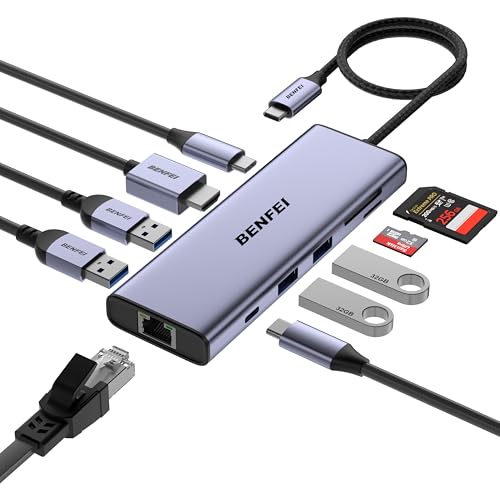
- Includes HDMI, Gigabit Ethernet, four USB-A ports, USB-C data, and SD/TF card readers.
- Supports 4K at 60Hz HDMI when the host USB-C port supports DisplayPort Alt Mode.
- USB-C pass-through charging supports up to 85W to a laptop, with 15W reserved for the hub.
Best For: Chromebook owners who connect peripherals or use an external display.
9. SODI Foldable Adjustable Laptop Stand
A Portable Lift for Desk Work
SODI Foldable Adjustable Laptop Stand
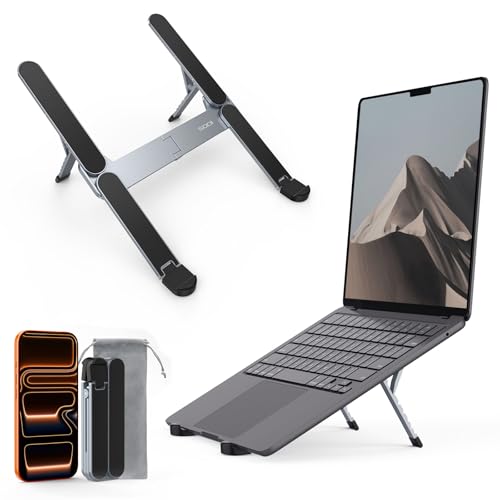
- Adjusts to six heights and folds for carrying in a backpack or pocket.
- Aluminum stand has silicone non-slip pads and an H-shaped frame.
- Listed as compatible with Chromebooks and other laptops in the 10–15.6-inch range.
Best For: Chromebook users who work at desks, libraries, or cafés.
10. ProCase 13-Inch Laptop Sleeve
Everyday Carry Protection in Beige

- Padded sleeve has a soft lining to help protect against scratches and everyday bumps.
- Front pocket organizes small accessories such as cables, a mouse, and a charger.
- Check the listed internal dimensions, 12 × 8.66 × 0.87 inches, against the Chromebook before buying.
Best For: Chromebook owners who carry a suitably sized laptop to school or work.
11. Samsung T7 Portable SSD 1TB
Portable Space for Photos and Projects

- Provides 1TB of external storage over USB.
- Listing states read speeds up to 1,050MB/s and write speeds up to 1,000MB/s.
- Compact drive has an aluminum unibody and listed shock resistance with fall protection up to six feet.
Best For: Chromebook users who want portable space for photos, videos, or project files.
Choosing a Gift for a Chromebook User
Start with the recipient’s routine. A student who carries a Chromebook between classes may appreciate a mouse, sleeve, or backpack more than a large desk accessory. A remote worker may get daily use from earbuds, a lamp, or a hub for connecting a monitor and other devices. For someone who draws, the XP-PEN display offers a more creative direction, though it needs a compatible Chromebook and the right USB-C video support.
Think about where the Chromebook usually lives. A foldable stand suits someone who moves among desks, libraries, or cafés. A lap desk is aimed at sofa or bed use, while a keyboard and lamp can make a fixed study area feel more comfortable. Portable storage is most useful when the person has a clear reason to keep large files locally, such as photo, video, or project libraries.
Match the Gift to Your Budget
For a smaller, everyday upgrade, consider the wireless mouse, sleeve, or foldable stand. Each addresses a specific part of carrying or using a Chromebook without requiring a major change to the recipient’s setup. A desk lamp or lap desk can make a more substantial comfort-focused gift for someone who studies or works from home.
A mechanical keyboard, earbuds, backpack, external SSD, or multiport hub may suit a recipient who will use its particular features regularly. The hub, drawing display, and SSD are more specialized choices: their value depends on whether the Chromebook user connects external equipment, makes digital art, or needs extra storage. Avoid choosing by the number of features alone; a simple accessory that fits a daily habit can be the more thoughtful Christmas gift.
Check Compatibility and Personalize the Choice
Chromebooks vary in size and ports, so check the exact device before buying a sleeve, backpack, stand, or connection accessory. The ProCase sleeve lists internal dimensions of 12 × 8.66 × 0.87 inches; measure the Chromebook and compare its shape and thickness with those dimensions. The backpack’s compartment is specified for laptops up to 17.3 inches, and the stand lists compatibility with Chromebooks and laptops in the 10–15.6-inch range. Size labels alone do not confirm a precise fit.
For USB-C accessories, verify the Chromebook has the port and capabilities the accessory needs. The BENFEI hub requires DisplayPort Alt Mode on the host USB-C port for HDMI video output. The drawing tablet also requires a full-featured USB-C port with USB 3.1 DP 1.2 support for its single-cable connection; its listing says it is not a standalone device. If the recipient uses an older Chromebook or an unusual port arrangement, check the model’s specifications before choosing either one.
Personalization can come from matching the gift to their habits: choose a mouse for someone who prefers precise pointer control, earbuds for calls and listening, or a keyboard for someone who enjoys a different typing feel. The keyboard’s companion driver is listed for Windows only, so Chromebook users should not count on that software for customization. Its connection options are Bluetooth, 2.4GHz wireless, and USB-C wired; confirm that the recipient has a practical way to connect it.
Timing and Last-Minute Decisions
For a Christmas gift, decide early if compatibility depends on measurements, ports, or software. A sleeve or backpack needs a size check, while a hub or drawing display calls for a closer look at the Chromebook’s capabilities. If you are choosing closer to the holiday, favor gifts with straightforward fit considerations, such as a lamp, mouse, or lap desk, while still checking the recipient’s preferences and workspace.
When you are unsure, a portable accessory can be easier to match to a routine than a device-specific upgrade. Consider whether they study at a desk, commute with their laptop, create art, or regularly move files. That small bit of context makes it easier to choose among these Christmas gift ideas for Chromebook users and give something that will be used beyond the holiday.
