
A useful study gift can make a desk more comfortable, keep class materials close, or help a student focus in a shared space. The right pick depends on their courses, devices, and how they like to work.
17 Christmas Gadgets for Studying
1. Anker Prime 14-in-1 Docking Station
A More Connected Study Desk
Anker Prime 14-in-1 Docking Station

- Combines 14 ports for charging, data, and display connections.
- Supports dual displays through HDMI, with resolution depending on laptop DisplayPort support.
- Works with compatible USB-C, USB4, or Thunderbolt laptops; check OS and display needs.
Best For: Students building a multi-display laptop study setup
2. AEEZO 10.1-Inch Digital Photo Frame
A Personal Touch for a Dorm
AEEZO 10.1-Inch Digital Photo Frame
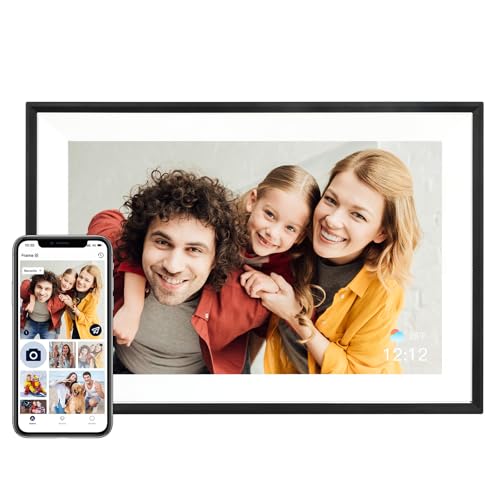
- Displays photos and videos in a slideshow on a 10.1-inch touchscreen.
- The AiMOR app can send photos to the frame over Wi-Fi.
- Has 32GB built-in storage and auto-rotates photos based on placement.
Best For: Students who want family and friends’ photos in their room
3. XTEINK X4 Pro E-Book Reader
Pocket-Sized Reading Companion

- Compact 4.3-inch e-ink reader includes an adjustable warm and cool front light.
- Supports EPUB, TXT, MOBI, and PDF files, with touch and page-turn buttons.
- Accepts microSD cards up to 256GB for expanded storage.
Best For: Students who carry e-books or digital readings between classes
4. Nulaxy 18-Inch Adjustable Laptop Stand
A Flexible Laptop Riser
Nulaxy 18-Inch Adjustable Laptop Stand

- Raises a laptop up to 18 inches and adjusts for viewing angle.
- Rotates 360 degrees for sharing a screen or repositioning the laptop.
- Fits laptops and tablets up to 17 inches; the maker recommends an external keyboard and mouse.
Best For: Students who want an adjustable laptop viewing position
5. Redragon K745 PRO Wireless Keyboard
A Customizable Typing Upgrade
Redragon K745 PRO Wireless Keyboard

- Full-size 108-key layout includes four shortcut keys for mute, calculator, screen lock, and desktop.
- Connects over USB-C, Bluetooth, or 2.4GHz wireless.
- Gasket-mounted construction has five layers of noise dampening; software supports key and lighting customization.
Best For: Students who type essays and want shortcut controls
6. Tonfarb Digital Voice Recorder
A Handy Lecture Note Aid
Tonfarb Digital Voice Recorder

- One-click controls start and save recordings, including from powered-off state.
- Includes 8GB built-in storage and a 128GB TF card, with USB-C file transfer.
- Voice-activated recording and noise reduction are listed features; record only when permitted.
Best For: Students who are allowed to record lectures or spoken notes
7. AFIING 55-by-24-Inch Desk Mat
Room to Spread Out

- Large surface can fit a keyboard, mouse, laptop, and desk accessories.
- Waterproof PU leather top wipes clean with a damp cloth.
- Suede backing helps the mat stay in place while typing, writing, or using a mouse.
Best For: Students organizing a wide desk workspace
8. ProtoArc EM11 NL Vertical Mouse
A Different Mouse Grip
ProtoArc EM11 NL Vertical Mouse

- Vertical shape is designed to keep the wrist and forearm in a more natural position.
- Connects to up to three devices through Bluetooth or a USB-A receiver.
- Sized for hands under 7.5 inches; it may take time to get used to the shape.
Best For: Right-handed students with small to medium hands
9. LED Desk Lamp with Wireless Charger
Light and Charging in One
LED Desk Lamp with Wireless Charger

- Offers three color temperatures and dimming from 5% to 100%.
- A flexible tube directs light, and the lamp folds for compact storage.
- Built-in 10W wireless charging is intended for compatible phones.
Best For: Students who need adjustable desk lighting and phone charging
10. SanDisk 1TB Extreme Portable SSD
Portable Space for Projects
SanDisk 1TB Extreme Portable SSD

- Provides 1TB of external storage for coursework and media files.
- USB-C connection and listed transfer speeds of up to 2000MB/s.
- Pocket-sized drive includes password protection and is rated IP65 with drop protection up to 3m.
Best For: Students storing large projects or making file backups
11. Texas Instruments TI-84 Plus CE Calculator
A Colorful Math Class Tool
Texas Instruments TI-84 Plus CE Calculator

- Graphing calculator designed for math and science coursework from middle school through college.
- MathPrint displays symbols, formulas, and stacked fractions in textbook-style layouts.
- Rechargeable battery and a four-year TI-84 Plus CE online calculator subscription are included.
Best For: Students whose courses call for an approved graphing calculator
12. Beats Studio Pro Wireless Headphones
A Quieter Place to Focus
Beats Studio Pro Wireless Headphones
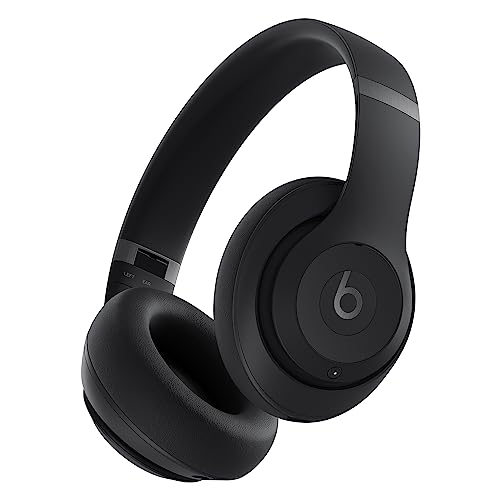
- Active Noise Cancelling and Transparency modes suit different listening environments.
- Wireless headphones work with Apple and Android and also support USB-C and 3.5mm audio.
- Listed battery life is up to 40 hours; the over-ear design has comfort cushions.
Best For: Students studying or commuting in busy environments
13. BUSY Bar Focus Timer
A Visible Focus Reminder

- LED pixel display shows a timer and custom BUSY messages.
- BUSY App can mute notifications and lock selected apps across devices.
- Large button, scroll wheel, and offline operation provide timer controls.
Best For: Students who benefit from visible timed focus sessions
14. cocopar 15.6-Inch Portable Touch Monitor
An Extra Screen for Coursework
cocopar 15.6-Inch Portable Touch Monitor
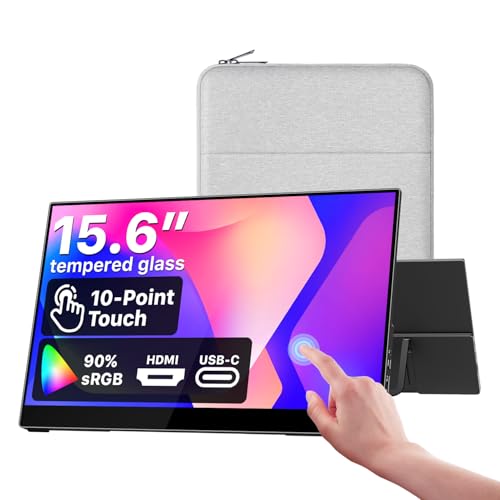
- 15.6-inch 1080p touchscreen monitor can extend a compatible laptop display.
- A single USB-C cable can carry power, video, and touch when the computer supports the required mode.
- Includes an adjustable kickstand, protective sleeve, power adapter, and HDMI and USB-C cables.
Best For: Students who compare sources while taking notes
15. Brother HL-L2460DW Monochrome Laser Printer
A Home Printing Workhorse
Brother HL-L2460DW Monochrome Laser Printer

- Prints black-and-white documents and supports automatic duplex printing.
- Connects through Wi-Fi, Ethernet, or USB, with mobile printing through Brother Mobile Connect.
- Has a 250-sheet paper tray and a manual feed slot for envelopes or specialty paper.
Best For: Students who regularly print readings and drafts at home
16. Sennheiser Profile USB Microphone
Clearer Audio for Online Classes
Sennheiser Profile USB Microphone

- USB cardioid condenser microphone connects to a PC or Mac.
- Includes a table stand, USB-C cable, mute button, headphone jack, and gain, mix, and volume controls.
- Plug-and-play setup is described for voice recording and streaming.
Best For: Students joining online classes or presenting remotely
17. HANYCONY 6-Foot Surge Protector
More Power at the Desk
HANYCONY 6-Foot Surge Protector
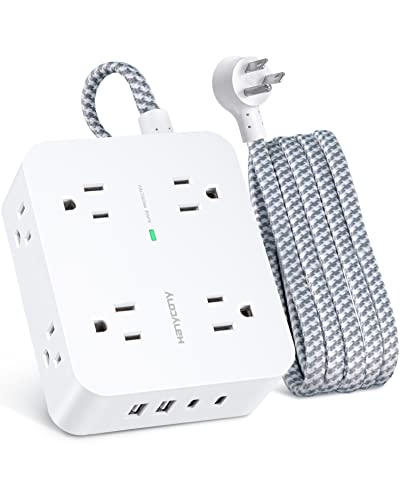
- Provides eight AC outlets and four USB charging ports, including two USB-C ports.
- The 6-foot extension cord has a flat plug and the strip includes two mounting holes.
- Includes overload protection and a surge-protection indicator light.
Best For: Students with several desk devices to plug in
Choosing Study Gadgets for the Recipient
Start with the student’s everyday routine. Someone who spends long stretches reading may appreciate the compact e-book reader, headphones, or adjustable lamp. A student who writes papers and switches between devices may get more use from the keyboard, mouse, laptop stand, or docking station. For classes with problem sets, the TI-84 Plus CE may be a particularly practical choice, provided the course permits that calculator. Gifts tied to a specific course requirement are worth checking against the syllabus before buying.
Think about where studying happens, too. A dorm desk has limited surface area and outlet access, so a folding lamp, desk mat, or power strip may solve a daily annoyance. Students who move between home, campus, and a library may favor the portable monitor, SSD, recorder, or e-reader. For a shared room or noisy home, headphones can help create a more private listening environment, while the BUSY Bar gives others a visible cue that a focus session is underway.
Set a Budget Around the Benefit
A small desk accessory can be a thoughtful gift when it fixes one recurring inconvenience. A large desk mat helps define a work area; a vertical mouse or keyboard changes the feel of daily computer use; a lamp adds directed light and wireless phone charging. These gifts may also be easier to fit into a modest budget than a printer, monitor, or docking station. Consider whether the recipient already owns something that serves the same purpose.
For higher-cost gifts, prioritize tools that support a broad range of tasks. A portable SSD can store assignments, creative files, and backups. A second monitor can support research and online lectures. A printer is more useful for a student who prints frequently, and a docking station makes the most sense for someone who regularly connects a laptop to peripherals or external displays. The value comes from actual use, so matching the item to a routine matters more than choosing the most feature-rich option.
Check Compatibility and Personalization
Computer accessories depend on the student’s existing devices. Before choosing the docking station or portable monitor, confirm the laptop has a compatible USB-C, USB4, or Thunderbolt connection and, for single-cable monitor use, supports DisplayPort Alt Mode or the stated requirement. macOS display behavior and operating system support differ by product, so check the specific notes. The mouse uses Bluetooth or a USB-A receiver, and its shape is designed for right-handed users with smaller to medium hands. The keyboard offers several connection modes, which can suit students who switch between a computer, laptop, and tablet.
Personal preferences matter for desk gear. A mechanical keyboard has a distinct typing feel and sound; a vertical mouse has a learning curve. The lamp’s wireless charger only helps if the phone supports wireless charging. For a calculator, check the course’s accepted model list. If considering a voice recorder, make sure recording is allowed in the class or institution and that the student is comfortable using one. These small checks help make a Christmas gift fit the person rather than simply adding another device to a desk.
Timing and Last-Minute Decisions
For a gift tied to a school schedule, look at upcoming classes, exams, and project needs. A graphing calculator or printer can be most useful before a term begins, while a storage drive or headphones can help throughout the year. For last-minute decisions, favor items that match devices and habits you already know: a desk mat, lamp, or power accessory can be easier to assess than a specialized calculator or multi-display setup. Check the recipient’s laptop ports, desk size, and charging needs if possible.
Keep the setup burden in mind. Some gifts need only a place on the desk; others involve pairing, software, cables, or device settings. A portable SSD may need a compatible connection and a backup routine. A docking station or extra monitor may need display configuration. If the student is leaving home for Christmas, compact or portable items are easier to carry. The best Christmas gadgets for studying are the ones that make a familiar part of school life smoother, more comfortable, or easier to organize long after the holiday.
