
A slim mechanical keyboard can make a desk feel less crowded without giving up the feedback of mechanical switches. The challenge is finding one that fits your typing habits, devices, and preferred layout.
These 10 options cover compact and full-size designs, productivity-focused boards, and gaming models. Use the guide below to narrow down the features that matter before choosing.
Best 10 Wireless Low Profile Mechanical Keyboard Picks for 2026
Best Full-Size Value

- 107 keys with number pad and volume knob
- Bluetooth, 2.4GHz, and wired connections
- Quiet linear red switches and white backlight
Best For: Multi-device spreadsheet work and all-day typing
Best Compact Customization

- Space-saving 75% layout
- Bluetooth pairing for up to three devices
- QMK remapping with Keychron Launcher
Best For: Customizable Mac and Windows setups with limited desk space
Best for Gaming

- LIGHTSPEED wireless with stated 1 ms report rate
- Programmable controls and LIGHTSYNC RGB
- Tactile switches and double-shot PBT keycaps
Best For: PC gaming in a slim tenkeyless layout
Best for Office Work
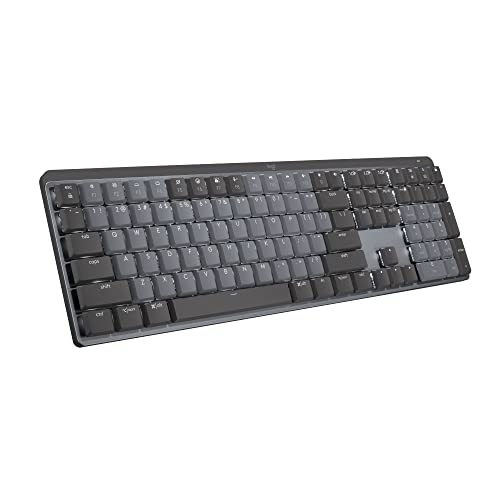
- Quiet tactile keys in a full-size layout
- Pairs with up to three devices
- Adaptive backlight and Logi Options+ controls
Best For: Multi-computer office work with a number pad
Best Full-Size Pick

- Full-size layout with number pad
- QMK remapping and three-device Bluetooth
- Tactile switches with acoustic foams
Best For: Full-size typing across Mac and Windows
Best for Everyday Use
- Tenkeyless layout with linear switches
- LIGHTSPEED, Bluetooth, and wired modes
- Customizable RGB and double-shot PBT keys
Best For: Windows gaming with a slim tenkeyless layout
Best Compact Customizable Pick

- 75% layout with aluminum frame
- Hot-swappable low-profile switches
- Tri-mode connectivity and web customization
Best For: Compact Mac or Windows setups with custom keys
Best with Extra Features

- 75% aluminum-frame layout
- Three connection modes; up to four devices
- 3-pin hot-swap and web-based remapping
Best For: Compact Mac/Windows setups with customizable switches
Best for Quiet Gaming Controls
Razer BlackWidow V4 Low Profile TKL

- Quiet tactile Orange switches
- 2.4GHz and three-device Bluetooth switching
- Clickable roller and dedicated controls
Best For: PC gaming with tactile switches and media controls
Best for Display Customization

- Tactile Kailh low-profile switches
- Up to five connected devices
- TFT display and 3-pin hot-swap
Best For: Multi-device TKL setups with display customization
Best Full-Size Value – X9 Slim Mechanical Keyboard
The X9 is a wireless low profile mechanical keyboard for anyone who wants a number pad and dedicated controls without giving up a slim typing feel. Its linear red switches are designed for smooth, quieter keystrokes, while the aluminum top case helps keep typing stable.
Best For: Spreadsheet work and all-day typing across multiple Mac or PC devices.
Pros:
- Full-size 107-key layout includes a number pad, shortcut keys, and volume knob.
- Bluetooth, 2.4GHz wireless, and wired USB connections offer flexible device switching.
- White backlighting has three brightness levels; the 2000mAh battery is rechargeable.
Cons:
- The full-size layout takes more desk space than a compact keyboard.
- Single-color backlighting limits lighting customization.
Choose this model if productivity controls matter more to you than a compact footprint or colorful lighting.
Best Compact Customization – Keychron K3 Version 2
The Keychron K3 is a wireless low profile mechanical keyboard that fits a 75% layout into a thin, lightweight design. Its tactile brown switches and included Mac and Windows keycaps make it a practical choice for a mixed-device desk.
Best For: Mac and Windows users who want compact typing and configurable shortcuts.
Pros:
- Pairs with up to three devices over Bluetooth 5.1 and also supports a wired USB-C connection.
- QMK firmware and Keychron Launcher support key remapping, macros, and shortcuts.
- Compact 84-key layout saves desk space without dropping the function row.
Cons:
- No dedicated number pad for frequent data entry.
- White-only backlighting will not suit shoppers seeking RGB effects.
The K3 makes the most sense when desk space and remapping flexibility outweigh the need for a full-size layout.
Best for Gaming – Logitech G515 LIGHTSPEED TKL
The Logitech G515 LIGHTSPEED TKL is a wireless low profile mechanical keyboard built around gaming needs: a tenkeyless layout, tactile GL Brown switches, and a LIGHTSPEED wireless mode with a stated 1 ms report rate. Bluetooth and wired connectivity add options away from a gaming setup.
Best For: PC gamers who want a slim, tactile keyboard with programmable controls.
Pros:
- LIGHTSPEED, Bluetooth, and wired modes cover gaming and everyday connections.
- KEYCONTROL supports up to 15 functions per key, with customizable LIGHTSYNC RGB.
- Double-shot PBT keycaps are designed for durability and an anti-oil feel.
Cons:
- The tenkeyless layout omits a number pad.
- Battery life is rated up to 36 hours and varies with use conditions.
Pick the G515 if wireless gaming responsiveness and per-key customization matter more than a number pad or extended time between charges.
Best for Office Work – Logitech MX Mechanical
The Logitech MX Mechanical is a wireless low profile mechanical keyboard aimed at a full-size office workflow. Its quiet tactile switches provide a noticeable bump with less typing noise, and its backlight responds when your hands approach.
Best For: Office users who type across multiple computers and want a number pad.
Pros:
- Pairs with up to three devices via Bluetooth Low Energy or the included Logi Bolt receiver.
- Full-size layout combines low-profile tactile keys with a number pad.
- USB-C rechargeable battery is rated up to 15 days with backlighting, or up to 10 months without it.
- Logi Options+ supports Fn-key customization and Flow cross-computer control.
Cons:
- Full-size dimensions require more desk space than compact alternatives.
- Battery life drops substantially when backlighting is used.
This is the strongest fit here for a multi-computer office desk, especially if adaptive lighting and productivity software are useful to your routine.
Best Full-Size Pick – Keychron K5 Version 2
The Keychron K5 Version 2 is a wireless low profile mechanical keyboard for buyers who want a number pad without giving up a slim typing setup. Its tactile Milk POM Banana switches, white backlighting, and layered acoustic foams make it a practical choice for everyday work.
Best For: Mac and Windows users who want a full-size layout, programmable keys, and Bluetooth device switching.
Pros:
- Full-size layout retains the number pad.
- QMK and Keychron Launcher support key remapping and layers.
- Bluetooth 5.2 pairs with up to three devices; USB-C offers a wired option.
- Acoustic foams help dampen key noise.
Cons:
- The 16.69-inch width takes more desk space than compact layouts.
- Backlighting is single-color rather than RGB.
Choose this one when layout and customization matter more than saving desk space. Its wired mode also offers a stated 1,000 Hz polling rate when you need it.
Best for Everyday Use – Logitech G515 LIGHTSPEED TKL
The Logitech G515 LIGHTSPEED TKL is a wireless low profile mechanical keyboard built around PC gaming. This black linear-switch model combines a tenkeyless footprint with LIGHTSPEED wireless, Bluetooth, and wired connectivity.
Best For: Windows gamers who want a slim keyboard with dedicated wireless controls and customizable RGB.
Pros:
- LIGHTSPEED wireless offers a stated 1 ms report rate.
- Factory-lubed linear switches and double-shot PBT keycaps.
- G HUB supports per-key KEYCONTROL customization and LIGHTSYNC RGB.
Cons:
- Tenkeyless layout omits a number pad.
- Rated for up to 36 hours of battery life, depending on use.
- Listed operating-system support is Windows.
This is the strongest fit of the three for a Windows gaming setup, especially if you value LIGHTSPEED connectivity and lighting controls over a full-size layout.
Best Compact Customizable Pick – NSYCA Air75
The NSYCA Air75 is a wireless low profile mechanical keyboard for shoppers who want a compact 75% layout without losing function and arrow keys. Its aluminum frame, RGB lighting, and hot-swappable low-profile switches give it room to adapt to both work and gaming.
Best For: Mac and Windows users who want a space-saving keyboard with switch swapping and web-based key customization.
Pros:
- Bluetooth, 2.4 GHz wireless, and USB-C wired modes support flexible setups.
- Compatible 3-pin low-profile switches can be swapped without soldering.
- Web configurator supports remapping, macros, and onboard profiles.
- Double-shot PBT shine-through keycaps pair with RGB backlighting.
Cons:
- The 75% layout does not include a number pad.
- Switch swaps require compatible 3-pin low-profile switches.
Pick the Air75 if desk space and customization are priorities. Its stated 1,000 Hz polling rate applies to 2.4 GHz and wired modes, giving gamers alternatives to Bluetooth.
Best with Extra Features – NSYCA Air75
The NSYCA Air75 is a wireless low profile mechanical keyboard for shoppers who want a compact 75% layout without giving up arrow or function keys. Its aluminum frame, shine-through PBT keycaps, and Bluetooth, 2.4GHz, and USB-C connectivity suit a desk shared between work and gaming.
Best For: Mac and Windows users who want a compact, programmable keyboard with swappable low-profile switches.
Pros:
- Switches among up to four devices across its connection modes.
- Supports compatible 3-pin low-profile switch swaps and web-based key remapping.
- Offers a stated 1000Hz polling rate in 2.4GHz and wired modes.
Cons:
- The 75% layout omits a dedicated number pad.
- Switch swaps are limited to compatible 3-pin low-profile switches.
Choose the Air75 if layout flexibility and customization matter more than having a full-size key set. Its wired or 2.4GHz mode is the relevant choice when you want the stated 1000Hz polling rate.
Best for Quiet Gaming Controls – Razer BlackWidow V4 Low Profile TKL
The Razer BlackWidow V4 Low Profile TKL is a wireless low profile mechanical keyboard aimed at gamers who prefer a quiet tactile bump. It combines Orange switches with 2.4GHz wireless, Bluetooth, and a clickable control roller in an 87-key layout.
Best For: PC gamers who want tactile low-profile switches and convenient media controls.
Pros:
- Offers 2.4GHz connectivity and switching among three Bluetooth devices.
- Includes a clickable roller, three control buttons, and doubleshot PBT keycaps.
- Has an 18.5mm front height and a 5052 aluminum alloy top case.
Cons:
- The TKL layout has no dedicated number pad.
- The stated up-to-980-hour battery life applies to Power Saving Mode.
This is the pick if tactile feel and built-in controls outweigh switch-swapping flexibility. The notes specify Orange switches but do not identify the keyboard as hot-swappable.
Best for Display Customization – Hexgears Immersion A3
The Hexgears Immersion A3 is a wireless low profile mechanical keyboard for buyers who want a TKL layout with more visual customization. Alongside tactile Kailh low-profile switches, it has RGB lighting and a TFT display for status information, wallpapers, or custom GIFs.
Best For: Multi-device users who want a compact tactile keyboard with a customizable display.
Pros:
- Connects to up to five devices using 2.4GHz, Bluetooth 5.0, or USB-C.
- Supports compatible 3-pin hot-swappable switches.
- Shows battery and connection information on its TFT display.
Cons:
- The 87-key TKL layout leaves out a number pad.
- Custom GIF uploads and key remapping use HexDrive software.
The A3 makes sense if its display and five-device support are features you will use. If you prefer to avoid software-based customization, those extras may carry less value.
How We Picked the Best Wireless Low Profile Mechanical Keyboard
We focused on the features that make a Wireless Low Profile Mechanical Keyboard useful day to day: layout, switch feel, connection options, keycap design, and whether its features suit work, gaming, or both. The selection includes compact 75% boards, tenkeyless gaming models, and full-size options with number pads. We treated different switch variants as separate choices because linear and tactile switches can feel noticeably different, even in the same keyboard family.
Quick Comparison: Start with Your Layout
For a compact desk, the Keychron K3 Version 2 and the two Air75 listings offer 75% layouts that retain a function row and arrow keys. The Logitech G515 Lightspeed and Razer BlackWidow V4 Low Profile are tenkeyless gaming options: they drop the number pad while leaving more space between key groups. If you use a number pad regularly, start with the X9 Slim, Keychron K5 Version 2, or Logitech MX Mechanical. Check the exact layout before ordering, as key arrangements can vary by listing and region.
Key Buying Factors for a Wireless Low Profile Mechanical Keyboard
Switch Feel and Typing Comfort
Linear switches move smoothly without a tactile bump; tactile switches provide feedback as a key actuates. Neither is universally better. Choose based on your preference for smooth keypresses or a more defined typing feel. Low-profile keys have a shorter overall height than conventional mechanical keys, but switch feel still varies by model. Consider whether you want a wrist rest and how the keyboard sits on your desk.
Wireless Connections and Device Compatibility
Bluetooth is convenient for switching among computers and tablets, while a 2.4GHz receiver is often preferable for gaming or a dedicated desktop setup. A USB connection can be useful for charging or wired use, but confirm that a particular model supports typing over USB rather than charging alone. Check operating-system support, key legends, and whether remapping software is available for your devices.
Keycaps, Lighting, and Maintenance
Backlighting helps in dim rooms, but illuminated key legends depend on the keycaps: RGB lighting does not automatically mean the letters shine through. Hot-swappable switches can make future replacements easier, provided compatible low-profile switches are available. If customization matters, verify switch and keycap compatibility for the exact version you buy.
Who Should Buy Which Wireless Low Profile Mechanical Keyboard?
For office work across multiple devices, consider the Logitech MX Mechanical or a Keychron model with the layout you need. For gaming, compare the Logitech G515 linear and tactile variants with the Razer BlackWidow V4 Low Profile, then choose the switch feel and connection setup you prefer. For a compact, customizable desk setup, look closely at the Air75 listings or Keychron K3; verify the precise keycap and hot-swap specifications because similarly named versions can differ. If a number pad is nonnegotiable, prioritize a full-size model over a smaller board with features you may never use.
