
The right USB video adapter can turn a camera, console, webcam, or legacy video source into a more useful part of your content workflow. Whether you need clean HDMI capture, webcam connectivity, multi-monitor output, or analog-to-digital conversion, the best choice depends on your source device and recording goals.
We’ve selected 10 options covering livestreaming, remote production, gaming, professional video, and archival projects. Use the comparison and buying advice below to narrow the list by resolution, frame rate, connection type, compatibility, and portability.
Best 10 USB Video Adapters for Content Creators Picks for 2026
Camera-to-Webcam Pick

- 1080p60 and 4K capture support
- Ultra-low latency for synced video
- Works with cameras, OBS, Zoom, and iPad
Best For: Camera-based livestreaming and recording
Multi-Monitor Workhorse

- Mirrors or extends an HDMI display
- Supports multiple monitors on PCs
- Works across Windows, Mac, ChromeOS, and more
Best For: Expanding a creator workstation
Professional Broadcast Bridge

- Converts SDI or HDMI to USB webcam video
- Accepts sources up to 2160p60
- No drivers required for streaming software
Best For: SDI/HDMI broadcast and studio streaming
Portable HDMI Capture Value

- Captures 1080p60 and records up to 2K30
- Accepts 4K30 HDMI input
- Plug-and-play support for cameras and consoles
Best For: Portable streaming and gameplay capture
Best Webcam Workflow Adapter
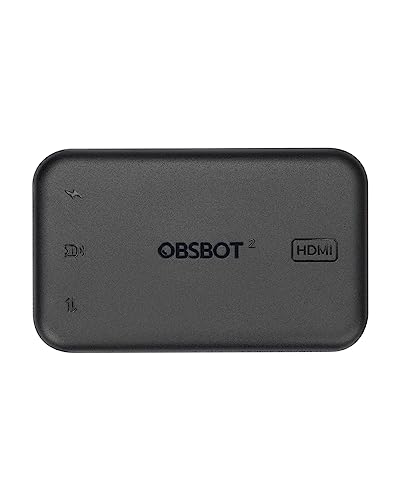
- Supports up to 4K30 or 1080p60 conversion
- Plug-and-play setup with no driver required
- Works with compatible OBSBOT remotes and ATEM devices
Best For: OBSBOT webcam owners building an HDMI workflow
Best Analog Digitizer

- Converts VHS, VCR, Hi8, and DV sources to USB
- Supports RCA and S-Video inputs
- Captures up to 720p with audio on Windows and Mac
Best For: Digitizing legacy tapes and camcorder footage
Best High-Resolution HDMI Capture
Guermok 4K USB3.0 Capture Card
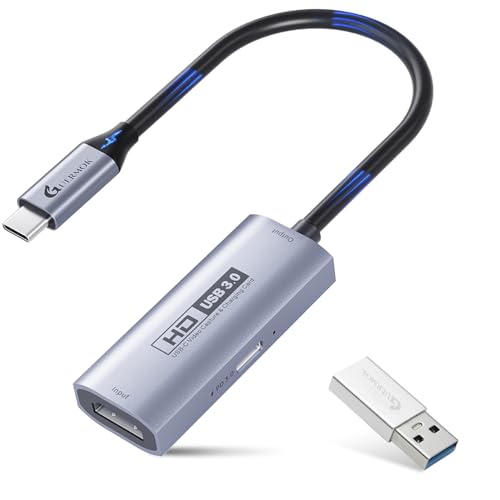
- Accepts 4K30 HDMI input and outputs up to 1080p60
- Includes USB-C/USB-A connectivity and PD passthrough
- Supports major operating systems and capture software
Best For: Streaming, gaming, and HDMI capture with compatible USB-C hosts
Best Compact HDMI Capture Adapter
RØDE 1080p60 HDMI to USB-C Converter

- Captures HDMI video up to 1080p60
- Compatible with UVC-enabled computers, tablets, and smartphones
- Ultra-compact, plug-and-play design
Best For: Portable livestreaming, meetings, and presentations
Best for NDI Workflows
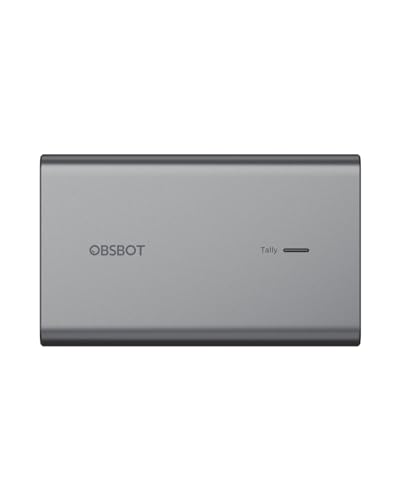
- Converts compatible UVC cameras to NDI
- Supports PoE and remote camera control
- Records simultaneously to a microSD card
Best For: Networked livestreaming and remote production
Best Durable 4K-Input Capture Card
KONDOR BLUE USB-C to HDMI Capture Card

- Accepts 4K30 HDMI input and outputs 1080p60
- Works with major desktop and mobile operating systems
- No external power with reinforced connectors
Best For: Camera-based streaming across popular platforms
Camera-to-Webcam Pick – Elgato Cam Link 4K
The Elgato Cam Link 4K is a strong choice among USB video adapters for content creators who want to use a DSLR, mirrorless camera, camcorder, action camera, or compatible iPhone as a computer webcam. Its USB 3.0 connection supports 1080p60 and 4K capture, while ultra-low latency helps keep video and audio synchronized.
Best For: Creators upgrading livestreams, video calls, and recordings with an HDMI-equipped camera.
Pros:
- Supports 1080p60 and up to 4K60 capture with compatible equipment.
- Works with OBS, Zoom, Discord, PC, Mac, and iPad.
- Compact design and ultra-low latency suit mobile and desktop setups.
Cons:
- Requires a compatible camera and HDMI output.
- 4K capture may depend on the specific Cam Link model and setup.
Choose this adapter when camera image quality and responsive monitoring matter more than built-in display outputs. It is particularly practical for creators building a dedicated camera-based streaming setup.
Multi-Monitor Workhorse – WAVLINK USB to HDMI Adapter
The WAVLINK USB 3.0/USB-C to HDMI adapter is designed for creators who need more desktop space rather than camera capture. It can mirror or extend a display at resolutions up to 2048×1152 at 60Hz or 2560×1440 at 50Hz, with support for multiple additional monitors on compatible systems.
Best For: Content creators expanding a Windows, Mac, ChromeOS, Ubuntu, or compatible Android workstation with an extra HDMI monitor.
Pros:
- Supports mirror and extended-display modes.
- Can support up to six total monitors on PCs, with one adapter per monitor.
- Includes microphone input and earphone output for added convenience.
- Supports USB-A, USB-C, Thunderbolt, and USB 4 connections with the appropriate setup.
Cons:
- DisplayLink driver installation is required.
- Maximum resolution and monitor count depend on the computer and operating system.
This is a better fit for editing timelines, research windows, chat panels, and other multitasking tasks than for recording HDMI camera footage. Verify operating-system support and install the required DisplayLink software before use.
Professional Broadcast Bridge – Blackmagic Web Presenter
The Blackmagic Design Web Presenter converts an SDI or HDMI source into USB webcam video for streaming software. It accepts SD, HD, and Ultra HD inputs up to 2160p60, while outputting 720p HD webcam video without requiring drivers.
Best For: Creators and small production teams using professional SDI or HDMI cameras with OBS, XSplit, YouTube Live, Facebook Live, Twitch, or similar platforms.
Pros:
- Accepts both SDI and HDMI sources.
- Supports input sources up to 2160p60.
- Driver-free USB webcam operation works with popular streaming software.
- Provides 12G-SDI and HDMI loop outputs for signal pass-through.
Cons:
- USB webcam output is limited to 720p HD.
- Its 620 g chassis is less portable than compact capture dongles.
- Designed for desktop use with professional camera connections rather than casual setups.
This adapter makes sense when SDI connectivity, loop-through, and broad broadcast input support are priorities. Creators seeking the sharpest USB webcam output should account for its 720p output specification.
Portable HDMI Capture Value – VIXLW 4K USB Capture Card
The VIXLW U168-1 is a compact USB video adapter for content creators capturing HDMI footage from cameras, consoles, and other devices. It accepts up to 4K at 30Hz and records at 2K30 or 1080p60, with USB 3.0 and USB-C connectivity for Windows, macOS, Linux, and Android setups.
Best For: Streamers, gamers, and mobile creators who want plug-and-play HDMI capture for OBS, Zoom, Twitch, or YouTube.
Pros:
- Supports 4K30 HDMI input and 1080p60 recording.
- Works with cameras, PS4/PS5, Xbox, Switch, and other HDMI devices.
- Plug-and-play design requires no external power or driver installation.
- Includes a USB 3.0-to-USB-C adapter for flexible connections.
Cons:
- Recording is limited to 2K30 or 1080p60 rather than 4K recording.
- Tablet use requires enabled OTG functionality.
- Actual performance depends on the computer’s processing power and HDMI source.
This model is a practical choice for creators who need broad device compatibility and easy setup at a compact size. It is especially attractive for 1080p60 streaming, while users needing native 4K recording should look elsewhere.
Best Webcam Workflow Adapter – OBSBOT UVC to HDMI Adapter
OBSBOT UVC to HDMI Adapter 2.0, for Tiny 2, Tiny 4K/1080P, Meet 4K/1080P, UVC Webcams
Check Price On AmazonFor content creators comparing USB video adapters for content creators, the OBSBOT UVC to HDMI Adapter is a focused option for converting compatible OBSBOT webcam output to HDMI. It supports up to 4K at 30fps or 1080p at 60fps, with plug-and-play setup and no driver requirement.
Best For: OBSBOT webcam owners who need HDMI connectivity for a PC, Mac, Smart TV, or ATEM device.
Pros:
- Converts UVC webcam video to HDMI at up to 4K30 or 1080p60.
- Plug-and-play installation without drivers.
- Supports low-latency video and OBSBOT remote controllers.
- Firmware updates are supported through software.
Cons:
- Its compatibility is centered on UVC webcams, particularly OBSBOT devices.
- It requires a separate HDMI display, switcher, or compatible device for HDMI output.
This is a specialized adapter rather than a general-purpose HDMI capture card. It makes the most sense when an OBSBOT webcam is already part of your setup and you want a straightforward HDMI workflow.
Best Analog Digitizer – USB RCA Video Capture Card
Among USB video adapters for content creators, this RCA-to-USB capture card is designed for digitizing footage from VHS, VCRs, Hi8, DV tapes, camcorders, and similar analog sources. It converts composite RCA or S-Video input to USB output up to 720p and captures audio without requiring an external sound card.
Best For: Creators transferring personal tapes and other analog video archives to a Windows or Mac computer.
Pros:
- Supports RCA and S-Video inputs from common legacy video equipment.
- Captures video and audio with up to 720p USB output.
- Plug-and-play operation with no external power required.
- Works with Windows and Mac OS and supports NTSC and PAL.
Cons:
- It is intended for analog-to-digital conversion, not HDMI capture.
- Capture software is required, such as OBS Studio, PotPlayer, or QuickTime Player.
- Its stated output is limited to 720p.
This adapter is a practical choice for preservation projects and basic editing rather than modern high-resolution streaming. Its broad legacy-device compatibility and simple setup make it useful for converting older media.
Best High-Resolution HDMI Capture – Guermok 4K USB3.0 Capture Card
For creators evaluating USB video adapters for content creators, the Guermok 4K USB3.0 HDMI Capture Card combines high-resolution HDMI input with USB-C and USB-A connectivity. It accepts up to 4K at 30Hz and outputs up to 2K at 30Hz or 1080p at 60Hz, while PD 3.0 charging passthrough can help power compatible USB-C host devices.
Best For: Live streamers, gamers, and mobile creators capturing HDMI video through a computer or compatible USB-C device.
Pros:
- Supports 4K30 HDMI input and up to 1080p60 output.
- Offers USB 3.0 connectivity plus USB-C and USB-A compatibility.
- Provides up to 100W PD charging passthrough for compatible USB-C host devices.
- Works with popular capture software and systems including Windows, Mac, Android, and Linux.
Cons:
- It requires capture software and cannot directly cast to a monitor or TV.
- Charging passthrough does not support the HDMI source or display device and is unavailable through the USB-A adapter.
- It uses one-way HDMI-to-USB transmission, not USB-C-to-HDMI conversion.
This is the most versatile option here for HDMI-based capture, especially when high frame-rate 1080p output or USB-C charging passthrough matters. Check your host port, software, and source-device requirements before buying.
Best Compact HDMI Capture Adapter – RØDE 1080p60 HDMI to USB-C Converter
For creators seeking USB video adapters for content creators, the RØDE HDMI-to-USB-C Converter is a compact option for bringing an HDMI source into a compatible UVC device. It supports video up to 1080p at 60 frames per second and requires no external power plug.
Best For: Livestreaming, video meetings, presentations, and mobile or computer-based workflows that use UVC input.
Pros:
- Supports up to 1080p60 video.
- Works with computers, tablets, and smartphones that support UVC input.
- Ultra-compact 5 g design with plug-and-play operation.
- Built to stated high manufacturing tolerances and backed by a one-year warranty.
Cons:
- Limited to HDMI-to-USB-C conversion rather than offering multiple video input types.
- UVC compatibility is required on the receiving device.
This is a straightforward pick when portability and 1080p60 capture matter more than advanced routing or network-streaming features.
Best for NDI Workflows – OBSBOT UVC to NDI Adapter
Among USB video adapters for content creators, the OBSBOT UVC to NDI Adapter stands out for network-based production. It converts compatible UVC webcam or USB-C camera feeds for NDI streaming and adds PoE, remote-control connectivity, tally indication, and simultaneous microSD recording.
Best For: Creators and streamers building an NDI-based setup with compatible webcams, network equipment, and remote production needs.
Pros:
- Provides plug-and-play UVC-to-NDI conversion for low-latency network streaming.
- Supports PoE, reducing the need for a separate power supply when connected to suitable Ethernet equipment.
- Can record livestream video simultaneously to a microSD card.
- Includes remote-controller support, a dedicated tally light, and a portable form factor.
Cons:
- Designed for NDI networks rather than basic direct USB capture.
- Requires compatible UVC camera equipment and suitable network infrastructure for its advanced features.
- Its stated 48-volt DC input and PoE features may be more setup than a simple desktop adapter requires.
This model makes the most sense for a networked studio or mobile production workflow where NDI, backup recording, and camera-status visibility are useful.
Best Durable 4K-Input Capture Card – KONDOR BLUE USB-C to HDMI Capture Card
For content creators comparing USB video adapters, the KONDOR BLUE capture card offers HDMI input through a USB-C connection, with support for 4K at 30Hz input and 1080p at 60Hz output. It is designed to work with major streaming and video applications without requiring external power.
Best For: Camera-based livestreaming and recording on Mac, Windows, Linux, or Android using software such as OBS, Zoom, YouTube, and Restream.
Pros:
- Accepts 4K 30Hz input and outputs 1080p60.
- Compatible with Mac OS, Windows, Linux, and Android.
- Works with a broad range of streaming, meeting, and video applications.
- Uses reinforced nylon-braided connectors and includes a lifetime warranty subject to the manufacturer’s terms.
Cons:
- Output is limited to 1080p60 rather than 4K output.
- Provides one HDMI input and is intended for a single-source capture setup.
- The lifetime warranty excludes issues such as misuse, accidents, normal wear, and transfer to another owner.
This is a practical choice for creators who want broad software and operating-system compatibility, camera HDMI capture, and a durable cable design in a no-external-power package.
How We Picked the Best USB Video Adapters for Content Creators
We evaluated these USB Video Adapters for Content Creators by looking at the job each model is designed to perform, including HDMI capture, UVC webcam conversion, NDI networking, multi-monitor expansion, and analog video transfer. We prioritized practical compatibility with common creator software such as OBS, Zoom, Skype, VLC, YouTube, and other UVC-compatible applications.
Resolution and frame-rate support were also important. Some adapters target 4K input or passthrough, while others are optimized for reliable 1080p60 capture. We also considered connection standards, audio handling, power delivery, portability, and whether a device is best suited to a simple plug-and-play setup or a more advanced production system.
Quick Comparison
| Best For | Look For | Relevant Options |
|---|---|---|
| Camera livestreaming | HDMI input, UVC output, 1080p60 or 4K support | Elgato, RØDE, KONDOR BLUE |
| Professional switching and broadcasting | Dedicated video processing, audio support, dependable I/O | Blackmagic Design Web Presenter |
| Webcam conversion | UVC compatibility and HDMI or NDI output | OBSBOT adapters |
| Gaming capture | Low-latency HDMI capture and high frame-rate support | 4K USB capture models, Guermok |
| Multiple displays | DisplayLink support and operating-system compatibility | WAVLINK USB video adapter |
| Analog archiving | RCA input and recording software support | USB analog capture device |
Key Buying Factors for USB Video Adapters for Content Creators
Input and Output Type
Start with the source. HDMI capture cards work with cameras, consoles, and other HDMI devices. UVC adapters are intended for compatible webcams, while RCA-to-USB hardware is designed for older VCRs, camcorders, and DVD players. Check whether you need HDMI output, USB output, NDI networking, or display expansion.
Resolution, Frame Rate, and Latency
For talking-head video, 1080p60 is often sufficient and can reduce storage and bandwidth demands. Choose 4K support when you need higher-resolution recording, cropping flexibility, or a future-ready workflow. Gamers and fast-moving subjects should pay close attention to frame-rate limits and latency.
Compatibility and Connections
Confirm the USB connector on your computer and whether the adapter requires USB 3.0 bandwidth, USB-C, drivers, or external power. Also verify compatibility with your operating system and preferred software. A device advertised as UVC usually offers broader app support, but specialized features may require dedicated software or hardware.
Power, Audio, and Portability
Small bus-powered adapters are convenient for mobile creators, but a powered model may be more dependable in a permanent studio. If your workflow includes microphones, embedded HDMI audio, or long recording sessions, check how audio is handled and whether power delivery or heat management affects the setup.
Who Should Buy Which USB Video Adapters for Content Creators?
Choose a compact HDMI-to-USB capture card if you want to stream from a mirrorless camera, camcorder, or console with minimal setup. A professional presenter-style unit is better for creators who need more controlled broadcasting, audio integration, or studio connectivity. Webcam owners should choose an OBSBOT UVC-to-HDMI or NDI adapter based on whether they need a physical display connection or network-based video distribution.
For creators adding several monitors to a laptop, the DisplayLink adapter is the more relevant choice, although it is not a camera capture device. If your goal is digitizing family tapes or older recordings, use the RCA-to-USB converter instead of an HDMI capture card. Finally, prioritize USB-C compatibility and 4K-capable hardware if you regularly change cameras, computers, or recording environments.
