
Thunderbolt 5 docks can turn a single laptop connection into a true desk workstation, with faster data, more display options, and cleaner cable management.
Below, we focus on the best Thunderbolt 5 docks for desk workstations for buyers who want reliable charging, external monitor support, and the right mix of ports.
Best 10 Thunderbolt 5 Docks for Desk Workstations Picks for 2026
Best for Thunderbolt 5 Power Users
WAVLINK Intel Certified TB5 Dock

- Four Thunderbolt 5 ports for fast, flexible expansion
- 140W charging plus 2.5G Ethernet for workstation builds
- Adds USB-A, SD 4.0, and audio to reduce dongle clutter
Best For: Power users who want a feature-rich dock for a high-performance desk workstation.
Best for ThinkPad Workstations
Lenovo ThinkPad Thunderbolt 4 Dock

- One-cable docking for a cleaner desk setup
- Good fit for ThinkPad and office workflows
- Supports flexible multi-display expansion
Best For: ThinkPad users who want a reliable workstation dock for everyday productivity.
Best for Mac Power Users
iVANKY FusionDock Max 2 Thunderbolt 5 Dock
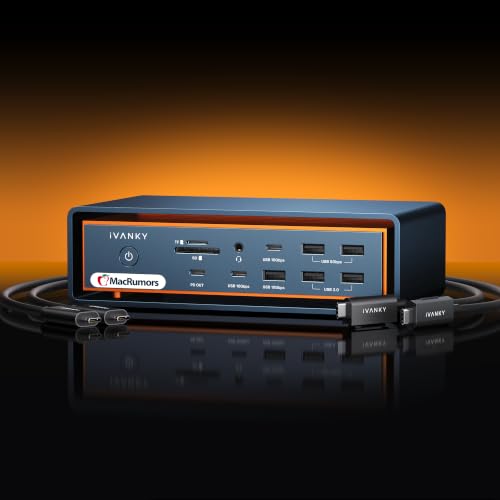
- Triple 6K display support on compatible Macs
- 3 TB5 ports plus 10 USB ports
- 140W PD and hybrid cooling for heavy use
Best For: Mac power users building a high-connectivity desk workstation with multiple displays.
Best for Thunderbolt 4 Mac/PC Setups
Belkin Connect Thunderbolt 4 Dock 5-in-1

- Four Thunderbolt 4 ports for fast peripherals and daisy-chaining
- Dual 4K/60Hz or single 8K/30Hz display support
- 96W power delivery keeps compatible laptops charged
Best For: Mac and Windows users who want a compact dock for dual monitors and laptop charging.
Best for Heavy-Duty Multi-Device Setups

- 14-in-1 port layout for a full desk setup
- Up to 140W charging and 120Gbps max transfer
- Up to 8K output with active cooling
Best For: Power users who need a high-bandwidth dock for displays, storage, networking, and charging.
Best for Multi-Display Power Users
iVANKY FusionDock Pro 3 Thunderbolt 5 Dock

- TB5 certified with up to 120Gbps Bandwidth Boost
- Dual 8K@60Hz support on compatible Windows laptops
- 180W adapter with up to 140W laptop charging
Best For: Users building a high-performance desk workstation with multiple displays and fast charging.
Best for Comfort

- 120Gbps max transfer with 140W laptop charging
- Up to 8K display support and Windows triple-monitor mode
- 4 USB-A ports, 2.5G Ethernet, and SD 4.0 reader
Best For: Power users and workstation setups that need maximum Thunderbolt 5 performance and display flexibility.
Best for Dual 8K Displays

- Dual HDMI 2.1 with up to 8K 60Hz / 4K 144Hz
- 140W charging plus 2.5GbE for workstation use
- Six USB-C ports, including two front-facing 30W ports
Best For: Power users who want a quiet, driverless dock for dual high-resolution monitors and fast charging.
Best Mac Power User Dock
iVANKY FusionDock Ultra 26-in-1

- Quad 6K or dual 8K display support on compatible Macs
- 10GbE Ethernet plus four high-speed USB-C downstream ports
- Thermal design aimed at sustained heavy workstation use
Best For: Mac power users building a high-display, high-bandwidth desk workstation.
Best Simple Pick

- Dual 8K 60Hz or triple 4K support on compatible systems
- 140W laptop charging with extra 30W USB-C charging
- 2.5GbE, SD/microSD, and 10Gbps USB for workstation use
Best For: Windows and Mac users building a high-end multi-monitor desk workstation.
Best for Thunderbolt 5 Power Users – WAVLINK Intel Certified TB5 Dock
If you want one of the most capable thunderbolt 5 docks for desk workstations, this WAVLINK model stands out for its four TB5 ports, 140W host charging, and broad expansion for modern Windows 11 and Mac setups. It’s built for users who need fast storage, wired networking, multiple peripherals, and high-refresh external displays in one hub.
Best For: Power users building a desktop-style workstation with heavy peripheral use, fast data transfer, and multi-display flexibility.
Pros:
- Four Thunderbolt 5 ports with strong bandwidth for high-speed workflows
- 140W power delivery plus 2.5G Ethernet for a cleaner single-cable setup
- Includes 4 USB-A ports, SD 4.0, and audio for broad desk accessory support
- Supports high-end display configurations on compatible Windows 11 and Mac systems
Cons:
- Triple-display support is limited by OS and host compatibility
- USB-C to HDMI/DP cables are not included
- Best results require a Thunderbolt 4/5 laptop with compatible display output
For buyers comparing thunderbolt 5 docks for desk workstations, this is a strong fit if you care more about expansion, charging, and speed than minimal size. It’s especially appealing for users who want a future-facing dock that can anchor a high-performance desk setup.
Best for ThinkPad Workstations – Lenovo ThinkPad Thunderbolt 4 Dock
If you’re comparing thunderbolt 5 docks for desk workstations, this Lenovo dock is worth a look for buyers who want a dependable, workstation-friendly hub with broad display support and a simple single-cable setup. It’s especially appealing if your desk is built around a ThinkPad and you want a dock that keeps peripherals, monitors, and charging organized.
Best For: ThinkPad users and office setups that need a reliable docking station for dual displays and everyday productivity.
Pros:
- Designed for clean, one-cable desk workstation connectivity
- Strong fit for ThinkPad-based office and productivity setups
- Supports versatile display expansion for multitasking
Cons:
- Thunderbolt 4 model, so it is not a true Thunderbolt 5 dock
- Best value mainly for Lenovo/ThinkPad-centric workflows
This dock makes the most sense if you want a proven workstation dock rather than chasing the newest spec sheet. For buyers focused on practical desk expansion, it can still be a solid option while shopping thunderbolt 5 docks for desk workstations, especially when compatibility and reliability matter more than headline bandwidth.
Best for Mac Power Users – iVANKY FusionDock Max 2 Thunderbolt 5 Dock
If you need one of the most capable thunderbolt 5 docks for desk workstations and you’re building around a compatible Mac, the iVANKY FusionDock Max 2 is aimed at high-end multitaskers who want lots of display bandwidth, fast I/O, and reliable cooling in a single dock.
Best For: Mac users with M1–M5 Pro/Max systems who want a workstation dock with triple-display support and lots of ports.
Pros:
- Supports up to triple 6K@60Hz output on compatible Mac configurations
- 3 Thunderbolt 5 ports plus 10 USB ports for a dense desk setup
- 140W power delivery helps keep a connected MacBook charged under load
- Hybrid cooling with copper plate and fan is built for sustained use
Cons:
- Not compatible with Windows or Chrome laptops
- Display support varies significantly by Mac chip tier
- Locked to one Mac and does not switch between multiple computers
For Mac-based thunderbolt 5 docks for desk workstations, this one stands out for display flexibility and workstation-grade expansion, but only if you’re comfortable staying inside Apple’s compatibility rules.
Best for Thunderbolt 4 Mac/PC Setups – Belkin Connect Thunderbolt 4 Dock 5-in-1
If you want a compact hub that can anchor a serious desk setup, this Belkin dock is a practical alternative to many thunderbolt 5 docks for desk workstations. It gives you four Thunderbolt 4 ports plus USB-A, 96W power delivery, and support for dual 4K or single 8K displays without adding much clutter.
Best For: Mac and Windows users who need a compact, high-speed dock for dual-monitor productivity and laptop charging.
Pros:
- Four Thunderbolt 4 ports make it easy to connect fast peripherals and daisy-chain devices.
- Supports dual 4K/60Hz displays or a single 8K/30Hz monitor for flexible workstation builds.
- 96W power delivery helps keep compatible laptops charged while in use.
- Includes cable and power supply, so setup is straightforward out of the box.
Cons:
- It is Thunderbolt 4, not Thunderbolt 5, so it is not the newest bandwidth tier.
- The 5-in-1 layout is compact, but users wanting lots of USB ports may need extra accessories.
For buyers comparing thunderbolt 5 docks for desk workstations, this Belkin model stands out as a polished, lower-clutter option with strong display support and dependable charging. It is a sensible pick if you value stability, simple connectivity, and a small footprint over chasing the very latest port standard.
Best for Heavy-Duty Multi-Device Setups – Anker Prime TB5 14-in-1 Dock
If you want one of the more capable thunderbolt 5 docks for desk workstations, this Anker Prime model stands out for sheer connectivity and high-end bandwidth. It combines Thunderbolt 5 data, dual video options, 2.5GbE, card readers, and fast charging in a dock designed to keep a busy desk setup organized and fast.
Best For: Power users who want a single dock to handle displays, storage, networking, and charging on a Thunderbolt 5 or Thunderbolt 4 laptop.
Pros:
- 14-in-1 design covers most desktop peripherals without needing extra adapters.
- High bandwidth and strong charging make it a good fit for large files and laptop power delivery.
- Supports up to 8K displays, including dual 8K on compatible Windows Thunderbolt 5 laptops.
- Active cooling helps maintain performance during heavier workloads.
Cons:
- Best display support is limited by laptop and OS compatibility.
- Cannot support external USB-A hubs.
- More dock than casual users need if you only want basic peripherals.
For demanding thunderbolt 5 docks for desk workstations, this is a strong pick if you value expansion, charging, and display flexibility over a minimal setup. Just make sure your laptop supports the display mode you want before buying.
Best for Multi-Display Power Users – iVANKY FusionDock Pro 3 Thunderbolt 5 Dock
If you need thunderbolt 5 docks for desk workstations that can handle serious multitasking, this iVANKY FusionDock Pro 3 stands out with high-bandwidth connectivity, strong charging, and unusually broad display support. It is built for desktop setups that run multiple monitors, move large files, and rely on a single-cable dock to keep the workspace clean.
Best For: Mac and Windows users who want a high-end desk dock for multiple displays, fast data, and laptop charging in one unit.
Pros:
- Thunderbolt 5 certified with up to 80Gbps transfer and Bandwidth Boost up to 120Gbps
- Supports up to dual 8K@60Hz on compatible Windows TB5 laptops and multiple 6K/8K modes on Mac
- 180W power supply can charge laptops up to 140W while also powering USB-C devices
- Includes 2.5GbE for faster wired networking on a desk setup
Cons:
- Full display support depends heavily on your laptop chip, OS, and monitor inputs
- Premium spec set likely makes it more expensive than simpler docks
- Some monitors may need adapters if they lack USB-C video input
For buyers comparing thunderbolt 5 docks for desk workstations, this model is a strong fit if display flexibility and docking power matter more than keeping the price low. Its mix of certified TB5 performance, robust charging, and workstation-friendly networking makes it a compelling hub for demanding creative or productivity setups.
Best for Comfort – WAVLINK TB5 Docking Station
If you want one of the most capable thunderbolt 5 docks for desk workstations, this WAVLINK model stands out for raw bandwidth, strong laptop charging, and serious multi-display support. It’s built for users who need a centralized hub for high-resolution monitors, fast peripherals, and everyday docking without juggling adapters.
Best For: Power users, creators, and trading or productivity setups that need high-speed Thunderbolt 5 connectivity, 140W charging, and advanced display support.
Pros:
- 120Gbps max transfer speed and 140W power delivery for demanding laptops
- Supports up to an 8K display or multi-monitor Windows 11 setups
- Includes 4 USB-A 3.2 Gen 2 ports, 2.5G Ethernet, and SD 4.0 card reader
- Cooling system, non-slip base, and Kensington lock slot add desktop stability
Cons:
- Full triple-display support is limited to compatible Windows 11 Thunderbolt 5 systems
- Display cables and security lock are not included
- Overkill for basic office setups that only need a simple USB hub
For buyers comparing thunderbolt 5 docks for desk workstations, this is a strong pick if you care more about performance and expansion than compactness or budget. It’s especially appealing when you want one dock to handle charging, displays, networking, and peripherals at once.
Best for Dual 8K Displays – Plugable Thunderbolt 5 Dock
If you want one of the most capable thunderbolt 5 docks for desk workstations, Plugable’s TBT-UDH2 is built around dual HDMI 2.1 output, fast laptop charging, and a generous mix of USB-C ports. It’s a strong fit for clean, cable-light setups where you want high-resolution displays, wired networking, and enough power delivery to keep a modern laptop topped off.
Best For: MacBook Pro, MacBook Air, and Windows users who want dual high-refresh displays and a tidy all-in-one desk dock.
Pros:
- Dual HDMI 2.1 supports up to 8K 60Hz or 4K 144Hz with Thunderbolt 5 hosts.
- 140W charging and 2.5GbE make it a true workstation hub.
- Six USB-C ports, including two front-facing 30W charging ports, add flexible connectivity.
- Driverless, fanless design keeps setup simple and quiet.
Cons:
- Mac base M1/M2/M3 systems are limited to a single external display.
- Intel Thunderbolt 4 systems need newer 12th Gen-or-later hosts for full dual-display support.
- It’s feature-rich, so it will be overkill for light laptop-only setups.
For buyers comparing thunderbolt 5 docks for desk workstations, this Plugable model stands out for display flexibility and workstation-friendly I/O rather than minimalism. If your priority is a polished dual-monitor setup with strong charging and Ethernet, it’s an easy dock to recommend.
Best Mac Power User Dock – iVANKY FusionDock Ultra 26-in-1
If you want one of the most ambitious thunderbolt 5 docks for desk workstations, the iVANKY FusionDock Ultra is built for Mac creators who need extreme display output, fast networking, and a crowded port layout in a single desktop hub. It is especially compelling if your setup centers on a MacBook Pro and you want a dock that can keep multiple high-resolution monitors, storage, and peripherals connected without feeling bandwidth-starved.
Best For: Mac-based power users who need quad-display support, 10GbE networking, and a dock built for heavy workstation loads.
Pros:
- Supports up to quad 6K or dual 8K displays on compatible Mac systems
- Includes 10GbE Ethernet plus four high-speed downstream USB-C ports
- Built-in thermal design helps sustain demanding all-day workstation use
- 26-in-1 layout reduces the need for extra adapters and hubs
Cons:
- Compatible with Mac only, so Windows users need to look elsewhere
- Premium capabilities may be overkill for simpler desk setups
- Display support depends on the specific Mac model and configuration
For Mac-first builders, this dock stands out in the thunderbolt 5 docks for desk workstations category by prioritizing top-tier display expansion and wired performance over broad cross-platform compatibility. If your workflow includes creative production, multitasking, and a clean one-cable desk setup, it offers a very strong workstation foundation.
Best Simple Pick – StarTech Thunderbolt 5 Dock
If you want one of the most capable thunderbolt 5 docks for desk workstations, this StarTech model is built for serious multi-monitor setups. It combines Thunderbolt 5 and USB4 compatibility with up to dual 8K 60Hz on supported systems, triple 4K output on Windows, and strong laptop charging for a tidy, high-performance desk.
Best For: Windows and Mac users who need a high-end dock for multiple displays, fast file transfers, and one-cable charging on a permanent workstation.
Pros:
- Supports up to dual 8K 60Hz or triple 4K displays, depending on the host system.
- 140W laptop charging plus a separate 30W USB-C charging port.
- 2.5GbE networking, SD 4.0/microSD 4.0, and 10Gbps USB ports add real workstation utility.
- Driverless compatibility with Windows 11 and macOS makes setup straightforward.
Cons:
- Premium capabilities come with a premium price.
- Full display support depends heavily on the laptop and operating system.
For buyers comparing thunderbolt 5 docks for desk workstations, this one stands out for sheer display flexibility and power delivery. It is especially compelling if you want a dock that can replace a pile of chargers, adapters, and hub cables in a multi-screen office setup.
How We Picked the Best Thunderbolt 5 Docks for Desk Workstations
We prioritized docks that make sense for a daily workstation setup: strong power delivery, modern display support, dependable Ethernet, and enough USB ports for monitors, storage, peripherals, and charging. We also favored Intel-certified or well-documented models where compatibility and performance are easier to verify.
For Thunderbolt 5 Docks for Desk Workstations, the most important difference is not just speed, but how well the dock balances bandwidth, charging, and monitor support without creating a bottleneck.
Quick Comparison
In a desk setup, the fastest dock is not always the best choice. Some buyers need maximum display flexibility for dual- or triple-monitor layouts, while others want the cleanest single-cable hub with strong charging and Ethernet. If you work with large files, external SSDs, or high-refresh displays, look for a dock with higher data headroom and modern video output options. If your workload is office-focused, a simpler dock with fewer ports may be enough.
Key Buying Factors for Thunderbolt 5 Docks for Desk Workstations
Power Delivery
Check whether the dock can deliver enough wattage for your laptop under load. Many workstation users should target 100W or more, with 140W being a better fit for performance laptops and larger notebooks.
Display Support
Match the dock to your monitor plan first. Confirm whether it supports single 8K, dual 4K, dual 6K, or more advanced multi-display layouts, and make sure the limits fit both Windows and Mac use if that matters to you.
Port Mix and Networking
Look for USB-A and USB-C coverage, fast card or storage options if needed, and at least 2.5GbE if you want a more capable wired connection for file transfers or a stable office network.
Thermals and Build
Higher-performance docks can generate heat. For all-day desk use, a cooler-running design, sturdy enclosure, and clear port layout can matter as much as headline speed numbers.
Who Should Buy Which Thunderbolt 5 Docks for Desk Workstations?
If you want the most straightforward office dock, choose a model with solid charging, Ethernet, and basic multiport expansion. If you run multiple high-resolution monitors or creator tools, prioritize display bandwidth and broader port selection. Mac users should verify dual-display or triple-display behavior carefully, since support can vary by chipset and operating system. Windows workstation users often have the most flexibility, especially if they need dual 8K or advanced multi-monitor configurations.
In short, the best Thunderbolt 5 Docks for Desk Workstations are the ones that match your laptop, monitor plan, and cable needs—not just the one with the biggest port count.
