
Thunderbolt 4 docks with SD card reader support make it easier to turn a laptop into a full workstation without losing fast media access. They’re especially useful for creators, office users, and hybrid workers who need one-cable simplicity.
Below, we focus on the most practical options for charging, monitor output, port variety, and card-reader convenience so you can pick the right dock for your setup.
Best 10 Thunderbolt 4 Docks with Sd Card Reader Picks for 2026
Best for Dual-Display Macs
Plugable 16-in-1 Thunderbolt 4 Dock

- Dual 4K 60Hz support for compatible laptops
- Built-in SD and microSD card readers
- 100W charging plus 2.5GbE and 7 USB ports
Best For: MacBook and Windows users who want a full-featured dock with dual displays and card readers.
Best for Multi-Monitor Workstations
Dell Pro Thunderbolt 4 Smart Dock SD25TB4

- Up to 4K x4 display support for complex setups
- 130W charging helps reduce laptop power clutter
- Remote management, 2.5GbE, and Thunderbolt 4 expansion
Best For: Power users and IT-managed offices that need a high-end multi-monitor dock.
Best Budget All-in-One
Anker 7-in-1 USB-C Hub with SD Reader

- SD and microSD card slots for fast media access
- 85W pass-through charging for laptop power delivery
- 4K HDMI plus USB-A/USB-C ports for everyday expansion
Best For: Travelers and everyday laptop users who need a compact hub with card readers and basic display support.
Best for Power Users
UGREEN Revodok Max 213 Thunderbolt 4 Dock

- 40Gbps Thunderbolt 4 performance
- Dual 4K or single 8K display support
- SD/TF 4.0 reader plus 2.5GbE
Best For: Creators and professionals who want a high-end Thunderbolt 4 dock with card reader support and advanced display options.
Best for Card Readers and Displays
Sabrent Thunderbolt 4 Docking Station

- SD/microSD 4.0 reader up to 312MBps
- HDMI 2.1, DP 1.4, and TB4 video outputs
- USB-C, USB-A, Ethernet, and audio in one dock
Best For: Creators and power users who need fast card transfers plus flexible multi-display output.
Best for Dell Power Users
Dell SD25TB4 Pro Thunderbolt 4 Smart Dock
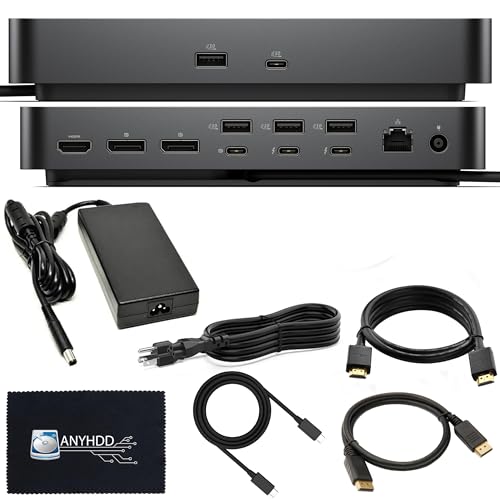
- Dual Thunderbolt 4 ports with broad display support
- 180W adapter and 3-year warranty included
- Works with macOS, Windows 10/11, and Ubuntu
Best For: Dell users who want a powerful Thunderbolt 4 dock for a multi-display workstation.
Best for Comfort

- Built-in power supply keeps the desk setup cleaner
- 90W charging suits many productivity laptops
- Includes SD UHS-II, 2.5GbE, HDMI, and USB ports
Best For: Creators and power users who want a feature-rich Thunderbolt dock with SD card support.
Best for Multi-Display Workstations
Satechi 16-in-1 Thunderbolt 4 Dock

- 16-in-1 design with SD and microSD card readers
- Up to four 4K/60Hz displays on Windows
- 96W charging plus 2.5Gbps Ethernet
Best For: Mac and Windows users who need a high-port-count dock for multi-monitor setups and fast card transfers.
Best for High-Speed Media Transfers
WAVLINK Thunderbolt 4 Dock with SD Reader
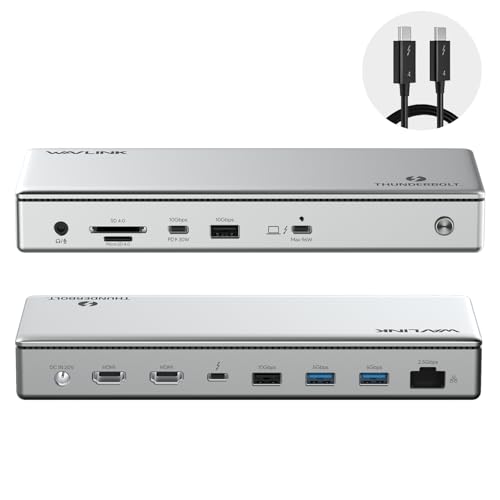
- 312MB/s SD/MicroSD reader for fast imports
- Dual 4K 60Hz HDMI or single 8K display support
- Up to 96W charging plus 2.5G Ethernet
Best For: Creators and professionals who want fast card transfers, dual displays, and charging in one dock.
Best for MacBook Pro/Air
Plugable Thunderbolt 4 Dock for M4/M5 MacBook Air
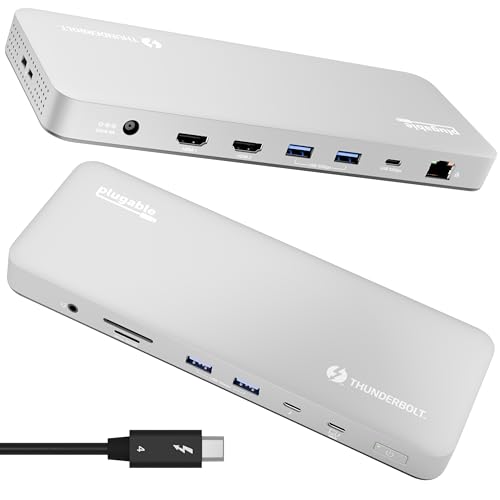
- 100W charging for MacBook Air and Pro
- Built-in SD card reader for media workflows
- 4K dual displays or one 6K monitor
Best For: MacBook Air and Pro users who want a driverless Thunderbolt dock with card reading and strong charging.
Best for Dual-Display Macs – Plugable 16-in-1 Thunderbolt 4 Dock
If you want one of the more complete thunderbolt 4 docks with sd card reader support, this Plugable 16-in-1 dock is built for a tidy dual-monitor setup. It adds two 4K displays, fast wired networking, plenty of USB ports, and front-facing SD and microSD slots, making it a strong all-in-one hub for workstations and creator desks.
Best For: MacBook Air/Pro users and Windows laptop owners who want dual 4K screens, charging, and card readers in one dock.
Pros:
- Dual 4K 60Hz output over HDMI or DisplayPort
- Includes both SD and microSD card readers plus 7 USB ports
- 100W Power Delivery helps keep laptops charged while docked
- 2.5GbE Ethernet adds faster wired networking for heavy workflows
Cons:
- May be more dock than casual users need
- Best dual-display support is focused on compatible Mac and USB4/TB systems
- Large feature set can make the dock feel pricey versus simpler hubs
For buyers comparing thunderbolt 4 docks with sd card reader slots, this model stands out because it combines creator-friendly media access with serious desktop expansion. It is especially compelling if you want a single dock that handles displays, charging, storage cards, and peripherals without extra adapters.
Best for Multi-Monitor Workstations – Dell Pro Thunderbolt 4 Smart Dock SD25TB4
If you need one of the more capable thunderbolt 4 docks with sd card reader alternatives in a business setup, the Dell Pro Thunderbolt 4 Smart Dock SD25TB4 stands out for its 4K display support, high-watt charging, and remote manageability. It is built for users who care more about port density, dual Thunderbolt 4 expansion, and clean desk integration than about a built-in memory card slot.
Best For: Power users, IT-managed offices, and creators running multiple 4K displays who want a dock that can also charge a laptop and stay remotely manageable.
Pros:
- Supports up to 4 4K displays for demanding multi-monitor workflows
- Delivers up to 130W charging for Dell laptops and 96W for others
- Includes dual Thunderbolt 4 ports, 2.5GbE, Wi-Fi management, and enterprise security features
- Uses recycled materials and compact, sustainable packaging
Cons:
- No built-in SD card reader, so photographers will need a separate accessory
- Feature set is more business-focused than travel-friendly or minimalist
- May be overkill if you only need basic single-monitor docking
For buyers comparing thunderbolt 4 docks with sd card reader features, this model is a strong workstation dock but not the right choice if direct memory card access is a must-have. It makes the most sense when display expansion, charging, and remote IT control matter more than an integrated card slot.
Best Budget All-in-One – Anker 7-in-1 USB-C Hub with SD Reader
If you want a simple, affordable way to add display output, storage access, and extra ports, this Anker hub is a practical pick among thunderbolt 4 docks with sd card reader alternatives. It gives you the basics most laptop users need without the bulk or price of a full dock.
Best For: Everyday users who want a compact USB-C hub with SD/microSD slots, HDMI, and pass-through charging for travel or desk setups.
Pros:
- Includes both SD and microSD card readers for quick photo and video offloads.
- 85W USB-C pass-through charging helps keep your laptop powered while connected.
- 4K HDMI output and 5 Gbps USB-A/USB-C data ports cover common peripherals.
Cons:
- Not a true Thunderbolt 4 dock, so it lacks high-end bandwidth and expansion features.
- Only one display output and 4K is limited to 30Hz.
- Charger is not included, so you need your own USB-C power adapter.
For buyers comparing thunderbolt 4 docks with sd card reader, this Anker hub makes more sense if you value portability and core connectivity over advanced dock performance. It is a solid everyday accessory, just not a replacement for a full Thunderbolt workstation dock.
Best for Power Users – UGREEN Revodok Max 213 Thunderbolt 4 Dock
If you want one of the most feature-packed thunderbolt 4 docks with sd card reader support, the UGREEN Revodok Max 213 is built for desktop users who need speed, display flexibility, and serious port expansion in one unit. It combines 40Gbps Thunderbolt 4 connectivity with dual 4K@60Hz or a single 8K display option, plus 2.5GbE and built-in SD/TF 4.0 card slots for creative workflows.
Best For: MacBook, Surface Pro, and other laptop users who need a high-end dock for multi-display setups, fast transfers, and memory card access.
Pros:
- Thunderbolt 4 bandwidth with dual 4K@60Hz or single 8K display support
- Built-in SD/TF 4.0 card reader for photo and video workflows
- 90W charging helps keep a connected laptop powered
- 2.5GbE adds faster wired networking than standard gigabit docks
Cons:
- More expensive than basic USB-C docking stations
- Best value only if you can use the advanced display and port features
Overall, this is a strong choice if you need a desktop-grade hub that does more than the basics. Among thunderbolt 4 docks with sd card reader support, it stands out for combining high-resolution monitor output, faster networking, and practical creator-friendly storage access in one dock.
Best for Card Readers and Displays – Sabrent Thunderbolt 4 Docking Station
If you want one of the more versatile thunderbolt 4 docks with sd card reader support, the Sabrent DS-T4MF is built for mixed workstation setups. It combines 40Gbps Thunderbolt 4 connectivity with USB4 and Thunderbolt 3 compatibility, plus HDMI 2.1, DisplayPort 1.4, and an integrated SD/microSD reader for fast media offloads.
Best For: Creators and power users who need a single dock for dual displays, wired networking, and quick memory card transfers.
Pros:
- SD 4.0 and microSD support up to 312MBps for fast camera and drone card transfers
- Strong display options with HDMI 2.1, DP 1.4, and TB4 video outputs
- Useful mix of USB-C, USB-A, Gigabit Ethernet, and audio ports
Cons:
- Dual- and triple-monitor behavior depends on host system support
- More feature-rich than many casual users will need
For buyers comparing thunderbolt 4 docks with sd card reader, this Sabrent model stands out because it balances high-speed storage, broad port selection, and serious display support in one hub. It makes the most sense if you regularly move files from memory cards and want a dock that can also handle a demanding desk setup.
Best for Dell Power Users – Dell SD25TB4 Pro Thunderbolt 4 Smart Dock
If you’re comparing thunderbolt 4 docks with sd card reader support, this Dell smart dock stands out for high-bandwidth expandability, dual Thunderbolt 4 connections, and a strong port mix for multi-monitor setups. It is aimed at users who want a single-cable desk solution for workstations, content workflows, and mixed USB-C accessories, though you should confirm the exact card-reader needs for your setup before buying.
Best For: Dell laptop owners and workstation users who want a well-equipped Thunderbolt 4 dock with premium display and peripheral support.
Pros:
- Dual Thunderbolt 4 ports and multiple video outputs for flexible desk setups
- Includes 180W power adapter and is built for fast data transfer and charging
- Strong compatibility across macOS, Windows 10/11, and Ubuntu
- Three-year warranty adds extra peace of mind for office use
Cons:
- Bulkier and pricier than basic USB-C hubs
- SD card reader support is not clearly listed in the included port set
- Best fit is Dell-focused workflows rather than ultra-portable travel use
Overall, this is a capable Thunderbolt dock for users who care about display flexibility, charging, and expansion over simplicity. If your priority is thunderbolt 4 docks with sd card reader support, make sure the card-reading feature matches your exact workflow before choosing this model.
Best for Comfort – OWC Thunderbolt Go Dock
If you want one of the more fully featured thunderbolt 4 docks with sd card reader, the OWC Thunderbolt Go Dock is built for desk setups that need strong charging, broad port coverage, and easy expansion. Its built-in power supply helps keep the footprint cleaner than many brick-based docks, while the SD UHS-II slot makes it useful for photographers and creators moving media regularly.
Best For: Creators, Mac users, and power users who want a high-port-count dock with fast SD card access and 90W charging.
Pros:
- Built-in power supply reduces clutter and makes the dock easier to place on a desk
- 90W host charging is strong enough for many laptops, including work-focused setups
- Includes an SD 4.0 UHS-II reader plus 2.5GbE, HDMI, USB-A, USB-C, and audio
- Supports Thunderbolt Share and works with Thunderbolt 4, Thunderbolt 3, USB4, and USB-C devices
Cons:
- More expensive and more desk-oriented than basic travel docks
- Display support depends heavily on your laptop’s GPU and port capabilities
- Some non-Thunderbolt USB-C systems may not get the full feature set
This is a strong pick if you need a docking station that goes beyond the basics and still fits the thunderbolt 4 docks with sd card reader category well. It’s especially appealing for users who value a cleaner setup, fast card transfers, and a mix of modern ports in one hub.
Best for Multi-Display Workstations – Satechi 16-in-1 Thunderbolt 4 Dock
If you want one of the most fully loaded thunderbolt 4 docks with sd card reader support, the Satechi 16-in-1 is built for busy desks that need a lot of ports in one place. It combines dual card slots, 2.5Gbps Ethernet, multiple USB-A connections, and display outputs for users who juggle storage, peripherals, and external monitors.
Best For: Mac and Windows users who need a high-port-count dock for multi-monitor setups, fast wired networking, and quick media offloads.
Pros:
- 16-in-1 layout includes SD and microSD slots, plus plenty of USB-A and USB-C ports
- Supports up to four 4K/60Hz displays on Windows for serious workstation use
- 96W power delivery helps keep a laptop charged while the dock is in use
- 2.5Gbps Ethernet and UHS-II card readers are strong extras for creators and power users
Cons:
- Full display support is more limited on Mac than on Windows
- Large port count and power brick make it less travel-friendly than simpler docks
- Not the cheapest option if you only need basic charging and one monitor
For buyers comparing thunderbolt 4 docks with sd card reader features, this Satechi model stands out for turning a laptop into a full desktop hub. It makes the most sense when you need broad connectivity, fast card access, and stronger multi-display support in a single dock.
Best for High-Speed Media Transfers – WAVLINK Thunderbolt 4 Dock with SD Reader
If you want one of the more complete thunderbolt 4 docks with sd card reader, this WAVLINK model stands out for fast media imports, strong display support, and broad laptop compatibility. It combines a Thunderbolt 4-certified connection, dual 4K HDMI output, a 312MB/s SD/MicroSD reader, and 2.5G Ethernet in a single dock.
Best For: Creators, power users, and office setups that need fast card access, dual-monitor output, and dependable laptop charging in one dock.
Pros:
- SD/MicroSD card reader is rated up to 312MB/s for quicker photo and video transfers
- Dual 4K 60Hz HDMI or single 8K output gives you flexible monitor options
- Thunderbolt 4 certified with up to 96W charging and 40Gbps connectivity
- 2.5G Ethernet and four USB ports make it useful as a true desktop hub
Cons:
- Mac users need to pay attention to model-specific dual-display limits
- Full display flexibility depends on having the right Thunderbolt 4, Thunderbolt 5, or USB4 laptop
Overall, this is a strong pick if your setup needs more than a basic port replicator. Among thunderbolt 4 docks with sd card reader, it balances fast storage access, charging, and monitor output especially well for mixed work and creative workflows.
Best for MacBook Pro/Air – Plugable Thunderbolt 4 Dock for M4/M5 MacBook Air
If you want one of the most capable thunderbolt 4 docks with sd card reader for a modern MacBook setup, this Plugable dock focuses on high-end connectivity without requiring extra driver installs. It combines 100W laptop charging, a built-in SD card slot, Ethernet, six USB ports, and Thunderbolt certification, making it a strong desk hub for creators and power users.
Best For: MacBook Air and Pro owners who want a driverless Thunderbolt dock with strong charging, fast I/O, and easy card transfers.
Pros:
- 100W charging helps keep MacBook Air and Pro models powered while connected
- Built-in SD card reader is convenient for quick photo and video offloads
- 4K dual-monitor support or a single 6K display for flexible workstation setups
- Six USB ports plus Ethernet give you plenty of desktop expansion
Cons:
- Best features depend on Thunderbolt-equipped laptops and compatible displays
- Primarily aimed at Mac users, so some features may be more than casual buyers need
For buyers comparing thunderbolt 4 docks with sd card reader options, this Plugable model stands out for its balance of charging power, display support, and creator-friendly ports. It is a practical choice if you want a single dock to handle work, storage, and monitor connections with minimal setup friction.
How We Picked the Best Thunderbolt 4 Docks with Sd Card Reader
We prioritized docks that combine Thunderbolt 4 performance with useful everyday features, especially built-in SD or microSD support, reliable laptop charging, and strong display options. We also favored models with modern connectivity such as 2.5GbE, multiple USB ports, and broad compatibility across Windows and macOS.
Quick Comparison
At a glance, the best choice depends on your workflow. Compact hubs are better for light travel and basic desk use, while full Thunderbolt docks are better if you need multiple displays, higher power delivery, and more peripheral expansion. If you work with photos or video, built-in card readers can save time and reduce cable clutter.
Key Buying Factors for Thunderbolt 4 Docks with Sd Card Reader
Card Reader Speed and Format
Look for docks that support both SD and microSD if you move media between cameras, drones, and mobile devices. Faster card standards matter if you regularly transfer large files, while basic readers are fine for occasional imports and exports.
Power Delivery
Check whether the dock can charge your laptop at full working speed. Many Thunderbolt 4 docks provide 90W to 100W, which is enough for most ultraportables and many creator laptops, but higher-wattage models may be better for larger systems.
Display Support
Monitor needs vary widely. Some users only need one external display, while others want dual 4K or even more advanced multi-monitor support. Verify both resolution and refresh-rate limits before buying, especially if you use high-end displays.
Port Selection
A strong dock should cover your everyday devices: keyboard, mouse, storage, Ethernet, headphones, and card media. Extra USB-A ports, USB-C data ports, and Ethernet can make a major difference in daily convenience.
Compatibility
Not every Thunderbolt dock behaves the same on every laptop. Mac and Windows support can differ for multi-display setups, so confirm compatibility with your exact model, especially for Apple silicon laptops and work-managed devices.
Who Should Buy Which Thunderbolt 4 Docks with Sd Card Reader?
If you want a simple desk upgrade with light media use, a compact hub with SD/microSD support may be enough. If you need a true workstation dock, choose one of the fuller Thunderbolt 4 Docks with Sd Card Reader, higher charging output, and multi-display support. Creators should lean toward the models with the best card-reader convenience and the most stable display connectivity, while office users may value Ethernet, USB-A expansion, and easy one-cable docking most.
