
Receipts take up little space individually, but they can quickly overwhelm a desk, wallet, or filing system. The best compact scanners turn paper receipts into searchable digital records without demanding a permanent workstation.
We selected 10 portable models suited to different needs, from wireless mobile scanning and duplex capture to simple USB-powered document and receipt workflows. Use the guide below to narrow the list by speed, software, portability, and ongoing convenience.
Best 10 Space-Saving Portable Receipt Scanners Picks for 2026
Truly Cordless Choice
ScanSnap iX100 Wireless Mobile Scanner

- Battery scans up to 260 documents per charge
- Wi-Fi and USB connectivity
- Automatic cloud sorting and file naming
Best For: Cordless scanning while traveling or working remotely
Lightweight USB Pick

- Weighs 9.44 ounces
- USB-powered with no battery required
- OCR creates searchable and editable files
Best For: Simple computer-based scanning of receipts and documents
Compact Duplex Workhorse
ScanSnap iX1300 Wireless Duplex Scanner

- Space-saving design for small desks
- Up to 30 ppm duplex scanning
- Wi-Fi and USB connectivity with broad media support
Best For: Fast double-sided scanning in compact home-office setups
Best Compact Pick

- Up to 16 ppm in color or black and white
- USB-powered and less than 1 foot long
- Supports receipts, cards, OCR, and major desktop platforms
Best For: Mobile users who prioritize a small footprint and fast single-sheet scanning
Best Lightweight Value
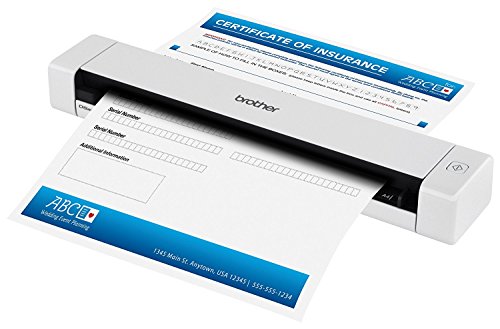
- Weighs just 14.08 ounces
- USB-powered and under 12 inches long
- Scans receipts at up to 8 ppm
Best For: Occasional receipt scanning where low weight and compact storage matter most
Lightest Pick
Epson DS-70 Portable Receipt Scanner

- Only 9.44 ounces for easy carry
- Scans pages in as fast as 5.5 seconds
- Includes OCR and long-document support
Best For: Travelers who prioritize minimum weight and simple USB scanning
Best USB Value
Plustek S410 Plus Receipt Scanner

- Bus-powered and weighs about 0.41 kg
- Automatically processes scans without button presses
- Includes OCR and broad paper-size support
Best For: Windows users wanting lightweight, automated USB scanning
Smart Receipt Organizer – Epson RapidReceipt RR-70W
The Epson RapidReceipt RR-70W is a strong fit for shoppers comparing space-saving portable receipt scanners with wireless connectivity and receipt-focused software. It weighs under 11 ounces, runs by USB or battery, and can scan up to 15 pages per minute in automatic feeding mode.
Best For: Small-business owners and mobile users who want receipt scanning, cloud access, and financial-software integration.
Pros:
- Compact, lightweight design with USB or battery power
- Wireless scanning to computers, mobile devices, and cloud services
- ScanSmart AI PRO can extract information and export categorized data to supported financial applications
- Automatic file naming helps distinguish receipts, invoices, and standard documents
Cons:
- Automatic feeding mode is rated at up to 15 pages per minute, below the speed of some larger duplex scanners
- Some financial-software and cloud features depend on compatible applications and services
The RR-70W stands out when receipt organization matters as much as portability. Its wireless workflow and automated file handling make it especially practical for bookkeeping on the go.
Truly Cordless Choice – ScanSnap iX100 Wireless Mobile Scanner
The ScanSnap iX100 is a convenient choice among space-saving portable receipt scanners for users who want to work without a power cable. Its battery can scan up to 260 documents per charge, while Wi-Fi supports direct connections to computers, mobile devices, and cloud services.
Best For: Travelers and mobile professionals who need cordless scanning for receipts, photos, cards, and other documents.
Pros:
- Battery supports up to 260 documents per charge
- Wi-Fi or USB connectivity works with computers and mobile devices
- ScanSnap Cloud can identify document types, name files, and route them to cloud services
- Automatic de-skew, color optimization, and blank-page removal simplify scanning
Cons:
- At 14.08 ounces, it is heavier than some of the lightest mobile scanners
- It uses simplex scanning rather than the duplex scanning offered by some larger models
The iX100 is particularly appealing when cordless operation is the priority. Its automated organization features can also reduce the effort needed to sort receipts and other documents after scanning.
Lightweight USB Pick – Epson WorkForce ES-50
The Epson WorkForce ES-50 keeps the setup simple for anyone comparing space-saving portable receipt scanners. This lightweight, single-sheet scanner weighs 9.44 ounces, draws power through USB, and handles receipts, ID cards, documents, and pages up to 8.5 by 72 inches.
Best For: Users who want a lightweight scanner powered directly from a computer without batteries or an external power supply.
Pros:
- Lightweight design at 9.44 ounces
- USB-powered operation avoids batteries and separate power adapters
- OCR can create searchable PDFs and editable Word or Excel files
- Automatic feeding mode combines successive sheets into one file
Cons:
- USB connectivity only; it does not offer built-in Wi-Fi
- Single-sheet feeding is less convenient for larger batches
- Requires a computer for its USB-powered workflow
The ES-50 is a practical budget-conscious style of portable scanner for desk drawers, briefcases, and occasional receipt work. Choose it when simple USB operation matters more than wireless convenience or high-volume feeding.
Compact Duplex Workhorse – ScanSnap iX1300 Wireless Duplex Scanner
The ScanSnap iX1300 is designed for buyers who want space-saving portable receipt scanners without giving up faster double-sided scanning. Its compact design frees desk space, and it can scan documents, receipts, photos, cards, and other media at up to 30 pages per minute in duplex mode.
Best For: Home offices and small workspaces that need compact, fast, double-sided scanning with wireless or USB connectivity.
Pros:
- Space-saving design stays out of the way during use
- Up to 30 pages per minute with duplex scanning
- Wi-Fi and USB support computers, mobile devices, cloud services, and Chromebook scanning through the mobile app
- Automatic de-skew, color optimization, and blank-page removal simplify processing
Cons:
- Its larger feature set may be more than needed for occasional single receipt scans
- The supplied notes do not specify item weight, resolution, or sheet capacity
The iX1300 is the strongest fit here when desk space and throughput are equally important. Duplex scanning and broad media support make it more versatile than a basic receipt-only mobile scanner.
Best Compact Pick – Brother DS-640
The Brother DS-640 is a strong choice for anyone comparing space-saving portable receipt scanners. It is less than a foot long, weighs about 1.5 pounds, and runs from a USB connection, making it convenient for mobile work without a wall outlet.
Best For: Travelers, students, and home-office users who want a compact scanner with broad operating-system support.
Pros:
- Scans color and black-and-white documents at up to 16 pages per minute.
- Handles receipts, business cards, ID cards, plastic cards, and plain paper.
- USB-powered design works where an outlet is unavailable.
- Supports Windows, Mac, and Linux, with OCR and image-enhancement tools included.
Cons:
- Its single-sheet capacity requires feeding documents individually.
- USB connectivity means it must be connected to a computer while scanning.
Choose the DS-640 when portability and speed matter more than batch scanning. Its compact footprint and image-optimization features make it particularly practical for digitizing receipts on the go.
Best for Batch Scanning – Canon imageFORMULA R10
The Canon imageFORMULA R10 brings useful batch-scanning capability to the space-saving portable receipt scanners category. Its 20-sheet automatic feeder, duplex scanning, and USB-powered design help mobile users process receipts and other documents with less manual feeding.
Best For: Remote offices, classrooms, and home offices that need portable two-sided scanning and a small automatic feeder.
Pros:
- Scans both sides of a document at once at up to 12 pages per minute.
- 20-sheet automatic feeder reduces repetitive manual loading.
- Handles receipts, business cards, plastic or embossed cards, reports, and legal documents.
- Built-in software supports searchable PDFs, editing, custom destinations, and Windows and Mac compatibility.
Cons:
- At about 998 grams, it is heavier than the smallest mobile scanners in this group.
- It is USB-powered rather than battery-powered.
- Canon says it is not intended for photographs on photo paper or photographic media.
The R10 is the most capable option here for users who regularly scan several receipts or documents at a time. Its feeder and duplex operation add convenience while keeping the scanner suitable for mobile setups.
Best Lightweight Value – Brother DS-620
The Brother DS-620 is a lightweight option among space-saving portable receipt scanners. Measuring under 12 inches and weighing less than a pound, it fits easily into a mobile workspace while using USB power instead of requiring a separate wall adapter.
Best For: Users who want an especially light, straightforward scanner for receipts and occasional document capture.
Pros:
- Weighs 14.08 ounces and measures about 11.4 inches wide.
- Scans color and black-and-white documents at up to 8 pages per minute.
- USB-powered operation does not require a wall outlet.
- Supports paper and receipts, with a stated daily duty cycle of up to 100 pages.
Cons:
- Its one-sheet capacity is less convenient for batches.
- Its 8 ppm speed is slower than the other listed Brother and Canon models.
- The supplied notes identify Windows 7 as the minimum system requirement.
The DS-620 makes sense when minimum weight and simple receipt scanning are the priorities. It is less suited to high-volume work, but its small dimensions and USB operation are useful for occasional mobile digitizing.
Lightest Pick – Epson DS-70 Portable Receipt Scanner
For shoppers seeking space-saving portable receipt scanners, the Epson DS-70 is a particularly light, straightforward option. It connects by USB, weighs 9.44 ounces, and scans receipts, cards, and documents up to 8.5 by 72 inches.
Best For: Travelers and mobile professionals who want the smallest, lightest single-sheet scanner with OCR support.
Pros:
- Compact 9.44-ounce design for easy portability.
- Scans a single page in as fast as 5.5 seconds.
- Handles receipts, business cards, ID cards, and long documents.
- Includes OCR and document-management software, plus a three-year limited warranty with Next-Business-Day Replacement.
Cons:
- USB connection means it requires a computer or compatible USB power source.
- Single-sheet capacity is better suited to occasional or small-batch scanning.
The DS-70 is a strong space-conscious choice when low weight and simple USB operation matter more than wireless or duplex scanning.
Most Flexible – Brother DS-940DW Wireless Receipt Scanner
The Brother DS-940DW combines a narrow, desk-saving design with wireless and battery-powered operation, making it one of the more flexible space-saving portable receipt scanners. It supports single- and double-sided scanning in one pass and can save scans to a microSD card.
Best For: Mobile users who need standalone, duplex, and wireless scanning in bags, purses, or other tight spaces.
Pros:
- Ultra-compact 2.5-inch width and Desk Saving Design.
- Scans single- and double-sided documents in one pass at up to 16 ppm.
- Embedded lithium-ion battery, Wi-Fi, and microSD support enable mobile use.
- Includes OCR and image-enhancement features such as background removal and text enhancement.
Cons:
- At 1.5 pounds, it is heavier than the Epson DS-70 and Plustek S410 Plus.
- Its listed resolution is 300 dpi, lower than the Epson DS-70’s listed 1200 resolution.
- Warranty coverage is listed as one year.
Choose the DS-940DW if wireless freedom, duplex scanning, and standalone operation are worth accepting a little more weight and complexity.
Best USB Value – Plustek S410 Plus Receipt Scanner
The Plustek S410 Plus is a slim, bus-powered option for anyone comparing space-saving portable receipt scanners for computer-based workflows. It weighs less than a pound, connects by USB, and automatically processes scans without requiring a button press.
Best For: Windows users who want lightweight receipt scanning with automatic filing and included OCR software.
Pros:
- Weighs about 0.41 kg and has a slim 1.6-inch depth.
- USB bus power eliminates batteries and external power sources.
- Handles letters, legal documents, invoices, receipts, business cards, and plastic ID cards.
- Button-free scanning and included OCR support searchable PDFs, Word, and Excel files.
Cons:
- USB-only connectivity does not provide wireless or standalone scanning.
- Listed minimum system requirements specify Windows 7, so non-Windows compatibility should be verified.
- Single-sheet capacity is intended for individual pages rather than high-volume batches.
The S410 Plus is a practical choice for a compact desk or travel kit when automatic workflows and low weight matter more than battery-powered operation.
How We Picked the Best Space-Saving Portable Receipt Scanners
We focused on scanners that are genuinely compact, light enough to move between workspaces, and practical for receipts and other narrow or single-page documents. The selection includes wireless and USB models, simplex and duplex scanners, and options with receipt-focused software or broad document-management support.
We also considered setup requirements, power options, scanning controls, software compatibility, and how well each design fits common workflows such as expense reporting, tax preparation, mobile bookkeeping, and home-office archiving. A small footprint matters, but it should not come at the cost of reliable paper feeding or usable digital files.
Quick Comparison
| Best For | Features to Prioritize | Likely Best Fit |
|---|---|---|
| Travel and mobile work | Wireless operation, battery power, compact body | Wireless mobile models |
| Home-office receipts | Simple setup, receipt software, dependable feeding | Compact USB scanners with document tools |
| Two-sided documents | Duplex scanning and an automatic document feeder | Duplex portable models |
| Occasional scanning | Low-cost operation and minimal controls | Single-sheet USB scanners |
| Small-business filing | Speed, batch handling, searchable output | Higher-throughput compact scanners |
Key Buying Factors for Space-Saving Portable Receipt Scanners
Size, Weight, and Storage
Measure the space where the scanner will be stored and used, including room for paper entry and exit. A slimmer scanner is easier to pack, while a slightly larger feeder-based model may be more efficient for repeated batches.
Power and Connectivity
USB-powered scanners are convenient at a desk and often avoid a separate charger. Wireless and battery-equipped models are better for travel, shared offices, or scanning away from a computer, but they add charging and connection considerations.
Simplex Versus Duplex Scanning
Simplex scanners capture one side at a time and can be perfectly adequate for receipts. Duplex scanning is more useful when you regularly process forms, invoices, contracts, or receipts with information on both sides.
Software and File Handling
Look for software that supports searchable PDFs, image cleanup, cloud destinations, and receipt organization. Check operating-system compatibility before buying, especially if you plan to scan directly to accounting or expense-management software.
Feed Reliability and Scan Speed
Receipt paper varies in thickness, width, and condition. A reliable feed path and adjustable guides may matter more than a high headline speed. For frequent batches, prioritize a document feeder and fast duplex capture; for occasional use, easy single-sheet loading may be preferable.
Who Should Buy Which Space-Saving Portable Receipt Scanners?
Choose a wireless mobile scanner if you work between locations or want to scan without keeping the device tethered to a computer. Pick a compact USB model if the scanner will live in a home office and you value straightforward setup and low storage demands.
Frequent users should consider duplex capability and a feeder that reduces manual handling. Users who mainly scan receipts one at a time can save space and money with a lightweight single-sheet design. For small businesses, prioritize software integration, searchable files, and dependable batch performance over the absolute smallest dimensions.
