
The best professional ultrawide productivity monitors give you room to work across multiple documents, spreadsheets, browser windows, and creative tools without the clutter of a multi-monitor setup.
Our 2026 roundup includes 34-inch WQHD displays, dual-QHD super-ultrawides, USB-C models, curved screens, and high-refresh options for professionals who value workspace, comfort, and flexible connectivity.
Best 10 Professional Ultrawide Productivity Monitors Picks for 2026
Best Overall
Samsung 49-Inch Business Ultrawide

- 49-inch 5120 x 1440 Dual QHD workspace
- USB-C docking with up to 90W charging
- 120Hz refresh rate and built-in speakers
Best For: Professionals needing maximum multitasking space
Best Balanced Choice

- 34-inch 3440 x 1440 WQHD display
- USB-C connectivity with up to 65W charging
- 99% sRGB and 95% DCI-P3 coverage
Best For: Mixed office, creative, and entertainment use
Best for Flexible Workspaces
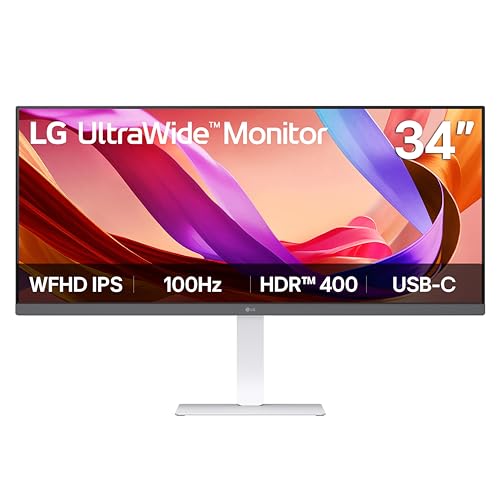
- 34-inch 21:9 IPS display for multitasking
- USB-C, DisplayPort, and HDMI connectivity
- Adjustable stand and screen-layout Switch app
Best For: Everyday work and adaptable desk setups
Best for Split-Screen Work
Samsung ViewFinity S50GC 34-Inch

- 34-inch 3440 x 1440 Ultra-WQHD display
- PBP and PIP for multiple input sources
- 100Hz refresh rate with HDR10 and eye care
Best For: Multi-source workflows and side-by-side projects
Balanced Creative Workspace

- 34-inch curved Ultrawide QHD display
- HDR10, 3000:1 contrast, and 120Hz performance
- Eye Saver Mode with HDMI and DisplayPort
Best For: Office multitasking and creative work
Connected Multitasker

- 34-inch 3440 x 1440 UltraWide workspace
- USB-C with up to 65W power delivery
- PbP and OnScreen Control for flexible multitasking
Best For: Laptop users and hybrid workstations
Smooth Everyday Productivity

- 34-inch curved 3440 x 1440 display
- 120Hz refresh rate with 5ms response time
- LG Switch, Reader Mode, and adjustable stand
Best For: Everyday office work and organized multitasking
Best for High-Speed Versatility
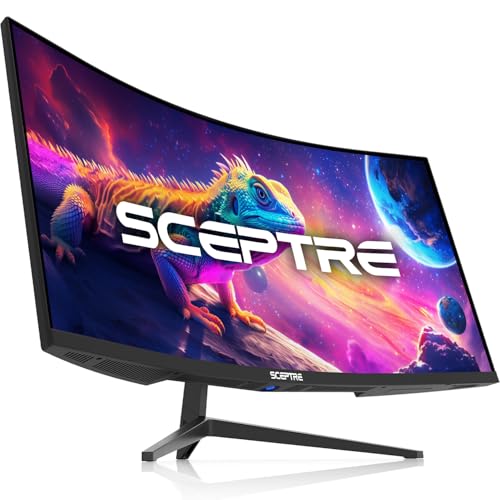
- 3440 x 1440 resolution with 21:9 workspace
- Up to 180Hz refresh rate and 1ms MPRT
- PBP/PIP, built-in speakers, and 100% sRGB
Best For: Users combining office multitasking with gaming or media work
Best for Comfortable Creative Work

- IPS 3440 x 1440 display with up to 99% sRGB
- USB-C with up to 96W laptop charging
- Screen layouts for up to six sections
Best For: Creators and hybrid workers seeking flexible, comfortable multitasking
Best Overall – Samsung 49-Inch Business Ultrawide
For demanding professional ultrawide productivity monitors, the Samsung S95UA stands out with a 49-inch Dual QHD display, 32:9 aspect ratio, and 1000R curve. Its USB-C docking capabilities, 120Hz refresh rate, and built-in speakers make it a versatile centerpiece for a busy workstation.
Best For: Professionals who want maximum screen space and a streamlined laptop-docking setup.
Pros:
- 5120 x 1440 Dual QHD resolution provides extensive workspace for multitasking.
- USB-C supports up to 90W charging and helps consolidate connections.
- 120Hz refresh rate, DisplayHDR 400, height adjustment, and built-in speakers add versatility.
Cons:
- The 49-inch width and 32.2-pound weight require substantial desk space.
- Its large curved format may be more monitor than some single-screen workflows need.
This is the strongest all-in-one choice for users who regularly manage multiple windows, sources, or creative projects. It costs more desk space, but the integrated hub and expansive resolution can replace a multi-monitor arrangement.
Best Balanced Choice – Dell 34-Inch USB-C Ultrawide
The Dell S3425DW is a well-rounded option among professional ultrawide productivity monitors, combining a 34-inch WQHD curved screen with 120Hz motion and one-cable USB-C connectivity. Its wide color coverage and comfort-focused features suit both office work and creative tasks.
Best For: Office professionals and creators who want a comfortable, versatile 34-inch display.
Pros:
- 3440 x 1440 resolution offers useful horizontal workspace without the footprint of a 49-inch monitor.
- USB-C connectivity provides up to 65W power delivery through a single cable.
- 99% sRGB, 95% DCI-P3, 3000:1 contrast, and 120Hz support work well for varied workloads.
Cons:
- USB-C power delivery is lower than the Samsung model’s 90W capacity.
- It has a one-year warranty rather than the three-year warranty listed for the Samsung.
Choose this Dell when you want a practical middle ground: more workspace than a conventional monitor, strong color coverage, and convenient USB-C charging in a comparatively manageable size.
Best for Flexible Workspaces – LG 34-Inch UltraWide IPS
The LG 34U530A-W is a practical pick for professional ultrawide productivity monitors when multitasking and viewing flexibility matter more than maximum resolution. Its 34-inch 21:9 IPS panel, adjustable stand, USB-C, and screen-layout Switch app support everyday work with minimal clutter.
Best For: Users who want an affordable-feeling, adjustable 34-inch workspace for documents, calls, and multiple windows.
Pros:
- 21:9 format provides more horizontal room for side-by-side applications.
- IPS panel, 178-degree viewing angles, and up to 99% sRGB coverage support clear, consistent images.
- USB-C, height/tilt/swivel adjustments, built-in speakers, and Switch app layouts improve convenience.
Cons:
- 2560 x 1080 resolution is lower than the 3440 x 1440 resolution on the Dell and Samsung 34-inch models.
- The listed five-millisecond response time is less performance-focused than the Dell’s stated figure.
This LG makes sense for general productivity, video calls, and content consumption where a wide layout and ergonomic adjustments are priorities. It is less suitable for users who need the sharpest text or greatest pixel density.
Best for Split-Screen Work – Samsung ViewFinity S50GC 34-Inch
The Samsung ViewFinity S50GC is a strong choice among professional ultrawide productivity monitors for users who work across multiple inputs. Its Ultra-WQHD resolution, picture-by-picture support, eye-care features, and borderless design make it well suited to organized split-screen workflows.
Best For: Professionals who need to view two sources or applications at once on a single 34-inch display.
Pros:
- 3440 x 1440 Ultra-WQHD resolution provides detailed space for multitasking.
- PBP supports two simultaneous sources, while PIP lets a second source remain visible.
- 100Hz refresh rate, HDR10, FreeSync, ambient light adjustment, and Eye Saver Mode add usability.
Cons:
- It lacks the USB-C connectivity and charging features offered by the Dell, LG, and Samsung 49-inch models.
- The listed 300-cd/m² brightness is lower than the LG’s and Samsung 49-inch monitor’s 400-cd/m² rating.
The S50GC is especially appealing for source comparison, remote-work setups, and users pairing a desktop with another device. Its conventional inputs may require more cables, but PBP and PIP make the screen highly practical.
Balanced Creative Workspace – Samsung ViewFinity S5 34-inch
For professionals comparing professional ultrawide productivity monitors, the Samsung ViewFinity S5 combines a 34-inch curved QHD workspace with a 21:9 aspect ratio. Its 3440 x 1440 resolution, HDR10 support, and 120Hz-class smoothness are well suited to multitasking and creative work.
Best For: Office professionals and creators who want a spacious curved display with strong contrast and smooth motion.
Pros:
- Ultrawide QHD resolution provides room for multiple windows and detailed creative work.
- HDR10 and a 3000:1 contrast ratio support darker blacks and brighter highlights.
- 120Hz refresh rate and AMD FreeSync Premium help reduce motion blur and tearing.
- Eye Saver Mode and flicker reduction can make extended sessions more comfortable.
Cons:
- Only one HDMI port is listed.
- The 300 cd/m² brightness may be modest for very bright rooms.
- The supplied specifications list a 5ms response time, so it is not aimed at the fastest competitive gaming.
The S5 is a practical all-around choice when workspace, contrast, and smooth everyday performance matter more than extensive docking features. HDMI and DisplayPort connectivity keep setup straightforward.
Connected Multitasker – LG 34WR55QK-B UltraWide
The LG 34WR55QK-B stands out among professional ultrawide productivity monitors with a 34-inch 3440 x 1440 workspace, flexible input options, and software-based window management. Its USB Type-C connection can deliver up to 65W to a compatible laptop, helping simplify a work desk.
Best For: Laptop-based professionals who need one wide screen, USB-C connectivity, and easy multi-window organization.
Pros:
- 21:9 UltraWide WQHD resolution supports multiple open applications on one screen.
- USB Type-C provides up to 65W power delivery for compatible laptops.
- OnScreen Control supports screen splitting and Picture-by-Picture from two input sources.
- Height and tilt adjustments make it easier to set a comfortable viewing position.
Cons:
- The 100Hz refresh rate is lower than some newer 120Hz alternatives.
- The VA panel is rated at 300 cd/m² brightness, which may be limited in direct sunlight.
- USB-C charging depends on device compatibility and the stated power requirement.
This LG is especially compelling for hybrid workstations that switch between a laptop and desktop. Its broad port selection, PbP support, and ergonomic stand make it a flexible productivity hub.
Smooth Everyday Productivity – LG 34U60ZB-B UltraWide
The LG 34U60ZB-B offers a straightforward option among professional ultrawide productivity monitors, pairing a 34-inch 1800R curved screen with 3440 x 1440 resolution. Its 120Hz refresh rate, Reader Mode, and LG Switch software support comfortable, organized daily work.
Best For: Professionals who want a clean, spacious monitor for documents, video calls, media, and general multitasking.
Pros:
- Ultrawide QHD resolution reduces the need to switch between windows.
- 120Hz refresh rate and 5ms response time keep motion smooth for work and entertainment.
- LG Switch supports up to 11 split-screen layouts and desktop controls.
- Height and tilt adjustment, Reader Mode, and a space-saving stand support longer sessions.
Cons:
- Connectivity is limited to DisplayPort, one HDMI port, and a headphone jack.
- The 250 cd/m² brightness is lower than many brighter productivity displays.
- It does not list USB-C or built-in speakers.
This model keeps the feature set focused on comfortable ultrawide computing rather than docking or extensive peripheral connectivity. It is a sensible fit for a tidy desk and software-assisted window management.
Best All-Around Workstation – Samsung ViewFinity S65UA
For shoppers comparing professional ultrawide productivity monitors, the Samsung ViewFinity S65UA combines a 34-inch 3440 x 1440 curved display with useful laptop-friendly connectivity. Its 100Hz refresh rate, USB-C charging, and eye-care features make it a practical choice for long multitasking sessions.
Best For: Laptop-based professionals who want a clean, single-cable desk setup for documents, research, and creative work.
Pros:
- USB-C supports display, data, and up to 90W laptop charging.
- 34-inch Ultra WQHD resolution provides room for side-by-side applications.
- 1000R curvature, TUV-certified eye care, flicker reduction, and automatic brightness and color-temperature adjustment support extended use.
- HDR10 and support for up to 1 billion colors enhance compatible media and creative content.
Cons:
- The 100Hz refresh rate is less gaming-focused than faster ultrawide options.
- The pronounced 1000R curve may not suit every workspace or viewing preference.
The S65UA is a well-rounded productivity monitor when USB-C convenience and long-session comfort matter more than maximum gaming speed. Its integrated Ethernet and Picture-by-Picture/Picture-in-Picture features add flexibility for complex desk setups.
Best for High-Speed Versatility – Sceptre C345B-QUT168
The Sceptre C345B-QUT168 is a strong option among professional ultrawide productivity monitors for users who also value responsive motion. Its 34-inch WQHD panel provides generous workspace, while the high refresh rate and multitasking modes broaden its appeal beyond office work.
Best For: Users who split time between productivity, photo or video editing, and fast-moving entertainment or gaming.
Pros:
- 3440 x 1440 resolution and a 21:9 layout provide substantially more workspace than a standard 1080p monitor.
- Up to 180Hz refresh rate and 1ms MPRT support smooth, responsive motion.
- Eye Care, blue-light filtering, and PBP/PIP modes support extended multitasking.
- Includes built-in speakers, two DisplayPort inputs, and two HDMI ports.
Cons:
- Connectivity does not include USB-C laptop charging.
- The one-year manufacturer warranty is shorter than the three-year warranty listed for the Samsung model.
- The feature set is more gaming-oriented than a dedicated office monitor.
This Sceptre stands out when a productivity display also needs gaming-grade speed. It offers a useful balance of workspace and responsiveness, though users seeking one-cable laptop connectivity should consider another option.
Best for Comfortable Creative Work – LG 34U650A-B
The LG 34U650A-B brings an IPS panel, 34-inch 3440 x 1440 resolution, and USB-C charging together in a productivity-focused design. For professional ultrawide productivity monitors, it is especially appealing to users who want consistent viewing angles, built-in audio, and flexible screen-layout tools.
Best For: Creators, office professionals, and hybrid workers who need comfortable multitasking with straightforward laptop connectivity.
Pros:
- IPS ultrawide panel offers 178-degree viewing angles and up to 99% sRGB coverage.
- USB-C handles display, data, and up to 96W laptop charging through one cable.
- Switch app can divide the screen into up to six sections and customize layouts.
- Height, tilt, and swivel adjustments plus built-in speakers support a tidy everyday workstation.
Cons:
- The 100Hz refresh rate and 5ms response time are less performance-focused than the Sceptre’s gaming specifications.
- Its 300-candela brightness is lower than the listed brightness of the Samsung and Sceptre monitors.
- The 3800R curve is relatively subtle for shoppers seeking an immersive curved display.
The LG is a polished productivity choice for people who prioritize IPS viewing consistency, laptop charging, and workspace organization. Its moderate curve and 100Hz refresh rate keep it versatile without making it primarily a gaming monitor.
How We Picked the Best Professional Ultrawide Productivity Monitors
We focused on features that matter during long workdays: usable screen resolution, panel quality, refresh rate, ergonomic adjustability, connectivity, and eye-comfort features. We also considered whether each monitor suits office productivity, content creation, multitasking, or mixed work-and-entertainment setups.
Resolution was especially important. A 3440 × 1440 WQHD display provides noticeably more workspace and sharper text than a 2560 × 1080 WFHD model, while a 49-inch dual-QHD monitor can replace two conventional displays for users who need maximum horizontal space.
Quick Comparison
- Best for maximum workspace: Samsung 49-inch Business Curved Ultrawide with dual QHD resolution and USB-C.
- Best for USB-C office setups: Samsung ViewFinity S65UA or LG 34WR55QK-B.
- Best for affordable WQHD productivity: Dell S3425DW, Samsung ViewFinity S50GC, or LG 34U60ZB-B.
- Best for high refresh rates: Sceptre’s 34-inch model or the Samsung ViewFinity S5 S55GH.
- Best for IPS viewing consistency: LG 34U530A-W or LG 34U650A-B.
Key Buying Factors for Professional Ultrawide Productivity Monitors
Resolution and Screen Size
For most professional users, 34 inches at 3440 × 1440 is the best balance of workspace, text clarity, and desk compatibility. Choose a 49-inch dual-QHD screen if you frequently compare large documents or manage several applications side by side. WFHD models can cost less, but text and fine interface elements may look less detailed.
Panel Type and Viewing Comfort
IPS panels typically provide consistent colors and wide viewing angles, while VA panels often deliver stronger contrast and deeper blacks. Curved screens can make a wide display feel more uniform, particularly when you sit centered. Look for reader modes, flicker reduction, low-blue-light settings, and height adjustment if you work for extended periods.
Connectivity and Workflow
USB-C is valuable for laptop users because one cable may carry video, data, and charging, depending on the monitor’s implementation. DisplayPort and HDMI provide broad compatibility, while picture-by-picture and picture-in-picture modes help combine two computers or sources on one screen.
Refresh Rate and Ergonomics
A 100Hz or 120Hz refresh rate makes scrolling and cursor movement feel smoother than standard 60Hz operation. Gaming-oriented refresh rates are useful for mixed-use desks, but they should not outweigh resolution, connectivity, or stand adjustability when productivity is the priority.
Who Should Buy Which Professional Ultrawide Productivity Monitors?
Choose the Samsung 49-inch model if you want a dual-monitor replacement with minimal bezel interruption. Pick a 34-inch WQHD USB-C monitor for a clean laptop workstation, especially if charging and cable reduction matter. IPS-based LG models are sensible for users who prioritize viewing angles and consistent color, while VA options suit buyers who prefer stronger contrast. Finally, choose the Sceptre or other high-refresh models if your professional setup also serves as a gaming or media station.
