
The best professional powered USB hubs make it easier to connect storage, cameras, controllers, peripherals, and other equipment without overloading a computer’s built-in ports.
We compared 10 powered hubs across port count, USB speed, charging support, power delivery, construction, controls, and installation flexibility to help you choose the right fit for your desk or workstation.
Best 10 Professional Powered USB Hubs Picks for 2026
Best for Port-Level Control
SABRENT 10-Port Powered USB 3.0 Hub

- Seven USB 3.0 data ports
- Three 2.4A charging ports
- Individual switches and LEDs
Best For: Desktops needing controlled, high-capacity USB expansion
Best for USB-C Workstations

- 15 USB-C and USB-A ports
- 10Gbps data transfer
- 100W PD and 65W adapter
Best For: USB-C workstations with varied peripherals and charging needs
Best for Simple Switching
Atolla 8-Port Powered USB 3.0 Hub
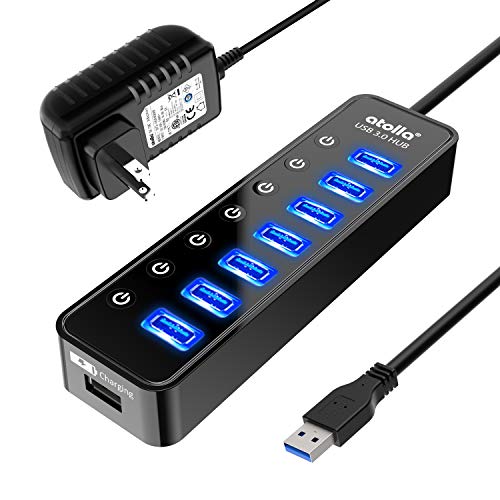
- Seven 5Gbps data ports
- Dedicated 2.4A charging port
- Individual on/off switches
Best For: USB-A desktops and home offices
Best for Flexible Laptop Connections

- Hybrid USB-C and USB-A cable
- Seven 5Gbps USB 3.0 ports
- Includes a 60W power adapter
Best For: Laptop users switching between USB-C and USB-A systems
Industrial Durability
StarTech 7-Port 10Gbps USB Hub

- Seven USB-A/USB-C ports with shared 10Gbps bandwidth
- Metal housing with ESD and 350W surge protection
- Desk, wall, and DIN-rail mounting options
Best For: Industrial workstations and mounted professional setups
Expanded Desktop Charging
TP-Link UH720 7-Port USB 3.0 Hub

- Seven USB 3.0 data ports up to 5Gbps
- Two dedicated 5V/2.4A smart-charging ports
- Built-in protection and included 12V/4A adapter
Best For: Office desks needing peripherals and device charging
Hybrid Connectivity

- Three fast data ports plus four USB-A 5Gbps ports
- Two USB-C PD charging ports rated up to 45W
- 65W adapter and protective power circuitry included
Best For: USB-C desks using mixed peripherals and dedicated charging
Rugged Desktop Pick
StarTech.com 7-Port USB 3.0 Hub

- Seven USB 3.0 ports
- Durable metal housing
- Up to 5 Gbps transfers
Best For: Compact professional workstations and travel setups
High-Capacity Performance Hub

- 16 ports at up to 10 Gbps
- 96W powered operation
- Individual port switches
Best For: Large, high-speed multi-device workstations
Flexible Charging Workstation

- Ten data ports plus charging
- Individual switches with LEDs
- Includes longer cables
Best For: Workstations combining peripherals and device charging
Best for Port-Level Control – SABRENT 10-Port Powered USB 3.0 Hub
The SABRENT 10-Port Powered USB 3.0 Hub is a practical choice for professional powered USB hubs when you need several peripherals connected at once. It provides seven USB 3.0 data ports, three dedicated charging ports, a 60W power adapter, and individual switches for convenient desktop control.
Best For: Desktops, workstations, and users who want independent control over connected USB devices.
Pros:
- Seven USB 3.0 data ports support transfer speeds up to 5Gbps.
- Three dedicated charging ports provide up to 2.4A per port.
- Individual power switches and LED indicators simplify device management.
- Works with Windows, macOS, and Linux without drivers.
Cons:
- Its charging ports are separate from the USB 3.0 data ports.
- The compact design may offer less spacing for bulky adapters.
With stable 60W power and port-level controls, this SABRENT hub is well suited to a busy desk where predictable connectivity and easy power management matter.
Best for USB-C Workstations – Gիտfos 15-in-1 USB 3.2 Hub
The Gitfos 15-in-1 hub is aimed at professional powered USB hubs users who need broad USB-C and USB-A expansion. It combines 10Gbps USB 3.2 data ports, multiple charging options, a 100W USB-C PD port, and a supplied 65W power adapter in an aluminum, angled design.
Best For: USB-C laptops, creative workstations, photographers, video editors, and multi-device desks.
Pros:
- Offers 15 ports with USB-C and USB-A connectivity.
- Provides 10Gbps USB 3.2 data transfer on selected ports.
- Includes a 100W USB-C PD charging port and additional charging ports.
- Aluminum construction, an angled profile, and non-slip feet support desk use.
Cons:
- The hub requires the included 65W power adapter to operate.
- Its ports do not support video output.
- The USB-C charging ports are not recommended for computers or other high-power appliances.
This is the most feature-dense option in the group, but buyers should verify their laptop, operating system, and charging requirements before choosing it.
Best for Simple Switching – Atolla 8-Port Powered USB 3.0 Hub
The Atolla 8-Port hub is a straightforward option among professional powered USB hubs for users who want USB 3.0 expansion without complicated setup. It adds seven data ports, one dedicated smart-charging port, individual on/off switches, and a 5V/4A power adapter.
Best For: Home offices, Mac setups, and desks with printers, storage drives, keyboards, and other USB peripherals.
Pros:
- Seven USB 3.0 data ports support speeds up to 5Gbps.
- A dedicated charging port can provide up to 2.4A.
- Individual switches reduce the need to unplug devices.
- Supports Windows, macOS, and Linux with plug-and-play operation.
Cons:
- The enclosure is plastic rather than aluminum.
- It has only one dedicated charging port.
For a conventional USB-A desktop setup, the Atolla delivers useful capacity and hands-on control at a simpler specification than the larger USB-C-focused alternatives.
Best for Flexible Laptop Connections – Plugable 7-in-1 USB Hub
The Plugable 7-in-1 hub is a versatile pick for professional powered USB hubs when a laptop setup may use either USB-C or USB-A. Its hybrid host cable supports both interfaces, while seven USB 3.0 ports and the included 60W adapter provide data connectivity and consistent power for permanent or mobile setups.
Best For: Laptop users, classrooms, home offices, shared charging stations, and IT testing environments.
Pros:
- Hybrid USB-C and USB-A host connectivity works with newer and older systems.
- Seven USB 3.0 ports support transfer speeds up to 5Gbps.
- The 60W adapter supports use as a standalone powered hub.
- Plug-and-play support covers Windows, macOS, and Linux.
Cons:
- It offers fewer ports than the 10-port and 15-in-1 alternatives.
- The supplied unit weighs 1.4 pounds, making it less convenient for frequent travel.
- Older machines may require current drivers and system updates for optimal compatibility.
The Plugable stands out for connection flexibility: it is a sensible choice when the same powered hub needs to move between USB-C and USB-A computers.
Industrial Durability – StarTech 7-Port 10Gbps USB Hub
For professional powered USB hubs in demanding workspaces, the StarTech HB31C5A2CME emphasizes rugged installation and dependable connectivity. It provides five USB-A and two USB-C ports with shared 10Gbps bandwidth, plus surge and ESD protection.
Best For: Industrial environments, mounted workstations, labs, and users connecting fast storage or specialized equipment.
Pros:
- Seven downstream ports support USB 3.2 Gen 2 speeds up to 10Gbps.
- Metal housing, ESD protection, and 350W surge protection suit demanding environments.
- Mounts on a desk, wall, or DIN rail and includes screw-lock host connectivity.
- Supports universal power input, including the included adapter or a 7–24V DC terminal block.
Cons:
- The 10Gbps bandwidth is shared across downstream ports.
- Charging output is limited to 12W per port and 40W total.
- Its industrial mounting features may be unnecessary for a basic desk setup.
This is a strong professional choice when physical security, mounting flexibility, and protection matter as much as port expansion. Its OS-independent plug-and-play design also keeps deployment straightforward.
Expanded Desktop Charging – TP-Link UH720 7-Port USB 3.0 Hub
The TP-Link UH720 is one of the more practical professional powered USB hubs for a desk that needs both data connectivity and dedicated charging. It combines seven USB 3.0 data ports with two 5V/2.4A smart-charging ports and includes a 12V/4A power adapter.
Best For: Offices and home workstations connecting peripherals while charging phones, tablets, and other USB devices.
Pros:
- Seven USB 3.0 data ports support transfers up to 5Gbps.
- Two dedicated smart-charging ports provide up to 2.4A output.
- Includes overheat, overload, overvoltage, short-circuit, and surge protection.
- Supports Windows, macOS, Linux, and ChromeOS without requiring drivers.
Cons:
- Data ports use USB 3.0 speeds rather than 10Gbps USB 3.2 Gen 2.
- The enclosure is plastic rather than metal.
- The charging ports are separate from the seven data ports.
The UH720 is a sensible general-purpose hub when reliable peripheral expansion and convenient device charging are more important than maximum transfer speed. Its physical power button and broad operating-system support are useful for shared desks.
Hybrid Connectivity – intpw 9-Port 10Gbps USB-C Hub
The intpw powered hub targets modern USB-C workstations that need a mixture of fast data ports and dedicated charging. It offers three 10Gbps data ports, four USB-A 5Gbps ports, and two USB-C PD charging ports, backed by a 65W adapter.
Best For: USB-C laptops, desktops, and creative or office setups using mixed USB-A accessories and mobile-device charging.
Pros:
- Provides USB-C and USB-A data connectivity, including 10Gbps ports.
- Two dedicated USB-C PD ports support up to 45W charging each.
- Angled aluminum housing helps make desktop plug-in access easier.
- Includes overload, overvoltage, overcurrent, short-circuit, and overcharge protection.
Cons:
- The two PD charging ports do not support data transfer.
- It does not provide video output.
- The notes advise avoiding multiple SSDs or removable drives simultaneously.
This model is best viewed as a flexible USB expansion and power-distribution station rather than a docking station. Its mixed port layout and dedicated charging outputs suit modern desks, provided you respect the stated storage-device limitations.
Rugged Desktop Pick – StarTech.com 7-Port USB 3.0 Hub
For buyers seeking professional powered USB hubs in a compact format, the StarTech.com ST7300U3M offers seven USB 3.0 ports, a durable metal enclosure, and up to 5 Gbps data transfer. Its upright ports and desktop- or wall-mountable design make it practical for organized workstations.
Best For: Professionals who need a sturdy, space-conscious hub for expanding a Mac or Windows computer.
Pros:
- Seven USB 3.0 ports support data rates up to 5 Gbps.
- Metal housing is designed for regular daily use.
- Backward compatible with USB 2.0 and USB 1.x devices.
- Upright ports simplify connecting and disconnecting peripherals.
Cons:
- Offers fewer ports than larger professional hubs.
- Its compact enclosure may provide less room for unusually bulky connectors.
The ST7300U3M is a straightforward choice when durability and convenient port access matter more than maximum capacity. It suits desktops, travel setups, and workstations that need dependable USB expansion without a large footprint.
High-Capacity Performance Hub – ACASIS 16-Port USB 3.2 Hub
Among professional powered USB hubs, the ACASIS 16-port model stands out for its 10 Gbps USB 3.2 connectivity, 96W power adapter, and individually switched ports. Its aluminum housing and surge protection are suited to demanding multi-device setups.
Best For: Power users, studios, and offices connecting many high-speed USB devices at once.
Pros:
- Provides 16 USB ports with data transfer speeds up to 10 Gbps.
- 96W power adapter supports stable operation with multiple devices.
- Individual switches make it easy to control connected peripherals.
- Aluminum housing helps with heat dissipation and durability.
Cons:
- Larger and heavier than compact desktop hubs.
- Its extensive capacity may be unnecessary for simple peripheral setups.
This ACASIS hub is the strongest fit for users who prioritize port count, fast transfers, and individual device control. Broad Windows, macOS, UNIX, and Linux compatibility adds flexibility for mixed-system environments.
Flexible Charging Workstation – Wenter 11-Port USB 3.0 Hub
The Wenter 11-port model is a practical option for professional powered USB hubs when a setup needs both data expansion and dedicated charging. It combines ten USB 3.0 data ports with a smart-charging port, individual switches, LED indicators, and longer cables.
Best For: Home offices and workstations managing peripherals alongside phones, tablets, and other chargeable devices.
Pros:
- Ten USB 3.0 data ports support transfers up to 5 Gbps.
- Dedicated charging port can deliver up to 2.4 amps per port.
- Individual switches and LEDs provide convenient power control.
- Included longer USB and power cables help with desk placement.
Cons:
- USB 3.0 data speed is lower than the ACASIS hub’s 10 Gbps rate.
- Plastic construction may feel less rugged than a metal-enclosed model.
- Charging and data capabilities are split across different ports.
Choose the Wenter when convenient power management is as important as adding USB connections. Its plug-and-play design, hot-swapping support, and broad Windows, Mac, and Linux compatibility make it easy to integrate into a busy desk setup.
How We Picked the Best Professional Powered USB Hubs
We focused on hubs that use an external power adapter, since dedicated power improves stability when several devices are connected at once. Our comparison considered USB generation and rated speeds, total port count, charging capability, included power supplies, connector types, physical construction, and practical features such as individual switches, LED indicators, wall mounting, and industrial-grade design.
Because “powered” does not guarantee identical performance, check each model’s port layout and specifications carefully. Some prioritize high-speed data, while others add dedicated charging ports or USB-C connectivity.
Quick Comparison
| What to Compare | Why It Matters |
|---|---|
| Port count | Determines how many peripherals can remain connected. |
| USB speed | Affects transfers to SSDs, cameras, and other high-bandwidth devices. |
| Charging ports | Useful for phones and accessories, but not always equivalent to laptop charging. |
| Power adapter | Higher wattage can provide more headroom for multiple devices. |
| Build and mounting | Important for studio, office, lab, and industrial installations. |
Key Buying Factors for Professional Powered USB Hubs
Speed and Port Type
USB 3.0 is suitable for everyday peripherals and moderate file transfers, while USB 3.2 Gen 2 hubs rated up to 10Gbps are better suited to fast external SSDs and frequent media work. Confirm whether the hub uses USB-A, USB-C, or a mix, and verify the host connection required by your computer.
Power and Charging
A powered hub should include a dedicated adapter with enough capacity for your intended devices. Smart-charging ports can be convenient, but they may not provide USB Power Delivery to charge a laptop. Treat charging wattage and data-port power as separate specifications.
Reliability and Workspace Fit
Metal enclosures, strain-resistant cables, ventilation, and wall- or desk-mounting options can matter more than maximum port count in a professional environment. Individual switches are helpful when devices need to be isolated or powered down without unplugging them.
Who Should Buy Which Professional Powered USB Hubs?
Choose a compact 7-in-1 option for a laptop workstation with modest expansion needs. A 7- or 8-port desktop hub is a practical middle ground for keyboards, drives, printers, and other everyday equipment. Select a 9-, 10-, or 11-port model when you regularly connect numerous peripherals and want dedicated charging or power controls.
For large production setups, a 15- or 16-port hub offers the most expansion, but confirm that its adapter and host connection match your workload. If durability, secure installation, or compliance is a priority, an industrial StarTech model may be the better choice than a consumer-focused hub. Finally, users transferring large files should prioritize a genuine 10Gbps model and compatible cables and devices rather than choosing solely by port count.
