
Choosing the right network video recorder can simplify camera management while giving your business, facility, or larger property dependable local storage and remote access.
These 10 professional network video recorders cover compact installations, high-channel systems, PoE deployments, and enterprise-focused surveillance platforms. Use the guide below to match capacity, compatibility, and features to your security plan.
Best 10 Professional Network Video Recorders Picks for 2026
High-Capacity Reolink Hub
36-Channel PoE Network Video Recorder

- Manages up to 36 Reolink IP cameras
- Supports up to 48TB across three HDD bays
- Requires external PoE switches; HDDs not included
Best For: Large Reolink-only camera systems
UniFi Protect Pro Storage

- Works with the UniFi Protect application
- Supports systems with up to 60 cameras
- Provides local storage and remote access
Best For: Expanding UniFi Protect installations
Analytics-Ready GeoVision Recorder

- Supports 32 cameras and up to 12MP recording
- Offers four SATA bays with up to 48TB capacity
- Includes standalone dual-display monitoring
Best For: Business systems needing 4K recording and analytics
Compact UniFi Protect Recorder

- Supports IP cameras in the UniFi ecosystem
- Offers Ethernet and USB connectivity
- Supplied specifications list four channels
Best For: Smaller UniFi Protect installations
Best Reolink NVR
RLN16-410 16-Channel PoE Recorder
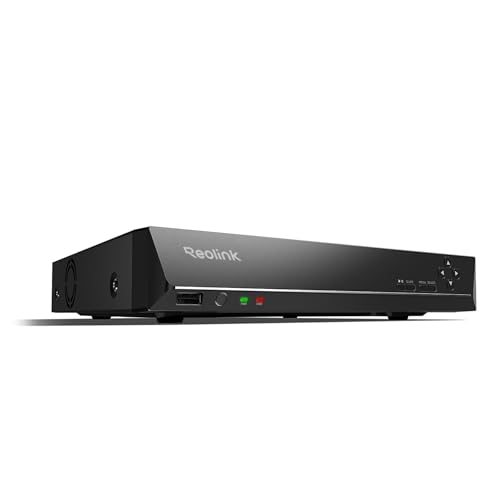
- 16-channel Reolink camera support
- Pre-installed 4TB hard drive
- PoE plug-and-play installation
Best For: Reolink-based home and small-property surveillance
Best High-Capacity NVR
Ubiquiti Enterprise Network Video Recorder
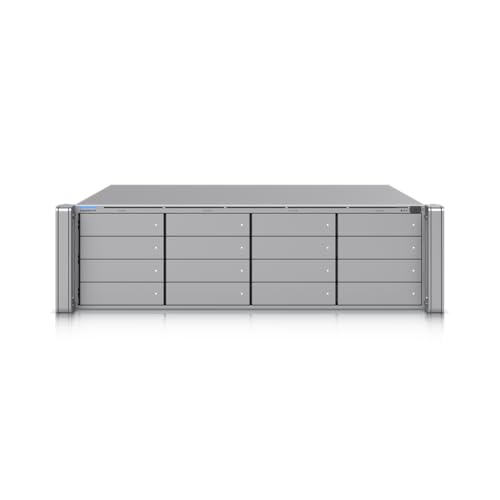
- Supports 16 HDDs or SSDs
- 10Gb SFP+ and Ethernet connectivity
- Redundant hot-swap power supplies
Best For: Expandable professional surveillance infrastructure
Best TP-Link PoE NVR

- 16-channel PoE+ recorder
- HDMI connectivity for local viewing
- Storage is not listed as included
Best For: 16-camera VIGI PoE+ installations
Enterprise-Ready Choice
Hikvision DS-7600 16-Channel NVR

- 16-channel recording capacity
- Supports multiple MPEG-4, H.264, and H.265 formats
- TAA compliant with HDMI and VGA output
Best For: Professional installations needing 16 channels and TAA compliance
Compact PoE Solution

- Built-in six-port PoE switch
- Supports up to six 4K or 15 Full HD cameras
- Includes HDMI viewing and 3.5-inch HDD compatibility
Best For: Ubiquiti deployments needing integrated PoE in a compact NVR
Easy Expandable Pick
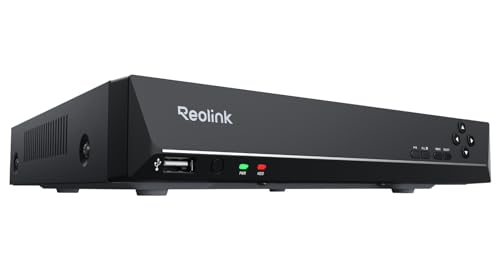
- Supports eight simultaneous PoE camera recordings
- Accepts up to 16TB across internal and eSATA storage
- Includes free local and remote viewing apps
Best For: Reolink users building an expandable 24/7 PoE security system
High-Capacity Reolink Hub – 36-Channel PoE Network Video Recorder
For buyers comparing professional network video recorders, the Reolink RLN36 is a high-capacity option for larger Reolink camera installations. It manages up to 36 compatible Reolink IP cameras and supports up to 48TB across three HDD bays, but it requires external PoE switches because the recorder has no built-in PoE ports.
Best For: Large Reolink-only systems that need centralized management and substantial local storage.
Pros:
- Supports up to 36 Reolink IP cameras, including 4K and 12MP models.
- Three HDD bays support up to 16TB each, for up to 48TB total storage.
- Includes USB 3.0 for efficient footage backups and supports smart camera features such as human and vehicle detection.
Cons:
- Works only with Reolink IP cameras.
- Has no PoE ports, so external PoE switches are required and not included.
- HDDs are not included.
The RLN36 is a strong fit when scale and storage matter more than all-in-one installation convenience. Confirm camera compatibility and budget for PoE switches and hard drives before buying.
UniFi Protect Pro Storage – Network Video Recorder Pro
The Ubiquiti UniFi Network Video Recorder Pro is designed for UniFi Protect deployments that need local surveillance storage and room to add cameras. It supports remote access through the UniFi Protect application and stores footage locally rather than on a cloud server.
Best For: UniFi Protect users building a larger camera system with local recording and remote access.
Pros:
- Works with the UniFi Protect application.
- Can add up to 60 cameras to the system.
- Stores surveillance footage locally and supports remote access to streams and recordings.
Cons:
- Its supplied specifications list 8TB of storage capacity.
- Designed for UniFi Protect cameras and ecosystem integration.
- The supplied details do not specify included camera hardware.
For professional network video recorders within a UniFi installation, the UNVR-Pro offers a straightforward local-storage approach and substantial camera expansion. It is most suitable when you are already committed to UniFi Protect.
Analytics-Ready GeoVision Recorder – 32-Channel 4K NVR
The GeoVision GV-RNVR3240-N is a standalone choice among professional network video recorders, supporting up to 32 IP cameras with 4K recording and up to 12MP resolution. Its Linux-embedded design enables local viewing without an external PC, while four SATA bays provide up to 48TB of internal storage.
Best For: Businesses needing high-resolution recording, local dual-display monitoring, and advanced GeoVision camera analytics.
Pros:
- Supports 32 IP camera inputs, 4K recording, and up to 12MP resolution.
- Four 3.5-inch SATA bays support up to 48TB, with eSATA expansion.
- Offers face recognition and analytics with compatible GV-R Series cameras.
- Provides dual HDMI and VGA outputs for standalone monitoring.
Cons:
- Advanced analytics are tied to compatible GV-R Series IP cameras.
- Hard drives are not listed as included.
- Warranty coverage is listed as one year.
This GeoVision recorder balances high-resolution recording, expandable storage, and direct local monitoring. It is a practical choice for installations that can use its compatible camera and analytics ecosystem.
Compact UniFi Protect Recorder – Network Video Recorder
The Ubiquiti UniFi Protect Network Video Recorder is a compact option for a UniFi Protect camera setup. Its supplied specifications identify Ethernet and USB connectivity and IP camera support, making it worth considering for buyers who want a straightforward recorder within the UniFi ecosystem.
Best For: Smaller UniFi Protect installations that need a compact network video recorder.
Pros:
- Supports IP cameras.
- Uses Ethernet and USB connectivity.
- Designed for the UniFi Protect ecosystem.
Cons:
- The supplied specifications list four channels.
- Storage capacity is not specified in the supplied details.
- The supplied notes do not provide recording-resolution or storage-expansion information.
This model may suit a smaller UniFi deployment, but the limited supplied specifications make it important to verify channel capacity, storage, and compatibility before purchase.
Best Reolink NVR – RLN16-410 16-Channel PoE Recorder
For buyers seeking professional network video recorders within the Reolink ecosystem, the RLN16-410 offers a straightforward 16-camera PoE setup. Its pre-installed 4TB hard drive supports simultaneous recording, while one Ethernet cable can carry power and data to compatible Reolink PoE cameras.
Best For: Reolink camera owners building a 16-camera home or small-property surveillance system with local and remote access.
Pros:
- Supports up to 16 compatible Reolink IP cameras.
- Includes a pre-installed 4TB hard drive for 24/7 recording.
- PoE plug-and-play setup can transmit power and data over distances up to 330 feet.
- Works with Reolink apps and clients for local or remote viewing without monthly fees.
Cons:
- Works only with Reolink IP cameras.
- Additional storage requires adding an extra hard drive, up to 8TB according to the supplied details.
The RLN16-410 is a practical choice when compatibility with Reolink cameras matters more than cross-brand flexibility. Its 16 channels, included storage, and integrated PoE simplify installation and ongoing recording.
Best High-Capacity NVR – Ubiquiti Enterprise Network Video Recorder
The Ubiquiti Enterprise NVR is designed for demanding professional network video recorder installations that need substantial drive expansion and fast network connectivity. It supports up to 16 3.5-inch HDDs or SSDs and includes redundant hot-swap power supplies for added operational resilience.
Best For: Ubiquiti-oriented professional surveillance deployments that need expandable storage and high-speed network uplinks.
Pros:
- Supports up to 16 3.5-inch HDDs or SSDs.
- Provides two 10G SFP+ uplinks and one 10 GbE RJ45 port.
- Includes two hot-swap power supplies for power redundancy.
Cons:
- Storage drives are not listed as included in the supplied details.
- The listed manufacturer warranty is six months.
- Its enterprise-focused feature set may be more than smaller systems require.
With extensive drive support, 10Gb networking, and redundant power supplies, this NVR is best suited to installations where scalability and infrastructure reliability are priorities. Plan separately for compatible storage drives.
Best TP-Link PoE NVR – VIGI 16-Channel NVR2016H-16MP
The TP-Link VIGI NVR2016H-16MP is a 16-channel PoE+ option for buyers comparing professional network video recorders for a multi-camera installation. Its supplied specifications list HDMI connectivity and support for up to 16 camera channels, while storage details indicate compatibility with substantial hard-drive capacity.
Best For: Multi-camera VIGI surveillance systems needing 16 channels and PoE+ capability.
Pros:
- Provides 16 camera channels.
- Uses PoE+ for a streamlined network camera installation.
- Includes HDMI connectivity for local display setups.
- Supplied specifications list 10TB memory capacity and a 20TB hard-drive size.
Cons:
- Built-in media is listed as not included.
- The supplied details do not specify a pre-installed hard drive.
- Camera compatibility and detailed recording features should be confirmed before purchase.
The VIGI NVR2016H-16MP makes sense for a 16-camera PoE+ deployment, especially when local HDMI viewing is useful. Because storage is not listed as built in, verify the drive configuration and capacity requirements before ordering.
Enterprise-Ready Choice – Hikvision DS-7600 16-Channel NVR
For professional network video recorders, the Hikvision DS-7600NI-Q2/P Series is a strong fit when a system needs 16 channels and broad video-format support. It provides HDMI and VGA connectivity, RCA audio input, and TAA compliance for organizations with specific procurement requirements.
Best For: Professional installations requiring 16-channel capacity and TAA-compliant equipment.
Pros:
- Supports up to 16 channels.
- Handles MPEG-4, H.264, H.264+, H.265, and H.265+ formats.
- Offers HDMI and VGA connectivity plus RCA audio input.
- TAA compliant for eligible professional purchasing environments.
Cons:
- Hard drive is not included.
- Only one USB port is listed.
This Hikvision NVR emphasizes channel capacity and compatibility rather than an all-in-one storage package. Plan for a separate hard drive and verify that your cameras and display setup match its wired connections.
Compact PoE Solution – Ubiquiti UNVR-Instant
The Ubiquiti UNVR-Instant is a compact option among professional network video recorders, combining 3.5-inch hard-drive compatibility with a built-in six-port PoE switch. Its HDMI viewing port and support for up to six 4K or 15 Full HD cameras make it suitable for smaller installations, though it needs a Gateway or Layer 3 switch.
Best For: Ubiquiti-focused deployments needing integrated PoE and flexible camera capacity.
Pros:
- Includes a built-in six-port PoE switch.
- Supports 3.5-inch hard drives.
- Supports up to six 4K or 15 Full HD cameras.
- Provides an HDMI viewing port.
Cons:
- Requires linking to a Gateway or Layer 3 switch.
- Hard drive is not stated as included.
The UNVR-Instant is appealing when simplified PoE connectivity matters, but it is not a fully standalone networking solution. Confirm the required Ubiquiti network equipment and storage before purchasing.
Easy Expandable Pick – Reolink RLN8-410 8CH NVR
The Reolink RLN8-410 is a practical choice among professional network video recorders for Reolink PoE camera systems. It supports eight simultaneous camera recordings, 24/7 recording, one internal hard drive up to 8TB, and an eSATA connection for another external drive up to 8TB.
Best For: Reolink camera owners building an expandable PoE system with local and remote access.
Pros:
- Supports up to eight cameras recording simultaneously.
- Supports 24/7 recording with an internal HDD up to 8TB and external eSATA storage up to 8TB.
- PoE simplifies camera power and data over one Ethernet cable up to 330 feet.
- Provides free app and client access for local and remote viewing without monthly fees.
Cons:
- Hard drive is not included.
- Works with compatible Reolink cameras and excludes 4G LTE cameras.
- Firmware updates and compatibility checks may be needed.
This Reolink model offers a straightforward path to an independent PoE surveillance system with expandable storage. It is most suitable for buyers committed to compatible Reolink cameras and willing to add their own hard drive.
How We Picked the Best Professional Network Video Recorders
We focused on recorders that support serious IP-camera deployments, prioritizing channel capacity, PoE integration, storage expansion, video format support, and dependable management features. The lineup includes compact 8-channel models, midrange 16-channel systems, and high-capacity 32- or 36-channel recorders, along with enterprise and ecosystem-specific options.
We also considered whether each unit is best suited to a complete camera system or to an existing network. Compatibility matters: a recorder may work most smoothly with cameras from the same manufacturer, while ONVIF support can provide broader flexibility depending on the model and firmware.
Quick Comparison
| Best For | Recommended Type | What to Prioritize |
|---|---|---|
| Small home or office | 8-channel NVR | Simple setup, PoE ports, remote viewing |
| Growing property | 16-channel NVR | Expansion room, drive capacity, camera compatibility |
| Large installation | 32- or 36-channel NVR | Bandwidth, multiple drive bays, high-resolution support |
| Unified security ecosystem | Ubiquiti recorder | Platform compatibility and centralized management |
| Professional deployment | Enterprise or commercial NVR | Reliability, retention, integration, and serviceability |
Key Buying Factors for Professional Network Video Recorders
Channel Count and Expansion
Choose more channels than you need today if additional cameras are likely. A recorder with spare capacity can be less expensive and disruptive than replacing an undersized unit later. Also check whether channel limits apply to wired PoE cameras, third-party network cameras, or high-resolution streams separately.
PoE and Network Bandwidth
Integrated PoE ports simplify installation by carrying power and data over one Ethernet cable. Confirm the total PoE budget, per-port speed, and uplink capacity. High-resolution cameras, multiple streams, and remote users can quickly increase bandwidth requirements.
Storage and Retention
Drive bays, maximum supported capacity, compression, recording schedules, and motion detection all affect retention. H.265 or H.265+ can reduce storage use, but cameras and recorder settings must support the same format. For important footage, consider redundancy, health monitoring, and a separate backup strategy.
Resolution, Playback, and Access
Match the recorder’s recording throughput and output resolution to your cameras. Useful features include synchronized playback, event search, mobile access, alerts, user permissions, and secure remote connectivity. Avoid judging performance by camera count alone; total decoding and recording bandwidth also matters.
Who Should Buy Which Professional Network Video Recorders?
Choose an 8-channel model for a small residence, storefront, or office with limited expansion plans. A 16-channel recorder is the safer choice for a medium property or installation expected to grow. Large facilities should look toward 32- or 36-channel units with multiple drive bays and stronger throughput.
If you already use a managed camera ecosystem, staying within that platform can simplify configuration and daily operation. For mixed-camera environments, verify ONVIF support, codec compatibility, licensing requirements, and supported resolutions before purchasing. Finally, prioritize storage planning and network capacity over headline channel count so your recorder remains useful as surveillance demands increase.
