
The best professional electronic writing tablets make handwritten notes easier to organize, edit, share, and revisit without carrying stacks of paper. The right model depends on whether you prioritize a natural paper-like screen, color sketching, app flexibility, or simple erasability.
We’ve selected 10 options spanning dedicated e-ink notebooks, standalone digital notepads, pen displays, and versatile Android tablets. Use the guide below to narrow the list by writing feel, software, storage, portability, and long-term value.
Best 10 Professional Electronic Writing Tablets Picks for 2026
Best Android Paper-Feel Notebook

- Color Android LCD with three viewing modes
- 16K pressure, battery-free smart pencil
- Built-in notes, PDF, audio, and AI tools
Best For: Color note-taking, Android apps, and versatile study or work use
Best Distraction-Free E-Reader Notebook

- 10.2-inch glare-free, 300 ppi display
- Premium Pen included with no charging required
- AI note tools and PDF markup support
Best For: Reading, handwriting, and focused document annotation
Best Color E Ink Writing Tablet

- Large 11.8-inch color E Ink display
- Marker Plus with built-in eraser included
- Folders, tags, handwriting conversion, and PDF markup
Best For: Paper-like color writing, sketching, reading, and organization
Best Standalone Drawing Notebook

- Paper-textured 10.95-inch anti-glare display
- 16K pressure sensitivity with tilt support
- Android 14, Google Play, and battery-free stylus
Best For: Portable sketching, drawing, note-taking, and PDF annotation
Focused Work Tablet

- 10.3-inch high-contrast E-Ink display
- Handwriting conversion and organized notes
- Imports and shares work documents
Best For: Distraction-free professional notes, PDFs, and meetings
Reading and Writing Pick
- 10.2-inch glare-free 300 ppi display
- AI conversion and notebook summarization
- Annotates books and imported PDFs
Best For: Readers and professionals combining documents with handwritten notes
Simple Reusable Note Pad

- Double-sided 10.5-inch LCD writing area
- Thin, lightweight, and reusable
- One-click clearing for notes and sketches
Best For: Scratch notes, messages, schoolwork, and office reminders
Best Student Tablet
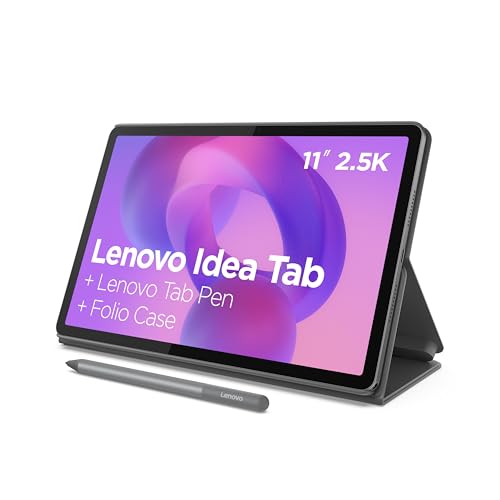
- Includes Tab Pen and folio case
- 2.5K 90Hz display with 8GB RAM and 256GB storage
- Study apps and up to 12-hour battery life
Best For: Students balancing handwritten notes with apps, research, and streaming
Best Paper-First Notebook

- Writes on real A5 paper with instant phone sync
- 8192 pressure levels and Bluetooth 5.3
- Offline storage, search, editing, and PDF/PNG export
Best For: Paper-focused note-takers and sketchers who want digital backups
Best E-Ink Writing Tablet

- 10.3-inch 300-ppi paper-like e-ink display
- 8192 pressure levels with no-charge stylus
- AI transcription, OCR, summaries, and broad file support
Best For: PDF annotation, reading, and organized professional note-taking
Best Android Paper-Feel Notebook – XPPen Magic Note Pad
For shoppers comparing professional electronic writing tablets, the XPPen Magic Note Pad is a versatile Android option for writing, reading, meetings, and study. Its 10.95-inch color LCD uses an AG nano-etched surface for reduced glare and includes three display modes, but it is not an E Ink tablet.
Best For: Users who want handwriting tools, Android apps, color display modes, and built-in productivity features in one device.
Pros:
- 16,384 pressure levels, a battery-free X3 Pro Pencil 2, and a paper-like textured surface support detailed handwriting and annotation.
- The XPPen Notes app supports handwriting-to-text conversion, audio recording, PDF editing, cloud uploads, and AI note features after the applicable system update.
- Its 90Hz LCD, 400-nit brightness, 16.7 million colors, and TÜV-certified eye-care features are suited to extended reading and writing.
Cons:
- It uses a normal Android LCD rather than an E Ink display, so its appearance and viewing experience differ from an e-reader.
- Some MyScript and AI features require a system update.
This is the most feature-rich choice here for buyers who need a writing tablet that can also run Android software. Choose it over a minimalist e-notebook if color, apps, and multimedia note tools matter more than an E Ink-style display.
Best Distraction-Free E-Reader Notebook – Kindle Scribe
The Kindle Scribe is a focused option among professional electronic writing tablets, combining a 10.2-inch glare-free reading display with a Premium Pen for writing and document markup. Its notification-free design is especially appealing for readers and note-takers who want fewer digital distractions.
Best For: Readers, writers, and professionals who want handwritten notes, book annotations, and PDF markup on a dedicated Kindle device.
Pros:
- The 300 ppi, front-lit display is designed for comfortable reading and writing in varied lighting conditions.
- The included Premium Pen requires no setup or charging and provides a pen-on-paper-style writing experience.
- Built-in AI tools can convert handwriting to text, summarize notes, and adjust their length and tone.
- Send to Kindle supports importing and marking up documents and PDFs, while Active Canvas creates space for notes in books.
Cons:
- Its feature set is centered on Kindle reading and note-taking rather than a general-purpose app ecosystem.
- The product information does not specify color display support.
The Kindle Scribe is a strong match for buyers who prioritize reading comfort, long battery life, and a calm writing environment. It is less suitable if you need Android apps or a color screen for creative work.
Best Color E Ink Writing Tablet – reMarkable Paper Pro
The reMarkable Paper Pro brings color to a paper-focused workflow, making it a compelling choice among professional electronic writing tablets for writing, sketching, reading, and document organization. Its 11.8-inch Canvas Color display pairs with the included Marker Plus and adjustable reading light.
Best For: Professionals, students, and creatives who want a large low-glare color e-notebook with a natural writing feel.
Pros:
- The 11.8-inch color E Ink display supports writing, sketching, and reading with an adjustable reading light.
- Marker Plus includes a built-in eraser, and six spare tips are included in the bundle.
- Folders and tags help organize notes and documents, while handwriting conversion and PDF markup support practical workflows.
- The low-glare display is designed for comfortable indoor and outdoor reading.
Cons:
- Its Linux-based, focused paper-tablet design may be less flexible than a general Android tablet.
- The listed bundle provides Wi-Fi and USB-C connectivity but does not indicate cellular connectivity.
- At 1.2 pounds, it is portable but not as light as a small notebook.
The Paper Pro stands out when a large color E Ink canvas and realistic handwriting are the priority. It offers a more deliberate writing environment than a conventional tablet while adding color for diagrams, sketches, and reading.
Best Standalone Drawing Notebook – XPPen Magic Note Pad 10.95
For creative professionals seeking professional electronic writing tablets, this standalone XPPen Magic Note Pad combines a textured 10.95-inch display with Android 14 and a pressure-sensitive battery-free Pencil 2. It is built for sketching, drawing, handwritten notes, PDF annotation, and mobile creative work.
Best For: Artists, students, and professionals who want a portable standalone tablet for drawing and handwritten notes.
Pros:
- The AG nano-etched X-Paper display and 16,384 pressure levels provide friction and control for sketching, shading, and doodling.
- Natural, light-color, and black-and-white modes adapt the display to drawing, annotation, or reading.
- Android 14 and Google Play access allow users to add apps beyond the pre-installed lifetime-free XPPen Notes app.
- At 7mm thick and 495g, it is designed for portability, while the stylus needs no battery or charging.
Cons:
- Its LCD display is not E Ink, despite the paper-like texture and reading mode.
- The product information lists USB connectivity but does not detail broader wireless connectivity.
This model is a practical pick for buyers who want drawing capability without connecting to a separate computer. Its combination of Android flexibility, 90Hz performance, pressure sensitivity, and portability makes it better suited to active creative work than a basic digital notebook.
Focused Work Tablet – reMarkable Paper Pure
The reMarkable Paper Pure is a strong choice among professional electronic writing tablets for distraction-free note-taking, document review, and sketching. Its 10.3-inch black-and-white E-Ink display, 21 ms ink response, and lightweight 360 g design suit focused work and meetings.
Best For: Professionals, teachers, and remote workers who want a paper-like digital workspace for notes, PDFs, and organized ideas.
Pros:
- Whiter, higher-contrast third-generation 10.3-inch E-Ink display
- Handwriting-to-text tools, tags, folders, and note templates
- Works with documents from Google Drive, Dropbox, Microsoft Word, and more
- Lightweight design with Wi-Fi connectivity and optional Connect features
Cons:
- Black-and-white display may not suit color-based documents or artwork
- Some advanced features require a Connect subscription
This is the most work-oriented option here for users who value focus and document organization over general tablet functions. It is particularly appealing for meetings, reading, and handwritten planning without notifications.
Reading and Writing Pick – Like-New Kindle Scribe
The Like-New Amazon Kindle Scribe combines reading and handwriting in one device, making it a practical option among professional electronic writing tablets. Its 10.2-inch glare-free, front-lit display supports comfortable reading and writing, while built-in AI tools can convert and summarize notes.
Best For: Professionals and readers who want to annotate books and PDFs, maintain digital notebooks, and use AI-assisted note tools.
Pros:
- 32GB storage for notes, documents, and books
- Premium Pen provides a pen-on-paper writing experience without setup or charging
- Built-in AI tools can convert handwriting and summarize notes
- Front-lit 300 ppi display is designed for reading and writing in varied lighting
Cons:
- This is a refurbished, Like-New device and may arrive in generic packaging
- Battery life is described as months for reading and weeks for writing, rather than a single fixed figure
Choose the Kindle Scribe if reading is as important as writing. Active Canvas also makes it useful for adding notes to book pages, while Send to Kindle supports importing documents and PDFs for markup.
Simple Reusable Note Pad – Ksequ LCD Writing Tablet
The Ksequ 10.5-inch LCD Writing Tablet is a simple, low-cost alternative among professional electronic writing tablets for temporary notes, messages, and sketches. Its double-sided full-screen design is thin and lightweight, with a one-click clear function and no listed connectivity or operating system.
Best For: Students, offices, homes, and anyone needing a reusable scratch pad for quick handwritten notes or communication.
Pros:
- Lightweight 6.8-ounce design with 0.2-inch thickness
- Double-sided full-screen LCD writing area for portable note-taking
- Designed for repeated use and can replace substantial amounts of scratch paper
- One-click clear key and attached pen support quick messages and sketches
Cons:
- Handwriting can be difficult to see in weak light
- No connectivity or operating system is listed, so it is not designed for digital file storage or syncing
- The supplied dimensions list an 11.5-inch length and width, which may be important when planning storage
This tablet works best as an always-ready writing surface rather than a connected professional document device. Its portability and reusable LCD screen make it useful for scratch work, reminders, and classroom or office messages, provided lighting is adequate.
Best Student Tablet – Lenovo Idea Tab 11
The Lenovo Idea Tab is a practical choice among professional electronic writing tablets for students who want a full Android tablet alongside pen-enabled note-taking. Its 11-inch 2.5K display, included Tab Pen, folio case, and preinstalled learning apps support writing, research, streaming, and everyday coursework.
Best For: Students who need a versatile tablet for handwritten notes, assignments, web research, and entertainment.
Pros:
- Includes a Lenovo Tab Pen and folio case.
- Sharp 11-inch 2.5K IPS display with a smooth 90Hz refresh rate.
- 8GB memory and 256GB storage provide room for apps, files, and media.
- Up to 12 hours of battery life, plus Lenovo AI Note, Squid, Nebo, and MyScript Calculator.
Cons:
- Its Android touchscreen format may be less paper-like than an e-ink writing device.
- The included USB-C cable is specified as USB 2.0.
The Idea Tab stands out when writing is only one part of your workflow. It offers stronger general tablet functionality than a dedicated digital notebook, while still providing the pen support and study-focused apps needed for organized notes and calculations.
Best Paper-First Notebook – XPPen Note Plus
The XPPen Note Plus takes a different approach to professional electronic writing tablets: you write on real A5 paper with its matching ink pen, while Bluetooth 5.3 digitizes each stroke on your phone. It suits buyers who want the feel of a conventional notebook without giving up searchable, shareable digital copies.
Best For: Students, professionals, and sketchers who prefer real paper and need phone-based syncing.
Pros:
- Captures handwriting and sketches from real A5 paper without requiring a screen.
- 8192 pressure levels support detailed writing and smart sketches.
- Works offline, then syncs with Android 10 or later and iOS 14 or later.
- Supports tagging, quick search, editing, Google Cloud backup, and PNG/PDF sharing.
Cons:
- Notes appear on a phone rather than on an integrated tablet display.
- Requires the included matching ink pen for digital capture.
- Its A5 paper format is less suited to large documents or expansive canvas work.
Choose the Note Plus if natural paper writing matters more than an on-device screen. Its replaceable A5 core, offline storage, long writing runtime, and cross-platform syncing make it a useful bridge between handwritten workflows and digital filing.
Best E-Ink Writing Tablet – Penstar eNote 2
The Penstar eNote 2 is a strong option among professional electronic writing tablets for readers and note-takers who want an e-ink writing surface. Its 10.3-inch, 300-ppi display is designed for paper-like reading and writing, while Android 14, broad file support, OCR, and AI tools extend it beyond basic handwriting.
Best For: Readers, researchers, and professionals who annotate PDFs, organize documents, and want an eye-friendly e-ink screen.
Pros:
- 10.3-inch 2480×1860 e-ink display with a stated 300 ppi resolution.
- 8192 pressure levels, nine customizable buttons, and a no-charge stylus.
- Supports more than 35 file formats and third-party Android apps.
- Includes voice-to-text, handwriting-to-text, note summaries, folders, and tags.
Cons:
- The 4GB RAM configuration is more modest than many general-purpose tablets.
- E-ink is better suited to reading and writing than vivid video or graphics.
- Battery-life information varies between the supplied specifications, which cite two to four weeks.
The eNote 2 is compelling for paper-like document work rather than entertainment-first tablet use. Its large, high-density e-ink panel, extensive format compatibility, bundled folio, and AI-assisted organization make it a capable digital reading and annotation workspace.
How We Picked the Best Professional Electronic Writing Tablets
We compared these Professional Electronic Writing Tablets by focusing on the features that affect everyday writing and creative work: pen responsiveness, screen technology, handwriting feel, document support, portability, battery expectations, storage, and software flexibility. We also considered whether each device is purpose-built for focused writing or doubles as a broader tablet for reading, drawing, video, and apps.
Because these products serve different users, the list includes premium e-ink notebooks, color-capable digital writing tablets, phone-connected note devices, simple LCD pads, and full Android hardware. Pressure sensitivity matters most for artists, while file compatibility, synchronization, and distraction control are often more important for office and academic users.
Quick Comparison
- Best for premium paper-like writing: reMarkable Paper Pro or reMarkable Paper Pure.
- Best for Kindle readers and document workflows: Amazon Kindle Scribe.
- Best for color notes and sketching: XPPen 3 in 1 Color Digital Notebook or XPPen 10.95-inch standalone tablet.
- Best for app versatility: Lenovo Idea Tab.
- Best for simple, low-cost reminders: a reusable LCD writing tablet.
- Best for phone-connected notes: XPPen Note Plus.
- Best for AI-assisted e-ink notes: Penstar eNote 2.
Key Buying Factors for Professional Electronic Writing Tablets
Screen and Writing Feel
E-ink displays are typically easiest on the eyes and provide a focused, paper-like experience, but they may be slower and less colorful than conventional screens. LCD and IPS displays offer color, faster refresh rates, and more flexible apps. Consider whether you write long-form notes, annotate documents, sketch, or simply capture quick reminders.
Pen Performance
Pressure sensitivity and tilt recognition are valuable for drawing, shading, and expressive handwriting. Battery-free pens reduce charging interruptions. Also check whether the pen is included, how it stores with the tablet, and whether replacement nibs or accessories are available.
Software, Sync, and File Support
Check how easily notes export to PDF or common document formats and whether synchronization works with your phone, computer, or preferred cloud service. Kindle and reMarkable devices are highly focused, while Android tablets generally offer more apps but may introduce more distractions and setup choices.
Storage, Battery, and Portability
Choose enough storage for notebooks, PDFs, and sketches, especially if the device does not rely heavily on cloud access. Review battery claims in the context of your usage, and consider the weight of the tablet plus its folio and pen. A slim device is more likely to travel with you every day.
Who Should Buy Which Professional Electronic Writing Tablets?
Choose reMarkable if you want a refined, distraction-free writing environment and prioritize handwriting over general-purpose apps. Choose Kindle Scribe if reading ebooks and annotating documents are central to your workflow. Choose XPPen if color, drawing controls, pressure sensitivity, or creative work matter most.
Choose Lenovo if you want one tablet for notes, entertainment, browsing, and Android productivity. Choose the Penstar eNote 2 if AI-oriented organization and e-ink note-taking appeal to you. Choose the LCD writing tablet for quick lists and temporary notes at the lowest-complexity price point, while the XPPen Note Plus is a better fit for users who want handwritten notes to connect with a phone.
