
The best professional desktop document scanners make it easier to digitize invoices, forms, receipts, contracts, and other paper records without slowing down your workflow. The right model combines reliable feeding, accurate image capture, useful software, and the connectivity your office needs.
We compare 10 strong options for busy offices, home businesses, and professionals who need faster, more organized document management. Use the guide below to narrow your choices by speed, size, wireless access, and scanning volume.
Best 10 Professional Desktop Document Scanners Picks for 2026
Best High-Volume Office Scanner

- 50-sheet ADF for batch scanning
- Duplex scanning with double-feed detection
- OCR and cloud-sharing support
Best For: Busy offices processing stacks of paperwork
Best Space-Saving Business Scanner

- Upright design saves desk space
- Handles cards, photos, and varied paper
- 25 ppm duplex scanning with 30-sheet feeder
Best For: Compact offices scanning mixed media
Best Wireless Desktop Scanner

- 45 ppm duplex scanning with 100-sheet feeder
- Wi-Fi 6, USB, and USB-C connectivity
- Touchscreen profiles and automatic file organization
Best For: Connected teams with high-volume workflows
Best Compact Pick

- Compact 20-page desktop scanner
- Duplex scanning up to 30 ppm/60 ipm
- Includes OCR and image correction tools
Best For: Small offices and space-conscious workspaces
Best Wireless Option
ScanSnap iX1300 Wireless Scanner

- USB and Wi-Fi connectivity
- Duplex scanning up to 30 ppm
- Supports documents, photos, and cards
Best For: Multi-device homes and offices needing wireless workflows
Best High-Capacity Pick
- 50-page automatic document feeder
- OCR and searchable PDF support
- Barcode, FTP, and NAS workflow tools
Best For: Windows users scanning larger, organized document batches
Best Portable Pick
Brother DS-740D Duplex Compact Scanner

- 16 ppm single-pass duplex scanning
- Micro USB-powered, compact design
- Works with Windows, Mac, and Linux
Best For: Mobile professionals and space-constrained setups
Best High-Capacity Wireless Pick

- 100-sheet automatic document feeder
- Up to 35 ppm duplex scanning
- Wireless and computer-free scan destinations
Best For: Batch scanning in home and office workflows
Best Compact Wireless Pick
- Space-saving wireless desktop design
- 30 ppm single-pass duplex scanning
- 20-page ADF scans cards and passports
Best For: Small offices and home workspaces needing wireless flexibility
Best High-Volume Office Scanner – Epson WorkForce ES-400 II
The Epson WorkForce ES-400 II is one of the more capable professional desktop document scanners for offices that regularly process stacks of paperwork. Its 50-sheet ADF, duplex scanning, OCR support, and cloud-sharing options make it practical for digitizing and organizing routine business documents.
Best For: Busy home offices and small businesses scanning substantial batches of documents.
Pros:
- 50-sheet automatic document feeder for larger scanning jobs
- Duplex scanning with ultrasonic double-feed detection and skew correction
- Creates searchable PDFs and editable Word or Excel files with OCR
- Supports direct sharing to services including Dropbox, Google Drive, and OneDrive
Cons:
- USB is the listed connection type, with no wireless connectivity noted
- Its larger 50-sheet workflow may be more than occasional users need
With automatic image adjustments, file naming, and TWAIN compatibility, the ES-400 II is a strong choice when productivity and workflow integration matter more than portability.
Best Space-Saving Business Scanner – Canon imageFORMULA DR-C225 II
The Canon imageFORMULA DR-C225 II is a practical option among professional desktop document scanners when desk space and media flexibility are priorities. Its upright design, 30-sheet feeder, and ability to handle cards, receipts, photos, and varied paper thicknesses suit everyday office digitization.
Best For: Offices needing a compact scanner for mixed document types and streamlined filing.
Pros:
- Space-saving upright design with top feed and top eject
- Scans both sides simultaneously at up to 25 pages per minute
- Handles receipts, photos, business cards, plastic cards, and thick or thin documents
- Includes cloud scanning options, bundled software, and a three-year warranty
Cons:
- 30-sheet feeder capacity is smaller than the Epson and ScanSnap options here
- USB is the listed connection type, rather than wireless
The DR-C225 II balances a compact footprint with broad media support, making it especially useful for offices that scan more than standard letter-size paperwork.
Best Portable Desktop Scanner – Brother ADS-1300
The renewed Brother ADS-1300 is a compact choice for shoppers comparing professional desktop document scanners for flexible use at home, work, or while traveling. It offers single-pass duplex scanning, a 20-page feeder, and support for cards, long pages, and USB flash drives in a lightweight design.
Best For: Mobile users and small workspaces that need versatile document scanning.
Pros:
- Lightweight, compact body measuring 4 inches deep and 3.3 inches high
- Scans up to 30 pages per minute with single-pass duplex scanning
- Card slot supports business cards, ID badges, and plastic cards
- Can scan to a computer or USB flash drive and handle documents up to 197 inches long
Cons:
- 20-page ADF capacity is the smallest among these selections
- This listing is a renewed premium/refurbished model
- Windows 7 is the listed minimum system requirement
The ADS-1300 prioritizes portability and document variety over high-capacity batch work, making it a useful fit for users who need a scanner that can move between locations.
Best Wireless Desktop Scanner – ScanSnap iX2500
The ScanSnap iX2500 stands out among professional desktop document scanners for users who want high throughput with flexible connectivity. Its 100-sheet feeder, 45-page-per-minute duplex scanning, touchscreen profiles, Wi-Fi 6, and USB-C connection support streamlined workflows across computers, mobile devices, and cloud services.
Best For: Connected offices and teams that share scanning workflows across multiple devices.
Pros:
- 100-sheet document feeder for substantial batches
- Fast 45 ppm double-sided scanning
- Wi-Fi 6 and USB connectivity, including USB-C
- Touchscreen profiles and automatic optimization, naming, and sorting
Cons:
- At 7.7 pounds, it is heavier than the other listed options
- Its broader connectivity and touchscreen features may be unnecessary for basic USB-only scanning
The iX2500 is the most feature-rich pick in this group for shared, modern workflows, particularly when wireless access and large-batch capacity are central requirements.
Best Compact Pick – Epson WorkForce ES-C220
The Epson WorkForce ES-C220 is a practical choice for buyers seeking professional desktop document scanners in a compact footprint. Its 20-page ADF, duplex scanning, and automatic image corrections support everyday paperwork while taking up relatively little desk space.
Best For: Small offices and home workspaces that need compact batch scanning.
Pros:
- Compact design is intended to save desk space.
- Duplex scanning reaches up to 30 ppm/60 ipm.
- 20-page ADF handles varied paper sizes, cards, and passports.
- ScanSmart software includes OCR and automatic image adjustments.
Cons:
- USB is the listed connection type, with no wireless connectivity noted.
- The ADF capacity is smaller than the 50-page capacity of some desktop models.
Choose the ES-C220 when space efficiency and straightforward duplex scanning matter more than a larger feeder or wireless operation.
Best Wireless Option – ScanSnap iX1300 Wireless Scanner
The ScanSnap iX1300 is a flexible option among professional desktop document scanners, combining duplex color scanning with USB or Wi-Fi connectivity. Its compact design, 20-page feeder, and support for computers, mobile devices, cloud services, and Chromebook scanning make it adaptable to mixed-device environments.
Best For: Users who want wireless scanning and support for documents, receipts, photos, and cards.
Pros:
- Connects through USB or Wi-Fi and can scan without a computer.
- Duplex scanning reaches up to 30 ppm.
- Handles documents, photos, thick items, and plastic cards.
- Automatic de-skew, color optimization, and blank-page removal simplify scanning.
Cons:
- The 20-page sheet capacity may require more frequent reloading for larger batches.
- Listed system requirements vary by operating system and device.
The iX1300 stands out when connectivity and device flexibility are priorities, especially for users who scan to mobile devices or cloud services.
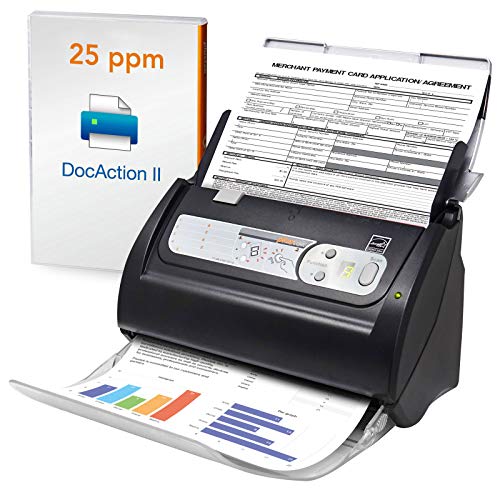
Best High-Capacity Pick – Plustek PS186 Desktop Scanner
The Plustek PS186 is suited to buyers comparing professional desktop document scanners with a larger automatic feeder and workflow-focused software. Its 50-page ADF, searchable PDF creation, barcode categorization, and FTP or NAS support make it a useful fit for organized Windows-based document processing.
Best For: Windows users handling larger batches and structured document workflows.
Pros:
- 50-page ADF supports larger batches than the other listed models.
- OCR can create searchable PDF files.
- Barcode support helps categorize documentation automatically.
- Offers customizable scan settings plus FTP and NAS delivery.
Cons:
- Designed for Windows 7/8/10/11 with Intel or AMD systems.
- USB is the listed connection type, with no wireless option noted.
- Duplex scanning is not specified in the supplied details.
The PS186 is the strongest match here for higher-volume, Windows-based workflows where feeder capacity, OCR, and barcode organization are more important than wireless access.
Best Portable Pick – Brother DS-740D Duplex Compact Scanner
The Brother DS-740D is a practical choice for anyone seeking professional desktop document scanners in a highly portable format. It scans single- and double-sided documents in one pass at up to 16 pages per minute and draws power through an included micro USB 3.0 cable, so it can work without a wall outlet.
Best For: Mobile professionals, small workspaces, and users who need occasional duplex scanning on the go.
Pros:
- Duplex scanning at up to 16 pages per minute, with color scanning at the same speed as black and white.
- Compact design measures less than one foot in length and helps save desk space.
- Supports Windows, Mac, and Linux, along with scan-to destinations such as email, cloud services, and OCR.
- Image tools include background removal, text enhancement, and automatic color adjustment.
Cons:
- Its 25-sheet standard capacity is more suited to smaller batches than high-volume scanning.
- USB connectivity and cable power may be less convenient than a wireless desktop scanner.
The DS-740D prioritizes portability and flexible placement over large-volume automation. It is a sensible fit when compact size, duplex capture, and broad operating-system support matter most.
Best High-Capacity Wireless Pick – Epson WorkForce ES-580W
The Epson WorkForce ES-580W is a strong option among professional desktop document scanners for offices that process larger batches. Its 100-sheet automatic document feeder, wireless connectivity, touchscreen, and speeds up to 35 pages per minute make it well suited to organized, repeatable document workflows.
Best For: Home offices and workplaces that need high-capacity batch scanning, wireless destinations, and computer-free operation.
Pros:
- 100-sheet ADF handles various paper types and sizes in one batch.
- Scans both sides with Single-Step Technology at up to 35 pages per minute.
- 4.3-inch touchscreen and wireless scanning support phones, tablets, computers, USB, email, and cloud services.
- OCR creates searchable PDFs and converts scans to editable Word or Excel files.
Cons:
- Its larger ADF-focused desktop design is less portable than compact scanners.
- The listed cloud and computer-free features may be more than users need for occasional scanning.
The ES-580W is the most workflow-oriented model in this group. Choose it when batch capacity, speed, wireless access, and built-in organization tools are more important than a small footprint.
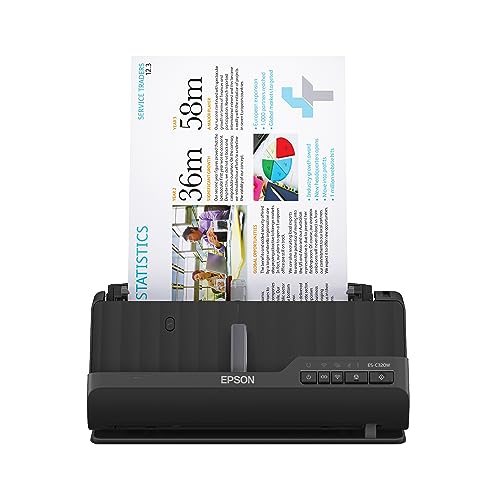
Best Compact Wireless Pick – Epson WorkForce ES-C320W
The Epson WorkForce ES-C320W balances wireless convenience with a compact footprint, making it a useful choice among professional desktop document scanners for smaller offices and home workspaces. It captures both sides at up to 30 pages per minute and includes a 20-page ADF for short document batches.
Best For: Users who want wireless duplex scanning, flexible media handling, and a space-saving desktop design.
Pros:
- Compact design is intended to save 60% of desk space.
- Wireless scanning works with smartphones, tablets, computers, and cloud storage through Epson Smart Panel.
- Single-Step Technology scans both sides at speeds up to 30 pages per minute.
- Flexible scan path handles paper, cards, and passports.
Cons:
- The 20-page ADF is smaller than the ES-580W’s 100-sheet feeder.
- Its compact design is better suited to smaller batches than sustained high-volume work.
The ES-C320W is a well-rounded middle ground: more connected than a basic USB mobile scanner and smaller than a high-capacity office unit. It makes the most sense when desk space and wireless access are priorities.
How We Picked the Best Professional Desktop Document Scanners
We focused on features that matter in real office workflows: automatic document feeder capacity, duplex scanning, rated scan speed, connectivity, software support, physical footprint, and overall flexibility. Models were selected to cover different needs, from high-volume desktop scanning to compact workstations and occasional mobile use.
We also considered whether a scanner is suitable for mixed document batches, including single- and double-sided pages, color originals, receipts, forms, and multi-page contracts. Wireless connectivity and compatibility with common Windows and macOS workflows were treated as practical advantages, not substitutes for dependable feeding and image quality.
Quick Comparison
| Priority | Look for | Best fit |
|---|---|---|
| High-volume office work | Fast duplex scanning and a larger ADF | Busy departments and document-heavy businesses |
| Shared wireless access | Wi-Fi, network features, and flexible software | Small offices and distributed workgroups |
| Limited desk space | Compact design with duplex capability | Home offices and reception desks |
| Occasional travel or field work | Small footprint and USB power or portability | Mobile professionals |
Key Buying Factors for Professional Desktop Document Scanners
Speed and Feeder Capacity
Pages-per-minute ratings are useful, but they do not tell the whole story. A dependable ADF and continuous duplex feeding can have a greater effect on productivity than a small difference in rated speed. Choose a larger feeder and faster duty cycle for recurring batches.
Duplex Scanning
Single-pass duplex scanning captures both sides of a page in one pass, reducing manual flipping and helping mixed documents move through faster. It is especially valuable for contracts, forms, and double-sided invoices.
Connectivity and Workflow Software
USB is reliable for a dedicated workstation, while Wi-Fi can make a scanner easier to share. Check whether the included software supports searchable PDFs, OCR, cloud destinations, email, and configurable one-touch buttons. Confirm operating-system compatibility before buying.
Size, Maintenance, and Document Handling
Compact scanners suit crowded desks, but larger models may offer sturdier feeding and higher recommended daily volumes. Look for ultrasonic double-feed detection, easy roller replacement, and support for receipts, long pages, or thin originals if those materials are part of your workflow.
Who Should Buy Which Professional Desktop Document Scanners?
Choose a high-speed desktop model if your office scans multiple batches every day and needs a robust feeder. Choose a wireless scanner if several users need convenient access or you want to scan directly from different workstations. Choose a compact desktop model for a home office, small business, or shared desk where space is limited. Choose a mobile scanner only when portability matters more than batch capacity and throughput.
Before purchasing, estimate your typical pages per session, not just your occasional maximum. Select a scanner with enough speed and feeder capacity to handle that workload comfortably, then prioritize software, connectivity, and service support that fit the way your organization stores and retrieves documents.
