
A quality boom arm can make a professional microphone setup easier to position, quieter to operate, and more comfortable to use. The right model also keeps your desk clear while helping reduce unwanted stand and cable noise.
We compared 10 professional desk boom arms across adjustability, load capacity, reach, mounting design, and everyday usability to help you find the best fit for your microphone and workspace.
Best 10 Professional Desk Boom Arms Picks for 2026
Studio Standard
RØDE PSA1+ Professional Boom Arm

- Quiet internal spring damping
- Supports microphones up to 1.2kg
- 360-degree reach with cable management
Best For: Podcasters and streamers seeking a quiet, tidy studio arm
Long-Reach Workhorse

- 48-inch maximum reach
- Supports up to 5 pounds
- Includes clamp and flange mounts
Best For: Creators needing extended reach and higher load capacity
Low-Profile Premium

- Quiet, highly flexible positioning
- Slim all-metal construction
- Padded clamp for tight desk edges
Best For: Streamers wanting discreet styling and monitor-friendly placement
Adaptable Value
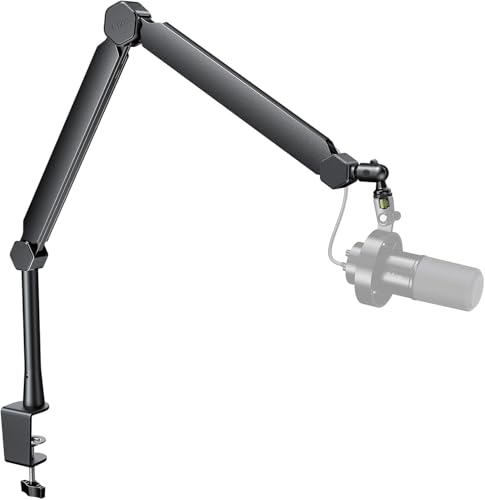
- Includes a 150mm extension tube
- All-metal adjustable design
- Adapters for 1/4-inch, 3/8-inch, and 5/8-inch threads
Best For: Creators needing monitor clearance and broad compatibility
Best Low-Profile Stability
Aokeo AK-58i Low Profile Mic Boom Arm

- Low-profile design helps improve stability
- 360° horizontal and 180° vertical adjustment
- Supports microphones up to 2 kg
Best For: Discreet gaming, podcasting, and streaming desks
Best Traditional Reach
Audio-Technica AT8700 Boom Arm

- 17-inch boom reach with 16.75-inch height
- Full 360° rotation
- Includes USB and XLR cable clips
Best For: Recording and streaming desks needing extended positioning
Best Heavy-Duty Design
ABA01 Low Profile Mic Boom Arm
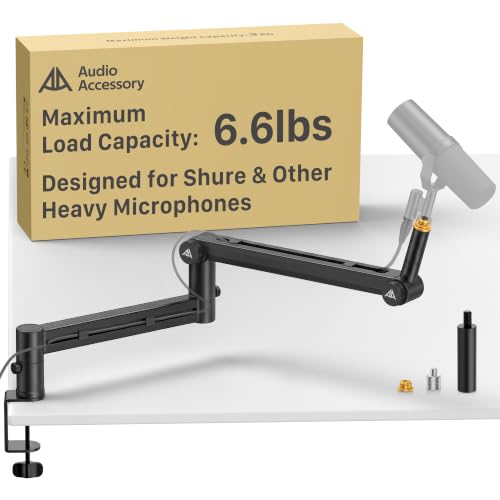
- Supports microphones up to 3 kg
- Gear-lock design helps prevent sagging
- 780 mm reach with cable channels
Best For: Heavy studio microphones and demanding desk setups
Reliable Starter Pick

- Supports microphones up to 2.2 pounds.
- Adjustable steel arm with quiet positioning.
- Clamp fits desks up to 2.2 inches thick.
Best For: Beginners and everyday podcasting, gaming, and streaming setups
Low-Profile Feature Pick

- Low-profile dual-arm design stays below a monitor.
- Supports up to 3.3 pounds with aluminum construction.
- Built-in cable channels and multiple thread adapters.
Best For: Streamers and recording setups prioritizing clearance and cable organization
Minimalist Desk Pick

- Low-profile arm sits 3.35 inches above the desk.
- Supports up to 3.3 pounds with alloy-steel construction.
- Magnetic cable channel and two thread adapters included.
Best For: Compact, clutter-conscious streaming and recording workstations
Studio Standard – RØDE PSA1+ Professional Boom Arm
The RØDE PSA1+ is a polished choice for professional desk boom arms, combining broad microphone compatibility with quiet movement and concealed cable routing. Its clamp fits desks up to 70mm thick, while the arm supports microphones and shock mounts from 0.25kg to 1.2kg.
Best For: Podcasters and streamers who want quiet, full-reach positioning with a clean-looking desk setup.
Pros:
- Internal spring damping enables quiet repositioning during recording.
- 360-degree rotation and full extension provide flexible microphone placement.
- Integrated cable management keeps XLR cables hidden.
- Includes 3/8-inch and 5/8-inch thread adaptors.
Cons:
- The 1.2kg maximum capacity may not suit heavier microphone setups.
- The clamp is specified for desks up to 70mm thick.
The PSA1+ stands out when silent operation and tidy cable management matter as much as reach. It is especially well suited to established podcast and streaming desks.
Long-Reach Workhorse – Samson MBA48 48-Inch Boom Arm
The Samson MBA48 is a practical option among professional desk boom arms for users who need substantial reach and a high stated load capacity. Its steel construction, internal springs, and 48-inch maximum reach support flexible positioning for larger desktop recording setups.
Best For: Creators who need a long boom arm with a 5-pound capacity and flexible mounting options.
Pros:
- 48-inch maximum reach covers wide positioning requirements.
- Durable steel construction supports up to 5 pounds.
- Internal springs allow silent and effortless positioning.
- Includes both a C-clamp and a flange mount.
Cons:
- The C-clamp supports desks up to 2 inches thick.
- The arm uses a 5/8-inch mic clip thread, so adapter needs may vary by microphone.
- Its long reach may be more arm than compact desks require.
Choose the MBA48 when reach and load capacity take priority. The included flange mount also gives users an alternative to the supplied desk clamp for a more permanent installation.
Low-Profile Premium – Elgato Wave Mic Arm MK.2
The Elgato Wave Mic Arm MK.2 is designed for professional desk boom arms buyers who want a slim, all-metal setup with broad positioning control. It can rise above tall monitors or stay below shoulder level, and its padded clamp is designed for tight desk spaces.
Best For: Streamers and desktop creators who value discreet styling, quiet adjustment, and monitor-friendly positioning.
Pros:
- Adjusts and rotates the microphone in virtually any direction.
- Operates smoothly and quietly with a touch.
- Slim all-metal arms avoid distracting logos.
- Padded clamp fits almost any desk edge, including tight spaces.
Cons:
- The supplied notes do not state a maximum microphone weight.
- The arm may require its riser extension to clear taller monitors.
The Wave Mic Arm MK.2 is a strong fit for clean, modern workstations. Its flexible height range and padded clamp make it useful where monitor clearance and desk aesthetics are important.
Adaptable Value – FIFINE BM66T Boom Arm
The FIFINE BM66T offers a feature-rich approach to professional desk boom arms, with an all-metal build, extension tube, adjustable joints, and integrated cable channels. Its clamp fits desktops from 0.8 to 2.4 inches thick, while included adapters cover 1/4-inch, 3/8-inch, and 5/8-inch connections.
Best For: Podcasters, streamers, and gamers who need monitor clearance and broad thread compatibility.
Pros:
- 150mm extension tube helps clear the top of a monitor.
- All-metal construction and built-in springs support stable positioning.
- Removable cable-management covers help organize microphone cables.
- Included adapters support 1/4-inch, 3/8-inch, and 5/8-inch setups.
Cons:
- The supplied notes do not specify a maximum microphone weight.
- Riser screws should be tightened with the Allen wrench before use.
- Joints and springs may need repeated movement initially to achieve the desired tension.
The BM66T is particularly versatile for crowded desks and multi-microphone setups. Its extension tube and wide adapter selection make it a practical choice when clearance and compatibility are priorities.
Best Low-Profile Stability – Aokeo AK-58i Low Profile Mic Boom Arm
For creators comparing professional desk boom arms, the Aokeo AK-58i emphasizes stability and a discreet footprint. Its low-profile design helps keep the microphone steady while minimizing visual clutter around your screen.
Best For: Gaming, podcasting, streaming, and recording setups using microphones up to 2 kg.
Pros:
- Low center of gravity helps reduce shaking and shifting.
- 360-degree arm rotation and 180-degree microphone-arm movement support flexible positioning.
- Includes 3/8-to-1/4-inch and 3/8-to-5/8-inch adapters for broad microphone compatibility.
- Integrated cable-hiding design reduces visible cable clutter.
Cons:
- Fits tables less than 7 cm thick, which may limit desk compatibility.
- Its 2 kg load rating is lower than the heaviest-duty option in this roundup.
The AK-58i is a practical choice when you want a compact, stable boom arm that stays unobtrusive. Confirm your desk thickness and microphone weight before buying.
Best Traditional Reach – Audio-Technica AT8700 Boom Arm
The Audio-Technica AT8700 is a straightforward option among professional desk boom arms, combining a table clamp with full 360-degree rotation. Its extended reach suits recording and streaming setups that need flexible microphone placement.
Best For: Recording or streaming desks that need a conventional clamp-mounted arm with substantial reach.
Pros:
- Offers a 17-inch boom reach and 16.75-inch vertical height.
- Full 360-degree rotation allows broad positioning flexibility.
- Includes six USB cable clips and six XLR cable clips for cable organization.
- Uses a standard 5/8-inch-27 thread and supports up to 1.7 kg.
Cons:
- Its 1.7 kg maximum load is less suitable for especially heavy microphones.
- The supplied notes do not specify a low-profile design.
Choose the AT8700 if reach, rotation, and included cable clips matter more than a compact low-profile appearance. Check that your microphone and accessories stay within the 1.7 kg recommendation.
Best Heavy-Duty Design – ABA01 Low Profile Mic Boom Arm
For professional desk boom arms intended for heavier microphones, the ABA01 stands out with a 3 kg load capacity and gear-lock mechanism. Its extra-long reach and reinforced construction are designed for stable positioning without the sag associated with spring-loaded designs.
Best For: Heavy microphones such as the Shure SM7B, SM7dB, MV7, RODE PodMic, and comparable studio models.
Pros:
- Supports up to 3 kg with reinforced 40 × 25 mm arms.
- Gear-lock construction is designed to resist sagging over time.
- Provides a 780 mm reach with 360-degree horizontal and 120-degree vertical adjustment.
- Deep cable channels help route multiple cables neatly.
Cons:
- At 1.63 kg, the arm itself is relatively substantial.
- Its extra-long reach may be more than compact desks require.
The ABA01 is the strongest fit here for users prioritizing load capacity and long-term positioning stability. Its broad compatibility and included adapters add flexibility, while the larger construction should be matched to your available desk space.
Reliable Starter Pick – MAONO BA20 Boom Arm
The MAONO BA20 is a practical choice among professional desk boom arms for podcasting, gaming, streaming, and recording. Its steel construction, adjustable positioning, and included microphone clip make it easy to set up with many common microphones.
Best For: Beginners and creators who want a sturdy, straightforward boom arm with broad microphone compatibility.
Pros:
- Supports microphones weighing up to 2.2 pounds (1 kilogram).
- Wide range of motion with quiet, knob-adjusted positioning.
- Upgraded clamp fits desks up to 2.2 inches thick and includes a protective rubber pad.
- Includes a standard microphone clip, screw adapter, and cable straps.
Cons:
- Not recommended for glass tables.
- Its 1-kilogram weight limit may exclude heavier microphone setups.
The BA20 balances useful adjustability and accessible compatibility without adding unnecessary complexity. It is a sensible option for a conventional desktop recording setup, provided your desk and microphone stay within its stated limits.
Low-Profile Feature Pick – NEEWER MS007 Boom Arm
The NEEWER MS007 stands out among professional desk boom arms with a low-profile dual-arm layout designed to keep monitors, cameras, and desk space clear. Its aluminum construction, broad adjustment range, and built-in cable channels suit recording, streaming, voiceover, and video-call setups.
Best For: Creators who need a low-profile arm with flexible positioning and integrated cable management.
Pros:
- Supports up to 3.3 pounds (1.5 kilograms).
- Extends to 26.5 inches and offers 360-degree horizontal rotation with 100-degree tilt.
- Built-in channels and four included straps help manage USB and XLR cables.
- Includes 1/4-inch, 3/8-inch, and 5/8-inch mounting options through adapters.
Cons:
- The desk clamp fits surfaces from 0.4 to 2.4 inches thick, so unusually thick desks may not work.
- Its multi-joint design may be more capability than a simple microphone setup requires.
With its low-profile design and versatile mounting hardware, the MS007 is particularly useful when screen visibility and cable tidiness matter. The 1.5-kilogram capacity also gives it more headroom than lighter-duty arms.
Minimalist Desk Pick – InnoGear LP98 Low-Profile Arm
The InnoGear LP98 is one of the more discreet professional desk boom arms, placing its lower arm just 3.35 inches above the desk. It combines a solid alloy-steel build, magnetic cable management, and broad adjustment options for compact streaming, recording, and workstation setups.
Best For: Minimalist desks and creators who want a low-profile arm with smooth, highly flexible positioning.
Pros:
- Supports microphone setups up to 3.3 pounds (1.5 kilograms).
- Offers 360-degree base rotation, 180-degree swivel, and 170-degree tilt.
- Magnetic cable channel keeps wires hidden and easier to organize.
- Includes 3/8-to-5/8-inch and 3/8-to-1/4-inch adapters for broad device compatibility.
Cons:
- The clamp is designed for flat-edged desks up to 2.36 inches thick.
- A shock mount is not included.
The LP98 is a strong fit when keeping the desk visually clear is as important as microphone adjustability. Its 3.3-pound capacity and included adapters make it flexible, while the low-profile design helps preserve workspace.
How We Picked the Best Professional Desk Boom Arms
We focused on the features that matter in real recording, streaming, and podcasting setups: stable desk clamps, smooth positioning, useful reach, dependable tension, and compatibility with common microphone mounts. We also considered whether each arm suits compact desks, low-profile installations, heavier microphones, or frequent repositioning.
Because microphone weights and desk thicknesses vary, we treated published capacity and mounting specifications as important starting points rather than assuming every arm fits every setup. Models with cable-management features, extension sections, or spring-damping systems received extra consideration when those additions improve daily use.
Quick Comparison
| What to Compare | Why It Matters |
|---|---|
| Reach | Determines how easily the microphone can sit beside, above, or in front of your monitor. |
| Load capacity | Helps prevent sagging when using a heavy microphone, shock mount, pop filter, or accessory. |
| Desk clamp | Affects stability, desk compatibility, and how securely the arm stays mounted. |
| Profile and joints | Influences clearance, movement range, and whether the arm blocks screens or workspace. |
| Thread adapters | Determine compatibility with microphone clips, shock mounts, and different mounting standards. |
Key Buying Factors for Professional Desk Boom Arms
Microphone Weight and Balance
Check the complete working weight, including the microphone, shock mount, pop filter, and any other attached accessory. A model rated close to its limit may require frequent tension adjustments or may not hold its position reliably.
Reach and Adjustment Range
Measure the distance from your desk edge to your preferred speaking position. Longer arms are useful for wide desks and multi-monitor setups, while shorter or low-profile arms can work better in compact workspaces.
Clamp Stability and Desk Fit
Confirm the clamp opens wide enough for your desk and that the mounting surface is suitable. A broad, well-padded clamp can reduce movement and protect the desktop, but it still needs a firm, flat installation area.
Noise, Movement, and Cable Management
Spring damping, smoother joints, and internal or external cable routing can make a noticeable difference during live use. If you adjust the microphone often, prioritize quiet movement and accessible tension controls.
Who Should Buy Which Professional Desk Boom Arms?
Choose a premium studio-style arm if you want smooth operation, strong construction, and a refined setup for frequent recording. A long-reach arm is a better choice for large desks, multiple monitors, or microphones that need to swing out of the way. Low-profile models suit compact desks and users who want the microphone below or beside the monitor line.
For heavier microphones and accessories, prioritize the highest suitable load rating and a rigid clamp. Streamers and gamers who move between keyboard and microphone positions should look for broad adjustment range and easy repositioning. If you are building a first recording setup, verify the thread size and included adapters before buying, then choose the arm that fits your microphone, desk, and daily workflow rather than selecting by appearance alone.
