
A dependable controller dock keeps rechargeable gamepads organized, powered, and ready between sessions. The best option depends on your console ecosystem, controller count, charging speed, battery support, and available desk or media-center space.
We compared ten charging solutions spanning PS5, Xbox, Nintendo Switch, and mixed-device setups. Use the guide below to narrow the list by compatibility, convenience, and long-term value.
Best 10 Professional Controller Charging Docks Picks for 2026
DualSense Desk Charging

- Charges two DualSense controllers
- Includes charging indicators and AC adapter
- Officially licensed with a two-year limited warranty
Best For: PS5 owners charging two DualSense controllers
Xbox Magnetic Charging

- Works with Xbox Series X|S and Xbox One controllers
- Magnetic charging secures the controller
- Includes 1100 mAh battery pack and two battery doors
Best For: Xbox players seeking a secure, branded charging dock
Cross-Platform Controller Dock
PURBHE 6-in-1 Switch and PS5 Charger

- Supports Switch and PS5 controllers
- Charges multiple controllers simultaneously
- Includes LED status and built-in safety protections
Best For: Multi-console households using Switch and PS5 controllers
Xbox Dual-Battery Pick
Upgraded Xbox Controller Charging Dock

- Two 6200mWh rechargeable battery packs
- Dual-bay charging with status LEDs
- Supports official Xbox One and Series X|S controllers
Best For: Xbox gamers needing extended playtime and two charging slots
Switch Four-Controller Pick
FASTSNAIL Joy-Con Charging Dock

- Charges up to four Joy-Cons simultaneously
- Individual LED charging indicators
- Storage and display stand for Switch Joy-Cons
Best For: Switch households with multiple Joy-Cons
Fast PS4 Charging Pick

- Approximately 1.8-hour rated charging time
- LEDs show charging and completion
- Multiple USB power-source options
Best For: PS4 players wanting a dedicated fast-charging dock
Multi-Platform Pick
HEATFUN 2-Port Controller Charging Dock

- Charges two compatible controllers simultaneously
- Works with Switch Pro, PS5, Xbox Series, and Elite 2
- Removable USB-C adapters and status LEDs
Best For: Mixed-console gaming setups
RGB Feature Pick
Tokluck PS5 Dual Controller Charging Station

- Charges two PS5 controllers in about two hours
- Supports DualSense and Edge controllers
- Includes RGB modes and an on/off switch
Best For: PS5 gaming setups with customizable lighting
Simple Drop-In Pick
bibuks PS5 Dual Controller Dock
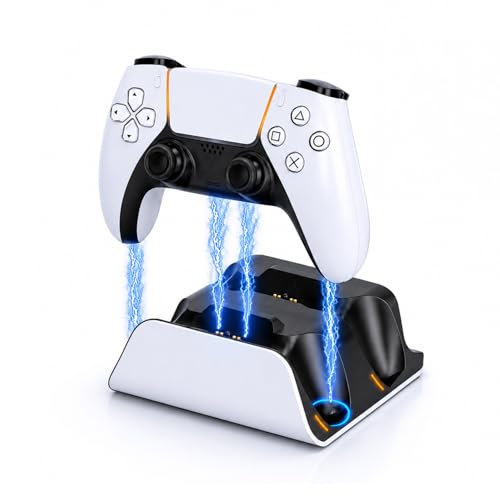
- Charges two PS5 controllers simultaneously
- Self-aligning drop-and-charge design
- Anti-slip base with separate LED indicators
Best For: Simple, tidy PS5 controller charging
DualSense Desk Charging – PowerA Twin Charging Station
If you want professional controller charging docks for a PS5 setup, the PowerA Twin Charging Station provides a straightforward way to charge and display two DualSense wireless controllers. Its tabletop design uses an AC adapter and includes charging indicators for at-a-glance status.
Best For: PS5 owners who want a dedicated dock for charging two official-style DualSense controllers.
Pros:
- Charges two DualSense wireless controllers at the same time.
- Simple slide-in charging design also displays the controllers neatly.
- Officially licensed for PlayStation 5 and backed by a two-year limited warranty.
Cons:
- Designed for DualSense controllers rather than a mixed-controller collection.
- Uses a corded AC adapter, so it needs a nearby outlet.
This is a focused, easy-to-use option for PS5 gamers who value tidy storage and dual-controller charging over extra compatibility or additional charging ports.
Multi-Controller Switch Dock – NEWDERY 6-in-1 Charger Dock
For Nintendo setups that need professional controller charging docks with high capacity, the NEWDERY 6-in-1 Charger can charge up to four Joy-Cons and two Pro controllers simultaneously. Separate LED indicators, a slide-in design, and tabletop storage make it practical for a busy gaming desk.
Best For: Nintendo Switch owners who need one station for multiple original Joy-Cons and Pro controllers.
Pros:
- Supports charging four Joy-Cons and two Pro controllers at once.
- Individual LEDs show charging and fully charged or standby status.
- Built-in protection helps guard against overheating, short circuits, and over-power conditions.
Cons:
- AC adapter is not included.
- Designed for original Switch controllers; some third-party controllers may not work.
- Switch 2 Pro Controller support is noted, but it does not fit Switch 2 Joy-Cons.
Its six-device capacity makes this a strong organizational choice for households or players with several Nintendo controllers, provided the required USB power source is available.
Xbox Magnetic Charging – 8BitDo Xbox Charging Dock
The 8BitDo Charging Dock is one of the more polished professional controller charging docks for Xbox users. It uses magnetic charging to secure compatible Xbox controllers, includes a rechargeable battery pack and two battery doors, and adds a storage compartment for a cleaner tabletop setup.
Best For: Xbox Series X|S and Xbox One players who want a secure magnetic dock with an included rechargeable battery solution.
Pros:
- Compatible with Xbox Series X|S and Xbox One wireless controllers.
- Magnetic charging helps hold the controller securely in place.
- Includes a 1100 mAh rechargeable battery pack and two battery doors.
Cons:
- Supports Xbox controllers only, rather than multiple console platforms.
- The station has a single charging connection.
With its Xbox-licensed design, adjustable lighting, and amber-to-white charging indicator, this dock suits players who want both functional charging and a coordinated console setup.
Cross-Platform Controller Dock – PURBHE 6-in-1 Switch and PS5 Charger
For gamers comparing professional controller charging docks across consoles, the PURBHE 6-in-1 station offers broad compatibility in a compact tabletop format. It supports Nintendo Switch Joy-Cons, Switch Pro controllers, and PS5 DualSense controllers, with simultaneous charging for several compatible controllers.
Best For: Multi-console households that want one USB-C-powered station for Switch and PS5 controllers.
Pros:
- Supports Joy-Cons, Switch Pro controllers, and PS5 DualSense controllers.
- Can charge four Joy-Cons and two Switch Pro controllers, or two PS5 controllers, at the same time.
- Includes LED charging status and protection against overcharging, over-voltage, over-current, and short circuits.
Cons:
- Controllers are not included.
- Requires power from a game console, USB hub, or wall charger.
- Compatibility depends on the specified Nintendo and PS5 controller types.
This dock is a practical space-saving choice for mixed Nintendo and PlayStation setups, especially when flexible USB power and multi-device charging matter more than a dedicated branded design.
Xbox Dual-Battery Pick – Upgraded Xbox Controller Charging Dock
For Xbox players comparing professional controller charging docks, this dual-bay station combines two 6200mWh rechargeable battery packs with a visual charging stand. It supports official Xbox One and Xbox Series X|S controllers and includes alternate battery covers for different controller generations.
Best For: Xbox gamers who want extended playtime, two rechargeable battery packs, and an organized charging stand.
Pros:
- Includes two 6200mWh battery packs rated for 18–25 hours of playtime.
- Dual charging bays let you charge both included batteries.
- LED indicators show charging and full/standby status with red and green lighting.
- Built-in protection helps guard against overcharging, overheating, over-current, and short circuits.
Cons:
- Controllers are not included.
- Works with official Xbox wireless controllers, but not Xbox 360, Elite Series 2, or third-party controllers.
- The power plug is not included.
With long rated battery life, two charging slots, and broad compatibility across official Xbox One and Series X|S controllers, this is a practical choice for households that regularly rotate between controllers. Verify your controller model before buying.
Switch Four-Controller Pick – FASTSNAIL Joy-Con Charging Dock
This FASTSNAIL stand is a compact option among professional controller charging docks for Nintendo Switch users. Its two-set design can charge up to four Joy-Con controllers simultaneously while keeping them stored and displayed in one place.
Best For: Nintendo Switch or Switch OLED households that need simultaneous Joy-Con charging and organized storage.
Pros:
- Charges up to four Joy-Con controllers at the same time.
- Slide-in, plug-and-play design is simple to use.
- Individual LED indicators show each Joy-Con’s charging status.
- Lightweight, portable construction is described as solid and durable.
Cons:
- Joy-Con controllers are not included.
- It uses a USB connection, so a wall adapter is not specified as included.
- It is designed for Joy-Con controllers rather than a broad range of gamepads.
The main advantage is capacity: charging four Joy-Cons at once can be useful for multiplayer sessions and shared consoles. Its compact storage-oriented design also keeps controllers ready without taking up much space.
Fast PS4 Charging Pick – OIVO DualShock 4 Dock Station
For PS4 owners seeking professional controller charging docks, this OIVO station emphasizes fast charging and straightforward status monitoring. Its updated copper contact design is rated to charge controllers in about 1.8 hours and can draw power from a PS4, PC, or wall power source.
Best For: PS4 players who want a dedicated DualShock 4 charging station with fast rated charging and safety protections.
Pros:
- Rated to charge PS4 controllers in approximately 1.8 hours.
- Red and blue LED indicators show charging and completion status.
- Can receive power from a PS4, PS4 Slim, PS4 Pro, PC, or wall source.
- Protection features cover overcharge, over-discharge, over-temperature, over-voltage, over-current, and short circuits.
Cons:
- The wall adapter is not included.
- It is intended for Sony PS4 controllers rather than newer console platforms.
- Only one charging station is included.
This dock is a sensible PS4-focused choice when charging speed and safety features matter. Its multiple power-source options add flexibility, though buyers planning to use a wall outlet will need to provide an adapter.
Multi-Platform Pick – HEATFUN 2-Port Controller Charging Dock
For households using more than one console, this professional controller charging docks option supports Switch Pro, PS5, Xbox Series X|S, and Xbox Elite Series 2 controllers. Its two-port design, removable USB-C adapters, and front status light make it a practical desk or TV-area charging station, provided you use compatible first-party-style controllers.
Best For: Gamers who need one compact dock for compatible Switch Pro, PS5, Xbox Series, or Elite 2 controllers.
Pros:
- Charges two compatible controllers at once.
- Includes removable USB-C adapters for drop-in charging.
- Red and green LEDs show charging and full-charge status.
- Built-in protection helps guard against short circuits.
Cons:
- Does not support PowerA, Luna, or other third-party pro controllers.
- USB wall adapter is not included.
- Thick protective cases may need to be removed for charging.
This is the most flexible choice of the three for mixed-console setups. Confirm your exact controller model and use a 5V/2A adapter for more stable, faster charging.
RGB Feature Pick – Tokluck PS5 Dual Controller Charging Station
This professional controller charging docks choice is designed specifically for PlayStation 5 users who want simultaneous charging plus a more decorative setup. It charges two DualSense or Edge controllers, includes an on/off switch, and adds selectable RGB lighting for a gaming-room display.
Best For: PS5 owners who want dual charging, controller storage, and customizable RGB lighting in one station.
Pros:
- Charges two PS5 controllers in about two hours.
- Compatible with DualSense and Edge controllers.
- Offers multiple RGB lighting modes with touch control.
- On/off switch and protective chip add convenience and safety.
Cons:
- Designed for PlayStation 5 controllers rather than multiple platforms.
- RGB lighting may be unnecessary for users seeking a simple dock.
- Charging depends on a connected power source such as the PS5, adapter, or laptop.
Choose this model when lighting and presentation matter as much as charging. Its included cable can draw power from several common sources, while the dual-controller capacity keeps the setup tidy.
Simple Drop-In Pick – bibuks PS5 Dual Controller Dock
For a straightforward PS5 setup, this professional controller charging docks model emphasizes easy placement and clear charging feedback. It charges two controllers simultaneously, uses self-aligning contact points, and has a compact desktop design with anti-slip feet.
Best For: PS5 players who want an uncomplicated dual-controller dock with automatic alignment and a clean white finish.
Pros:
- Charges two PS5 controllers in as fast as 2.5 hours with suitable power.
- Self-aligning design lets you drop controllers onto the dock.
- Separate LEDs show charging and full or standby status.
- Four anti-slip pads help keep the station stable.
Cons:
- Limited to PS5 controllers.
- A 5V/3A power adapter is recommended for optimal performance.
- Warranty coverage is listed as 90 days.
This is a good fit for buyers who prioritize simple drop-and-charge operation over extra lighting features. Its stable base and dual indicators make it easy to keep two controllers organized beside the PS5.
How We Picked These Professional Controller Charging Docks
We focused on the factors that matter after installation: confirmed controller compatibility, charging reliability, connector alignment, included batteries or charging accessories, footprint, indicator visibility, and ease of removing a controller. The selection includes dedicated PS5, Xbox, and Switch docks alongside multi-platform models for households with several consoles.
Because charging docks vary widely, check the exact controller generation before buying. A dock designed for a PS4 DualShock 4, Xbox One controller, or original Switch Joy-Con may not fit a newer model without an adapter or separate battery solution.
Quick Comparison
| Best For | Look For |
|---|---|
| PS5 households | DualSense alignment, dual-controller capacity, and USB-C compatibility |
| Xbox users | Included rechargeable battery packs and secure magnetic contacts |
| Nintendo Switch | Joy-Con and Pro Controller support, plus a compact footprint |
| Mixed-console setups | Multi-port compatibility and clearly labeled charging positions |
| Display-focused setups | Stable stands, visible LEDs, and a tidy desktop design |
Key Buying Factors for Professional Controller Charging Docks
Compatibility and Capacity
Start with the controllers you actually own. Confirm whether the dock supports one or two controllers, Joy-Cons individually, Xbox Elite models, or newer console revisions. A higher capacity is useful for families and competitive setups, but only if every charging slot fits securely.
Charging Method and Speed
Contact-based docks are convenient because they avoid repeated cable connections. Magnetic or self-aligning contacts can make placement easier, while USB-C or micro-USB adapters may offer broader compatibility. Treat advertised charging times as estimates; battery capacity, power supply, and simultaneous charging affect real results.
Battery Support
Some Xbox docks include dedicated rechargeable battery packs, while many PS5 and Switch stands charge the controller’s built-in battery through contacts. If replacement packs are required, confirm that they are included and that the controller’s battery cover remains compatible.
Stability, Indicators, and Safety
A wide, weighted base helps prevent tipping when controllers are removed. LED indicators should show charging status without being distracting in a bedroom or living room. Look for overcharge protection and a reputable power adapter, especially for a dock that will remain connected continuously.
Who Should Buy Which Professional Controller Charging Docks?
Choose a dedicated PS5 dock if you primarily use DualSense controllers and want the simplest fit. Xbox owners should prioritize a model with correctly sized rechargeable battery packs. Switch users who alternate between Joy-Cons and a Pro Controller should choose a dock that explicitly supports both rather than relying on generic USB ports.
For homes with PS5, Xbox, and Nintendo systems, a multi-console dock can reduce cable clutter, but verify its exact port layout and charging limitations before purchase. If appearance matters, select a stable display stand with subdued indicators; if convenience matters most, prioritize self-aligning contacts and enough capacity for every frequently used controller.
