
The best professional conference room cameras make hybrid meetings easier to follow by combining clear video, reliable microphones, and intelligent framing in one system.
This roundup compares 10 options for huddle spaces, medium conference rooms, and larger professional setups, including 360-degree cameras, AI tracking, 4K PTZ models, and certified solutions for popular meeting platforms.
Best 10 Professional Conference Room Cameras Picks for 2026
Best for Hybrid Collaboration

- 360-degree 1080p video
- 18-foot 360-degree audio pickup
- Automatic speaker focus
Best For: Hybrid teams needing room-wide coverage and speaker tracking
Best for Small Rooms
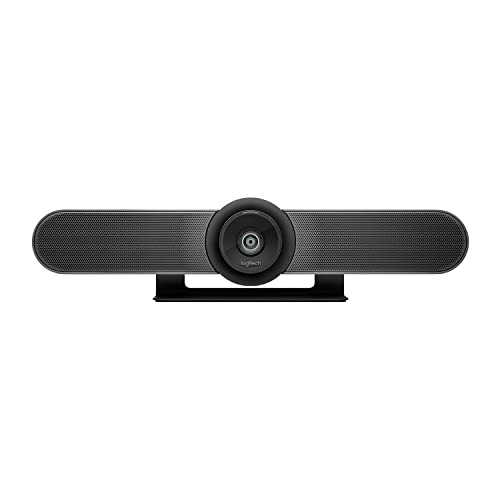
- Up to 4K video
- 120-degree field of view
- Motorized pan and tilt
Best For: Huddle rooms needing wide coverage and integrated audio
Best for PTZ Flexibility
TONGVEO 4K AI Conference System
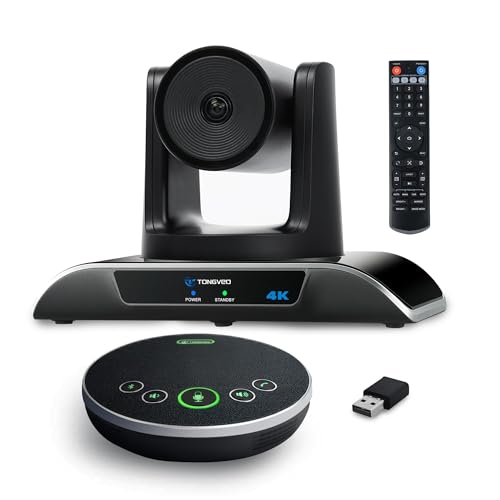
- 4K PTZ camera with 120-degree view
- AI tracking and gesture controls
- Included 5-meter-pickup speakerphone
Best For: Presentations and rooms needing adjustable camera control
Best for AI Framing

- 4K video with 120-degree view
- AI group and presenter tracking
- Physical privacy lens cover
Best For: Small rooms needing automatic framing and simple USB setup
Immersive 360° Pick
coolpo PANA 360° Conference Camera

- 360° UHD 4K room coverage
- AI speaker tracking with 8 microphones
- USB plug-and-play with local AI processing
Best For: Teams needing an all-in-one camera for full-room coverage
Flexible PTZ System
TONGVEO 4K AI Tracking Camera Kit

- 4K PTZ camera with 3x optical zoom
- AI face and human auto-tracking
- Wireless speakerphone with 16.4-foot pickup
Best For: Small-to-medium rooms needing flexible video and audio connections
Privacy-Focused Choice
Yealink UVC34 4K Conference Camera

- 4K video with 120° wide-angle coverage
- AI framing and speaker tracking
- Automatic privacy shutter and 8-mic array
Best For: Huddle rooms using Teams, Zoom, or other major platforms
Large-Room AI Coverage
4K All-in-One Conference Camera

- 4K video with 120° coverage and 5x optical zoom
- AI framing plus presenter and speaker tracking
- Four-mic noise reduction and built-in speakers
Best For: Medium and large conference rooms
Room-Wide Perspective
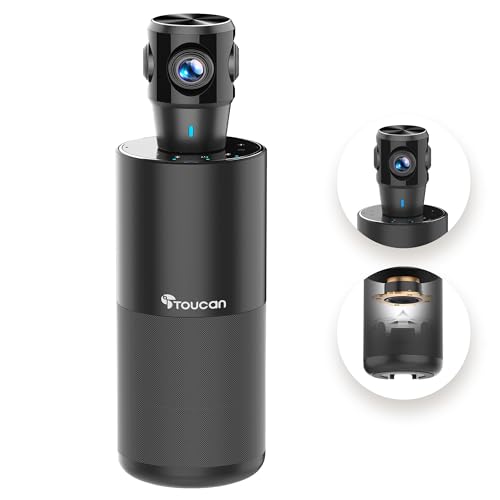
- 360° video capture for flexible seating
- Four noise-reduction microphones and built-in speaker
- Plug-and-play support for major platforms and devices
Best For: Small rooms and collaborative discussions
PTZ Presentation Tracking
TONGVEO 1080p Conference System

- AI face and humanoid tracking with 3x optical zoom
- 1080p at 60fps via USB 3.0 or HDMI
- Wireless Bluetooth speakerphone with echo cancellation
Best For: Small-to-medium rooms and presentations
Best for Hybrid Collaboration – Owl Labs Meeting Owl 3
The Owl Labs Meeting Owl 3 is a strong choice among professional conference room cameras for teams that want an all-in-one 360-degree view with automatic speaker focus. Its 1080p video, 18-foot audio pickup, and plug-and-play USB setup suit hybrid meetings where participation and room awareness matter.
Best For: Hybrid teams meeting in small to large rooms that want automatic speaker tracking and broad room coverage.
Pros:
- Captures 360-degree 1080p video while focusing on in-room speakers.
- Provides 360-degree audio pickup up to 18 feet.
- Works with Zoom, Google Meet, Microsoft Teams, Webex, and other platforms.
- Can expand with additional Owl devices or an expansion microphone.
Cons:
- Video resolution is limited to 1080p rather than 4K.
- Some larger-room expansions require additional Owl hardware.
The Meeting Owl 3 stands out when remote attendees need a natural sense of the whole room. Its automated framing and expandable ecosystem make it particularly practical for evolving hybrid meeting spaces.
Best for Small Rooms – Logitech MeetUp 4K
The Logitech MeetUp is a practical option among professional conference room cameras for huddle rooms and compact meeting spaces. It combines a 4K sensor, 120-degree field of view, motorized pan and tilt, and integrated microphones in a single room-friendly unit.
Best For: Small conference rooms and huddle spaces that need wide coverage, sharp video, and flexible mounting.
Pros:
- Captures video in up to 4K with a 120-degree field of view.
- Motorized pan and tilt can expand viewing coverage to 170 degrees.
- Beamforming microphones pick up voices up to 4 meters.
- Supports USB BYOD use and room deployments for Teams, Zoom, and Google Meet.
Cons:
- The expansion microphone is sold separately.
- Designed primarily for small and huddle rooms rather than large spaces.
MeetUp is a good fit when a compact room needs a polished, wide-angle camera without assembling several separate components. Its mounting options and remote-management support also help with repeatable office deployments.
Best for PTZ Flexibility – TONGVEO 4K AI Conference System
The TONGVEO system offers a more adjustable approach to professional conference room cameras, pairing a 4K PTZ camera with a speakerphone. AI tracking, gesture controls, 350-degree horizontal rotation, and USB 3.0 connectivity give meeting hosts several ways to control the shot.
Best For: Presentations, training sessions, and flexible meeting setups that benefit from PTZ movement, tracking, and a separate speakerphone.
Pros:
- Records up to 4K at 30 frames per second with a 120-degree viewing angle.
- Supports AI auto-tracking, gesture control, presets, and remote operation.
- Offers 350-degree horizontal and 180-degree vertical movement.
- Includes a speakerphone with noise-reducing microphones and up to 5-meter pickup.
Cons:
- Requires software and equipment that support 4K to use its maximum resolution.
- The gesture and tracking features may require configuration for the room.
- Its separate camera and speakerphone design involves more components than an all-in-one unit.
This kit is appealing when camera positioning and presenter movement matter more than the simplest installation. Its mounting choices and control interfaces provide useful flexibility for rooms used for both meetings and presentations.
Best for AI Framing – WYRESTORM FOCUS 210
The WYRESTORM FOCUS 210 is a compact choice among professional conference room cameras for small meeting rooms. Its 4K video, 120-degree lens, AI group framing, presenter tracking, and built-in noise-canceling microphones are designed to keep meetings easy to follow with minimal setup.
Best For: Small conference rooms and shared offices needing automatic framing, clear table audio, and privacy protection.
Pros:
- Provides 4K video with a 120-degree wide-angle view.
- Automatically frames groups and tracks presenters.
- Dual AI noise-canceling microphones capture voices up to 5 meters.
- Includes a physical lens cover and plug-and-play USB connection.
Cons:
- Its intended coverage is small meeting spaces rather than large rooms.
- Uses digital zoom rather than optical zoom.
- Audio and camera functions are integrated, leaving less expansion detail than modular systems.
The FOCUS 210 is a straightforward option for offices that want automated framing and presenter tracking without a complicated room installation. Its privacy cover is a useful addition for shared workplace environments.
Immersive 360° Pick – coolpo PANA 360° Conference Camera
For teams comparing professional conference room cameras, the COOLPO PANA stands out with a 360° view, 4K resolution, and built-in audio. Its all-in-one design is intended to show everyone in the room while AI speaker tracking adjusts attention to the active participant.
Best For: Medium-sized meeting spaces where a full-room view and local data processing are priorities.
Pros:
- 360° capture and UHD 4K video provide an immersive meeting view.
- AI voice tracking and intelligent zoom help highlight active speakers.
- Eight microphones capture voices from up to 15 feet.
- USB plug-and-play setup and on-device AI processing support simple, privacy-conscious deployment.
Cons:
- The all-in-one camera does not offer optical zoom.
- Its listed operating-system support starts with Windows 10 and macOS 10.10.
The PANA is a practical choice when you want broad room coverage without stitching multiple camera feeds. It is especially compelling for teams that value easy USB setup and local processing.
Flexible PTZ System – TONGVEO 4K AI Tracking Camera Kit
This TONGVEO kit combines a 4K PTZ camera with a wireless Bluetooth speakerphone, making it a versatile option among professional conference room cameras. Its AI tracking, HDMI and USB outputs, and flexible mounting options suit rooms that need both presentation flexibility and focused speaker framing.
Best For: Small-to-medium conference rooms, classrooms, worship spaces, and telemedicine setups requiring a separate camera and speakerphone system.
Pros:
- 4K video at 30 fps, 3x optical zoom, and a 93° wide-angle view provide detailed coverage.
- AI human and face tracking keeps the speaker centered during movement.
- HDMI and USB 3.0 outputs support different display and conferencing workflows.
- Wireless speakerphone offers four microphones, a 16.4-foot pickup range, and multiple connection methods.
Cons:
- USB output is listed at 1080p, while 4K output is available through HDMI.
- The system has more separate components to configure than an integrated camera-and-audio unit.
Choose this system if you need PTZ control, optical zoom, and flexible connections rather than a single panoramic camera. The included speakerphone also makes it adaptable for portable or multipurpose rooms.
Privacy-Focused Choice – Yealink UVC34 4K Conference Camera
The Yealink UVC34 is a streamlined option for professional conference room cameras, pairing 4K video with a 120° field of view and an integrated eight-microphone array. Its automatic privacy shutter, AI framing, and Teams and Zoom certifications make it well suited to regularly used business meeting spaces.
Best For: Huddle rooms and business teams that want certified platform support, wide coverage, and hardware-based privacy protection.
Pros:
- 4K video, an 8MP sensor, and a 120° field of view capture the room in detail.
- AI auto framing, speaker tracking, and face enhancement help maintain a natural meeting composition.
- Eight microphones provide a stated 5-meter far-field pickup range.
- Automatic electric privacy shutter and an extra-long 7-meter USB cable support practical office deployment.
Cons:
- The listed UVC34 configuration is a camera system without a conferencing computer included.
- It uses digital zoom rather than optical zoom.
The UVC34 is a strong fit for teams prioritizing dependable daily operation and privacy features. Its broad view and integrated audio reduce the need for extra room equipment, while the long cable simplifies placement.
Large-Room AI Coverage – 4K All-in-One Conference Camera
For teams comparing professional conference room cameras for medium or large spaces, the WYRESTORM HALO VX10 combines 4K video, room-wide audio, and intelligent framing in one compact system. Its 120-degree view, 5x optical zoom, AI auto framing, and speaker tracking are designed to keep meetings visually focused without constant camera adjustments.
Best For: Medium and large conference rooms, hybrid meetings, presentations, training sessions, and client calls.
Pros:
- 4K camera with a 120-degree wide-angle view and 5x optical zoom.
- AI auto framing and presenter or speaker tracking help keep participants centered.
- Four-microphone array with noise reduction and built-in dual speakers simplify room audio.
- Plug-and-play USB connectivity works with Teams, Zoom, Google Meet, Windows, and Mac.
Cons:
- Its larger 18-inch width may require more placement space than a compact webcam.
- The system is wired through USB rather than offering a fully wireless setup.
The HALO VX10 is a strong fit when clear 4K video, automated tracking, and integrated sound matter more than minimizing hardware size. It offers a streamlined setup for larger meeting environments.
Room-Wide Perspective – TOUCAN 360° Conference Camera
The TOUCAN SC360 is a practical option among professional conference room cameras when participants may sit around the room rather than directly in front of the lens. Its 360-degree capture, four noise-reduction microphones, speaker, and AI tracking support flexible group communication with plug-and-play USB connectivity.
Best For: Small rooms, flexible seating arrangements, team discussions, and users who need broad software and device compatibility.
Pros:
- 360-degree capture helps show participants from different positions in the room.
- Four noise-reduction microphones support clearer voice pickup.
- Built-in speaker and Bluetooth connectivity add audio flexibility.
- Works with Zoom, Microsoft Teams, Google Voice, PCs, Macs, and tablets.
Cons:
- Video resolution is 1080p rather than 4K.
- Its fixed-focus and auto-focus specifications may offer less manual control than a dedicated PTZ camera.
- The 360-degree design may be unnecessary for a conventional front-facing meeting layout.
The SC360 stands out for room-wide visibility and simple compatibility. It is especially useful for collaborative spaces where participants move around or sit in multiple directions.
PTZ Presentation Tracking – TONGVEO 1080p Conference System
For buyers seeking professional conference room cameras with presentation-focused control, the TONGVEO system pairs an AI auto-tracking PTZ camera with a Bluetooth conference speakerphone. It delivers 1080p video at up to 60fps, 3x optical zoom, HDMI and USB 3.0 outputs, and microphone pickup rated for rooms up to 40 square meters.
Best For: Small-to-medium conference rooms, presentations, lectures, training sessions, and meetings with up to 8–12 people.
Pros:
- AI face and humanoid tracking follows presenters and speakers.
- 1080p output at 60fps is available through USB 3.0 and HDMI.
- PTZ movement, 3x optical zoom, and a 114-degree field of view support presenter-focused framing.
- Wireless Bluetooth speakerphone includes a full-duplex microphone array and rechargeable battery.
Cons:
- Video resolution is Full HD rather than 4K.
- The PTZ camera is wired, while the speaker is wireless, so the setup uses mixed connection types.
- Its stated audio coverage is limited to approximately 16.4 feet.
The TONGVEO is a versatile choice for rooms where tracking a presenter and connecting to displays are priorities. Its separate wireless speakerphone adds placement flexibility while the camera provides HDMI and USB workflow options.
How We Picked the Best Professional Conference Room Cameras
We focused on the features that affect everyday meeting quality: resolution, field of view, speaker tracking, microphone pickup, speaker performance, connection options, software compatibility, and installation flexibility. We also considered whether each camera suits a compact huddle room or a larger conference space.
Certification or stated compatibility with platforms such as Microsoft Teams, Zoom, and Google Meet is useful, but compatibility can vary by operating system and meeting-room hardware. Check the manufacturer’s current specifications before purchasing.
Quick Comparison
| Camera type | Best suited for | Features to prioritize |
|---|---|---|
| 360-degree camera | Small to medium rooms | Panoramic coverage, speaker tracking, microphone pickup |
| 4K PTZ camera | Medium to large rooms | Optical zoom, presets, HDMI or USB output |
| All-in-one system | Simple room deployments | Integrated microphones, speakers, and automatic framing |
| Conference webcam | Huddle rooms and small teams | Wide angle, plug-and-play setup, platform support |
Key Buying Factors for Professional Conference Room Cameras
Video Coverage and Image Quality
Choose 4K when you need detailed views, digital cropping, or a camera mounted farther from participants. A 1080p model can still be effective for smaller rooms and standard meeting displays. Wide-angle and 360-degree designs help include everyone without frequent manual adjustments.
Tracking, Framing, and Controls
AI auto-framing can keep a group visible, while speaker tracking can focus on the person talking. These features are convenient, but they vary in speed and accuracy. PTZ cameras with optical zoom and preset positions provide more deliberate control for larger rooms or specialized installations.
Audio Pickup and Room Size
Do not judge a camera by video specifications alone. Verify microphone pickup distance, noise reduction, echo cancellation, and whether expansion microphones are available. Integrated speakers simplify installation, but dedicated room audio may be preferable for larger spaces.
Connections and Compatibility
USB is typically the easiest option for a computer-based meeting room. HDMI, Bluetooth, and USB 3.0 can add flexibility, especially for displays, wireless audio, or higher-bandwidth video. Confirm compatibility with your preferred conferencing software and operating system.
Who Should Buy Which Professional Conference Room Cameras?
Choose a 360-degree model such as the Meeting Owl 3, coolpo Camera 360, or TOUCAN when visibility around a shared table matters most. These designs are particularly convenient for collaborative rooms where participants sit in different positions.
Choose a 4K PTZ system from TONGVEO, Yealink, or a similar model when you need optical zoom, HDMI connectivity, or more precise camera control. These are better candidates for medium and larger rooms, training spaces, and permanent installations.
For the simplest small-room setup, an all-in-one camera with built-in microphones and speakers can reduce cable clutter and configuration time. Before ordering, measure the room, estimate the farthest participant distance, and confirm that the camera’s audio coverage and viewing angle match the layout.
