
Professional book scanners make it easier to digitize bound books, oversized documents, and fragile materials without forcing pages flat. The right model can improve capture speed, image quality, OCR accuracy, and workflow efficiency.
This roundup compares 10 options, from portable document cameras to large-format overhead scanners, so you can choose a setup suited to your collection, workspace, and budget.
Best 10 Professional Book Scanners Picks for 2026
High-Resolution Choice

- 38MP sensor and 410 DPI detail
- Flattens curved bound pages
- A3 scanning with OCR support
Best For: High-volume book and document digitization
Large-Format Specialist
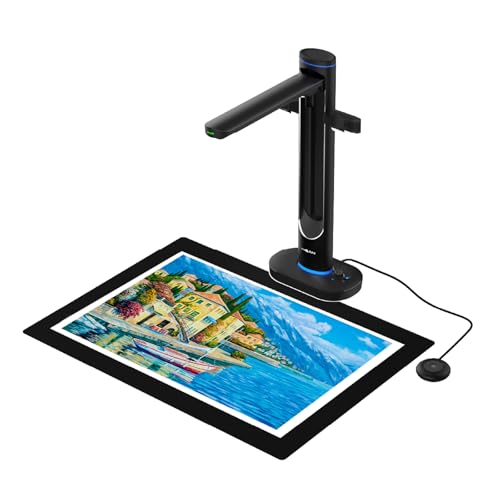
- Handles books and documents up to A2
- Dual 48MP cameras with up to 600 DPI
- OCR, text-to-speech, and UVC support
Best For: Archival, educational, and oversized-material scanning
Portable Workflow Pick
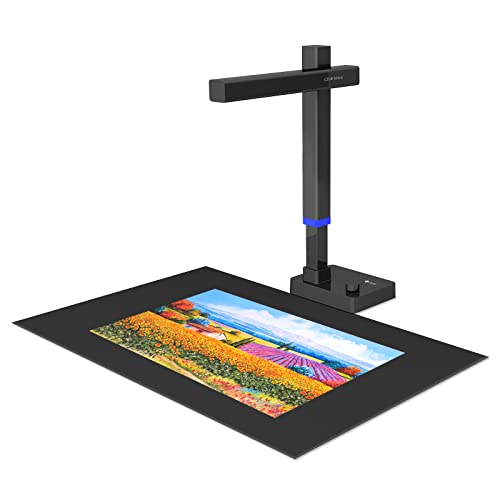
- Lightweight 2-pound foldable design
- 24MP sensor with curved-page flattening
- Exports searchable and editable files
Best For: Portable scanning at home, work, or school
Automated Overhead Scanner

- Scans books without cutting or damaging them
- Automatic curve correction and finger removal
- Page-turn and multi-document detection
Best For: Mixed collections and repeated overhead scanning
Best Premium Choice
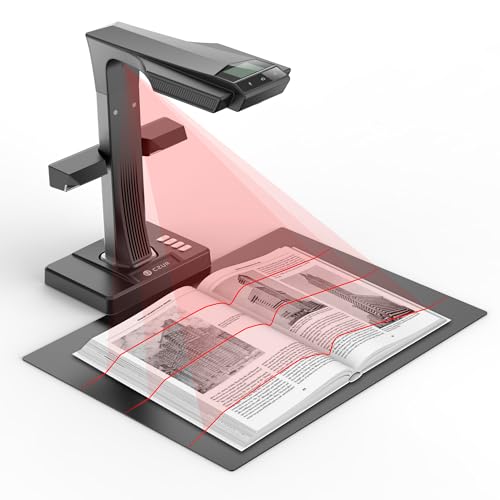
- 24MP A3 scanner with 5696 × 4272 resolution
- Page flattening, HDMI, and multi-angle lighting
- OCR supports 180+ languages
Best For: High-volume book and document digitization up to A3
Best Large-Format Pick

- Captures A2-size material up to 594 × 420 mm
- 26MP camera with software-enhanced detail
- Auto-flattening, finger removal, and page splitting
Best For: Oversized books, maps, newspapers, and manuscripts
Best Value Book Scanner

- 16MP camera with fast 1.5-second-per-page scanning
- Curved-page flattening for bound books
- 180+ language OCR and multi-item support
Best For: Fast book, binder, and document scanning
Best All-Around Book Scanner

- Two-second page scanning with multiple output formats
- Three-laser technology flattens curved book pages
- A3/A4 capture with 180+ language OCR
Best For: Home offices, libraries, and general book digitization
Best Large-Format Scanner

- Switches between A2 and A3 capture formats
- 26MP sensor with software-enhanced 600 DPI output
- Automatic flattening, cleanup, and multi-format OCR
Best For: Large books, maps, newspapers, and technical documents
Best Portable Scanner

- About one-second scanning for A3 and A4 materials
- Foldable, height-adjustable design with foot pedal
- Works as both a scanner and USB document camera
Best For: Remote teaching, mobile scanning, and thinner books
High-Resolution Choice – CZUR ET MAX
For demanding book-digitization projects, the CZUR ET MAX is one of the most capable professional book scanners in this roundup. Its 38MP sensor, A3 scanning area, curve-flattening technology, and OCR tools make it well suited to detailed, high-volume work.
Best For: Libraries, offices, educators, and users scanning bound books or large documents in bulk.
Pros:
- 38MP CMOS sensor with up to 410 DPI resolution for detailed captures
- Patented technology flattens curved book pages without unbinding them
- OCR supports editable and searchable files in more than 180 languages
- Works with Windows, macOS, and supported Ubuntu Linux systems
Cons:
- Not recommended for glossy or highly reflective materials
- Some OCR language support varies by operating system
- Its professional feature set may be more than casual users need
The ET MAX stands out when scan detail, document size, and workflow flexibility matter most. Its HDMI output is also useful for live demonstrations, while the fast operating speed supports larger scanning jobs.
Large-Format Specialist – VIISAN S48 Duo
The VIISAN S48 Duo is a strong option among professional book scanners for oversized or delicate materials. Its overhead A2 design, dual 48MP cameras, AI image processing, and accessibility features support archival, educational, and presentation-focused workflows.
Best For: Libraries, archives, schools, and offices handling large books, maps, manuscripts, or distance learning.
Pros:
- Scans materials up to A2 size without pressing on bindings
- Dual 48MP cameras capture detailed text, lines, and color
- AI processing helps flatten curves, remove finger marks, and clean backgrounds
- Includes OCR, text-to-speech, and UVC camera functionality
Cons:
- At 2.8 kg, it is less portable than compact overhead scanners
- Requires at least 4GB RAM and 20GB of available hard-drive space
- Its large-format capabilities may be unnecessary for standard letter-size documents
Choose the S48 Duo when protecting fragile materials or scanning oversized pages is a priority. The added text-to-speech and UVC functions make it especially versatile for accessibility, teaching, and live collaboration.
Portable Workflow Pick – CZUR Shine Ultra Pro
The CZUR Shine Ultra Pro offers a practical balance of portability and book-scanning capability. For users who need professional book scanners that can move between workspaces, its foldable design, 24MP sensor, and document-conversion software are useful advantages.
Best For: Mobile professionals, students, home offices, and users who scan books and documents in multiple locations.
Pros:
- Foldable, height-adjustable design weighs only 2 pounds
- Pixel transformation helps flatten curved book pages
- Exports scans as JPG, PDF, searchable PDF, Word, or Excel files
- Compatible with current Windows and macOS systems
Cons:
- Its 24MP resolution is lower than the higher-end models in this roundup
- Connects through USB rather than offering broader connectivity options
- The compact design is less suited to very large-format materials
The Shine Ultra Pro is a sensible choice when space and portability matter more than maximum resolution or oversized scanning. It delivers useful book flattening and file-conversion features in a lightweight package.
Automated Overhead Scanner – ScanSnap SV600
The ScanSnap SV600 is a dependable overhead option for users comparing professional book scanners with automated page-handling features. It scans books, newspapers, magazines, and loose materials without cutting them, while page-turn detection can streamline repeated scanning.
Best For: Users digitizing books, newspapers, photos, business cards, and mixed document collections.
Pros:
- Scans books and other materials without cutting or damaging them
- Automatically corrects book curves and supports finger removal
- Multi Document Detection crops and rotates multiple items in one scan
- Page Turning Detection can start scans automatically
Cons:
- At 6.6 pounds, it is relatively heavy for an overhead scanner
- Uses a lower stated resolution than the newer high-megapixel alternatives
- Requires a USB connection and compatible Windows or macOS systems
The SV600 remains appealing for mixed collections and repetitive book scanning, particularly when automatic page detection and document separation can save time. Its broad media handling makes it more versatile than a book-only scanner.
Best Premium Choice – CZUR ET24 Pro
For shoppers comparing professional book scanners, the CZUR ET24 Pro stands out with a 24MP camera, A3 scanning support, and upgraded page-flattening technology. It also adds HDMI connectivity, multi-angle lighting, and OCR for turning scans into editable files.
Best For: Digitizing books, magazines, artwork, receipts, and other documents up to A3 size.
Pros:
- 24MP camera captures up to 5696 × 4272 resolution at 320 DPI.
- Flattening technology helps correct curved book pages.
- ABBYY OCR supports more than 180 languages and exports to PDF, Word, and Excel.
- Supports Windows, compatible macOS versions, Ubuntu Linux, and HDMI connections.
Cons:
- Very glossy paper is not recommended.
- Thai and Hebrew OCR are not supported; Arabic support varies by operating system.
- The unit weighs about 4.5 kg and requires a computer for scanning.
The ET24 Pro is a strong fit when image quality, large-format capability, and workflow flexibility matter more than compact size. Its extra lighting and preview display are useful refinements for frequent book-scanning projects.
Best Large-Format Pick – VIISAN S21 A2 Scanner
The VIISAN S21 is one of the more capable professional book scanners for oversized material. Its A2 capture area, 26MP camera, and software-assisted page correction make it suitable for large journals, newspapers, maps, manuscripts, and everyday documents.
Best For: Scanning A2/A3 books, maps, newspapers, manuscripts, and other large-format materials.
Pros:
- Large A2 capture area measures up to 594 × 420 mm.
- 26MP resolution and software enhancement support detail equivalent to up to 600 DPI.
- Software can flatten pages, remove fingers, repair edges, and split facing pages.
- OCR exports scans to PDF, Word, Excel, EPUB, and text files.
Cons:
- Bundled OfficeCam software is not compatible with ARM-based devices such as Surface Pro X.
- Very glossy paper is not recommended.
- The built-in LEDs are not recommended for use in bright light.
Choose the S21 if a large working area is the priority. Its adjustable A2/A3 design and broad file-format support provide useful flexibility, while the software handles several repetitive book-scanning corrections automatically.
Best Value Book Scanner – CZUR ET16 Plus
The CZUR ET16 Plus is a practical option among professional book scanners for users who want fast overhead scanning without stepping up to the ET24 Pro. Its 16MP camera, curved-page flattening, and 1.5-second-per-page scanning speed are designed for efficient book and document projects.
Best For: Quickly digitizing books, binders, business cards, vouchers, and physical objects.
Pros:
- Can scan at about 1.5 seconds per page, with a stated 300-page book workflow of roughly 10 minutes.
- Patented technology helps flatten curved book pages.
- Sixteen-megapixel camera and 10 LED lights plus supplemental lighting support clear scans.
- OCR recognizes more than 180 languages.
Cons:
- Very glossy paper is not recommended.
- Thai and Hebrew OCR are not supported; Arabic support varies by operating system.
- It uses a USB connection and requires a compatible Windows or macOS computer.
The ET16 Plus makes sense for home offices, archives, and researchers who value speed and automated page flattening. It offers a capable feature set while using a lower-resolution camera than CZUR’s ET24 Pro.
Best All-Around Book Scanner – CZUR Aura Pro
The CZUR Aura Pro is a versatile choice among professional book scanners for users who want fast page capture, curved-page correction, and flexible file output. It scans a page in about two seconds, uses three laser lines to flatten curved pages, and supports OCR in more than 180 languages, with Thai, Hebrew, and Arabic excluded.
Best For: Home offices, libraries, students, and professionals digitizing books and standard documents on Windows or Mac.
Pros:
- Scans pages in approximately two seconds and exports JPG, Word, PDF, and searchable PDF files.
- Three-laser flattening technology improves clarity when scanning curved book pages.
- Includes a glare-free smart lamp with four color-temperature settings and supplemental side lighting.
- Works with current Windows and Mac systems, including supported Apple Silicon Macs.
Cons:
- Thai, Hebrew, and Arabic are not supported by the OCR.
- Requires a USB connection rather than Wi-Fi or Bluetooth.
Choose the Aura Pro if you want a dedicated book scanner that balances speed, OCR, lighting, and page-flattening features in one compact unit. Its A3/A4 capture capability makes it suitable for both books and larger documents.
Best Large-Format Scanner – VIISAN S21 Pro A2/A3 Scanner
The VIISAN S21 Pro stands out among professional book scanners for large-format work, switching between A2 and A3 capture with a foldable, height-adjustable design. Its 26MP sensor, software-enhanced 600 DPI output, automatic page flattening, and broad OCR export options make it useful for books, maps, newspapers, and technical documents.
Best For: Researchers, educators, libraries, and offices scanning oversized materials or needing portable book and document capture.
Pros:
- Interchangeable A2 and A3 formats accommodate large newspapers, maps, books, and documents.
- 26MP capture with software-enhanced 600 DPI output preserves fine details.
- Automatically flattens pages, removes fingerprints, repairs page edges, and separates spreads.
- OCR supports more than 180 languages and exports to PDF, Word, Excel, ePub, and TXT.
Cons:
- Highly glossy or glare-prone paper is not recommended.
- Not compatible with ARM-based devices such as Surface Pro X.
- AI Gemini features require connection through the VisualCam Lite Web UI and Chrome.
The S21 Pro is the strongest fit when document size and automated cleanup matter more than a traditional flatbed form factor. Its foldable design also makes it easier to move between classrooms, offices, libraries, and home workspaces.
Best Portable Scanner – CZUR Shine Ultra
The CZUR Shine Ultra is a practical option among professional book scanners for fast, portable capture of A3 and A4 materials. It scans at about one second per page, folds to 90 degrees, and doubles as a USB document camera for platforms such as Zoom and Google Meet.
Best For: Mobile workspaces, remote teaching, and users scanning thinner books and documents up to A3 size.
Pros:
- Captures pages in about one second and supports A3, A4, and smaller objects.
- Portable 90-degree-foldable design with a two-level adjustable neck and foot pedal.
- Offers OCR in more than 180 languages, excluding Thai, Hebrew, and Arabic.
- Includes smart paging, auto-cropping, color modes, and document-camera functionality.
Cons:
- Curved-page flattening is intended for thinner books; thicker books may require CZUR’s ET series.
- Not compatible with Android or iOS devices.
- Its 13MP camera provides lower stated resolution than the VIISAN S21 Pro.
The Shine Ultra makes sense when speed, portability, and document-camera use are priorities. It is particularly convenient for thinner books and flat materials, while users handling thick volumes should consider a model designed for that use.
How We Picked the Best Professional Book Scanners
We focused on scanners designed for books and bound materials rather than standard sheet-fed office scanners. Our comparison considers camera resolution, maximum capture size, page-flattening features, OCR support, portability, software capabilities, and how well each model fits common digitization workflows.
Because specifications and software performance can vary by computer and operating system, treat advertised resolution as one factor—not a guarantee of final image quality. Lighting, page condition, book curvature, and operator technique also affect results.
Quick Comparison
- Best for demanding office or archive work: High-resolution CZUR ET MAX and VIISAN S48 Duo models.
- Best for large books and oversized documents: A2/A3 VIISAN scanners and the comparable 26MP large-format model.
- Best for portable scanning: CZUR Shine Ultra Pro and Shine Ultra Smart.
- Best for established overhead workflows: ScanSnap SV600.
- Best for balanced desktop use: CZUR ET24 Pro, ET16 Plus, and Aura Pro.
Key Buying Factors for Professional Book Scanners
Resolution and Image Quality
Higher megapixel counts can preserve small print, illustrations, and fine details, particularly when you need to crop or enlarge pages. Resolution alone is not enough: lens quality, color consistency, focus, and software processing matter just as much.
Book Size and Capture Area
Check the maximum supported format before buying. A3 scanners suit many books and office documents, while A2-capable models provide more room for oversized pages, maps, newspapers, and open spreads.
Page Flattening and Finger Removal
Auto-flattening software can correct curved pages near the spine, while finger-removal tools help keep hands out of finished images. These features are especially useful when scanning thick or delicate books that cannot lie completely flat.
OCR and Workflow Features
OCR converts captured pages into searchable or editable text. If you are digitizing reference collections, prioritize accurate OCR, batch processing, export options, and software that works with your preferred operating system. Text-to-speech may also benefit accessibility and distance-learning use cases.
Portability and Workspace
Portable document-camera scanners are convenient for classrooms, fieldwork, and shared offices. Larger overhead units generally offer a more stable setup and broader capture area, but require dedicated desk space and reliable lighting.
Who Should Buy Which Professional Book Scanners?
Choose a high-resolution professional model if you manage regular archival, publishing, research, or office scanning and need detailed images with efficient batch workflows.
Choose a large-format scanner for oversized books, artwork, newspapers, maps, or documents that will not fit comfortably on an A3 platform.
Choose a portable CZUR Shine model if compact storage, quick setup, and occasional scanning matter more than maximum capture size.
Choose the ScanSnap SV600 if you want a recognizable overhead design for general books and documents and prefer a straightforward desktop workflow.
Before purchasing, confirm included software, USB and operating-system compatibility, desk clearance, and the file formats you need. For frequent archival work, also budget for storage and a consistent naming and backup system.
