
The best premium powered USB hubs make it easier to connect storage, peripherals, phones, cameras, and other accessories without overloading your computer’s built-in ports.
We compared 10 powered models across port count, USB standards, charging capability, power delivery, controls, and everyday versatility to help you choose the right hub for your setup.
Best 10 Premium Powered USB Hubs Picks for 2026
Best for Controlled Charging
SABRENT 10-Port Powered USB 3.0 Hub

- Seven USB 3.0 ports support up to 5Gbps
- Three dedicated charging ports deliver up to 2.4A
- Individual switches and LEDs offer port-level control
Best For: Desktops and workstations needing controlled USB-A expansion
Best for USB-C Workstations

- 15 ports combine USB-C and USB-A expansion
- 10Gbps data ports support fast file transfers
- 100W PD port plus dedicated charging connections
Best For: USB-C laptops and high-connectivity creator workstations
Best Budget-Controlled Hub
Atolla 8-Port Powered USB 3.0 Hub
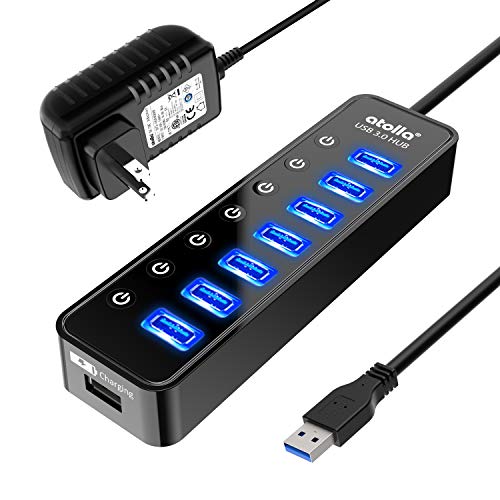
- Seven USB 3.0 data ports reach 5Gbps
- Dedicated charging port supports up to 2.4A
- Individual switches provide convenient device control
Best For: Home offices and everyday USB-A peripherals
Best for Maximum Port Count

- Eight USB-A and eight USB-C ports provide broad expansion
- All data ports support up to 10Gbps
- 96W adapter and individual switches support busy setups
Best For: Workstations connecting many USB-A and USB-C peripherals
Premium High-Speed Powerhouse

- Nine-port USB-A and USB-C layout
- 10Gbps data and dedicated 45W PD charging
- 65W adapter with aluminum angled design
Best For: USB-C workstations needing fast data and device charging
Reliable Expand-and-Charge Hub

- Seven USB 3.0 data ports
- Two 5V/2.4A smart-charging ports
- Protection features and two-year warranty
Best For: USB-A desktop workstations and office peripherals
Premium Port-Control Specialist
Rosonway 7-Port 10Gbps USB-C Hub

- Seven USB-C and USB-A 10Gbps data ports
- Individual switches with status LEDs
- Aluminum body and detachable host cable
Best For: Fast mixed-port setups requiring individual device control
Best All-Around Control
UGREEN 7-Port Powered USB 3.0 Hub

- Seven USB 3.0 ports with 5Gbps transfer speeds
- Four smart-charging ports
- Individual switches and LED indicators
Best For: Home offices and mixed peripheral setups
Best High-Capacity Choice

- Sixteen ports with 10Gbps USB 3.2 speeds
- 96W power adapter for multiple devices
- Aluminum housing with independent switches
Best For: Large, data-heavy workstation setups
Best for Extended Cable Reach
Wenter 11-Port Powered USB Hub

- Ten 5Gbps USB 3.0 data ports
- Dedicated smart-charging port
- Long included USB and power cables
Best For: Flexible home-office and workstation layouts
Best for Controlled Charging – SABRENT 10-Port Powered USB 3.0 Hub
For a practical premium powered USB hubs setup, the SABRENT HB-B7C3 combines seven USB 3.0 data ports with three dedicated charging ports. Its included 60W adapter is designed to keep connected peripherals supplied with consistent power, while individual switches make everyday device management easier.
Best For: Desktops, gaming setups, and workstations that need individually controlled USB-A ports plus dedicated charging.
Pros:
- Seven USB 3.0 data ports support transfers up to 5Gbps.
- Three charging ports provide up to 2.4A per port with smart detection.
- Individual power switches and LED indicators simplify port control.
- Includes a 60W power adapter and supports Windows, macOS, and Linux without drivers.
Cons:
- It uses USB 3.0 rather than newer 10Gbps USB 3.2 connectivity.
- The notes do not indicate USB-C ports or video output.
The SABRENT is a strong choice when separate port switches and dependable powered USB 3.0 expansion matter more than the newest interface standard.
Best for USB-C Workstations – GITFOS 15-in-1 USB 3.2 Hub
The Gitfos C1 is a premium powered USB hubs option for USB-C computers that need extensive peripheral expansion and charging. It offers 15 ports, 10Gbps USB 3.2 data connections, a 100W USB-C PD port, and a supplied 65W power adapter. Note that the hub does not support video output.
Best For: USB-C laptops, creators, photographers, and remote-work setups connecting many storage devices and peripherals.
Pros:
- Provides 15 ports across USB-C and USB-A connections.
- USB 3.2 data ports support transfers up to 10Gbps.
- Includes a 100W USB-C PD port and dedicated charging ports rated up to 45W single-port output.
- Aluminum construction, an angled design, and non-slip feet support organized desk use.
Cons:
- All ports lack video-output support.
- The included 65W adapter must be connected for the hub to operate.
- The USB-C charging ports are not recommended for computers or other high-power appliances.
Choose the Gitfos when USB-C connectivity, high port count, and fast data transfer are priorities, but use a separate display solution if you need monitor expansion.
Best Budget-Controlled Hub – Atolla 8-Port Powered USB 3.0 Hub
The Atolla 8-Port Hub offers a straightforward premium powered USB hubs alternative for adding USB 3.0 connections to a computer. It includes seven data ports, one smart charging port, individual on/off switches, and a 5V/4A adapter for everyday peripherals such as drives, printers, keyboards, and mice.
Best For: Home offices and general desktop setups that need affordable USB 3.0 expansion with simple physical controls.
Pros:
- Seven USB 3.0 data ports support speeds up to 5Gbps.
- A dedicated charging port can provide up to 2.4A with the included adapter.
- Individual switches reduce the need to unplug devices.
- Supports Windows, macOS, and Linux with plug-and-play operation.
Cons:
- Only one port is dedicated to charging.
- The plastic enclosure is less premium than an aluminum design.
- It does not offer USB-C or 10Gbps USB 3.2 connectivity.
The Atolla makes sense for users who want convenient per-port control and reliable USB 3.0 expansion without requiring newer USB-C features.
Best for Maximum Port Count – VANGREE 16-Port USB 3.2 Hub
The VANGREE 16-Port Hub is built for demanding setups that need a large number of USB connections in one enclosure. Its eight USB-A and eight USB-C USB 3.2 ports support up to 10Gbps, while the 96W UL-certified adapter and individual switches help manage multiple peripherals. It does not support USB-C video or audio.
Best For: Offices, storage-heavy workstations, and users connecting numerous USB-A and USB-C peripherals at once.
Pros:
- Sixteen ports provide an even mix of eight USB-A and eight USB-C connections.
- USB 3.2 data bandwidth reaches up to 10Gbps.
- A 96W UL-certified adapter supports multiple connected peripherals.
- Independent switches and blue LED indicators provide clear port-level control.
Cons:
- USB-C ports do not extend displays or carry video and audio.
- Each port delivers up to 5V/1.5A for device charging.
- At 1.5 pounds, it is less lightweight than smaller hubs.
For users who regularly run out of USB connections, the VANGREE delivers exceptional capacity and fast data support, provided display output is not part of the requirement.
Premium High-Speed Powerhouse – intpw 9-Port 10Gbps USB Hub
For shoppers seeking premium powered USB hubs with a mix of USB-A, USB-C, fast data transfer, and device charging, the intpw hub is a versatile desktop option. It combines three 10Gbps data ports, four 5Gbps USB-A ports, and two USB-C PD charging ports, but it does not support video output.
Best For: USB-C laptop users who need many connections, fast file transfers, and dedicated charging for phones or tablets.
Pros:
- Offers nine ports, including USB-C and USB-A data connections.
- Provides 10Gbps transfer speeds on selected USB 3.2 ports.
- Includes two USB-C PD charging ports and a 65W power adapter.
- Aluminum angled design and built-in protection support stable desktop use.
Cons:
- USB-C PD ports do not support data transfer.
- Does not provide video output and is not recommended for charging computers.
- Using multiple SSDs or removable drives simultaneously is discouraged.
The intpw stands out when port variety and charging flexibility matter more than display connectivity. Its power adapter helps maintain stable operation with several peripherals, while the clear limits make it best suited to phones, tablets, storage devices, and everyday accessories.
Reliable Expand-and-Charge Hub – TP-Link UH720 9-Port USB Hub
The TP-Link UH720 is a practical choice among premium powered USB hubs for conventional USB-A setups. It adds seven USB 3.0 data ports plus two dedicated smart-charging ports, with a 12V/4A adapter and broad Windows, Mac, Chrome, and Linux compatibility.
Best For: Home and office desktops connecting keyboards, mice, printers, hard drives, smartphones, and tablets.
Pros:
- Provides seven USB 3.0 data ports with speeds up to 5Gbps.
- Two 5V/2.4A smart-charging ports are designed for USB devices.
- Includes overheat, overload, overvoltage, short-circuit, and surge protection.
- Offers plug-and-play operation, a power switch, and a two-year warranty.
Cons:
- Uses USB 3.0 rather than newer 10Gbps USB 3.2 connectivity.
- All expansion ports are USB-A, with no USB-C ports listed.
- The plastic enclosure is less premium than an aluminum design.
The UH720 favors dependable expansion and straightforward charging over newer port standards. Its large port count, hardware power switch, protection circuitry, and long warranty make it a sensible fit for established USB-A workstations.
Premium Port-Control Specialist – Rosonway 7-Port 10Gbps USB-C Hub
The Rosonway RSH-H7C4 is one of the more control-focused premium powered USB hubs, with four USB-C and three USB-A 10Gbps data ports. Its powered aluminum body includes an independent electronic switch for every port, making it useful when you want precise control over connected accessories.
Best For: USB-C users who need fast data across every port and want to switch individual peripherals on or off.
Pros:
- All seven ports support data transfer speeds up to 10Gbps.
- Four USB-C and three USB-A ports suit mixed modern setups.
- Independent switches and blue indicators simplify power management.
- Aluminum construction, detachable cable, and surge protection support flexible use.
Cons:
- USB-C ports do not support PD charging or video output.
- Standard USB-C charging is limited to 1.5A.
- The included 36W adapter provides less power than some larger powered hubs.
The Rosonway is particularly compelling for users with several high-speed data peripherals and a preference for hands-on power control. It is not a display dock or high-power charging station, but its uniform 10Gbps ports and individual switches make it well suited to organized desktop and travel setups.
Best All-Around Control – UGREEN 7-Port Powered USB 3.0 Hub
For shoppers comparing premium powered USB hubs, the UGREEN 7-port model balances fast connectivity with useful port-by-port control. It offers seven USB 3.0 ports, four additional smart-charging ports, and a 12V/2A adapter to help maintain stable performance with multiple connected devices.
Best For: Home offices and desktop users who need flexible expansion, individual switches, and dedicated charging support.
Pros:
- Seven USB 3.0 ports support data transfers up to 5Gbps.
- Four smart-charging ports automatically detect charging protocols.
- Individual switches and LED indicators make port management convenient.
- Plug-and-play support works with Windows, macOS, UNIX, and Linux.
Cons:
- The data ports and charging ports serve different purposes, so users must choose the appropriate connection.
- Its 12V/2A power supply is less substantial than the adapters supplied with higher-capacity hubs.
The UGREEN is a practical premium powered USB hub for everyday expansion. Its combination of 5Gbps data speeds, smart charging, and individual controls makes it especially convenient for a mixed collection of peripherals.
Best High-Capacity Choice – ACASIS 16-Port USB 3.2 Hub
If you need a premium powered USB hub for a crowded workstation, the ACASIS 16-port model stands out with USB 3.2 Gen 2 connectivity and a high-output 96W adapter. Its 10Gbps ports, aluminum housing, and surge protection are designed for demanding multi-device setups.
Best For: Power users who connect many peripherals and prioritize high-speed transfers and substantial external power.
Pros:
- Sixteen USB ports provide extensive expansion for desktops and laptops.
- USB 3.2 Gen 2 supports data transfer speeds up to 10Gbps.
- The 96W adapter helps support multiple connected devices.
- Aluminum construction aids heat dissipation, while independent switches simplify port control.
Cons:
- Its larger 8.78-inch chassis takes more desk space than smaller hubs.
- The 781-gram weight makes it less convenient for portable use.
- It is more capacity than many basic keyboard, mouse, and printer setups require.
The ACASIS is the strongest fit when port count and bandwidth matter most. Its 16-port layout and 10Gbps performance make it a compelling premium powered USB hub for data-heavy, multi-peripheral workstations.
Best for Extended Cable Reach – Wenter 11-Port Powered USB Hub
The Wenter 11-port hub is a useful premium powered USB hub for users who need plenty of USB 3.0 connections without placing the hub directly beside the computer. Its ten data ports, dedicated smart-charging port, individual switches, and long included cables support flexible desk arrangements.
Best For: Home offices and workstations where cable reach, port-level control, and a dedicated charging connection are important.
Pros:
- Ten USB 3.0 data ports support transfers up to 5Gbps.
- A dedicated charging port can provide up to 2.4 amps per port according to the supplied notes.
- Individual switches and LED indicators allow convenient power management.
- Includes a 100cm USB cable and a long power cable for flexible placement.
Cons:
- The plastic enclosure is less premium than aluminum-bodied alternatives.
- It offers USB 3.0 rather than the faster 10Gbps USB 3.2 performance found on some competing hubs.
- Only one port is dedicated to charging.
The Wenter emphasizes practical desk organization rather than maximum transfer speed. It is a sensible premium powered USB hub for users who value eleven total ports, straightforward controls, and extra cable length.
How We Picked the Best Premium Powered USB Hubs
We focused on hubs that use an external power adapter, since dedicated power helps maintain stable performance when several devices are connected at once. The lineup includes compact seven-port models, high-capacity 16-port hubs, USB-A and USB-C combinations, and options with dedicated charging ports.
Our comparison emphasizes practical specifications rather than port count alone: USB generation, advertised transfer speed, charging support, adapter wattage, cable length, individual switches, build materials, and the balance between data and charging ports.
Quick Comparison
- For maximum capacity: Choose a 16-port model such as the ACASIS or the USB-A/USB-C 16-port hub.
- For fast USB-C connectivity: Look at the Gitfos, Rosonway, intpw, or USB-C-heavy 16-port options with 10Gbps support.
- For mixed charging and data use: SABRENT, TP-Link, UGREEN, Atolla, and Wenter provide dedicated smart-charging ports.
- For desk organization: Individual power switches, status LEDs, and longer host cables can make frequent device changes easier.
Key Buying Factors for Premium Powered USB Hubs
Port Type and Layout
Count the connectors you actually use, then consider their placement. USB-A remains useful for keyboards, mice, flash drives, and older accessories, while USB-C is increasingly important for current phones, storage devices, cameras, and laptops. A mixed layout is usually the most flexible choice.
Speed and Standards
USB 3.0 generally supports up to 5Gbps under ideal conditions, while USB 3.2 Gen 2 models advertise up to 10Gbps. Real-world speed depends on the computer, cable, device, and shared hub bandwidth. A 10Gbps hub is most worthwhile when transferring large files to compatible SSDs or other high-speed peripherals.
Power and Charging
Check the included adapter’s wattage and distinguish data ports from charging-only ports. A powered hub can keep multiple peripherals stable, but it may not replace a dedicated laptop charger or guarantee full USB Power Delivery performance. If you need high-wattage charging, verify the hub’s PD specifications and host-device compatibility.
Controls, Construction, and Compatibility
Individual switches are useful for disconnecting drives or accessories without unplugging them. Aluminum housings can improve durability and heat handling, while a longer cable may help with desktop placement. Also confirm operating-system support and whether the hub works properly with your computer’s USB-C or USB-A connection.
Who Should Buy Which Premium Powered USB Hubs?
Choose a seven- to nine-port hub if you want a practical desktop expansion without taking up much space. Pick an 11- or 15-port design for a workstation with numerous peripherals, and choose a 16-port hub when maximum expansion matters more than compactness.
Users with newer USB-C equipment should prioritize a hub with several USB-C data ports and 10Gbps support. For mixed home-office use, a model with smart-charging ports and individual switches may be more convenient than one with the highest theoretical speed. Gamers, creators, and professionals moving large files should prioritize bandwidth, adapter capacity, and reliable cooling over headline port count.
