
The best premium PoE network switches simplify network design by carrying both data and power to access points, cameras, VoIP phones, and other compatible devices over Ethernet. The right model can also improve capacity, monitoring, reliability, and future expansion.
This roundup compares ten options across compact home-office installations, business networks, surveillance systems, and larger UniFi deployments. Pay close attention to PoE budget, port speed, management controls, uplinks, and ecosystem compatibility before choosing.
Best 10 Premium PoE Network Switches Picks for 2026
Best for UniFi-managed networks

- 48 Gigabit PoE+ ports
- Four 10G SFP+ uplinks
- Layer 2/3 management with UniFi integration
Best For: Large UniFi deployments needing high port density and 10G backbone links
Best compact 2.5G option

- Eight 2.5GBASE-T ports
- 230W PoE budget with PoE++ support
- Fanless, wall-mountable metal design
Best For: Small, quiet installations needing faster-than-Gigabit PoE connectivity
Best straightforward UniFi 24-port switch

- 24 Gigabit Ethernet ports
- PoE+ support for compatible devices
- Metal enclosure with SFP and RJ45 interfaces
Best For: Medium UniFi networks needing a 24-port Gigabit PoE switch
Best high-budget plug-and-play choice

- 16 PoE+ ports with a 250W budget
- Two Gigabit ports and two combo SFP slots
- Plug-and-play rack-mountable metal design
Best For: PoE-heavy installations needing simple setup and flexible uplinks
Enterprise PoE Capacity

- 48 Gigabit Ethernet ports
- 32 802.3at PoE+ ports
- UniFi Controller management with 240W power supply
Best For: Large managed networks with many PoE devices
Compact Smart PoE Pick

- Four Gigabit PoE+ ports
- 120W total PoE budget
- VLAN, QoS, IGMP, and PoE Auto Recovery
Best For: Small networks with a few PoE devices
Mid-Size Managed Option

- 16-port managed Ethernet switch
- Low-profile 1.7-inch listed height
- Mid-size alternative to five- and 48-port models
Best For: Mid-size Ubiquiti network installations
High-Power Plug-and-Play Pick

- 16 Gigabit PoE+ ports
- 183W shared power budget
- Fanless desktop or wall-mount design
Best For: Larger PoE installations needing simple setup
Compact Managed Value

- Eight Gigabit ports
- Four PoE ports with 57W budget
- VLAN, QoS, and IGMP features
Best For: Small managed networks with a few PoE devices
Flexible Smart-Managed Option
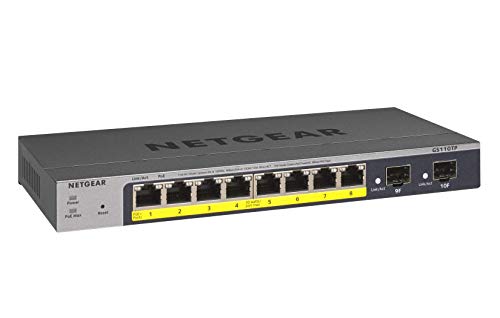
- Eight Gigabit PoE+ ports
- Two 1G SFP expansion ports
- Smart and optional Insight management
Best For: Small business networks needing fiber flexibility
Best for UniFi-managed networks – UniFi Pro USW-PRO-48-POE
For larger installations that need centralized management, the Ubiquiti UniFi Pro USW-PRO-48-POE is a premium PoE network switch with 48 Gigabit PoE+ ports and four 10G SFP+ uplinks. Its Layer 2/3 features and UniFi Network integration make it suited to structured deployments with access points, cameras, and VoIP phones.
Best For: Expansive UniFi networks, rack-mounted installations, and users needing 10G uplinks with advanced management features.
Pros:
- 48 RJ-45 Gigabit ports support IEEE 802.3af/at PoE and PoE+ devices.
- Four SFP+ 10G uplinks provide high-speed backbone connectivity.
- Supports VLANs, spanning tree, 802.1x, RADIUS, DHCP, and port mirroring.
- Integrates with the UniFi Network application for centralized management.
Cons:
- Its 48-port rack-mount design may be excessive for smaller networks.
- Management features are most useful within a more structured network setup.
This is a strong choice when port density, 10G uplinks, and UniFi ecosystem compatibility matter more than a compact footprint.
Best compact 2.5G option – TRENDnet TPE-BG380
The TRENDnet TPE-BG380 combines eight 2.5GBASE-T ports with a 230W PoE power budget, making it a practical premium PoE network switch for faster edge connections. Its fanless metal enclosure and wall-mountable design suit offices and installations where quiet operation and flexible placement are important.
Best For: Small networks, high-speed edge devices, and installations that need PoE++ power without fan noise.
Pros:
- Eight 2.5Gbps RJ-45 ports work with existing Cat5e or better cabling.
- 230W PoE budget and IEEE 802.3af/at/bt compliance support a range of powered devices.
- Fanless metal design reduces operating noise and supports wall mounting.
- Provides 40Gbps switching capacity and supports jumbo frames up to 12KB.
Cons:
- Only eight ports are available.
- The supplied details identify it as an unmanaged switch, limiting configuration options.
Choose this model for a compact, quiet deployment where 2.5Gbps access speeds and substantial PoE capacity are more important than advanced management.
Best straightforward UniFi 24-port switch – UniFi USW-24-POE
The Ubiquiti UniFi USW-24-POE is a 24-port Gigabit Layer 2 Ethernet switch designed for networks using PoE-powered access points, cameras, phones, and other devices. It offers a middle ground for buyers seeking a premium PoE network switch with more capacity than a small desktop model without moving to a 48-port platform.
Best For: Medium-sized UniFi installations requiring 24 Gigabit ports and PoE+ connectivity.
Pros:
- Provides 24 ports in a rack-oriented metal enclosure.
- Supports PoE+ and Gigabit Ethernet connectivity.
- Includes PoE+, SFP, and RJ45 interfaces for flexible network connections.
Cons:
- The supplied information does not specify the total PoE power budget.
- Its Layer 2 design may be less suitable for buyers seeking the broader Layer 2/3 feature set of higher-end models.
This switch fits buyers who want a 24-port UniFi-compatible platform for standard Gigabit PoE deployments and do not need the capacity of a 48-port model.
Best high-budget plug-and-play choice – TP-Link TL-SG1218MP
The TP-Link TL-SG1218MP is a 16-port Gigabit PoE+ switch with a 250W total PoE budget, two additional Gigabit non-PoE ports, and two combo SFP slots. It is a practical premium PoE network switch for buyers who want substantial device power, straightforward setup, and a rack-mountable metal chassis.
Best For: Small to medium installations powering multiple PoE+ devices while retaining SFP uplink options.
Pros:
- Sixteen PoE+ ports provide up to 30W per port, with a 250W total budget.
- Two Gigabit non-PoE ports and two combo SFP slots expand connection options.
- Plug-and-play setup requires no software installation or configuration.
- Includes QoS, IGMP Snooping, a metal enclosure, and rack-mounting hardware.
Cons:
- Ports are limited to Gigabit speeds.
- The supplied details do not identify advanced Layer 2/3 management features.
This model is a sensible fit for surveillance, voice, or access-point deployments that prioritize PoE capacity and simple installation over multi-gigabit access speeds.
Enterprise PoE Capacity – Ubiquiti UniFi USW-48-PoE
For larger deployments that need substantial port capacity, the Ubiquiti UniFi USW-48-PoE is a premium PoE network switch with 48 Gigabit Ethernet ports, including 32 802.3at PoE+ ports. Its UniFi Controller management and 240W power supply make it suited to centrally managed networks.
Best For: Larger offices, managed installations, and networks needing many PoE+ connections.
Pros:
- Provides 48 Gigabit Ethernet ports.
- Includes 32 802.3at PoE+ ports.
- Adds four 1G SFP ports for compatible uplinks.
- Offers UniFi Controller management and a 240W power supply.
Cons:
- Its 48-port design may be more capacity than smaller networks need.
- The listed item weight is 17 pounds, making it less convenient for compact setups.
This is the strongest fit of the three for high-port-count deployments. Choose it when centralized UniFi management and broad PoE+ capacity matter more than a compact footprint.
Compact Smart PoE Pick – TP-Link TL-SG105MPE
The TP-Link TL-SG105MPE is a compact premium PoE network switch for smaller installations. It combines four Gigabit PoE+ ports with one non-PoE Gigabit port, while offering VLAN features, QoS, IGMP Snooping, and PoE Auto Recovery through an easy-to-use management interface.
Best For: Small offices, desktop networks, and installations with up to four PoE-powered devices.
Pros:
- Provides four 802.3at/af PoE+ ports with up to 30W per port.
- Offers a 120W total PoE power budget.
- Includes VLAN, QoS, IGMP Snooping, and link aggregation features.
- Fanless metal design and PoE Auto Recovery support practical operation.
Cons:
- Five total ports limit expansion compared with larger switches.
- PoE Auto Recovery requires configuration.
With its small footprint and broad smart-management feature set, this TP-Link model is a practical choice when four PoE connections are enough. It offers more control than an unmanaged switch without the scale of a full-size deployment model.
Mid-Size Managed Option – Ubiquiti USW-16-POE
The Ubiquiti USW-16-POE is a 16-port managed Ethernet switch for networks that need more room than a compact five-port unit but do not require 48 ports. Its supplied specifications identify it as a managed Ubiquiti switch with a chassis measuring 7.9 x 17.4 x 1.7 inches.
Best For: Mid-size wired networks that want a 16-port managed switch.
Pros:
- Provides 16 Ethernet ports for a mid-size installation.
- Offers managed-switch functionality.
- Uses a relatively low-profile 1.7-inch listed height.
Cons:
- The supplied notes do not specify the PoE port count or power budget.
- The listed 17.4-inch width may require careful placement planning.
- Detailed management and performance features are not provided in the supplied specifications.
This model occupies the middle ground between the other two options in port count. It is worth considering for a Ubiquiti-based, mid-size installation, but verify the exact PoE specifications before matching it to powered devices.
High-Power Plug-and-Play Pick – NETGEAR GS316PP
For installations that need many powered devices with minimal setup, the NETGEAR GS316PP is a practical premium PoE network switch. It provides 16 Gigabit ports, PoE+ support, a 183W shared power budget, and a fanless metal design for quiet desktop or wall-mounted operation.
Best For: Small offices, surveillance setups, and other installations with numerous PoE devices and higher overall power demands.
Pros:
- Sixteen 1Gbps Ethernet ports provide room for multiple connected devices.
- Each PoE+ port can deliver up to 30W, with dynamic allocation across the 183W budget.
- Fanless operation, desktop or wall mounting, and plug-and-play setup simplify deployment.
Cons:
- Its unmanaged design does not provide VLAN, QoS, or other software-based network controls.
- The 16-port chassis is larger and heavier than the smaller switches in this roundup.
The GS316PP is the strongest fit when port count and PoE capacity matter more than advanced management. Its silent, straightforward design makes it especially suitable for installations where reliability and simple expansion are priorities.
Compact Managed Value – TP-Link TL-SG108PE
The TP-Link TL-SG108PE is a compact premium PoE network switch for buyers who want basic management features without a complicated installation. It combines eight Gigabit ports, four PoE ports, web-based controls, VLAN support, QoS, IGMP snooping, and a 57W PoE budget.
Best For: Small networks that need a few powered devices plus traffic prioritization and segmentation controls.
Pros:
- Four PoE ports support up to 15.4W per port within a 57W total budget.
- Easy Smart management includes VLAN, QoS, IGMP snooping, rate limiting, and monitoring features.
- Compact metal, fanless construction supports quiet placement in small workspaces.
Cons:
- Only four ports provide PoE power.
- The total PoE budget is lower than the larger NETGEAR options in this roundup.
This TP-Link is a sensible middle ground for a small office or home network that needs more control than an unmanaged switch offers. Its limited PoE count and budget make it better for focused deployments than for powering a large group of devices.
Flexible Smart-Managed Option – NETGEAR GS110TP
The NETGEAR GS110TP adds smart management and fiber expansion to a compact premium PoE network switch. Its eight Gigabit PoE+ ports share a 55W budget, while two 1G SFP ports support fiber connections or network expansion.
Best For: Small business networks that need PoE, basic managed control, and a path to fiber connectivity.
Pros:
- Eight PoE+ ports provide power for compatible devices from a 55W total budget.
- Two 1G SFP ports enable fiber links and network expansion.
- Smart management supports secure setup, access control, SNMP, and optional Insight cloud management.
Cons:
- Its 55W PoE budget is modest for power-intensive deployments.
- Only eight RJ45 Ethernet ports are available for connected devices.
The GS110TP is the most versatile choice here for a smaller network that may benefit from fiber uplinks or remote administration. It offers more expansion and management flexibility than a basic unmanaged switch, though its power budget favors lighter-duty deployments.
How We Picked the Best Premium PoE Network Switches
We evaluated these switches against the features that most affect real-world deployments: available PoE power, number and speed of ports, management capabilities, uplink options, installation flexibility, and overall fit for the intended network size. The selection includes managed and unmanaged designs, compact desktop models, rack-friendly switches, and options suited to UniFi ecosystems.
Because “premium” does not always mean “largest,” we considered whether each switch delivers useful capability for its target environment. A small managed switch with fast 2.5GbE ports may be a better choice for a modern office than a larger gigabit-only model, while a high-port-count switch may be more practical for a camera-heavy installation.
Quick Comparison
- Small installations: Five- and eight-port models suit a few access points, phones, cameras, or wired devices.
- Growing offices: Sixteen-port switches provide more PoE capacity without requiring a large rack footprint.
- Large deployments: Twenty-four- and forty-eight-port switches are better for multiple floors, dense wireless networks, and extensive surveillance.
- High-speed networks: The TRENDnet 2.5GbE option is worth considering when compatible devices and cabling can use more than standard gigabit speeds.
- UniFi environments: Ubiquiti models integrate most naturally with UniFi management and monitoring tools.
Key Buying Factors for Premium PoE Network Switches
PoE Standard and Power Budget
Check whether the switch supports PoE, PoE+, or PoE++ and compare its total wattage with the combined requirements of all connected devices. Leave headroom for startup surges and future additions. A switch may have enough powered ports but still lack sufficient total power for every port at once.
Port Count and Speed
Count both current connections and likely expansion. Gigabit Ethernet remains suitable for many cameras and access points, but 2.5GbE can help newer wireless access points and high-throughput workstations. Also verify whether every port supplies PoE or only selected ports do.
Management and Uplinks
Managed switches provide VLANs, traffic prioritization, monitoring, and configuration control—important for business, guest, voice, and security networks. Look for SFP or SFP+ uplinks when connecting to a server, core switch, or longer fiber run. Unmanaged models are simpler, but offer fewer troubleshooting and segmentation options.
Physical Design and Reliability
Confirm rack-mount hardware, cooling, noise level, power requirements, and placement. A fanless desktop switch is convenient for an office or home, while a rack switch may be preferable for centralized equipment. Use quality Cat5e or better cabling and check the manufacturer’s operating limits.
Who Should Buy Which Premium PoE Network Switches?
Choose a compact TP-Link or TRENDnet model for a home office, small camera system, or limited group of access points. Step up to a 16-port switch when you need room for growth or several PoE devices in one location. Select a 24- or 48-port Ubiquiti switch if you already use UniFi or need centralized visibility across a larger network. For a simple installation with minimal configuration, NETGEAR’s unmanaged option can reduce setup time. Businesses that need VLANs, monitoring, and traffic controls should prioritize a managed switch such as the UniFi, TP-Link Easy Smart, or NETGEAR Smart Managed models.
