
The best premium electronic writing tablets make handwritten notes easier to organize, search, edit, and carry. This roundup compares distraction-free e-paper devices, Android tablets, and color-capable digital notebooks.
Whether you need a focused writing tool, an ereader with note-taking features, or a more versatile tablet for drawing and study, the right choice depends on display technology, pen performance, software, and portability.
Best 10 Premium Electronic Writing Tablets Picks for 2026
Best All-in-One Pick

- Standalone Android 15 creative tablet
- 3K OLED display with etched writing surface
- Battery-free Pro Pen 3 with 8,192 pressure levels
Best For: Professional artists and designers who want portable, computer-free creative work
Best Focused Writing Tablet

- 10.2-inch glare-free 300 ppi display
- Includes a no-charge Premium Pen
- AI tools summarize and convert handwritten notes
Best For: Distraction-free reading, note-taking, and document markup
Best Paper-Like Color Pick

- 11.8-inch color e-ink display
- Marker Plus with built-in eraser included
- Adjustable light and low-glare reading surface
Best For: Natural handwriting, sketching, reading, and PDF organization
Best Student Value
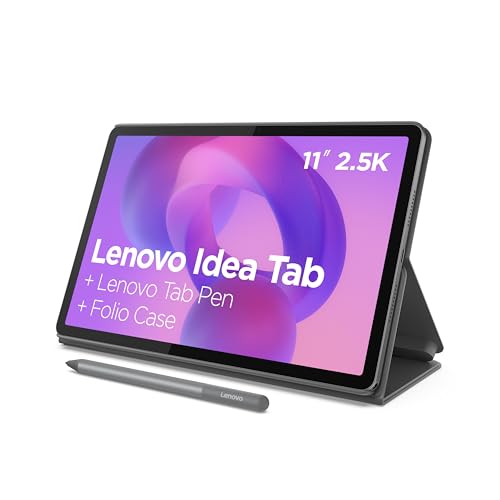
- 11-inch 2.5K 90Hz touchscreen
- Tab Pen and folio case included
- 8GB RAM and 256GB storage for multitasking
Best For: Students needing notes, study apps, entertainment, and portability
Best Smart Paper Notebook

- Writes on real A5 paper while syncing to a phone
- Supports offline notes, search, tags, and PDF sharing
- Uses replaceable A5 cores up to 8mm thick
Best For: Students, meetings, and paper-first note-taking
Best Premium Color Paper Tablet

- 11.8-inch low-glare color E-Ink display
- Includes Marker Plus and folding keyboard folio
- Supports PDF markup, tags, folders, and handwriting conversion
Best For: Color annotation, reading, and focused work
Best Android E-Ink Note Tablet

- 10.3-inch, 300 ppi anti-glare E-Ink display
- Android 14 with 128GB storage and third-party apps
- Adds OCR, AI voice-to-text, split-screen notes, and broad file support
Best For: Reading, research, and feature-rich digital notes
Best Paper-Like Pick

- Paper-like 10.3-inch black-and-white display
- Distraction-free design with no notifications
- Includes Marker Plus, leather folio, and spare tips
Best For: Focused notes, reading, and PDF markup
Best for Reading and Notes
- 10.2-inch glare-free 300 ppi display
- Includes a no-charge Premium Pen
- AI tools convert and summarize handwritten notes
Best For: Reading, book annotation, and document markup
Best Color Android Option

- 10.95-inch color-capable anti-glare LCD
- X3 Pro Pencil 2 with 16,384 pressure levels
- Android 14 with handwriting and math tools
Best For: Color notes, study, meetings, and Android productivity
Best All-in-One Pick – Wacom MovinkPad Pro 14
For artists who want premium electronic writing tablets without carrying a computer, the Wacom MovinkPad Pro 14 is a powerful all-in-one option. Its 14-inch 3K OLED display, etched glass surface, Android 15 platform, and included battery-free Pro Pen 3 support serious drawing and design work on the go.
Best For: Artists, designers, photographers, and animators who need professional pen performance in a portable standalone tablet.
Pros:
- 3K OLED display with 100% sRGB and DCI-P3 coverage for vivid, high-contrast visuals.
- 8,192 pressure levels and a battery-free Pro Pen 3 deliver precise, natural input.
- Snapdragon 8s Gen 3, 12GB RAM, 256GB storage, and microSD expansion support demanding creative work.
- Android 15, Google Play access, and included creative apps allow use without a computer.
Cons:
- Windows ARM-based systems and Intel Macs are not supported for instant pen display mode.
- Its professional feature set may be more than casual note-takers need.
The MovinkPad Pro 14 stands out when pen precision, display quality, and independence from a computer matter most. It is a premium creative tool rather than a basic writing tablet.
Best Focused Writing Tablet – Amazon Kindle Scribe
The Amazon Kindle Scribe is a focused choice among premium electronic writing tablets for people who want writing, reading, and document markup in one distraction-free device. Its 10.2-inch glare-free display, included Premium Pen, and built-in AI notebook tools make it especially practical for organized notes and study.
Best For: Readers, students, and professionals who prioritize handwritten notes, PDF markup, and distraction-free reading.
Pros:
- Purpose-built for writing, reading, and thinking without notifications or social media.
- Premium Pen provides a paper-like feel and does not require setup or charging.
- Built-in AI tools can convert handwriting, summarize notes, and adjust note length and tone.
- 10.2-inch, 300 ppi, glare-free front-lit display is comfortable in varied lighting.
Cons:
- Its feature set is centered on reading and note-taking rather than professional drawing.
- The supplied notes do not specify color display capabilities or broad creative-app support.
Choose the Kindle Scribe when a calm writing environment and strong reading integration are more important than a full general-purpose tablet experience. Its long battery life also suits frequent readers and note-takers.
Best Paper-Like Color Pick – reMarkable Paper Pro
The reMarkable Paper Pro brings a paper-like experience to a premium electronic writing tablet with an 11.8-inch color display and adjustable reading light. It is designed for handwritten notes, sketches, PDF markup, and organized documents while keeping the interface focused and low glare.
Best For: Writers, students, remote workers, and creatives who want natural handwriting with color and comfortable day-or-night reading.
Pros:
- 11.8-inch Canvas Color display supports writing, sketching, and reading in color.
- Paper-like surface and included Marker Plus provide responsive, natural handwriting.
- Adjustable reading light and low-glare display support indoor, outdoor, and nighttime use.
- Folders, tags, PDF markup, and handwriting-to-text conversion help organize work.
Cons:
- The Linux-based device is more specialized than a general-purpose Android tablet.
- The included details do not identify a broad app store or creative software ecosystem.
The Paper Pro is a strong middle ground for users who want the tactile feel of digital paper without giving up color. Its organized, low-distraction workflow makes it especially appealing for long-form writing and document work.
Best Student Value – Lenovo Idea Tab 11
The Lenovo Idea Tab is a practical entry in the premium electronic writing tablets category for students who need a versatile Android tablet with pen support. It combines an 11-inch 2.5K 90Hz display, 8GB of memory, 256GB of storage, and a bundled Tab Pen and folio case for schoolwork, entertainment, and everyday note-taking.
Best For: College students who want one affordable setup for handwritten notes, research, streaming, and multitasking.
Pros:
- Sharp 11-inch 2.5K IPS touchscreen with a smooth 90Hz refresh rate.
- Includes Lenovo Tab Pen, folio case, and learning apps such as Lenovo AI Note, Squid, and Nebo.
- MediaTek Dimensity 6300, 8GB RAM, and 256GB storage support everyday multitasking.
- Up to 12 hours of YouTube playback and 20W charging support mobile study routines.
Cons:
- Its integrated stylus experience is aimed at study and general use rather than professional pen display work.
- The IPS display does not offer the OLED or e-ink characteristics found on the more specialized options.
The Idea Tab makes the most sense for students who want broad tablet functionality instead of a dedicated digital notebook. The included accessories and learning software add practical value straight out of the box.
Best Smart Paper Notebook – XPPen Note Plus
The XPPen Note Plus takes a different approach to premium electronic writing tablets: you write on real A5 paper with its dedicated ink pen while strokes sync to your phone over Bluetooth 5.3. It is a practical choice for people who want familiar handwriting without scanning pages later.
Best For: Students, teachers, meeting notes, and handwritten sketches that need quick phone syncing.
Pros:
- Captures handwriting on real paper with 8192 levels of pressure sensitivity.
- Supports offline writing, automatic syncing, tagging, search, and PNG/PDF sharing.
- Accepts most A5 notebook cores up to 8mm thick, helping reduce refill restrictions.
- Offers up to 14 hours of continuous writing and 50 days of standby time.
Cons:
- Requires the included matching ink pen and does not use an electronic screen.
- Phone compatibility is limited to Android 10 or later and iOS 14 or later.
The Note Plus is most appealing if you prefer the tactile feel of paper but want digital backups and easy sharing. Its phone-centered workflow is less suitable for shoppers seeking a standalone e-ink tablet.
Best Premium Color Paper Tablet – reMarkable Paper Pro
The reMarkable Paper Pro is a premium electronic writing tablet for users who want a large, low-glare color workspace. Its 11.8-inch E-Ink display, adjustable reading light, Marker Plus, and folding keyboard cover support writing, sketching, reading, and focused typing.
Best For: Professionals, students, and creative users who want color annotation, organized documents, and an included keyboard folio.
Pros:
- Provides an 11.8-inch color E-Ink display with a paper-like writing experience.
- Includes the Marker Plus with built-in eraser and a folio keyboard.
- Supports folders, tags, PDF annotation, and handwriting-to-text conversion.
- Adjustable reading light and low-glare display are suited to daytime and nighttime reading.
Cons:
- The supplied details do not specify battery life or current software support status.
- The keyboard folio adds functionality but may be less minimal than a tablet-only setup.
Choose the Paper Pro if color and a larger writing surface matter more than a compact form factor. The bundled keyboard makes it a particularly versatile option for combining handwritten notes with focused typing.
Best Android E-Ink Note Tablet – Penstar eNote 2
The Penstar eNote 2 is a feature-rich premium electronic writing tablet built around a 10.3-inch, 300 ppi E-Ink display. Alongside paper-like writing, it adds Android 14, third-party app support, voice-to-text, handwriting conversion, split-screen reading, and 128GB of storage.
Best For: Readers, researchers, and professionals who want one E-Ink device for notes, documents, audio capture, and Android apps.
Pros:
- Delivers a 2480 × 1860, 300 ppi anti-glare E-Ink display designed for clear reading.
- Includes an 8192-level pressure-sensitive, non-charging stylus with customizable controls.
- Supports more than 35 file formats, split-screen reading, OCR, and AI voice-to-text features.
- Offers Android 14, 4GB RAM, 128GB storage, speakers, microphones, and a bundled folio.
Cons:
- At approximately 0.97 kg, it is heavier than many compact writing tablets.
- Battery estimates vary in the supplied details, which list up to four weeks in one place and a two-week average elsewhere.
- The broad feature set may be more than users need for simple handwriting.
The eNote 2 stands out for shoppers who want an open, multipurpose E-Ink tablet rather than a dedicated notebook. Its strong file support and Android capabilities make it well suited to reading-heavy workflows, though its weight and feature complexity are worth considering.
Best Paper-Like Pick – reMarkable 2 Writing Tablet
For shoppers seeking premium electronic writing tablets with a distraction-free experience, the reMarkable 2 emphasizes paper-like writing, focused note-taking, and document review. Its 10.3-inch black-and-white display, slim 4.7 mm design, and included Marker Plus make it especially suited to handwritten work.
Best For: Focused note-taking, PDF markup, and users who want a paper-like digital notebook without notifications or social media.
Pros:
- Paper-like writing surface with 1,024 levels of pressure sensitivity.
- No app store, ads, notifications, or social media to interrupt concentration.
- Includes Marker Plus, spare tips, black leather folio, and a one-year free Connect subscription.
- Supports folders, tags, handwriting-to-text conversion, PDF markup, and cloud syncing.
Cons:
- The black-and-white display is less suitable for color content.
- Full cloud access requires a Connect subscription after the trial period.
- Its Linux-based, focused design is less versatile than a general-purpose Android tablet.
The reMarkable 2 is a strong choice when writing feel and concentration matter more than entertainment apps or color. The included premium accessories also make this bundle ready for everyday use.
Best for Reading and Notes – Like-New Kindle Scribe 32GB
The Like-New Kindle Scribe combines an e-reader with a digital notebook, making it one of the more practical premium electronic writing tablets for people who read and write on the same device. Its included Premium Pen supports handwritten notes, document markup, and notebook tools.
Best For: Readers who want to annotate books, mark up imported PDFs, and keep handwritten notebooks in one device.
Pros:
- 10.2-inch glare-free, 300 ppi front-lit display for reading and writing in varied lighting.
- Premium Pen requires no setup or charging before writing.
- Built-in AI tools can convert handwriting, summarize notes, and adjust note length and tone.
- Supports Send to Kindle document imports and Active Canvas for notes in books.
Cons:
- This is a refurbished, certified Like-New device and may arrive in generic packaging.
- The supplied notes do not specify the pen’s pressure sensitivity or included protective accessories.
Choose the Kindle Scribe if reading is as important as writing. Its glare-free screen, long battery claims, and built-in note tools make it a flexible option for books, documents, and handwritten planning.
Best Color Android Option – XPPen Magic Note Pad
Among premium electronic writing tablets, the XPPen Magic Note Pad stands out for combining a color Android tablet experience with a paper-textured, anti-glare display. It is not an E Ink device, but its 90Hz LCD, included stylus, and note-focused software provide broader multimedia and productivity flexibility.
Best For: Students, meeting notes, and users who want color content, Android features, handwriting conversion, and math tools.
Pros:
- 10.95-inch AG nano-etched display offers monochrome, light-color, and natural-color modes.
- X3 Pro Pencil 2 provides 16,384 pressure levels and a customizable shortcut key.
- XPPen Notes supports handwriting-to-text, audio recording, PDF editing, AI assistance, and cloud uploads.
- Android 14, 90Hz refresh rate, and 6GB RAM with 128GB storage support broader tablet use.
Cons:
- It uses a normal LCD rather than an E Ink display, so the visual experience differs from paper-based readers.
- Some MyScript Notes and MyScript Math benefits require a system upgrade to 1PAE.
- The supplied notes do not confirm battery capacity or runtime.
The XPPen is the better fit for buyers who want color, Android functionality, and advanced handwriting tools instead of a minimalist E Ink notebook. Its display certification and reduced blue-light features may also appeal to extended writing sessions.
How We Picked the Best Premium Electronic Writing Tablets
We focused on tablets that support serious handwriting, annotation, reading, or digital sketching rather than ordinary touchscreen tablets alone. The selection includes e-ink writing tablets for low-distraction work, Android devices for broader app access, and hybrid digital notebooks that sync handwritten pages to a phone or computer.
We considered display quality, writing latency, stylus features, file handling, battery expectations, portability, storage, software ecosystems, and overall value. Bundles were assessed separately when included accessories materially change the tablet’s usefulness.
Quick Comparison
| Best For | Look For | Trade-Off |
|---|---|---|
| Focused writing | E-ink display, low distractions, long battery life | Slower refresh and fewer apps |
| Reading and notes | Large screen, document support, adjustable lighting | Less capable for advanced drawing |
| Drawing and design | Pressure sensitivity, responsive pen, color display | Higher cost and shorter battery life |
| Study and general use | Android access, multitasking, ample storage | More distractions than e-ink tablets |
| Portable digital notebooks | Lightweight build, handwriting conversion, phone sync | Software and accessory limitations |
Key Buying Factors for Premium Electronic Writing Tablets
Display and Writing Feel
E-ink screens are comfortable for long reading and focused writing, while OLED and LCD panels provide smoother scrolling, richer color, and better support for creative apps. Check whether the surface has texture, glare control, and enough space for your normal page layouts.
Pen Performance
Look for low latency, accurate tracking, pressure sensitivity, tilt support, and a comfortable grip. A built-in eraser, shortcut buttons, and included replacement nibs can make a meaningful difference. Confirm whether the pen needs charging and whether it is included.
Software, Sync, and File Support
Consider how easily the tablet exports PDF, EPUB, image, or text files. Cloud sync, handwriting recognition, phone connectivity, and document annotation are especially important for students and professionals. Android tablets generally offer more apps, while dedicated e-ink platforms typically provide a simpler experience.
Battery, Storage, and Accessories
Long battery life matters when traveling or taking notes throughout the day. Choose enough storage for books, notebooks, and documents, and check whether a folio, keyboard, or premium stylus is included. Bundle pricing can be worthwhile if you would otherwise buy those accessories separately.
Who Should Buy Which Premium Electronic Writing Tablets?
Choose a dedicated e-ink model if your priority is distraction-free handwriting, reading, and meetings. A Kindle Scribe-style device is especially suitable for readers who want notes alongside an existing ebook library. A reMarkable-style tablet is a strong fit for people who value a paper-like workflow and minimal software clutter.
Choose an Android-based writing tablet if you need web access, media, productivity apps, or a more flexible study device. Artists and visual note-takers should prioritize color, pressure sensitivity, pen accuracy, and app compatibility over maximum battery life. Finally, pick a compact synced digital notebook if you mainly want handwritten pages captured digitally while keeping your familiar paper-first workflow.
