
The right conference room camera can make hybrid meetings feel more natural by keeping participants visible, voices intelligible, and remote attendees engaged. Premium models add features such as 4K video, speaker tracking, panoramic views, PTZ control, and intelligent framing.
We compared 10 premium conference room cameras across room size, video quality, microphone coverage, tracking performance, connectivity, and platform compatibility so you can choose a system that fits your meeting space and workflow.
Best 10 Premium Conference Room Cameras Picks for 2026
Best 4K 360° Pick

- 4K 360° video and audio
- Automatic speaker focus
- Expandable room coverage
Best For: Hybrid meetings needing premium automation and 4K room capture
Best for Huddle Rooms
- 4K video with 120° view
- Motorized pan and tilt
- Beamforming microphones
Best For: Small rooms needing wide-angle USB conferencing
Best Value 360° Camera

- 360° 1080p video
- AI speaker tracking
- 18-foot audio pickup
Best For: Hybrid teams prioritizing immersive coverage over 4K resolution
Best Studio-Quality Setup

- 4K video at 30 fps
- 15x optical zoom
- Professional fixed installation
Best For: Dedicated rooms needing detailed video and optical reach
Best for Large Rooms

- Dual 4K lenses with speaker tracking
- Motorized electronic privacy shutter
- Designed for rooms up to 25 feet long
Best For: Large Poly-equipped conference rooms
Best Wide-Angle Video Bar

- Three cameras with panoramic 4K video
- Selectable field of view up to 180 degrees
- Plug-and-play USB setup for Teams and Zoom
Best For: Wide-coverage hybrid meeting rooms
Best PTZ Value

- 1080p video with pan, tilt, and zoom
- 3x optical zoom for close-ups
- USB connectivity for Windows and macOS
Best For: Rooms needing controlled camera positioning
Best Large-Room System
TONGVEO 4K PTZ AI-Tracking Camera Kit

- 4K/30fps video with 20x optical zoom
- AI face and humanoid tracking
- Speakerphone with 5-meter pickup
Best For: Large rooms, streaming, lectures, and events
Best Plug-and-Play Option
Yealink UVC34 4K Conference Camera

- 4K camera with 120° wide field of view
- Eight-mic array with 5-meter pickup
- Automatic privacy shutter and AI framing
Best For: Huddle rooms and Teams or Zoom setups
Best Gesture-Controlled Kit
TONGVEO 4K PTZ Camera and Speakerphone
- 4K/30fps video with 120° wide-angle view
- Gesture, face-tracking, and remote controls
- Portable speakerphone with 5-meter pickup
Best For: Small and medium meetings needing flexible control
Best 4K 360° Pick – Meeting Owl 4+
For teams seeking premium conference room cameras, the Meeting Owl 4+ combines 4K 360-degree video, 360-degree audio, and automatic speaker focus in one compact device. Its plug-and-play setup and Microsoft Teams certification make it a practical choice for hybrid meetings.
Best For: Hybrid meetings in small to large rooms where automatic speaker tracking and 4K room coverage are priorities.
Pros:
- Captures 360° video in 4K and 360° audio up to 18 feet.
- Automatically focuses on active in-room speakers using visual and audio cues.
- Can expand with additional Meeting Owls, an Owl Bar, or an Expansion Mic.
- Includes enterprise-oriented management and connectivity features.
Cons:
- Advanced expansion options may require additional Owl Labs hardware.
- Its feature set may be more than needed for basic small-room calls.
The Meeting Owl 4+ is the most capable all-in-one option here for organizations that want high-resolution, highly automated hybrid collaboration and room scalability.
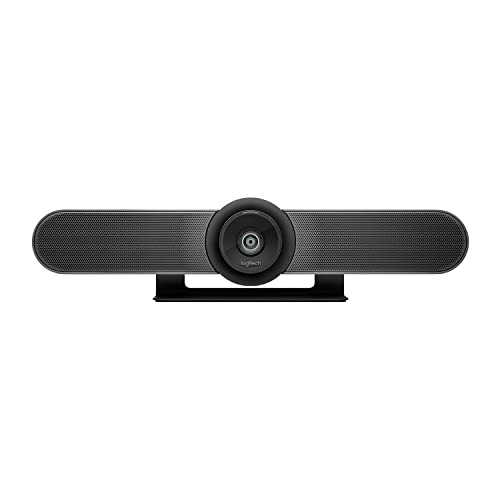
Best for Huddle Rooms – Logitech MeetUp 4K
The Logitech MeetUp is a practical premium conference room camera for huddle and small rooms. It pairs a 4K sensor with a 120-degree field of view, motorized pan and tilt, and beamforming microphones for straightforward room coverage.
Best For: Small conference rooms and huddle spaces using USB or room-based Microsoft Teams, Zoom, or Google Meet setups.
Pros:
- Provides 4K video, a 120° field of view, and 5x HD zoom.
- Motorized pan and tilt can extend the view up to 170°.
- Beamforming microphones capture voices up to 4 meters, or up to 5 meters with the optional Expansion Mic.
- Supports wall, credenza, and TV mounting.
Cons:
- The expansion microphone is sold separately.
- It is designed primarily for small and huddle rooms rather than large spaces.
MeetUp is a strong fit when a conventional forward-facing camera with wide coverage and flexible mounting is preferable to a 360-degree design.
Best Value 360° Camera – Meeting Owl 3
The Meeting Owl 3 brings premium conference room cameras’ 360-degree meeting experience to a 1080p HD platform. It combines room-wide video and audio with AI-driven speaker tracking, making it easier for remote participants to follow active discussions.
Best For: Hybrid teams that want automatic speaker focus and broad room coverage without requiring 4K video.
Pros:
- Captures 360° 1080p video and 360° audio up to 18 feet.
- Uses visual and audio cues to focus on the person speaking.
- Plug-and-play USB setup is designed to be ready in about six minutes.
- Can be paired with other Owl Labs devices or an Expansion Mic.
Cons:
- Video resolution is 1080p rather than 4K.
- Additional room coverage may require separately purchased Owl Labs accessories.
The Meeting Owl 3 is a sensible choice for teams that value immersive 360-degree participation and automated framing more than maximum video resolution.
Best Studio-Quality Setup – Logitech Rally Plus
The Logitech Rally Plus is a fixed-installation option for organizations evaluating premium conference room cameras for professional meeting spaces. It offers 4K video, autofocus, low-light capability, and 15x optical zoom in a substantial conference-room system.
Best For: Professional or larger fixed conference-room installations requiring detailed 4K video and strong optical zoom.
Pros:
- Delivers 4K video at up to 30 frames per second.
- Includes 15x optical zoom for detailed framing.
- Features autofocus and low-light capability.
- Designed as a professional fixed-installation system.
Cons:
- The 17-pound system is considerably less portable than compact room cameras.
- Its fixed-installation form factor may require more planning and mounting space.
- The supplied listing identifies one microphone pod, so larger rooms may need additional audio planning.
Rally Plus is best suited to dedicated meeting rooms where installation quality, 4K imaging, and optical reach matter more than a compact plug-and-play footprint.
Best for Large Rooms – Poly Studio E70
The Poly Studio E70 is a premium conference room camera designed for large meeting spaces up to 25 feet long. Its dual 4K lenses, speaker tracking, and group framing help keep both individual speakers and the full group in view.
Best For: Large conference rooms using a Poly G7500 or Poly Microsoft Teams Room setup.
Pros:
- Dual 4K lenses provide UHD video with professional-quality speaker tracking and group framing.
- Motorized electronic privacy shutter adds physical camera privacy.
- Poly Lens software supports desktop or cloud-based management and advanced analytics.
- Optical image stabilization and autofocus support polished meeting video.
Cons:
- Requires a Poly G7500 or Poly Microsoft Teams Room, sold separately.
- Power over Ethernet is required.
- Its advanced features are geared toward larger, professionally managed rooms.
Choose the Studio E70 when room coverage, automated framing, and centralized management matter more than a simple USB setup. It is a strong premium option, provided your conference system supports the required Poly hardware and PoE connection.
Best Wide-Angle Video Bar – Jabra PanaCast 50
Jabra PanaCast 50 180° Panoramic-4K Meeting Room Webcam, 4 Kilopixel Video Resolution, Black
Check Price On AmazonThe Jabra PanaCast 50 is a premium conference room camera for teams that need broad room coverage from one video bar. Three 13 MP cameras stitch together a panoramic view, with selectable 90-, 120-, 140-, or 180-degree field-of-view modes.
Best For: Hybrid meeting rooms that need wide-angle coverage, automatic framing, and compatibility across major conferencing platforms.
Pros:
- Three cameras deliver 4K video with real-time panoramic stitching.
- Adjustable field of view can cover up to 180 degrees.
- Automatic zoom adjusts to include participants in the frame.
- Plug-and-play USB connectivity works with leading conferencing solutions, including Microsoft Teams and Zoom.
Cons:
- The wide video output is listed at 3840 × 1080 pixels rather than standard 16:9 4K dimensions.
- Room occupancy insights depend on defined capacity guidelines and compatible setup.
- At 7.4 pounds, it is heavier than a typical compact webcam.
The PanaCast 50 is a practical choice when one camera needs to show an entire room without complicated installation. Its broad framing options and USB plug-and-play design make it especially flexible for mixed-platform meeting spaces.
Best PTZ Value – Logitech PTZ Pro 2
Logitech PTZ Pro 2 Camera – USB HD 1080P Video Camera for Conference Rooms | Conference Rooms
Check Price On AmazonThe Logitech PTZ Pro 2 is a premium conference room camera for organizations that prefer precise pan, tilt, and zoom control over ultra-high-resolution video. It records in 1080p and offers a wide field of view, optical zoom, and smoother preset-to-preset movement.
Best For: Conference rooms, training environments, and professional video applications that need controlled camera positioning.
Pros:
- Pan, tilt, and zoom controls help presenters frame people, whiteboards, and other details.
- Three-times optical zoom and a 90-degree viewing angle support flexible room coverage.
- On-camera video processing can help free bandwidth for smoother conferencing streams.
- USB connectivity works with Windows and macOS systems.
Cons:
- 1080p resolution is lower than the 4K output offered by the other cameras here.
- The 90-degree viewing angle may require more camera positioning in wider rooms.
- It is designed for computer connectivity rather than an integrated room-system platform.
The PTZ Pro 2 remains a sensible pick when reliable mechanical control and optical zoom are more important than 4K detail. It suits rooms where operators or presenters need to move between saved positions and focus on specific content.
Best Large-Room System – TONGVEO 4K PTZ AI-Tracking Camera Kit
For buyers seeking premium conference room cameras for large meetings, this TONGVEO system combines a 4K PTZ camera with a dedicated Bluetooth speakerphone. Its 20x optical zoom, AI subject tracking, and HDMI, USB 3.0, and LAN outputs make it a flexible choice for conferencing, streaming, lectures, and events.
Best For: Large meeting rooms, live streaming, lecture recording, worship services, and event presentations.
Pros:
- 4K video at up to 30fps with 20x optical zoom and a 63° wide-angle lens.
- AI face and humanoid tracking helps keep speakers in view.
- Speakerphone offers four microphones, 5-meter pickup, full-duplex audio, and USB, Bluetooth, or wireless-dongle connectivity.
- Supports HDMI, USB 3.0, LAN, PoE, RTSP, RTMP, and H.264/H.265 encoding.
Cons:
- The larger feature set may be more than needed for a small huddle room.
- Some professional network and video outputs may require additional setup.
This is the most expandable option in the group, especially when optical zoom, network integration, and room-wide audio matter. Its multi-interface design also leaves room for more advanced conferencing or streaming setups.
Best Plug-and-Play Option – Yealink UVC34 4K Conference Camera
The Yealink UVC34 is a practical pick among premium conference room cameras when straightforward deployment and broad platform support are priorities. It combines a 4K camera, 120° field of view, built-in microphone array, AI framing, and an automatic privacy shutter in one unit.
Best For: Huddle rooms and teams using Windows or macOS with Microsoft Teams, Zoom, or other major conferencing platforms.
Pros:
- 4K video and a 120° field of view help capture everyone in a compact room.
- Eight-microphone array provides up to 5 meters of far-field voice pickup.
- AI auto framing, speaker tracking, and face enhancement adjust the meeting view automatically.
- Includes a long 7-meter USB cable and an automatic electric privacy shutter.
Cons:
- Zoom is digital rather than optical.
- Its USB-focused design offers fewer listed professional video and network outputs than the PTZ alternatives.
The UVC34 favors convenience over extensive installation flexibility. Its wide view, integrated audio, privacy shutter, and certified Teams and Zoom support make it a strong fit for simpler room deployments.
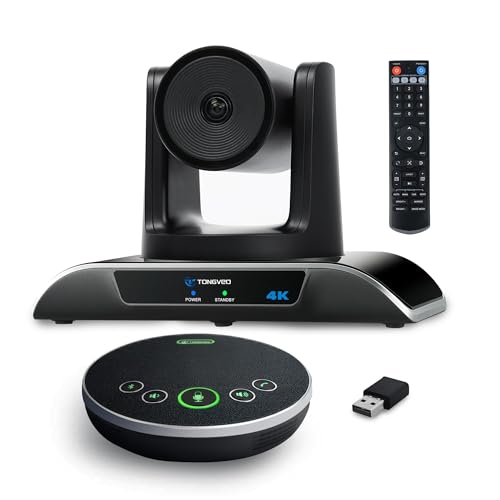
Best Gesture-Controlled Kit – TONGVEO 4K PTZ Camera and Speakerphone
This TONGVEO kit gives buyers premium conference room cameras with hands-free controls, a wide viewing angle, and a separate speakerphone. It records in 4K at 30fps and supports face tracking, gesture commands, remote control, and USB 3.0 plug-and-play operation.
Best For: Small and medium-sized meetings where gesture control, portability, and an included speakerphone are useful.
Pros:
- 4K/30fps video with a 120° field of view and 350° horizontal PTZ rotation.
- Supports AI tracking, six gesture commands, remote control, and up to nine preset positions.
- Speakerphone includes noise-reducing microphones, full-duplex audio, 5-meter pickup, and a 2400mAh battery.
- Works with Windows, Mac, Chrome OS, Zoom, Teams, OBS, WebEx, and other platforms.
Cons:
- Its 5x zoom is digital rather than optical.
- The product notes specify that certain focus buttons on the remote do not apply to this version.
- Users may need to adjust mirror settings in conferencing software for correct image orientation.
This model stands out for interactive control and flexible room coverage without requiring a separate audio purchase. It is a compelling middle ground for teams that want PTZ movement and wireless speakerphone convenience.
How We Picked the Best Premium Conference Room Cameras
We focused on cameras and room systems that improve real-world conferencing rather than simply offering high resolution. Key considerations included image quality, field of view, automatic speaker or participant tracking, microphone pickup, built-in audio, mounting flexibility, and compatibility with platforms such as Microsoft Teams and Zoom.
The selection includes 360-degree cameras for small and medium rooms, panoramic all-in-one systems, dual-lens cameras for larger spaces, and PTZ models suited to rooms that need precise framing or longer-range zoom. We also considered whether each system is practical to install and operate through USB, HDMI, network, or other commonly supported connections.
Quick Comparison
| Best For | Camera Type | Notable Strength |
|---|---|---|
| Small collaborative rooms | 360-degree or wide-angle | Captures everyone around a table |
| Medium meeting rooms | Panoramic or intelligent camera | Automatic framing and speaker focus |
| Large conference rooms | Dual-lens or PTZ | Extended coverage and flexible composition |
| Custom installations | PTZ camera system | Zoom, presets, and multiple output options |
Key Buying Factors for Premium Conference Room Cameras
Room Size and Field of View
Start with the room layout. A 360-degree model works well when participants sit around a central table, while a wide-angle camera is often better for huddle rooms. Larger rooms may require dual lenses, optical zoom, or multiple cameras to keep faces recognizable at a distance.
Tracking and Framing
Automatic speaker tracking can make meetings easier to follow, but performance varies. Look for systems that combine speaker detection with group framing and smooth transitions. If you need predictable composition, a PTZ model with remote control and saved presets may be preferable.
Audio Coverage
Video quality cannot compensate for poor sound. Check microphone pickup distance, noise reduction, echo cancellation, and whether the system includes a speakerphone. For long tables or larger rooms, confirm that expansion microphones or additional audio hardware are supported.
Resolution, Connectivity, and Compatibility
4K sensors can provide sharper crops and clearer digital framing, although the meeting platform, lighting, and network connection still affect the final image. Verify USB, HDMI, Ethernet, Bluetooth, and control requirements before buying, and confirm certification or compatibility with your preferred conferencing platform.
Installation and Management
Consider mounting position, cable length, power requirements, privacy controls, firmware updates, and centralized device management. A feature-rich camera is less useful if it is difficult to configure or cannot fit your existing room equipment.
Who Should Buy Which Premium Conference Room Cameras?
Choose a 360-degree camera if your team collaborates around a central table and wants automatic participant visibility with minimal setup. A panoramic system is a strong choice for medium rooms where a broad view and built-in audio are more important than optical zoom.
For large conference rooms, prioritize dual-lens cameras or systems with strong speaker tracking, group framing, and expansion options. These are better suited to boardrooms where participants sit at varying distances.
Buy a PTZ camera when you need manual control, optical or digital zoom, multiple outputs, or integration with a more customized installation. Finally, consider an all-in-one camera and speakerphone system when simplicity and quick deployment matter most. The best Premium Conference Room Cameras are the ones that match your room geometry, meeting platform, and audio requirements—not necessarily the model with the highest advertised resolution.
