
The best portable ultrawide productivity monitors make it easier to manage documents, spreadsheets, timelines, and communication without being tied to a traditional desktop setup. This roundup includes true ultrawide displays alongside portable second screens that expand a laptop workspace.
We compare resolution, panel quality, refresh rate, connectivity, ergonomics, and travel practicality so you can choose the right balance of screen area and mobility for your workflow.
Best 10 Portable Ultrawide Productivity Monitors Picks for 2026
Best All-Around
LG 34-inch UltraWide WQHD Monitor

- 34-inch 3440 x 1440 workspace
- USB-C with up to 65W power delivery
- Picture-by-Picture multi-source support
Best For: Desk-based multitasking and laptop workstations
Best Budget Travel Pick
KYY 15.6-inch Portable Monitor

- Lightweight 1.7-pound travel design
- Full HD IPS panel with 178° viewing angle
- USB-C and Mini-HDMI connectivity
Best For: Affordable mobile dual-screen setups
Best Eye-Care Ultrawide
Samsung ViewFinity S50GC 34-inch

- 34-inch Ultra-WQHD 21:9 display
- Ambient brightness adjustment and Eye Saver Mode
- Picture-by-Picture and Picture-in-Picture support
Best For: Extended work sessions and multi-source multitasking
Best Premium Travel Display
VisionOwl 16-inch 2.5K Monitor

- 2560 x 1600 16:10 portable workspace
- 144Hz refresh rate and 470-nit brightness
- 1.48-pound body with kickstand and VESA holes
Best For: High-performance mobile workstations and creative work
Dual-Screen Ultrawide Kit
Kado 34-inch + 15.6-inch Monitor

- 34-inch 3440×1440 ultrawide IPS display
- Includes a 15.6-inch Full HD portable monitor
- 100Hz, FreeSync Premium, speakers, and VESA support
Best For: A complete home workstation with a portable second screen
Connected Ultrawide Workstation
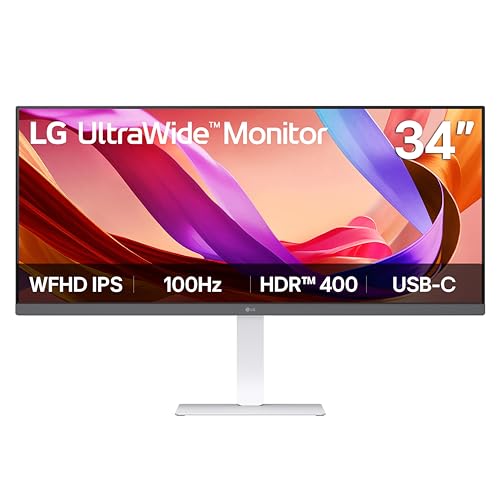
- 34-inch 21:9 IPS display at 2560×1080
- USB-C, DisplayPort, and HDMI connectivity
- 100Hz, HDR 400, speakers, and adjustable stand
Best For: A laptop-focused desktop productivity setup
Travel Productivity Pick
ViewSonic VG1656N Wireless Monitor

- 16-inch 1920×1200 16:10 IPS display
- Built-in battery and integrated stand
- Wireless casting and 60W USB-C connectivity
Best For: Mobile work, presentations, and travel second-screen use
Travel-Friendly Value Pick
MNN 15.6-inch FHD Portable Monitor

- Full HD IPS display with HDR and 178° viewing angles
- Dual full-function USB-C plus HDMI connectivity
- Lightweight design with cover that doubles as a stand
Best For: Travelers and remote workers seeking an affordable portable second screen
Ergonomic Work Pick
Lenovo L15 15.6-inch Portable Monitor

- Full HD IPS display with 178° viewing angles
- Height-adjustable stand supports a more comfortable setup
- Two USB-C ports and flicker-free viewing technology
Best For: Business users who want an adjustable portable work monitor
Mountable Flexibility Pick
cocopar 15.6-inch FHD Travel Monitor

- Full HD IPS panel with HDR, FreeSync, and 85% color gamut
- Two USB-C ports plus HDMI for broad device compatibility
- VESA-mountable design supports landscape and portrait use
Best For: Mobile workstations that need flexible mounting and orientation options
Best All-Around – LG 34-inch UltraWide WQHD Monitor
The LG 34WR55QK-B is a strong desktop choice for shoppers comparing portable ultrawide productivity monitors, especially if portability means moving a display between workstations rather than carrying it daily. Its 34-inch curved 21:9 WQHD panel provides ample room for multiple windows, while USB Type-C connectivity adds up to 65W laptop power delivery.
Best For: Desk-based multitasking, laptop workstations, and users who want a single ultrawide display with flexible input options.
Pros:
- 34-inch 3440 x 1440 UltraWide workspace supports multiple open windows.
- USB Type-C offers up to 65W power delivery, alongside HDMI and DisplayPort.
- Picture-by-Picture and OnScreen Control simplify multi-source workflows.
- Height- and tilt-adjustable stand, Reader Mode, HDR10, and up to 99% sRGB coverage add practical versatility.
Cons:
- At 15.2 pounds, it is less convenient for frequent travel than a slim portable monitor.
- Its 5ms response time and 100Hz refresh rate are capable but not aimed specifically at high-refresh gaming.
The LG combines a spacious ultrawide canvas with useful productivity features and laptop-friendly USB-C charging. Choose it when your priority is a polished primary monitor for a flexible desk setup, not a display designed to slip into a bag.
Best Budget Travel Pick – KYY 15.6-inch Portable Monitor
The KYY 15.6-inch display is a practical entry point for portable ultrawide productivity monitors if you need a lightweight second screen for travel. Its 1.7-pound, 0.3-inch-thick design fits easily in a bag, and USB-C plus Mini-HDMI connectivity supports laptops, phones, consoles, and other compatible devices.
Best For: Travelers and remote workers who want an affordable, lightweight dual-screen setup.
Pros:
- Lightweight 1.7-pound design with a slim 0.3-inch profile.
- 15.6-inch Full HD IPS screen offers 178-degree viewing angles.
- Two full-function USB-C ports and Mini-HDMI provide broad device compatibility.
- Includes a protective smart cover that doubles as an adjustable stand, plus built-in speakers.
Cons:
- Its 16:9 Full HD screen provides less horizontal workspace than a true ultrawide display.
- The 60Hz refresh rate is oriented toward general work and entertainment rather than high-refresh gaming.
- USB-C single-cable operation depends on the connected device supporting compatible video output.
The KYY is the most travel-friendly option in this group, with a useful cover, speakers, and flexible positioning in landscape or portrait mode. It is best viewed as a compact second screen rather than a full ultrawide replacement.
Best Eye-Care Ultrawide – Samsung ViewFinity S50GC 34-inch
The Samsung ViewFinity S50GC is a compelling desktop alternative for shoppers researching portable ultrawide productivity monitors and prioritizing a spacious, comfortable work surface. Its 34-inch Ultra-WQHD 21:9 panel supports side-by-side work, while ambient brightness adjustment, Eye Saver Mode, and Flicker Free features are designed for extended viewing.
Best For: Long work sessions, multitasking, and users who want an ultrawide monitor with eye-care and multi-source features.
Pros:
- 34-inch 3440 x 1440 display provides substantial room for multiple applications.
- Ambient light sensing automatically adjusts brightness, complemented by Eye Saver Mode and Flicker Free technology.
- Picture-by-Picture and Picture-in-Picture support two input sources.
- 100Hz refresh rate, HDR10, FreeSync, and a virtually borderless design suit work and entertainment.
Cons:
- At 10.8 pounds and over 32 inches wide, it is primarily a stationary desk monitor.
- Connectivity is centered on HDMI and DisplayPort; the supplied notes do not list USB-C video or charging.
The Samsung stands out for comfortable all-day productivity and clean multi-source multitasking. Pick it when eye-care features and a wide, nearly borderless canvas matter more than true travel portability or USB-C laptop charging.
Best Premium Travel Display – VisionOwl 16-inch 2.5K Monitor
The VisionOwl 16-inch monitor is the closest match here for shoppers seeking portable ultrawide productivity monitors in a genuinely travel-ready format. Its 16:10 2560 x 1600 panel is well suited to laptop expansion, while the 1.48-pound metal body, built-in kickstand, sleeve, and USB-C connectivity support mobile workstations.
Best For: Remote workers, business travelers, creators, and gamers who want a high-resolution portable second screen.
Pros:
- 2560 x 1600 resolution and 16:10 ratio provide extra vertical workspace for productivity.
- 144Hz refresh rate, HDR support, 470-nit brightness, and 110% sRGB coverage support smooth, vivid visuals.
- Dual USB-C ports and full-size HDMI connect laptops, PCs, consoles, and other devices.
- Lightweight metal construction includes a built-in kickstand, VESA holes, sleeve, cables, and speakers.
Cons:
- Single-cable video and power require a compatible Thunderbolt 3/4 or DisplayPort Alt Mode device.
- Its 16-inch panel cannot provide the same total horizontal workspace as a 34-inch desktop ultrawide.
- The high-refresh features may be unnecessary for users focused only on basic office work.
The VisionOwl offers the strongest blend of genuine portability, resolution, brightness, and refresh rate in this selection. It is a particularly versatile pick for mobile productivity, though buyers should verify USB-C video compatibility before relying on one-cable operation.
Dual-Screen Ultrawide Kit – Kado 34-inch + 15.6-inch Monitor
For shoppers comparing portable ultrawide productivity monitors, this Kado bundle stands out by pairing a large 34-inch ultrawide desktop display with a travel-ready 15.6-inch portable screen. The setup supports wide multitasking at home while adding a second display for work or creative tasks on the go.
Best For: Users who want a full-size ultrawide workstation plus a portable second screen.
Pros:
- 34-inch 3440×1440 21:9 IPS display provides extensive workspace.
- Includes a 15.6-inch Full HD IPS portable monitor for travel and second-screen use.
- 100Hz refresh rate, FreeSync Premium, built-in speakers, and VESA support add flexibility.
Cons:
- The bundle is less compact than a standalone portable monitor.
- The included portable display is Full HD rather than ultrawide resolution.
This is a versatile choice when you need both a panoramic primary display and a lightweight companion screen. Its two-monitor format is especially practical for mixed home-office, gaming, and creative workflows.
Connected Ultrawide Workstation – LG 34-inch UltraWide
Among portable ultrawide productivity monitors and flexible desk displays, the LG 34U530A-W is better suited to a laptop-centered workstation than frequent travel. Its 21:9 IPS panel, USB-C connectivity, and adjustable stand make it useful for keeping multiple work windows visible with fewer cables.
Best For: Laptop users who want a spacious ultrawide desktop monitor with USB-C and ergonomic adjustments.
Pros:
- 34-inch 21:9 IPS screen offers 2560×1080 workspace for multitasking.
- USB-C supports display output and data transfer for a cleaner setup.
- 100Hz refresh rate, DisplayHDR 400, built-in speakers, and adjustable stand enhance everyday use.
Cons:
- Its 19.4-pound desktop design is not as travel-friendly as a portable monitor.
- Resolution is 2560×1080 rather than higher-resolution ultrawide QHD.
The LG is a strong productivity-focused desk monitor for users who prioritize screen area, one-cable laptop connectivity, and viewing comfort. Consider it a stationary centerpiece rather than a carry-anywhere display.
Travel Productivity Pick – ViewSonic VG1656N Wireless Monitor
The ViewSonic VG1656N is a practical option for shoppers seeking portable ultrawide productivity monitors in a travel-friendly form. Its 16-inch 16:10 screen adds vertical workspace for documents and spreadsheets, while wireless casting, a built-in battery, and an integrated stand simplify temporary setups.
Best For: Remote workers, presenters, and travelers who need a self-contained second screen.
Pros:
- 1920×1200 16:10 IPS display provides useful extra vertical space.
- Built-in battery and stand support work away from wall outlets and fixed desks.
- Wireless casting and two-way 60W USB-C support flexible connections.
Cons:
- 60Hz refresh rate is aimed at productivity rather than high-speed visuals.
- 250-nit brightness and 3.1-pound weight may be less appealing for demanding visual work.
This ViewSonic is the most travel-oriented pick in the group, with features designed for meetings, presentations, and mobile multitasking. It is a portable second display, not a full-size ultrawide replacement.
Travel-Friendly Value Pick – MNN 15.6-inch FHD Portable Monitor
For shoppers comparing portable ultrawide productivity monitors, the MNN offers a practical second-screen setup in a lightweight 15.6-inch design. Its Full HD IPS display, dual full-function USB-C ports, HDMI connection, and included cover make it suitable for work, travel, and occasional gaming.
Best For: Travelers, students, and remote workers who want an affordable portable second screen with flexible connectivity.
Pros:
- Full HD 1920×1080 IPS display with 178-degree viewing angles and HDR support.
- Dual full-function USB-C ports can carry power and display signal with one compatible cable.
- Supports landscape, portrait, mirrored, extended, and second-screen modes.
- Includes a protective PU leather smart cover that doubles as a stand.
Cons:
- At 15.6 inches with a 16:9 aspect ratio, it is not an ultrawide display in the literal sense.
- USB-C video requires a compatible Thunderbolt 3 or USB 3.1 DP Alt Mode device.
- Its 300-nit brightness is adequate for many settings but may be less ideal in very bright spaces.
The MNN is a flexible, travel-oriented option when portability and connection variety matter more than true ultrawide width. It is especially compelling for adding a compact Full HD workspace to a compatible laptop.
Ergonomic Work Pick – Lenovo L15 15.6-inch Portable Monitor
Among portable ultrawide productivity monitors, the Lenovo L15 emphasizes comfortable everyday work rather than extra-wide proportions. Its Full HD IPS panel, flicker-free technology, two USB-C ports, and height-adjustable stand create a convenient mobile workstation for home, office, or travel.
Best For: Business users who prioritize an adjustable stand, eye-friendly viewing, and straightforward USB-C connectivity.
Pros:
- 15.6-inch Full HD IPS panel provides 1920×1080 resolution and 178-degree viewing angles.
- Height-adjustable stand helps customize viewing position during long work sessions.
- Flicker-free technology is designed to support a more comfortable viewing experience.
- Two USB-C ports simplify connections to compatible devices.
Cons:
- The 16:9 screen is portable and compact, but it is not a true ultrawide monitor.
- 250-nit brightness may be less suitable for especially bright environments.
- USB-C connectivity may require a compatible device and cable setup.
The L15 stands out for productivity users who want a more ergonomic portable setup. Its adjustable stand and flicker-free display make it a sensible choice for writing, spreadsheets, and general business work away from a fixed desk.
Mountable Flexibility Pick – cocopar 15.6-inch FHD Travel Monitor
For portable ultrawide productivity monitors shoppers who need mounting flexibility, the cocopar combines a compact 15.6-inch Full HD IPS screen with VESA support. Its two USB-C ports, HDMI input, HDR, and included magnetic cover make it adaptable for remote work, presentations, travel, and gaming.
Best For: Remote workers and creators who want a portable second display that can be used on a stand or with VESA mounting.
Pros:
- Full HD IPS display offers 178-degree viewing angles, HDR, FreeSync, and an 85% color gamut.
- Two full-featured USB-C ports and HDMI support a range of laptops, consoles, and other devices.
- Two VESA holes allow landscape or vertical mounting for a more flexible workstation.
- Thin, lightweight design includes a magnetic cover that serves as a stand.
Cons:
- The 16:9 15.6-inch format does not provide the continuous width of a true ultrawide screen.
- USB-C display requires Thunderbolt 3/4 or USB 3.1 DP Alt Mode compatibility.
- The listed 280-nit brightness may be limiting under strong direct light.
The cocopar is a strong fit when a portable monitor needs to do more than sit beside a laptop. VESA compatibility, portrait support, and broad device compatibility give it useful flexibility for mobile productivity setups.
How We Picked These Portable Ultrawide Productivity Monitors
We selected displays that can improve multitasking for remote work, travel, creative projects, and home-office setups. The list includes large 21:9 ultrawide monitors for maximum horizontal workspace and compact portable monitors for adding a second screen to a laptop. We considered resolution, panel technology, brightness, refresh rate, USB-C and HDMI connectivity, adjustability, portability, and useful productivity features such as picture-by-picture support, HDR, eye-care modes, and built-in stands.
Because “portable” can mean different things, check the product type carefully. A 34-inch ultrawide is portable only in the sense that it can be moved between rooms, while a 15.6- or 16-inch display is designed for bags and travel.
Quick Comparison
| Type | Best for | Typical advantage | Main compromise |
|---|---|---|---|
| 34-inch ultrawide | Desk-based multitasking | Expansive single-screen workspace | Large size and limited travel practicality |
| 15.6- to 16-inch portable monitor | Travel and laptop expansion | Easy to carry and deploy | Less total screen area |
| Portable monitor bundle | Flexible home and mobile setups | Combines primary and secondary displays | More equipment to store and connect |
Key Buying Factors for Portable Ultrawide Productivity Monitors
Screen Size and Aspect Ratio
Choose a 34-inch 21:9 monitor if you want side-by-side windows without a dual-monitor bezel. Portable models generally use 16:9 or 16:10 ratios and work best as a second screen beside a laptop display.
Resolution and Text Clarity
WQHD ultrawide resolution, such as 3440 × 1440, offers sharper text and more usable workspace than WFHD 2560 × 1080. For portable displays, Full HD is practical at 15.6 inches, while 2.5K models provide clearer text for detailed work.
Connectivity and Power
USB-C is the most convenient option when it supports both video and power, but not every laptop USB-C port does. HDMI is useful for broader compatibility. Some portable monitors require a second USB cable or wall adapter, so confirm your device’s output and power limits before buying.
Ergonomics and Travel Design
Look for a stable built-in stand, VESA compatibility, a protective cover, low weight, and a compact profile. Brightness, viewing angles, speakers, and an anti-glare finish also matter when working in hotels, cafés, or bright offices.
Who Should Buy Which Portable Ultrawide Productivity Monitors?
Choose a 34-inch ultrawide if you primarily work at a desk and need the most horizontal room for spreadsheets, editing timelines, research, or multiple application windows. WQHD models are especially suitable for text-heavy productivity.
Choose a portable 15.6- or 16-inch monitor if you travel frequently, work from multiple locations, or want a lightweight second display for a laptop. Prioritize USB-C simplicity, a dependable stand, and a cover.
Choose a bundle if you want both a spacious home-office screen and a travel-ready display. It can be a strong value for hybrid workers, but verify desk space, cable requirements, and whether your laptop can drive both screens at once.
