
Portable electronic writing tablets offer a simple, paper-free way to sketch, practice handwriting, capture reminders, and keep kids engaged. The options in this roundup range from lightweight LCD doodle boards to computer-connected graphics tablets for more precise creative work.
Use the guide below to compare screen size, power options, intended use, and included accessories before choosing the tablet that best fits your routine.
Best 10 Portable Electronic Writing Tablets Picks for 2026
Best for Simple Notes
Mafiti 8.5-Inch LCD Writing Tablet
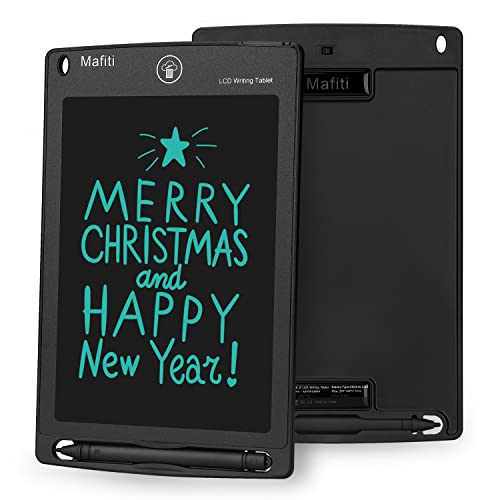
- Thicker writing with one-button erase
- Lock switch and stylus kick-stand
- Lightweight design with replaceable battery
Best For: Kids, students, home reminders, and office memos
Best for Connected Creativity
XP-Pen StarG640 Drawing Tablet
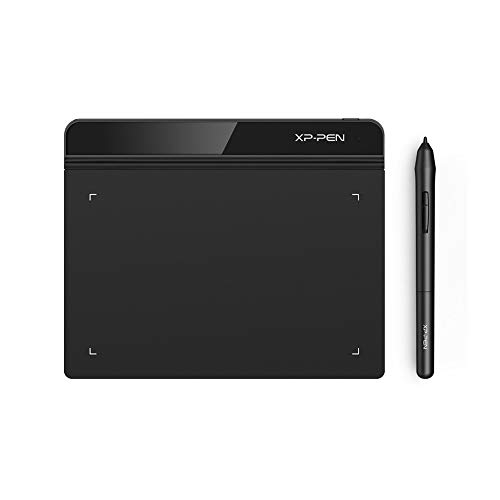
- Battery-free pen with 8192 pressure levels
- Slim 2 mm design and 6-by-4-inch active area
- Compatible with Windows, Mac, and Chromebook
Best For: Digital art, teaching, remote work, and e-signatures
Best for Large Paperless Notes
JSJGETYI 12-Inch Rechargeable Tablet

- Spacious 12-inch writing surface
- Foldable protective cover and lock switch
- USB-C rechargeable battery
Best For: Meetings, office notes, classroom use, and large sketches
Best for Established Creative Workflows
Wacom Intuos Small Drawing Tablet
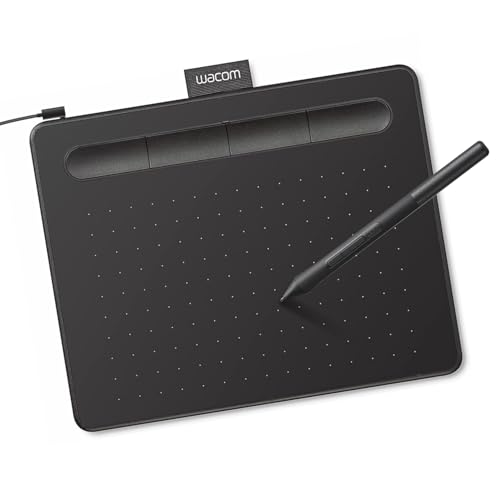
- Battery-free pen with 4096 pressure levels
- Four ExpressKeys for shortcuts
- Works with Windows, Mac, Android, and Chromebook
Best For: Digital creators, students, teachers, and photo editors
Best Two-Pack Value
TIQUS 9.25-Inch LCD Writing Tablets

- Two 9.25-inch LCD boards included
- Brighter, thicker handwriting design
- Lock button preserves notes
Best For: Shared notes, homework, and office reminders
Best for Kids' Travel Creativity
QIAOBUQI 16-Inch Color LCD Tablet

- Spacious 16-inch colorful screen
- Two styluses for shared use
- Rechargeable battery with long runtime
Best For: Ages 3–8, travel drawing, and learning practice
Best Multi-Pack for Reminders
TIQUS 8.5-Inch LCD Writing Tablets

- Three slim 8.5-inch tablets
- Lightweight and easy to carry
- Designed for lists and reminders
Best For: Home, office, kitchen, and everyday communication
Best Multi-Pack Value
6.5-Inch Kids’ LCD Writing Tablets

- Four colorful tablets for shared family or classroom use
- Lightweight design with pressure-sensitive writing
- Rated for up to 200,000 erases
Best For: Families and children ages 3–8
Best Compact Adult Option
Double-Sided 6.5-Inch LCD Notepad

- Double-sided full-screen writing surface
- Only 2 ounces and 0.2 inches thick
- Designed for notes, messages, and office use
Best For: Students and adults writing in bright conditions
Best for Travel Drawing Space
TECJOE 8.5-Inch LCD Tablet Set

- Four larger boards for siblings or group activities
- 8.5-inch glare-free, pressure-sensitive screens
- Styluses clip on and lock/erase controls are included
Best For: Families traveling with children ages 3–8
Best for Simple Notes – Mafiti 8.5-Inch LCD Writing Tablet
For quick notes, doodles, and reminders, this Mafiti model is a straightforward option among portable electronic writing tablets. Its 8.5-inch screen, one-button erase function, lock switch, and lightweight design make it convenient for home, school, or office use.
Best For: Kids, students, families, and anyone who wants a reusable memo or doodle board without a computer.
Pros:
- Thicker, easier-to-see writing than the previous version.
- One-button erasing and a lock-protection switch.
- Ultra-light 1/8-inch profile with built-in stylus storage.
- Replaceable CR2016 battery rated for more than 100,000 writing and erase cycles.
Cons:
- Designed for simple writing and drawing rather than saved digital files.
- Uses a coin-cell battery that eventually needs replacement.
This is a practical low-maintenance writing board for everyday messages and sketches. The kick-stand stylus adds flexibility for displaying reminders, while the compact build makes it easy to carry.
Best for Connected Creativity – XP-Pen StarG640 Drawing Tablet
The XP-Pen StarG640 is a computer-connected choice among portable electronic writing tablets, built for digital drawing, handwritten notes, remote work, and online teaching. Its 6-by-4-inch active area and slim 2 mm profile balance portability with precise pen input.
Best For: Digital artists, teachers, students, remote workers, and users who need handwriting or drawing input on Windows, Mac, or Chromebook.
Pros:
- Battery-free stylus supports uninterrupted use without charging.
- 8192 levels of pressure sensitivity for controlled lines.
- Works with Windows, Mac, and compatible Chrome OS devices.
- Supports drawing, e-signatures, online teaching, editing, and remote work.
Cons:
- Requires a connected computer or compatible device to operate.
- Its 6-by-4-inch active area is smaller than a standalone 12-inch writing board.
Choose this model when portability matters but you still want software-based drawing and handwriting. The battery-free pen and broad application support make it more versatile than a basic erasable memo tablet.
Best for Large Paperless Notes – JSJGETYI 12-Inch Rechargeable Tablet
With a spacious 12-inch screen and foldable cover, this model is a roomy option among portable electronic writing tablets. It is designed for standalone writing, drawing, meeting notes, and daily productivity, with USB-C recharging instead of disposable batteries.
Best For: Office workers, teachers, students, and creatives who prefer a large writing surface for notes and sketches.
Pros:
- Large 12-inch full-screen writing area.
- Slim 5.2 mm profile with a foldable PU protective cover.
- One-touch erase and lock protection help prevent accidental clearing.
- Rechargeable built-in battery charges through USB Type-C.
Cons:
- Standalone design does not connect to a computer or save files digitally.
- Larger screen may take up more bag space than compact writing boards.
This tablet is a good fit for users who want notebook-like writing room without paper waste. Its cover improves portability, and the rechargeable battery avoids routine coin-cell replacements.
Best for Established Creative Workflows – Wacom Intuos Small Drawing Tablet
The Wacom Intuos Small is a compact, computer-connected option for users comparing portable electronic writing tablets for digital art and productivity. It combines a battery-free pen, four ExpressKeys, 4096 pressure levels, and compatibility with major desktop platforms.
Best For: Creators, students, teachers, and photo or video editors who want a recognized pen tablet for software-based work.
Pros:
- Battery-free pen with a pen-on-paper feel and 4096 pressure levels.
- Four ExpressKeys provide convenient shortcut access.
- Works with Windows, Mac, and Android, with plug-and-play Chromebook support.
- Includes access to creative software and Wacom online training after registration.
Cons:
- Requires a connected compatible device rather than working as a standalone memo board.
- The 6-by-3.7-inch active area is relatively compact for detailed work.
For buyers prioritizing established pen technology and creative software compatibility, the Intuos Small is a capable compact choice. Its shortcut keys and included training resources add value for learners and regular creators.
Best Two-Pack Value – TIQUS 9.25-Inch LCD Writing Tablets
If you need portable electronic writing tablets for shared notes, homework, or quick reminders, this TIQUS two-pack offers two 9.25-inch LCD boards in one set. The upgraded version is designed for brighter, thicker handwriting and includes a lock button to preserve notes until you are ready to erase them.
Best For: Students, teachers, and adults who want two reusable writing boards for home, school, or office use.
Pros:
- Includes two 9.25-inch writing tablets for sharing or separate use.
- Brighter display and thicker handwriting than the stated older version.
- Lock button helps prevent accidental erasure.
- Can be written on with the included stylus or a finger.
Cons:
- The supplied warning says it is intended for users over 15 and adults.
- Standalone LCD writing boards are suited to writing and drawing rather than storing digital files.
Choose this set when quantity and simple note-taking matter most. The two-board format is practical for households, classrooms, or offices that need a low-mess alternative to paper.
Best for Kids' Travel Creativity – QIAOBUQI 16-Inch Color LCD Tablet
For families seeking portable electronic writing tablets for drawing and learning on the go, this 16-inch QIAOBUQI model provides a large, colorful LCD surface. It is designed for children ages 3 to 8 and combines a one-touch erase button, lock switch, two styluses, and rechargeable power in a travel-ready format.
Best For: Young children who need a spacious, reusable drawing and writing surface for home, travel, or school-related practice.
Pros:
- Large 16-inch screen gives children plenty of room to draw, write, and practice.
- Includes two styluses for parent-and-child use.
- Rechargeable battery is rated for up to nine months of playtime on one charge.
- Child-safe ABS body and lightweight design suit travel use.
Cons:
- The product notes clarify that LCD writing tablets are non-luminous, so the screen is not backlit.
- Its large screen may take more space in a bag than smaller writing tablets.
This is the strongest fit for mess-free creative play and early learning, especially when a larger drawing area and rechargeable operation are more important than compact size.
Best Multi-Pack for Reminders – TIQUS 8.5-Inch LCD Writing Tablets
These TIQUS portable electronic writing tablets are built for quick lists, memoranda, kitchen notes, and everyday communication. The multi-pack includes three slim 8.5-inch LCD boards, making it easy to keep one at home, one in the office, and one ready for travel.
Best For: Adults and users over 15 who need lightweight reusable boards for checklists, to-do lists, reminders, or communication.
Pros:
- Three 8.5-inch tablets provide strong value for multiple locations or users.
- Extra-slim, lightweight design is easy to carry.
- Pressure-sensitive screen is described as free from glare, blue light, and harmful radiation.
- Reusable surface reduces reliance on paper and pens.
Cons:
- The supplied warning limits intended use to children over 15 and adults.
- The notes emphasize writing and list-making rather than advanced digital tablet functions.
Consider this pack if you want simple, low-maintenance writing boards distributed around the house or workplace. Its three-unit format is particularly useful for recurring reminders and shared communication.
Best Multi-Pack Value – 6.5-Inch Kids’ LCD Writing Tablets
This four-pack is a practical pick if you need portable electronic writing tablets for several children. Each lightweight 6.5-inch board supports drawing, doodling, and early writing practice, with a one-button erase function and a lock switch for preserving a screen.
Best For: Families, classrooms, travel, and children ages 3–8 who want individual drawing boards.
Pros:
- Includes four colorful tablets for siblings or group activities.
- Pressure-sensitive screen supports lines of different thicknesses.
- Lightweight, waterproof, and designed for portable use in cars, planes, and school bags.
- Replaceable battery is rated for up to 200,000 erases.
Cons:
- The 6.5-inch screen provides less drawing space than larger models.
- Its one-month warranty is shorter than some alternatives.
Choose this set when quantity and portability matter most. It offers a convenient way to give multiple children their own reusable doodle board without carrying paper and crayons.
Best Compact Adult Option – Double-Sided 6.5-Inch LCD Notepad
For adults comparing portable electronic writing tablets, this double-sided LCD notepad emphasizes compact note-taking. It weighs 2 ounces, measures about 6.5 inches, and is suited to quick notes, planning, messages, and sketches when used in sufficiently bright light.
Best For: Students, office workers, and anyone needing an ultra-light reusable scratch pad or message board.
Pros:
- Double-sided full-screen design offers writing space on both sides.
- Very light and slim at 2 ounces and 0.2 inches thick.
- One-click clear key supports repeated note-taking without paper.
- Includes a one-year quality assurance period.
Cons:
- Handwriting can be difficult to see in weak light.
- The notes do not indicate a feature for transferring or digitally storing handwriting.
This is a sensible minimalist choice for disposable-style notes, reminders, and practice work. Its biggest limitation is visibility, so it is better suited to bright rooms or daytime use than dim environments.
Best for Travel Drawing Space – TECJOE 8.5-Inch LCD Tablet Set
This four-pack gives families larger portable electronic writing tablets for drawing, spelling, and math practice. Each 8.5-inch board is slim, lightweight, quiet, and mess-free, making the set useful for road trips, airplane rides, restaurants, and other situations where children need an engaging activity.
Best For: Siblings and children ages 3–8 who need more drawing room during travel or shared play.
Pros:
- Four tablets provide individual boards for siblings or group activities.
- 8.5-inch pressure-sensitive screens offer more space than smaller kids’ models.
- No-blue-light, glare-free screens are designed for comfortable drawing.
- Styluses clip to the boards, while lock and erase functions simplify use.
Cons:
- Each tablet weighs 3.5 ounces, making it heavier than some smaller boards.
- The erase function depends on an unlocked switch and correctly installed, sufficiently powered CR2016 battery.
Consider this set if screen area and family sharing are higher priorities than minimum weight. The four-board format and travel-friendly design make it especially practical for keeping several children occupied without creating a paper or crayon mess.
How We Picked the Best Portable Electronic Writing Tablets
We organized these picks around the features that matter most in everyday use: writing surface size, portability, erase and reset functions, battery or rechargeability, durability, included stylus design, and compatibility with computers where applicable. We also considered whether each tablet is better suited to casual notes, children’s activities, schoolwork, office reminders, or digital art.
LCD writing tablets generally provide a low-mess surface for temporary notes and drawings, while graphics tablets such as the Wacom and XPPen models require a computer but offer pressure-sensitive input and creative software support. Multi-packs can be especially useful for families, classrooms, kitchens, and shared workspaces.
Quick Comparison
- Best for simple notes and doodles: Compact LCD boards with one-button erasing.
- Best for young children: Colorful, lightweight models with large writing areas and reusable screens.
- Best for home and office reminders: Mid-size tablets with covers, magnets, or multi-pack value.
- Best for digital art: Computer-connected Wacom and XPPen graphics tablets.
- Best for shared use: Two-, three-, or four-pack bundles for multiple rooms or users.
Key Buying Factors for Portable Electronic Writing Tablets
Screen Size and Portability
Smaller tablets fit easily in bags, drawers, and children’s hands, but larger screens are more comfortable for handwriting, lessons, and drawing. Consider where the tablet will be stored and whether the user needs room for diagrams or long notes.
LCD Board or Computer Tablet
Reusable LCD boards are designed for quick, temporary writing and typically erase with a button. Graphics tablets connect to a Mac or Windows computer and are better for illustration, photo editing, animation, and other applications that need saved digital work.
Power and Erasing
Check whether the model uses a replaceable coin battery, a rechargeable battery, or no charging beyond its installed power source. Confirm that the erase function clears the whole screen; most basic LCD boards do not store or transfer notes.
Build, Accessories, and Safety
For children, prioritize a sturdy case, rounded edges, a secure stylus, and an easy-to-use erase button. Covers, stands, magnets, and replacement stylus storage can make an otherwise simple tablet more useful for travel or office organization.
Who Should Buy Which Portable Electronic Writing Tablets?
Parents and teachers should look for colorful, durable tablets with generous screens for handwriting practice, drawing, and low-waste activities. Adults managing reminders may prefer a covered mid-size model or a multi-pack for the kitchen, desk, and entryway. Families and offices can save money with bundle packs when several people need separate boards.
Artists and designers should choose a computer-connected Wacom or XPPen model instead of a basic LCD board. These tablets provide substantially more control and are designed for software-based creative work. Before buying, verify operating-system compatibility, available USB connections, and whether the included software meets your needs.
