
The best portable document cameras for content creators make it easier to show books, artwork, products, notes, and hands-on demonstrations without a complicated studio setup.
We compared 10 compact USB models across resolution, autofocus, lighting, microphones, folding designs, software compatibility, and workspace coverage so you can choose the right camera for tutorials, livestreams, reviews, and remote presentations.
Best 10 Portable Document Cameras for Content Creators Picks for 2026
Best for AI-Guided Demos

- 8MP Sony Exmor R sensor with UHD capture
- AI-tracking OKIOPoint visual pointer
- Compact design captures letter-size pages in landscape
Best For: Interactive tutorials and live document demonstrations
Best Foldable 4K Option

- 13MP Sony sensor with 4K at up to 30fps
- Folds to a compact pencil-case-sized profile
- Works as a document camera and webcam
Best For: Mobile product demos and flexible creator setups
Best for Smooth Live Switching
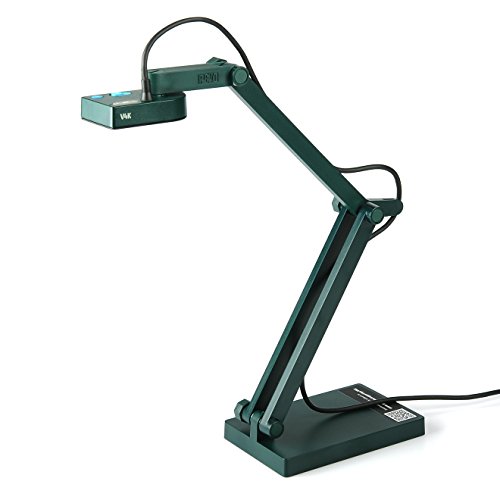
- 8MP Sony CMOS sensor for UHD images
- Fast autofocus for changing materials
- Multi-jointed stand with a 13.46 x 10.04-inch shooting area
Best For: Desk-based tutorials and frequent subject changes
Best Handheld Demonstration Camera

- Handheld multi-angle design for 2D and 3D subjects
- Up to 2560 x 1920 capture at 30fps
- LED, anti-glare sheet, and 16x digital zoom
Best For: Hands-on demonstrations and artwork walkthroughs
Best A3 Coverage

- 8MP capture up to 2448P at 30 fps
- Covers documents and objects up to A3 size
- Foldable design with lighting and image controls
Best For: Creators filming larger documents, crafts, and live demonstrations
Best Software Bundle

- 8MP Sony camera with 30 fps streaming
- Autofocus, macro mode, LED, and built-in mic
- Documate software adds annotation and recording
Best For: Creators who need flexible software controls for demonstrations
Best Manual Control

- 1944P capture at up to 30 fps
- Manual focus with adjustable exposure and lighting
- Foldable design with image inversion support
Best For: Creators who want hands-on control in a compact setup
Premium 4K Pick
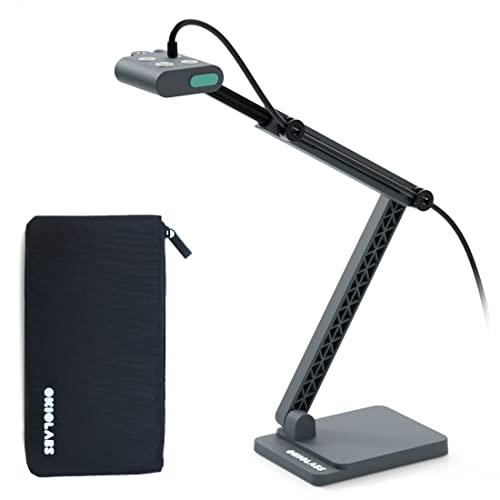
- 4K video at 30 fps with a 13MP sensor
- OKIOPoint tracking and autofocus
- Integrated light; works across major platforms
Best For: High-resolution live demos and polished tutorials
Flexible A3 Option
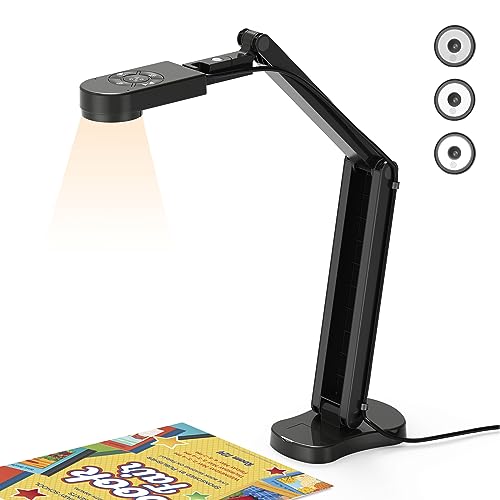
- 2448P video at 30 fps
- A3-size coverage with foldable multi-joint arm
- Three-level light and dual microphones
Best For: Wide overhead demos and object-focused content
Budget A3 Workhorse
PAKOTOO 8MP USB Document Camera

- 2448P autofocus capture for A3 and A4 documents
- Foldable arm with three brightness levels
- USB-C cable included, but setup is not plug and play
Best For: Affordable overhead lessons and object demonstrations
Best for AI-Guided Demos – OKIOCAM S-4K
For creators seeking portable document cameras for content creators, the OKIOCAM S-4K combines an 8MP Sony Exmor R sensor with UHD capture, autofocus, and software designed for interactive demonstrations. Its compact build is particularly useful when desk space and portability matter.
Best For: Live tutorials, document demonstrations, and creators who want AI-assisted pointer tracking.
Pros:
- Captures up to 3264 x 2448 resolution with enhanced low-light performance.
- Streams at up to 30fps in Full HD for responsive demonstrations.
- OKIOPoint provides AI tracking for documents and a visual pointer.
- Supports annotation, recording, snapshots, stop-motion, and timelapse through its software.
Cons:
- Maximum-resolution streaming drops to up to 15fps.
- Uses USB 2.0 connectivity.
- The optional protective pouch is not included.
The S-4K is a strong fit when presentation tools are as important as image quality. Its landscape letter-size coverage and AI pointer give instructional and demonstration-focused creators useful flexibility.
Best Foldable 4K Option – INSWAN INS-Flip 4
The INSWAN INS-Flip 4 is a practical choice among portable document cameras for content creators who need high-resolution capture without carrying a bulky stand. It folds to pencil-case size, includes a carry pouch, and can switch between document-camera and webcam use.
Best For: Mobile creators, product demonstrators, and hybrid setups that require both overhead capture and webcam video.
Pros:
- 13MP Sony sensor records 4K video at up to 30fps across resolutions.
- Foldable 0.68-inch-thick design weighs about 0.67 pounds.
- Functions as both a document camera and a webcam.
- Supports documents larger than B4 and macro shots from about 3.9 inches.
Cons:
- Requires USB connectivity and uses a USB 2.0 Type-A interface.
- The included software and operating-system compatibility may require checking current version requirements.
- Strong magnets for mounting are not included.
With 4K output, a flexible arm, and a very compact folded profile, the INS-Flip 4 is especially appealing for creators who move between workspaces or need one camera for demonstrations and video calls.
Best for Smooth Live Switching – IPEVO V4K Ultra HD
The IPEVO V4K is a dependable pick among portable document cameras for content creators who frequently switch between pages, artwork, and physical objects on camera. Its 8MP Sony CMOS sensor, fast focusing, and multi-jointed stand support detailed live demonstrations.
Best For: Desk-based tutorials, remote presentations, and creators who need quick focus changes between materials.
Pros:
- Captures UHD images up to 3264 x 2448 pixels.
- Streams at up to 30fps in Full HD.
- Fast autofocus helps reduce interruptions when changing subjects.
- Multi-jointed stand offers a maximum shooting area of 13.46 x 10.04 inches.
Cons:
- Maximum-resolution streaming is limited to up to 15fps.
- It has no zoom feature.
- At 1.3 pounds, it is heavier than some foldable alternatives.
The V4K prioritizes responsive focusing and broad software compatibility over ultralight portability. It is a sensible option for creators who keep a camera on the desk and regularly change what they show.
Best Handheld Demonstration Camera – INSWAN INS-3 Handheld
The INSWAN INS-3 stands out among portable document cameras for content creators who want to move around while filming. Its handheld design, LED light, anti-glare sheet, autofocus modes, and included software make it suitable for showing documents, artwork, models, and small 3D objects from different angles.
Best For: Hands-on demonstrations, artwork walkthroughs, and creators who need handheld multi-angle capture.
Pros:
- Captures 2560 x 1920 live images and video at up to 30fps.
- Handheld form makes it easy to show 2D and 3D subjects from varied positions.
- Includes LED lighting, an anti-glare sheet, dual autofocus, and brightness controls.
- Software provides 16x digital zoom, annotation, OCR, recording, and whiteboard tools.
Cons:
- Its listed 2K capture resolution is below the 4K output of some alternatives.
- Handheld operation may require more manual positioning than a fixed stand.
- Compatibility notes specify a USB-C port for iPad use.
The INS-3 is best when flexibility matters more than a fixed overhead viewpoint. Its built-in lighting and feature-rich software give hands-on creators practical tools for polished, interactive demonstrations.
Best A3 Coverage – 4K Foldable Document Camera
For creators seeking portable document cameras for content creators, this foldable Kitchbai visualiser combines an 8MP sensor, A3 coverage, adjustable lighting, and flexible positioning. Its USB-C plug-and-play setup also makes it practical for live demonstrations, overhead videos, and video calls.
Best For: Content creators who need broad A3 coverage, foldable portability, and manual image control.
Pros:
- Captures up to 2448P video at 30 fps with an 8MP sensor.
- Supports a maximum coverage area of 16.5 x 11.6 inches for larger documents and objects.
- Offers adjustable image reversal, three brightness levels, and dual microphones.
- Foldable, multi-jointed design supports flexible overhead and 3D-object shooting.
Cons:
- Requires a USB connection and compatible Windows, macOS, or Chrome OS device.
- Its tall, multi-joint design may take some setup to position precisely.
This is a strong option when framing space and portability matter equally. The A3 capture area and flexible controls suit creators filming paperwork, artwork, crafts, or demonstrations, while the built-in microphones help with simple presentation setups.
Best Software Bundle – INSWAN INS-1 Document Camera
The INSWAN INS-1 is a practical choice among portable document cameras for content creators who want sharp capture plus useful software controls. It combines an 8MP Sony camera, autofocus, built-in lighting, a microphone, and bundled Documate tools for recording and image editing.
Best For: Creators who want annotation, rotation, digital zoom, and recording tools alongside a portable camera.
Pros:
- Captures up to 3264 x 2448 resolution and streams at 30 fps.
- Multi-joint design provides a 14.72 x 11-inch viewing area while saving desk space.
- Includes autofocus, macro capture as close as 3.9 inches, LED lighting, and seven brightness levels.
- Bundled Documate software supports annotation, hue adjustment, image rotation, snapshots, and video recording.
Cons:
- Uses a USB-A cable, which may require an adapter for some newer devices.
- Compatibility varies by operating system version and device port.
Choose this model if your workflow benefits from software-based presentation tools rather than capture alone. Its macro capability and included microscope adapter also expand the types of close-up subjects you can show on camera.
Best Manual Control – Foldable USB Visualizer
This THUSTAND visualizer is a compact pick for portable document cameras for content creators who want straightforward image and lighting adjustments. Its foldable multi-jointed body, manual focus, image inversion controls, and plug-and-play USB connection support overhead filming and webcam use.
Best For: Creators who prefer hands-on focus, exposure, brightness, and image-mirroring controls.
Pros:
- Records up to 1944P at 30 fps with a compact, space-saving design.
- Provides manual focus for more precise image adjustment, with autofocus support listed as well.
- Includes three LED brightness levels and five exposure or fill-light levels.
- Supports image inversion and works with Windows, macOS, Chromebook, and common webinar software.
Cons:
- Its listed resolution is lower than the 8MP alternatives in this roundup.
- Manual controls may require more adjustment than a fully automatic setup.
- Uses a USB 2.0 connection.
The PA800 makes sense for creators who want control over how documents and objects look on screen. Its compact folding form and adjustable lighting are useful for small desks, while the image-invert function helps when switching between overhead content and face-to-face webcam use.
Premium 4K Pick – OKIOCAM S2 Pro
For content creators seeking portable document cameras for content creators, the OKIOCAM S2 Pro combines 4K video at 30 fps with autofocus, an integrated light, and broad computer compatibility. Its weighted base, reinforced arm, and included storage pouch make it well suited to polished demonstrations at a desk or on the go.
Best For: Creators who want high-resolution live demos, presentations, tutorials, and overhead shots with interactive pointer support.
Pros:
- 13MP CMOS sensor captures 4K video at up to 30 fps.
- OKIOPoint supports interactive tracking and zooming in OKIOCAM Live.
- Autofocus, integrated LED light, and a maximum viewing area of 13.6 x 10.6 inches.
- Works with Windows, Mac, Chromebooks, Zoom, Teams, Google Meet, and Canvas.
Cons:
- Requires a USB connection rather than standalone recording.
- Its maximum viewing area is smaller than an A3-size camera.
The S2 Pro is the strongest option here for creators who prioritize 4K clarity and presentation features. The durable construction and software support add value for frequent live production, although users needing larger document coverage may prefer an A3 model.
Flexible A3 Option – THUSTAR 8MP Document Camera
The THUSTAR 8MP model is a practical choice among portable document cameras for content creators who need wide coverage and built-in audio. Its foldable design, adjustable lighting, manual image reversal, and A3 shooting area support everything from paper demonstrations to 3D object showcases.
Best For: Creators making overhead lessons, product demonstrations, or live streams that benefit from A3-size coverage and dual microphones.
Pros:
- Captures up to 2448P video at 30 fps across an A3-size area.
- Foldable multi-joint design rotates to capture 2D and 3D objects.
- Three-level LED lighting and 10-degree brightness adjustment help in varied lighting.
- Built-in dual microphones are designed to reduce noise and work with Zoom, Teams, TikTok, OBS, and other platforms.
Cons:
- Resolution is lower than the OKIOCAM S2 Pro’s 4K output.
- Autofocus is activated with a button rather than continuously tracking moving objects.
Choose the THUSTAR when workspace coverage and flexible positioning matter more than maximum resolution. Its foldable body and built-in microphones make it a versatile setup for creators who regularly switch between documents, objects, and video calls.
Budget A3 Workhorse – PAKOTOO 8MP USB Document Camera
The PAKOTOO KB700 offers a straightforward setup for creators looking for portable document cameras for content creators with A3 coverage, adjustable lighting, and image inversion controls. It folds for transport and includes a USB-C cable, but it requires selecting the USB camera in the computer’s system settings.
Best For: Budget-conscious creators who need portable paper and object demonstrations for Windows, Mac, or Chromebook workflows.
Pros:
- 2448P autofocus capture covers documents up to A3 size.
- Foldable, multi-joint design supports multiple shooting angles.
- Three brightness levels and 10 exposure adjustments help refine the image.
- Built-in dual microphones and compatibility with Zoom, Teams, TikTok, and other listed platforms.
Cons:
- Not plug and play; users must select USB Camera in the computer system.
- Does not support zoom or HDMI, and it is not compatible with iPad.
- Uses USB 2.0 connectivity.
The KB700 is a sensible value pick when A3 coverage and portability outweigh advanced connectivity. Its manual controls are useful for basic creator setups, but the extra configuration and lack of HDMI or zoom make it less convenient for more elaborate production systems.
How We Picked the Best Portable Document Cameras for Content Creators
We focused on features that matter when a camera must move between desks, classrooms, studios, and remote-work setups. Resolution was important, but we also considered autofocus behavior, image controls, capture-area size, folding or handheld designs, built-in lighting, microphone support, and compatibility with common computers and video-conferencing software.
Models advertised for A3 capture can suit larger artwork, documents, and product demonstrations, while compact foldable cameras are easier to pack and reposition. We also separated genuinely useful creator features—such as image inversion, adjustable LEDs, and smart pointers—from specifications that may not improve everyday results.
Quick Comparison
| Feature | What to look for | Why it matters |
|---|---|---|
| Resolution | 8MP or 13MP; 4K support where available | Sharper text, artwork, and product details |
| Design | Foldable, handheld, or compact stand | Determines portability and setup speed |
| Lighting | Built-in LED with adjustable levels | Reduces shadows in uneven or dim spaces |
| Audio | Integrated microphone or dual microphones | Useful for demonstrations without a separate mic |
| Compatibility | USB support for Windows, Mac, or Chromebook | Helps avoid software and connection problems |
Key Buying Factors for Portable Document Cameras for Content Creators
Image Quality and Focus
Choose higher resolution when your videos include fine print, brushwork, electronics, or small products. Autofocus is especially useful when switching between a document and an object, although manual positioning and adequate lighting still affect clarity.
Portability and Coverage
Foldable models are convenient for creators who travel or clear their desk after recording. Check the camera arm and base design, not just the listed weight. If you record posters, large sketches, or full pages, confirm that the field of view accommodates A3 or similarly sized material.
Lighting, Controls, and Audio
Built-in LEDs help with shadows, but adjustable brightness is more useful than a simple on/off lamp. Image inversion can make demonstrations easier to frame. Integrated microphones are convenient, while creators producing polished voiceovers may still prefer a dedicated microphone.
Computer and Software Compatibility
USB plug-and-play support is valuable for streaming and recording applications, but verify operating-system compatibility before buying. A camera that works with your computer’s standard webcam settings is typically easier to use than one requiring specialized software.
Who Should Buy Which Portable Document Cameras for Content Creators?
Choose a foldable 4K model if you travel, teach from multiple locations, or need a quick overhead setup. A higher-megapixel model is a better fit for artwork, detailed product reviews, and close-up demonstrations. Pick a handheld camera when you need to move around an object or capture unusual angles. For general online lessons, notes, books, and occasional creator work, an 8MP USB model with autofocus, LED lighting, and broad operating-system support should provide the best balance.
Before purchasing, confirm the included cable, camera controls, mounting stability, capture size, and whether your recording software recognizes the device as a standard webcam. These details often matter more to daily workflow than headline resolution alone.
