
The best portable conference room cameras make it easier to turn almost any room into a capable meeting space. This roundup compares compact webcams, all-in-one speakerphones, PTZ systems, and 360-degree cameras for different team sizes and workflows.
We focused on video quality, microphone performance, portability, setup simplicity, compatibility, and useful meeting features so you can choose the right camera without overbuying.
Best 10 Portable Conference Room Cameras Picks for 2026
Best All-in-One PTZ System
TONGVEO Auto-Tracking Conference Camera

- 1080p video up to 60fps
- AI face and humanoid tracking
- Includes Bluetooth speakerphone
Best For: Small-to-medium rooms and presentation-focused meetings
Best Portable Compact Pick

- Lightweight 384g all-in-one design
- 1080p camera with 90° view
- Four-mic noise-canceling array
Best For: Home offices, huddle rooms, and mobile users
Best 4K Huddle Room Camera
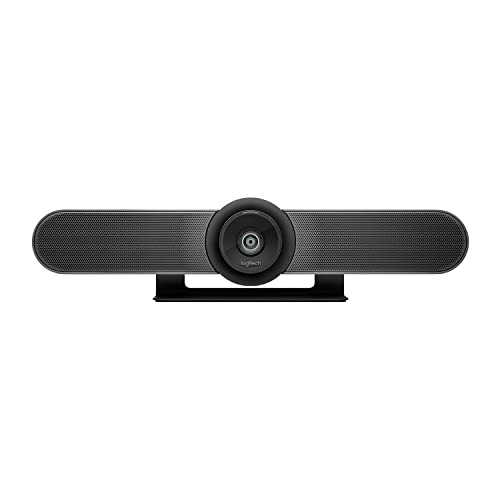
- 4K sensor with 120° field of view
- 5x HD zoom and motorized pan/tilt
- Beamforming microphones included
Best For: Small rooms needing wide, high-resolution coverage
Best 360-Degree Collaboration Camera

- 360° 1080p room view
- AI speaker tracking
- 18-foot audio pickup
Best For: Hybrid meetings around a shared table
Classic Desk Conferencing

- 1080p video with integrated speakerphone
- Remote and base call controls
- USB plug-and-play for Windows and macOS
Best For: Small tables and desktop video meetings
Full-Room 360° Coverage
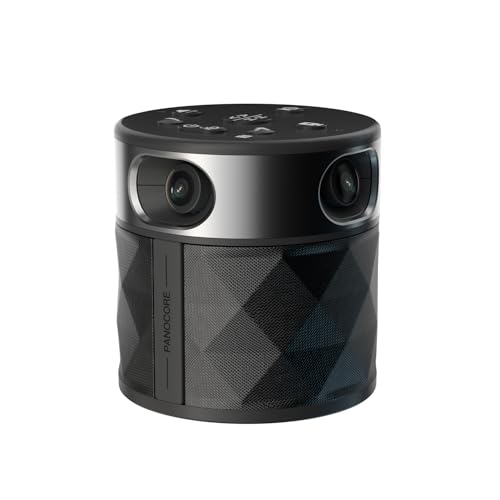
- 360° and dual 180° viewing modes
- Active-speaker focus with room context
- Integrated speaker, mic array, and local recording
Best For: Small to medium hybrid meeting rooms
Flexible 360° Viewing
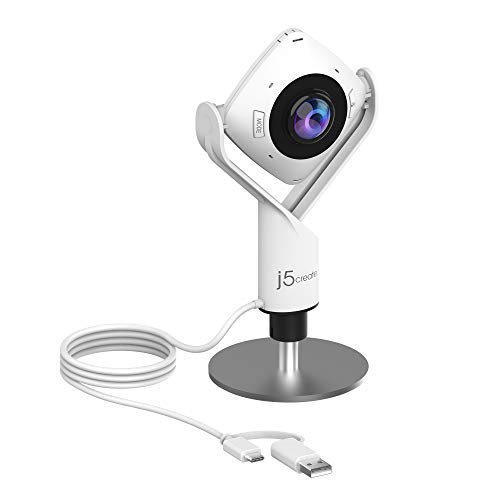
- Six selectable 360° display modes
- 1080p video with omnidirectional microphone
- USB plug-and-play with broad app support
Best For: Classes and collaborative small-group calls
Best Plug-and-Play Pick
Yealink UVC34 4K Conference Camera

- 4K video and a 120° field of view
- Eight-microphone array with 5-meter pickup
- Automatic privacy shutter and AI framing
Best For: Wired huddle-room meetings on Teams, Zoom, and other platforms
Best Sound-Focused Option
Bose Professional VB-S Video Conference Bar

- 4K camera with 5x digital zoom
- Four beamforming, noise-reducing microphones
- Built-in Bluetooth speaker and flexible mounting
Best For: Home offices, classrooms, and compact professional meeting setups
Best 360-Degree Pick
Meeting Owl 4+ Smart Conference Camera

- 4K 360-degree video and room-wide audio
- Automatic speaker focus using visual and audio cues
- Expandable ecosystem for larger spaces
Best For: Hybrid meetings where remote attendees need a full-room view
Best All-in-One PTZ System – TONGVEO Auto-Tracking Conference Camera
For teams seeking portable conference room cameras with both video and audio included, the TONGVEO system combines a 1080p PTZ camera, AI auto-tracking, and a Bluetooth conference speakerphone. It is particularly suited to small-to-medium meeting spaces where speaker movement and clear room audio matter.
Best For: Small-to-medium conference rooms, hybrid meetings, training sessions, and presentations requiring speaker tracking.
Pros:
- 1080p video at up to 60fps with USB 3.0 and HDMI outputs
- AI facial and humanoid tracking with 350° horizontal and 180° vertical movement
- Wireless Bluetooth speakerphone offers full-duplex audio and up to 16.4 feet of pickup
- Works with Zoom, Teams, WebEx, OBS, FaceTime, and other common platforms
Cons:
- The PTZ camera itself is wired, even though the speakerphone is wireless
- The system may be more equipment than needed for a single user or very small room
This is a flexible choice when you want portable conference room cameras with dedicated room audio and automatic speaker framing. Its separate camera and speakerphone design provides useful placement flexibility, but buyers should plan for a wired camera connection.
Best Portable Compact Pick – NUROUM C10 Conference Webcam
The NUROUM C10 is a compact option among portable conference room cameras, combining a 1080p webcam, microphone array, and speaker in a lightweight 384-gram body. Its 90° field of view is designed for individuals and small teams in huddle rooms, focus rooms, and home offices.
Best For: Solo users, small teams, home offices, and mobile hybrid meetings.
Pros:
- All-in-one design with 1080p video, four microphones, and a speaker
- Noise reduction, full-duplex audio, and automatic gain control up to 10 feet
- USB-C cable and USB-A adapter are included, with no driver or power adapter required
- Compatible with Windows, macOS, Linux, Zoom, Teams, and Skype
Cons:
- The fixed 90° view is intended for individuals and small groups rather than larger rooms
- Video capture is limited to 30fps
Choose the C10 when portability and a simple setup are more important than pan, tilt, or zoom controls. Its integrated audio and compact design make it easy to move between workspaces and connect to a laptop quickly.
Best 4K Huddle Room Camera – Logitech MeetUp
Logitech MeetUp is a room-focused option for buyers comparing portable conference room cameras with higher-resolution video. It pairs a 4K sensor, 120° field of view, 5x HD zoom, and built-in beamforming microphones in an all-in-one system for small and huddle rooms.
Best For: Small conference rooms and huddle spaces where wide coverage and 4K video are priorities.
Pros:
- 4K video sensor with a 120° field of view and 5x HD zoom
- Beamforming microphones pick up voices from up to 4 meters
- Motorized pan and tilt can expand the view up to 170°
- Supports USB BYOD use and room deployments for Teams Rooms, Zoom Rooms, and Google Meet
Cons:
- The expansion microphone is sold separately
- At approximately 1,040 grams, it is less lightweight than compact laptop-oriented models
MeetUp is a strong fit for a semi-permanent huddle-room setup that may occasionally need to be moved. Its wide lens, motorized movement, and 4K capability offer more room coverage than basic portable conference room cameras, while USB connectivity keeps BYOD meetings straightforward.
Best 360-Degree Collaboration Camera – Owl Labs Meeting Owl 3
The Meeting Owl 3 stands out among portable conference room cameras by capturing a 360° view of the room while automatically focusing on active speakers. Its 1080p video, 18-foot audio pickup, and plug-and-play USB setup are designed for engaging hybrid meetings.
Best For: Hybrid teams that need automatic speaker focus and visibility around a shared meeting table.
Pros:
- 360° 1080p video helps show the whole room
- AI-driven speaker tracking uses visual and audio cues to focus on participants
- 360° audio pickup reaches up to 18 feet
- Can pair with additional Owl devices or an expansion microphone for larger spaces
Cons:
- It requires a power supply in addition to the USB connection
- The device uses digital zoom rather than optical zoom
The Meeting Owl 3 is a practical choice when remote participants need awareness of everyone in the room, not just a front-facing camera view. Its automatic framing reduces manual camera control, while the Owl ecosystem provides an upgrade path for larger meeting areas.
Classic Desk Conferencing – Logitech BCC950
The Logitech BCC950 is a practical choice among portable conference room cameras when you want video and audio in one desktop unit. Its 1080p camera, built-in speakerphone, and plug-and-play USB connection simplify small meeting setups.
Best For: Small conference tables, home offices, and teams that want integrated video and speakerphone controls.
Pros:
- Combines 1080p video with a full-duplex speakerphone and noise-canceling microphone.
- Supports remote and base controls for pan, tilt, zoom, volume, mute, and call handling.
- Works with Windows and macOS through USB and supports major platforms including Skype for Business, Cisco Jabber, and WebEx.
Cons:
- Audio pickup is specified for meetings up to 8 feet from the base.
- The freestanding design is less suited to broad room coverage than a 360-degree camera.
The BCC950 favors straightforward, business-focused conferencing over panoramic room views. It is a sensible fit when a compact all-in-one desktop system is more important than covering a larger group.
Full-Room 360° Coverage – PANOCORE360 Meeting Camera
The PANOCORE360 stands out among portable conference room cameras for small and medium rooms that need full-room visibility. It combines four cameras, a three-microphone array, a speaker, AI voice processing, and dual 360° or 180° viewing modes in one USB-powered unit.
Best For: Hybrid meetings with up to 12 participants where active-speaker focus and full-room context are both useful.
Pros:
- Captures a 360° view and can switch to dual 180° widescreen coverage.
- Uses auto-focus on the active speaker while retaining room context.
- Offers a built-in speaker, omnidirectional microphones with up to 10-foot pickup, local microSD recording, and driver-free compatibility with Zoom, Teams, Webex, and Meet.
Cons:
- Outputs 1080p video even though the camera system captures a merged 4K 360° view.
- May require the included splitter and power adapter on older or low-power computers.
- Its feature set may be more than needed for simple one-on-one calls.
With chip-level stitching, auto-framing, and low-power USB operation, the PANOCORE360 is designed to reduce setup complexity. Its room-wide perspective makes it especially compelling for collaborative meetings where participants sit around a table.
Flexible 360° Viewing – j5create JVCU360
The j5create JVCU360 is a compact option for buyers comparing portable conference room cameras with flexible presentation modes. Its 360° camera, six display modes, built-in omnidirectional microphone, and USB plug-and-play operation support a range of meeting layouts.
Best For: Online classes, collaboration sessions, and small meetings where different viewing modes help show multiple participants.
Pros:
- Provides 360° video with six modes, including full view, host, dual host, single view, and wide-angle views.
- Delivers Full HD 1080p video at 30 Hz with a built-in omnidirectional microphone.
- Supports Zoom, Microsoft Teams, Google Meet, Cisco, Slack, and other common conferencing apps.
Cons:
- Uses fixed focus rather than autofocus.
- Firmware updates or app permissions may be required to optimize functionality and resolution.
- The listed 2-megapixel sensor and 2x digital zoom offer less imaging flexibility than more advanced room cameras.
The JVCU360 is appealing when viewing flexibility matters more than advanced speaker tracking. Its broad software compatibility and multiple display modes make it adaptable, though setup may involve permissions or firmware maintenance.
Best Plug-and-Play Pick – Yealink UVC34 4K Conference Camera
The Yealink UVC34 is a practical choice among portable conference room cameras for teams that want a straightforward USB setup with strong room coverage. Its 4K camera, 120-degree field of view, integrated microphone array, and automatic privacy shutter make it well suited to huddle rooms and small meeting spaces.
Best For: Teams using Windows or macOS with Microsoft Teams, Zoom, or other major conferencing platforms.
Pros:
- 4K video with a 120-degree field of view captures the room clearly.
- Eight-microphone array supports voice pickup from up to 5 meters.
- AI auto framing and speaker tracking help keep meetings focused.
- Automatic electric privacy shutter adds hardware-level visual privacy.
Cons:
- The all-in-one unit weighs about 1,620 grams, so it is less convenient for frequent travel.
- Its USB-B to USB-A connection may require an adapter for newer USB-C-only computers.
Choose the UVC34 when dependable wired connectivity, broad platform compatibility, and built-in privacy features matter more than minimizing the device’s size. The included 7-meter cable also gives you flexibility when positioning it in a room.
Best Sound-Focused Option – Bose Professional VB-S Video Conference Bar
The Bose Professional VB-S combines a 4K camera, noise-reducing microphones, and a Bluetooth speaker in one low-profile unit. For portable conference room cameras, it is a useful option when clear meeting audio and occasional Bluetooth streaming are just as important as video quality.
Best For: Home offices, classrooms, and small offices that want an all-in-one camera and speaker with flexible tabletop or wall placement.
Pros:
- 4K camera includes 5x digital zoom and a wide field of view.
- Four beamforming microphones focus on voices and reduce unwanted noise.
- Bluetooth supports music or calls from a phone.
- Includes a remote, credenza stand, mounting kit, and USB-C to USB-A cable.
Cons:
- The separate display mounting kit is sold separately.
- At 27 inches wide, the bar is less compact than a small tabletop webcam.
The VB-S is a strong fit for buyers who want fewer components on the meeting table and place a high value on sound. Its auto-framing modes, remote-controlled PTZ functionality, and broad compatibility add useful flexibility for everyday meetings.
Best 360-Degree Pick – Meeting Owl 4+ Smart Conference Camera
The Meeting Owl 4+ takes a different approach to portable conference room cameras by showing the entire room while automatically focusing on active speakers. Its compact 360-degree design, integrated microphone and speaker, and plug-and-play USB setup make it especially useful for collaborative hybrid meetings.
Best For: Hybrid teams that need room-wide visibility and automatic speaker focus in small to large meeting spaces.
Pros:
- Captures 360-degree video in 4K and 360-degree audio up to 18 feet.
- Automatically focuses on in-room speakers using visual and audio cues.
- Supports expansion with additional Owls, an Owl Bar, or an Expansion Mic.
- Offers enterprise features including Wi-Fi management, a Kensington lock, and optional power over Ethernet.
Cons:
- Its 360-degree design may be unnecessary for a single-presenter setup.
- Expanding coverage requires additional Owl Labs equipment.
The Meeting Owl 4+ is the most room-aware option in this group. It is a particularly compelling choice when remote participants need to follow spontaneous discussion around a table, while its compatibility with Teams, Zoom, Google Meet, Webex, and other platforms keeps deployment flexible.
How We Picked the Best Portable Conference Room Cameras
We selected these Portable Conference Room Cameras by comparing the features that matter most in real meeting environments: video resolution, field of view, microphone pickup, speaker quality, connectivity, portability, and software compatibility. We also considered whether each model is better suited to an individual desk, a small huddle room, or a larger conference space.
AI speaker tracking, automatic framing, 360-degree views, optical zoom, and noise reduction can improve meetings, but they are not equally useful for every buyer. The right choice depends on room size, participant count, meeting platform, and how often the equipment must be moved.
Quick Comparison
| Type | Best For | Typical Strength |
|---|---|---|
| Desktop webcam and speakerphone | Individuals and small teams | Simple setup and portability |
| 360-degree meeting camera | Huddle rooms and collaborative tables | Automatic participant framing |
| All-in-one conference camera | Small to medium rooms | Integrated camera, microphone, and speaker |
| PTZ camera system | Flexible room layouts and presentations | Zoom, tracking, and installation options |
Key Buying Factors for Portable Conference Room Cameras
Video Coverage and Resolution
Look beyond the headline resolution. A 1080p camera can be sufficient for most calls, while 4K models provide extra detail and flexibility for cropping. A wide-angle or 360-degree camera is useful when participants sit around a table, but a conventional webcam may produce a more natural image for one or two people.
Microphone Pickup and Audio Processing
Clear audio is usually more important than maximum video resolution. Check the stated microphone pickup range and look for echo cancellation, noise reduction, and automatic gain control. Larger rooms may still require expansion microphones or a separate audio system.
Compatibility and Connections
USB connectivity generally offers the easiest setup with laptops and meeting-room computers. HDMI, Bluetooth, and USB 3.0 can add flexibility, but confirm that the camera works with your preferred platforms, including Zoom, Microsoft Teams, Google Meet, or other conferencing software.
Tracking and Automatic Framing
Speaker tracking and automatic framing can reduce manual camera adjustments, especially in shared rooms. These features work best when participants are clearly visible and the room has reasonable lighting. If meetings are highly structured, a standard wide-angle camera may be simpler and more predictable.
Portability and Room Fit
Consider weight, mounting options, cable length, power requirements, and storage. A compact desktop model is easiest to move, while PTZ and 360-degree systems may offer better coverage but need more space and careful placement.
Who Should Buy Which Portable Conference Room Cameras?
Choose a desktop webcam or speakerphone for a remote worker, executive office, or two-person meeting setup. Choose a 360-degree camera for collaborative huddle rooms where people sit around a table. Choose an all-in-one conference camera when you want one device with integrated video and audio. Choose a PTZ system when optical zoom, presenter tracking, HDMI, or more deliberate camera control matters. For frequent hybrid meetings in larger rooms, prioritize microphone coverage and platform certification over resolution alone.
