
The best PoE network switches for small businesses simplify installations by delivering power and data over one Ethernet cable. They can reduce wiring, support IP cameras and wireless access points, and help keep office networks organized.
Our 2026 roundup includes compact plug-and-play switches, smart managed models, and higher-capacity options for businesses that need more ports, stronger management features, or additional PoE headroom.
Best 10 PoE Network Switches for Small Businesses Picks for 2026
Balanced Smart Choice
TP-Link TL-SG1016PE 16-Port PoE+ Switch

- 8 PoE+ ports with a 150W total budget
- 8 extra Gigabit non-PoE ports
- VLAN, QoS, IGMP, LAG, and Auto Recovery
Best For: Small offices needing flexible powered and non-PoE connectivity
Simple Plug-and-Play Pick
NETGEAR GS108PP 8-Port PoE+ Switch

- 8 Gigabit PoE+ ports
- 123W total PoE power budget
- Fanless, unmanaged, and mountable
Best For: Small, uncomplicated PoE installations
Flexible Managed Value
Goalake 8-Port Gigabit PoE Switch

- 8 PoE ports and 120W total budget
- 2 Gigabit uplinks for router or NVR
- App/web management with VLAN and QoS
Best For: Small offices and camera systems needing managed features
High-Capacity Office Upgrade
TP-Link TL-SG1428PE 24-Port PoE+ Switch

- 24 PoE+ Gigabit ports with 250W budget
- 2 SFP slots plus 2 non-PoE ports
- VLAN, QoS, IGMP, LAG, and Auto Recovery
Best For: Growing offices with many powered endpoints and uplink needs
Best Overall Capacity
Linksys LGS116P 16-Port PoE+ Switch

- 16 Gigabit ports for expansion
- Eight PoE+ ports with 80W budget
- Metal desktop or wall-mount design
Best For: Small offices needing extra ports and PoE capacity
Best Managed Option
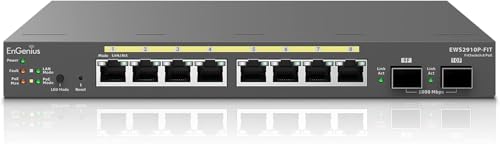
- Layer 2+ VLAN, QoS, and ACL features
- Two SFP uplinks for fiber connectivity
- 55W budget across eight PoE ports
Best For: Small networks needing management and monitoring controls
Best Plug-and-Play Value
TP-Link TL-SG1008P 8-Port PoE+ Switch

- Four PoE+ ports with 64W budget
- Plug-and-play installation
- Fanless metal case with QoS and IGMP Snooping
Best For: Quiet, simple deployments with a few PoE devices
Best Overall
NETGEAR GS728TP 28-Port PoE+ Smart Switch

- 24 PoE+ ports with a 190W power budget
- Four 1G SFP ports for uplinks
- Managed controls with desktop or rackmount placement
Best For: Growing small offices with multiple PoE devices
Best Plug-and-Play Pick
D-Link DGS-1008P 8-Port Unmanaged PoE+ Switch

- Eight Gigabit ports with four PoE ports
- Up to 30W per PoE port
- Fanless metal housing and simple installation
Best For: Small, basic PoE setups without management needs
Balanced Smart Choice – TP-Link TL-SG1016PE 16-Port PoE+ Switch
For small businesses needing room for cameras, access points, phones, and wired devices, the TP-Link TL-SG1016PE is a practical choice among PoE network switches for small businesses. It combines eight PoE+ ports with eight additional Gigabit ports, plus straightforward web-based management.
Best For: Small offices that need a mix of powered and non-PoE Gigabit connections with VLAN, QoS, and automatic PoE device recovery.
Pros:
- Eight PoE+ ports provide up to 30W each within a 150W total budget.
- Eight additional Gigabit non-PoE ports add flexible connectivity.
- Web management includes VLAN, QoS, IGMP, and LAG features.
- Auto Recovery can detect and reboot unresponsive PoE devices.
Cons:
- The 150W power budget may require prioritizing devices in larger deployments.
- Its 16-port metal chassis takes more space than a compact desktop switch.
This is a well-rounded option when basic plug-and-play installation is important but your network would benefit from smart management and traffic segmentation.
Simple Plug-and-Play Pick – NETGEAR GS108PP 8-Port PoE+ Switch
The NETGEAR GS108PP keeps deployment simple for small businesses that want PoE without switch configuration. Its eight Gigabit PoE+ ports, compact metal design, and multiple mounting options make it a convenient fit for basic networks and smaller installations.
Best For: Small offices, work areas, and straightforward camera or access-point setups that do not need managed networking features.
Pros:
- All eight ports support Gigabit Ethernet and PoE+.
- The 123W power budget supports power-hungry connected devices.
- Plug-and-play operation requires no software or configuration.
- Fanless design operates quietly and supports desktop, wall, or rack mounting.
Cons:
- As an unmanaged switch, it does not provide VLAN or QoS controls.
- Its external power adapter may add cable clutter during installation.
Choose the GS108PP when ease of installation matters more than network customization and eight PoE+ connections are enough for your current setup.
Flexible Managed Value – Goalake 8-Port Gigabit PoE Switch
The Goalake 8-port switch targets small businesses and security installations that need more control than an unmanaged model provides. It offers eight PoE ports, two Gigabit uplinks, app and web management, and features designed for cameras, wireless access points, and VoIP devices.
Best For: Small offices, surveillance systems, and larger properties needing VLAN, QoS, long-range mode, and quiet fanless operation.
Pros:
- Eight 802.3af/at PoE ports provide up to 30W each within a 120W budget.
- Two dedicated Gigabit uplinks help connect an NVR or router.
- App and web management include VLAN, QoS, port mirroring, and storm control.
- Fanless metal construction and a claimed 250-meter extension mode suit quiet or distant installations.
Cons:
- The 120W budget is lower than the capacity of some larger PoE switches.
- Advanced features may require more setup than a basic unmanaged switch.
This model is appealing when a small business wants managed functionality and surveillance-oriented features without moving to a larger 24-port platform.
High-Capacity Office Upgrade – TP-Link TL-SG1428PE 24-Port PoE+ Switch
For growing offices with many powered endpoints, the TP-Link TL-SG1428PE provides 24 PoE+ Gigabit ports and a 250W power budget. It also adds two non-PoE Gigabit ports and two SFP slots, making it one of the more expandable PoE network switches for small businesses in this group.
Best For: Growing small businesses that need to connect numerous cameras, access points, phones, and uplinks while retaining smart management features.
Pros:
- Twenty-four PoE+ ports provide up to 30W per port.
- A 250W total budget supports a larger powered-device deployment.
- Two SFP slots and two non-PoE Gigabit ports support flexible uplinks.
- Managed features include VLAN, QoS, IGMP, LAG, and configurable Auto Recovery.
Cons:
- The rack-sized chassis is less suitable for very small desktop installations.
- Auto Recovery requires configuration according to the supplied specifications.
- A 250W budget still requires attention to total device consumption.
This is the strongest fit here for businesses planning ahead: it offers substantial port capacity and useful uplink options without requiring a fully enterprise-focused switch.
Best Overall Capacity – Linksys LGS116P 16-Port PoE+ Switch
For small businesses needing room for multiple wired devices, the Linksys LGS116P is a practical choice among PoE network switches for small businesses. It combines 16 Gigabit ports with eight PoE+ ports and an 80W power budget in a metal enclosure.
Best For: Small offices, IP surveillance setups, and networks that need more ports and PoE capacity without managed-switch configuration.
Pros:
- 16 Gigabit ports provide useful expansion capacity.
- Eight PoE+ ports share an 80W power budget.
- 32Gbps non-blocking bandwidth supports high-bandwidth transfers.
- Metal housing supports desktop or wall mounting.
Cons:
- Unmanaged design does not provide VLAN, QoS, or ACL configuration.
- Only the first eight ports support PoE+.
- The listed dimensions may require careful placement planning.
Choose this model when port count and PoE availability matter more than advanced network controls. Its Gigabit connectivity, fanless-style simplicity, and limited lifetime warranty make it a flexible fit for growing basic networks.
Best Managed Option – EnGenius Fit EWS2910P-FIT
The EnGenius Fit EWS2910P-FIT stands out among PoE network switches for small businesses that need traffic controls and remote management. Its eight Gigabit PoE ports, 55W budget, Layer 2+ features, and SFP uplinks support more structured deployments.
Best For: Small businesses using IP cameras, access points, or VoIP phones that need VLANs, QoS, ACLs, monitoring, and fiber-uplink options.
Pros:
- Layer 2+ management includes VLAN, QoS, ACL, and spanning-tree features.
- Two SFP uplinks offer fiber backbone flexibility.
- Intelligent power allocation supports connected PoE devices within the 55W budget.
- LACP and redundancy features can support network stability.
Cons:
- The 55W PoE budget is lower than some higher-capacity alternatives.
- Eight total ports may limit expansion in larger small-business networks.
- Its management features may be more than a basic plug-and-play setup requires.
This is the strongest fit when control and visibility are priorities. The combination of Layer 2+ management, device monitoring, and SFP uplinks gives a small network a clearer path to growth than an unmanaged switch.
Best Plug-and-Play Value – TP-Link TL-SG1008P 8-Port PoE+ Switch
The TP-Link TL-SG1008P is a straightforward option for small businesses seeking PoE network switches for small businesses without software setup. It provides eight Gigabit ports, four PoE+ ports, a 64W budget, and a quiet fanless metal design.
Best For: Small offices and installations powering a few cameras, access points, or VoIP devices while keeping setup simple and noise low.
Pros:
- Four PoE+ ports deliver up to 30W per port.
- 64W total PoE budget supports several powered devices.
- Plug-and-play operation requires no software configuration.
- Fanless metal housing supports quiet desktop or wall-mounted use.
Cons:
- Only four of the eight ports provide PoE+.
- Unmanaged design limits network configuration options.
- It offers less total port capacity than the 16-port Linksys model.
For a compact deployment, this TP-Link balances useful PoE capacity with easy installation. QoS and IGMP Snooping add practical traffic-handling features, while the fanless enclosure suits workspaces where quiet operation matters.
Best Overall – NETGEAR GS728TP 28-Port PoE+ Smart Switch
For small businesses that need room to grow, the NETGEAR GS728TP is a capable choice among PoE network switches for small businesses. It combines 24 Gigabit PoE+ ports, a 190W power budget, four 1G SFP uplinks, and managed features for more controlled network deployment.
Best For: Small offices needing many powered devices, managed controls, and flexible desktop or rackmount installation.
Pros:
- 24 PoE+ ports share a substantial 190W power budget.
- Four 1G SFP ports support fiber uplink options.
- Managed software supports secure setup, access control, and SNMP management.
- Includes mounting hardware and limited lifetime protection with next-business-day replacement.
Cons:
- Its 28-port design may be more capacity than very small installations require.
- Managed features may involve more setup than a plug-and-play switch.
The GS728TP is a strong fit when port count, PoE capacity, and management flexibility matter more than having the simplest possible setup. Quiet, energy-efficient operation also suits office environments.
Best Plug-and-Play Pick – D-Link DGS-1008P 8-Port Unmanaged PoE+ Switch
The D-Link DGS-1008P is a straightforward option among PoE network switches for small businesses. It provides eight Gigabit ports, with four PoE-capable ports delivering up to 30W per port and a listed 68W total power budget, without requiring configuration.
Best For: Small offices, camera setups, phones, or access points that need simple PoE connectivity on a desktop.
Pros:
- Plug-and-play installation requires no complex configuration.
- Four PoE ports support up to 30W per port.
- Fanless, compact metal design operates quietly.
- Eight Gigabit ports provide high-speed wired connectivity.
Cons:
- Only four of the eight ports provide PoE.
- As an unmanaged switch, it lacks advanced VLAN and traffic-management controls.
- Its 68W listed total budget is aimed at smaller deployments.
Choose the DGS-1008P when ease of installation and quiet operation are priorities. It is a practical fit for basic PoE deployments, but businesses needing centralized management should consider a smart-managed model.
Best Compact Managed Pick – D-Link DGS-1100-08PV2 Smart PoE+ Switch
The D-Link DGS-1100-08PV2 adds useful management features to a compact eight-port design, making it a flexible option among PoE network switches for small businesses. Its eight Gigabit PoE ports share a 64W budget and support VLANs, QoS, IGMP Snooping, and other traffic controls.
Best For: Small businesses that need managed networking, quiet operation, and modest PoE capacity in a desktop or wall-mounted switch.
Pros:
- All eight ports are Gigabit PoE-capable ports.
- Supports 802.1Q VLANs, QoS, bandwidth control, and IGMP Snooping.
- PD-Alive can automatically reset an unresponsive PoE device.
- Fanless design supports silent, energy-efficient operation.
Cons:
- The 64W PoE budget limits the number of higher-power devices it can support simultaneously.
- Eight ports may not be enough for larger or expanding deployments.
The DGS-1100-08PV2 is a good middle ground between an unmanaged switch and a larger business platform. Its compact form, remote or local web management, and automatic device recovery are especially useful for small installations.
How We Picked the Best PoE Network Switches for Small Businesses
We compared these switches by looking at port count, PoE and PoE+ support, total power budget, management features, uplink capacity, installation flexibility, and likely small-business use cases. We also considered whether a switch is fanless or desktop-friendly, since noise and placement matter in offices, retail spaces, and home-based businesses.
The selection covers unmanaged switches for simple deployments, easy smart and smart managed models for VLANs and traffic control, and larger switches for growing camera or access-point installations. Because actual device requirements vary, confirm each model’s current specifications before purchase.
Quick Comparison
| Best For | Recommended Type | What to Prioritize |
|---|---|---|
| Small office or home office | 8-port unmanaged | Fanless operation, plug-and-play setup, adequate PoE budget |
| Several cameras or access points | 16-port smart switch | PoE+ support, VLANs, QoS, and more total wattage |
| Growing business network | 24- or 28-port managed switch | Power headroom, SFP uplinks, monitoring, and expansion capacity |
| Security-focused installation | Managed or cloud-managed switch | VLANs, remote management, traffic controls, and camera compatibility |
Key Buying Factors for PoE Network Switches for Small Businesses
Port Count and Expansion
Count both current devices and likely additions. An 8-port switch may suit a few cameras or access points, while 16-, 24-, or 28-port models provide more room for phones, computers, printers, and future installations.
PoE Standard and Power Budget
Check whether connected devices need PoE or PoE+. The total power budget must cover the combined draw of all powered devices, not just one port. Leave reserve capacity for startup demands and future upgrades.
Management Features
Unmanaged switches are easiest to install, but managed models offer VLANs, QoS, link aggregation, IGMP snooping, monitoring, and access controls. These features are valuable when separating guest Wi-Fi, cameras, voice traffic, and business systems.
Uplinks, Placement, and Noise
Gigabit uplinks are suitable for many offices, while SFP ports can help connect longer-distance or fiber links. Fanless desktop switches are quiet; rack-mount models may offer greater capacity but need suitable ventilation and space.
Who Should Buy Which PoE Network Switches for Small Businesses?
Choose an unmanaged 8-port model for a straightforward, low-maintenance setup. Pick a 16-port switch when you need additional devices or modest expansion. A smart managed switch is the better choice for businesses that need VLANs, traffic prioritization, or troubleshooting visibility. For larger offices, multiple cameras, or several access points, choose a 24- or 28-port model with a generous power budget and expansion-ready uplinks.
