
The best network video recorders for content creators do more than store camera footage. They can simplify multi-camera production, protect valuable recordings, and provide a reliable way to manage growing video libraries.
Our 2026 roundup covers dedicated NVRs for IP and PoE cameras alongside a portable monitor-recorder designed for HDMI camera workflows. Use the guide below to match storage, connectivity, and control features to the way you create.
Best 10 Network Video Recorders for Content Creators Picks for 2026
Best for UniFi camera expansion

- UniFi Protect compatible
- Supports up to 60 added cameras
- Local storage with free remote access
Best For: Large UniFi camera systems needing local recording
Best for camera-to-editing workflows

- Records ProRes and ProRes RAW
- 1500-nit HDR touchscreen
- Professional monitoring and camera control
Best For: Mirrorless-camera creators capturing edit-ready footage
Best for compact UniFi recording

- Designed for UniFi Protect cameras
- Four-channel specification
- Ethernet and USB connectivity
Best For: Small UniFi camera installations
Best for plug-and-play Reolink systems
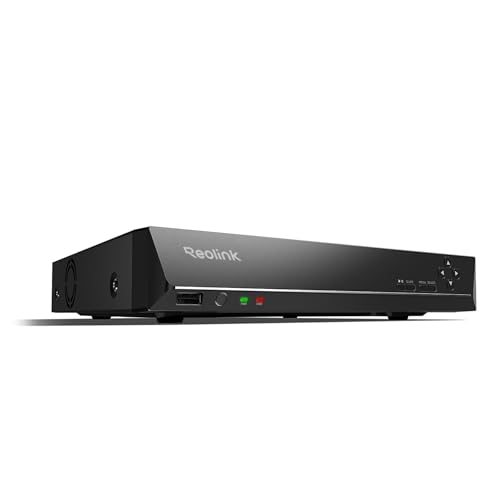
- Supports up to 16 Reolink cameras
- Pre-installed 4TB hard drive
- PoE setup with free remote apps
Best For: Reolink users wanting 24/7 local recording
Expandable Creator Hub

- Four 3.5-inch HDD or SSD bays
- RAID storage support
- 10G SFP+ and Gigabit Ethernet
Best For: Creators building an expandable eight-camera recording setup
Plug-and-Play Security Recorder
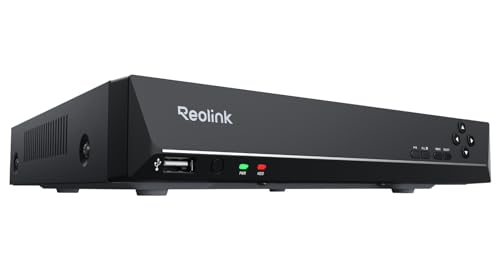
- Eight-channel simultaneous recording
- PoE power and data over one cable
- Supports internal and external HDDs
Best For: Creators wanting a simple Reolink-based studio or property system
Ready-to-Deploy Camera Bundle

- Includes four G5 Turret Ultra cameras
- Comes with a 1TB hard drive
- Four-channel all-in-one system
Best For: Creators starting a complete UniFi Protect camera setup
Best Local-Storage Pick

- 24/7 recording with a compatible HDD
- Up to 8TB local storage without subscriptions
- PoE setup and local AI video search
Best For: Reolink camera users who prioritize stable local recording
Best Enterprise Expansion
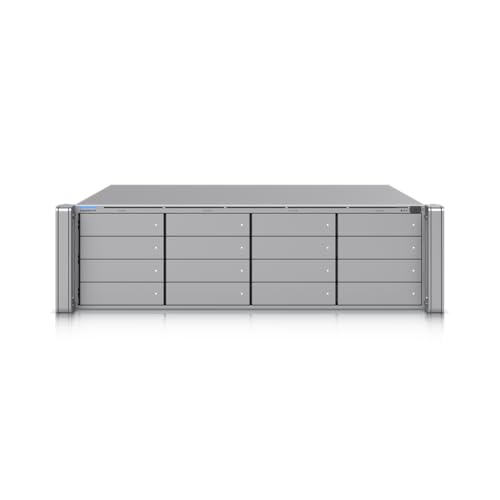
- Supports up to 16 HDDs or SSDs
- Includes 10Gb networking options
- Dual hot-swap PSUs add power redundancy
Best For: Large studios and teams planning extensive camera storage
Best Wireless Value
OOSSXX 10-Channel Wireless NVR

- Supports 10 channels with Wi-Fi or Ethernet
- Motion alerts and remote app viewing
- HDMI, VGA, and CVBS display outputs
Best For: Small studios needing wireless monitoring and phone access
Best for UniFi camera expansion – UniFi Protect NVR Pro
For content creators building a multi-camera studio, workspace, or property-monitoring setup, the Ubiquiti UniFi Network Video Recorder Pro provides local footage storage through the UniFi Protect application. It supports up to 60 added cameras and remote access to streams and recordings without a cloud-server subscription.
Best For: Creators already using UniFi cameras who want centralized, locally stored surveillance footage and broad camera coverage.
Pros:
- Works with the UniFi Protect application.
- Supports adding up to 60 cameras.
- Enables free remote access to camera streams and recordings.
- Stores footage locally rather than on a cloud server.
Cons:
- Designed for UniFi camera ecosystems, limiting compatibility with other camera brands.
- Its 160-watt power rating may be more than a small setup needs.
- The supplied details list 15 channels, so verify capacity requirements before buying.
The UNVR-Pro is a strong fit when local storage, remote viewing, and substantial UniFi camera expansion matter more than a compact or brand-agnostic recorder.
Best for camera-to-editing workflows – Atomos Ninja RAW
For content creators who mean video capture rather than security surveillance, the Atomos Ninja RAW is a portable monitor-recorder for HDMI and mirrorless cameras. It records ProRes or ProRes RAW to CFexpress Type B media or external USB-C storage while adding professional monitoring tools and camera control.
Best For: Filmmakers and video creators who want an on-camera recorder with HDR monitoring, ProRes workflows, and direct camera control.
Pros:
- Records ProRes and ProRes RAW, including ProRes RAW HQ, LT, 422, and 422 HQ.
- Offers a bright 1500-nit, 5-inch HDR touchscreen.
- Includes waveform, focus peaking, EL Zone false color, and Onion Skin tools.
- Runs from NP-F batteries, USB-C power banks, or a DC adapter.
Cons:
- It is a camera monitor-recorder, not a network video recorder for IP security cameras.
- CFexpress media and external storage are not specified as included recording media.
- Network-adapter functionality requires a separately sold adapter.
The Ninja RAW is the most relevant option here for creators recording original camera footage, especially those editing in DaVinci Resolve, Premiere Pro, Final Cut Pro, or Avid.
Best for compact UniFi recording – UniFi Protect NVR
The Ubiquiti UniFi Protect Network Video Recorder is a compact option for content creators who need a dedicated recorder for compatible IP cameras. Its Ethernet and USB connectivity and four-channel specification make it better suited to smaller UniFi camera installations than large multi-camera deployments.
Best For: Small setups using compatible UniFi cameras and needing a straightforward network video recorder.
Pros:
- Built for camera recording through the UniFi Protect ecosystem.
- Supports up to four channels according to the supplied specifications.
- Offers Ethernet and USB connectivity.
Cons:
- The four-channel capacity limits expansion for larger camera systems.
- The supplied notes do not specify included storage capacity.
- Compatibility is centered on cameras rather than general-purpose video inputs.
This NVR makes sense when a smaller UniFi installation is the priority, but buyers planning to add several cameras should compare its four-channel limit with their future needs.
Best for plug-and-play Reolink systems – RLN16-410 16CH NVR
For creators who want an independent security setup around Reolink cameras, the RLN16-410 combines 16-channel recording with a pre-installed 4TB hard drive. Its PoE design sends power and data over one Ethernet cable, while Reolink apps support local and remote access without monthly fees.
Best For: Reolink camera owners who need 24/7 recording, simple PoE installation, and room for up to 16 cameras.
Pros:
- Manages up to 16 Reolink cameras simultaneously.
- Includes a 4TB hard drive for 24/7 recording.
- PoE simplifies installation by carrying power and data over one Ethernet cable.
- Supports free Reolink apps and local or remote viewing without monthly fees.
Cons:
- Works only with Reolink IP cameras according to the supplied notes.
- An additional hard drive is needed for more storage, with support for up to 8TB extra.
- It is a security NVR rather than a recorder for HDMI camera production workflows.
The RLN16-410 is a practical choice for a Reolink-based creator workspace or property system, particularly when easy PoE deployment and continuous local recording are more important than cross-brand compatibility.
Expandable Creator Hub – UniFi Network Video Recorder
For content creators building a multi-camera studio or production space, the Ubiquiti UniFi Network Video Recorder provides an eight-channel foundation for storing digital video. Its four 3.5-inch HDD or SSD bays, RAID support, and 10G SFP+ uplink make it suited to larger, storage-focused setups.
Best For: Creators who need expandable local storage and an eight-camera UniFi Protect recording platform.
Pros:
- Supports up to four 3.5-inch HDDs or SSDs.
- RAID storage technology helps protect recorded data.
- Includes a 10G SFP+ uplink and Gigabit Ethernet port.
- Designed to be DC power backup-ready.
Cons:
- Storage drives are not identified as included in the supplied notes.
- At 11.3 pounds, it is a substantial device for smaller setups.
- Its eight-channel capacity may exceed the needs of a basic studio.
The UNVR is the strongest fit here for creators who prioritize storage expansion and data protection. It makes the most sense when your camera system can take advantage of UniFi Protect and faster network connectivity.
Plug-and-Play Security Recorder – REOLINK RLN8-410 NVR
The REOLINK RLN8-410 is a practical choice for content creators who want straightforward network video recording for a studio, office, or property. It records up to eight Reolink cameras simultaneously and uses PoE for one-cable power and data connections.
Best For: Creators who want an easy-to-deploy Reolink camera system with local and remote viewing.
Pros:
- Supports up to eight cameras recording simultaneously.
- PoE simplifies camera installation with one Ethernet cable.
- Supports one internal HDD up to 8TB plus an external eSATA HDD up to 8TB.
- Includes free Reolink apps and clients without monthly fees.
Cons:
- Internal and external hard drives are not included.
- It works only with compatible Reolink cameras, excluding 4G LTE cameras.
- Firmware and camera compatibility should be checked before use.
This recorder is a sensible starting point for creators already using Reolink cameras. Its PoE setup, eight-channel capacity, and app access keep installation manageable, though the ecosystem restriction limits camera flexibility.
Ready-to-Deploy Camera Bundle – UniFi Protect Instant Kit
The Instant Network Video Recorder Kit is a convenient entry point for content creators who want a complete camera recording package rather than a standalone recorder. It combines a UniFi Protect NVR Instant, four G5 Turret Ultra cameras, and a 1TB hard drive for a quick installation.
Best For: Creators who want four included cameras and storage in one UniFi Protect kit.
Pros:
- Includes the NVR, four G5 Turret Ultra cameras, and a 1TB hard drive.
- Provides a four-channel recording setup.
- Designed for quick installation as an all-in-one package.
Cons:
- Four channels offer less expansion than an eight-channel recorder.
- Installation requires linking to a Gateway or Layer 3 switch.
- The supplied 1TB drive provides less storage than multi-bay systems.
This kit is the simplest option for creators starting from scratch with UniFi Protect. The included cameras and drive reduce component shopping, while the four-channel limit and required network equipment should be planned for in advance.
Best Local-Storage Pick – Reolink RLN4E PoE NVR
For content creators who want dependable footage access without a subscription, the Reolink RLN4E is one of the more practical network video recorders for content creators. Its PoE design simplifies setup, while local recording and AI-assisted searches help manage footage efficiently.
Best For: Creators and small teams using compatible Reolink IP cameras who want wired stability, local storage, and remote viewing.
Pros:
- Supports 24/7 recording with a compatible internal surveillance-grade HDD.
- Offers up to 8TB of local HDD storage, with no subscription required.
- PoE carries power and data over one Ethernet cable for easier installation.
- Local AI search can help find people, vehicles, and events in recorded footage.
Cons:
- HDD and microSD card are not included.
- Works only with Reolink IP cameras.
- The four-channel design is less suitable for larger camera installations.
The RLN4E is a focused choice when local privacy, continuous recording, and simple PoE deployment matter more than broad camera compatibility or a high channel count.
Best Enterprise Expansion – Ubiquiti Enterprise NVR
The Ubiquiti Enterprise NVR is built for substantial camera deployments and high-throughput networking. Among network video recorders for content creators, it stands out for its 16 drive bays, 10Gb networking options, and redundant hot-swap power supplies.
Best For: Professional studios, production facilities, and larger teams that need extensive storage expansion and resilient network connectivity.
Pros:
- Supports up to 16 3.5-inch HDDs or SSDs.
- Provides two 10G SFP+ uplinks and one 10GbE RJ45 port.
- Includes two hot-swap PSUs for power redundancy.
- Offers a listed 70-channel capacity.
Cons:
- Its enterprise-oriented hardware may be more than a small creator needs.
- Storage drives are not listed as included in the supplied details.
- The manufacturer warranty is listed as six months.
Choose the Enterprise NVR when scalability and network throughput are priorities. Its feature set is better aligned with larger, infrastructure-heavy installations than compact home or single-studio systems.
Best Wireless Value – OOSSXX 10-Channel Wireless NVR
For creators seeking an accessible monitoring hub, this 10-channel OOSSXX model combines wireless connectivity, remote access, and motion alerts. It is a straightforward option among network video recorders for content creators who need phone-based viewing and basic event monitoring.
Best For: Home studios, offices, and small creator setups using OOSSXX cameras or compatible ONVIF cameras.
Pros:
- Supports up to 10 channels and wireless or Ethernet connectivity.
- Provides HDMI, VGA, and CVBS outputs for display flexibility.
- Motion detection and email alerts can notify users of activity or video loss.
- Free app access supports remote viewing from phones, tablets, PCs, and Macs.
Cons:
- Maximum storage is listed as 6TB, and the HDD is not included.
- Third-party camera support is limited to compatible ONVIF devices.
- Only one USB port is listed.
This OOSSXX recorder suits buyers who value wireless convenience and remote alerts over advanced enterprise features. Confirm camera compatibility before purchase, particularly when mixing brands.
How We Picked the Best Network Video Recorders for Content Creators
We selected these 10 models for the different ways creators capture and manage video. The lineup includes PoE NVRs for studio, office, and property cameras; Ubiquiti UniFi Protect recorders for connected surveillance ecosystems; wireless NVR options; and the Atomos Ninja RAW for creators who need on-camera HDMI recording rather than a fixed security recorder.
Our comparison focused on camera capacity, recording compatibility, storage expandability, network and PoE connectivity, remote access, monitoring features, and workflow flexibility. Because “NVR” can describe both security-camera hubs and production recorders, the right choice depends heavily on your camera type and how footage is used.
Quick Comparison
- Best for larger UniFi deployments: Ubiquiti UniFi Network Video Recorder Pro or Enterprise Network Video Recorder.
- Best for a compact UniFi system: Ubiquiti UniFi Protect Network Video Recorder or standard UniFi Network Video Recorder.
- Best for PoE camera capacity: REOLINK RLN16-410 16CH NVR.
- Best for smaller security setups: REOLINK RLN4E 4CH or RLN8-410 8CH NVR.
- Best for portable camera recording: Atomos Ninja RAW.
- Best for a bundled starting point: Instant Network Video Recorder Kit by Ubiquiti.
- Best for a basic wireless installation: 5MP 10 Channel Wireless NVR.
Key Buying Factors for Network Video Recorders for Content Creators
Camera and Signal Compatibility
First, identify whether your cameras use IP, PoE, Wi-Fi, HDMI, or another output. Security NVRs generally record compatible network cameras, while the Atomos unit is intended for direct HDMI camera connections. A recorder that cannot accept your camera’s signal will not fit your workflow, regardless of storage capacity.
Channels, Resolution, and Frame Rate
Choose enough channels for current cameras plus planned expansion. Check supported resolution and frame rates as well as simultaneous recording limits. High-resolution multi-camera footage consumes more bandwidth and storage, so confirm that the recorder and network can handle the combined load.
Storage and Retention
Estimate storage from camera count, resolution, frame rate, compression, and desired retention. Look for models with replaceable or expandable drives if you archive footage regularly. Also check whether a hard drive is included, since some NVRs ship without one.
Connectivity and Management
PoE ports can simplify installations by carrying power and data over one cable. Remote viewing, alerts, user permissions, and mobile or desktop software are valuable for teams and distributed shooting locations. Creators using an existing network should verify Ethernet speed and compatibility before buying.
Who Should Buy Which Network Video Recorders for Content Creators?
Choose Ubiquiti if you already use UniFi networking or Protect cameras and want centralized management. The standard models suit smaller systems, while the Pro and Enterprise options are better aligned with larger installations and heavier recording demands.
Choose REOLINK if you want a straightforward PoE security-camera recorder with a defined channel count. The four- and eight-channel models fit smaller studios or homes; the 16-channel version leaves more room for expansion.
Choose the Atomos Ninja RAW if your priority is recording high-quality footage directly from a compatible HDMI camera while monitoring and controlling the shot. It is a production accessory, not a replacement for a multi-camera IP surveillance NVR.
Choose a wireless or bundled kit when installation simplicity matters most. Before purchasing, confirm camera compatibility, included accessories, maximum storage, and whether the system supports the resolution and retention period your content workflow requires.
