
The right switch gives a small business a dependable foundation for computers, phones, cameras, access points, and other connected devices. The best choice depends on port count, PoE needs, management features, and installation space.
We’ve selected 10 practical Gigabit options, ranging from compact five-port models to high-capacity rackmount switches, so you can match your network hardware to today’s workload and tomorrow’s growth.
Best 10 Network Switches for Small Businesses Picks for 2026
Silent PoE Workhorse

- 16 Gigabit PoE+ ports
- 183W shared PoE budget
- Fanless plug-and-play operation
Best For: Quiet offices deploying multiple PoE devices without advanced management
Compact Network Manager
TP-Link 8-Port Easy Smart Switch

- Eight Gigabit ports in a compact metal housing
- VLAN, QoS, IGMP, and LAG support
- Web or software-based easy management
Best For: Small offices needing compact traffic control and monitoring
Reliable Expansion
NETGEAR GS324 24-Port Gigabit Switch

- 24 gigabit Ethernet ports
- Plug-and-play unmanaged setup
- Fanless desktop, wall, or rack mounting
Best For: Offices needing many simple wired connections
Compact PoE Flexibility

- Eight PoE+ ports and two uplinks
- 60W total PoE power budget
- Standard, isolation, and extend modes
Best For: Small camera and access-point installations
Best High-Capacity Pick
TP-Link 24-Port Gigabit Switch
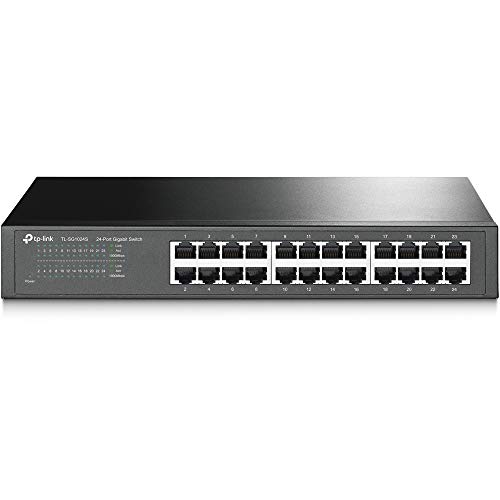
- 24 auto-negotiating Gigabit ports
- Fanless metal chassis for quiet operation
- Desktop or standard 1U rackmount installation
Best For: Growing offices needing many quiet, reliable wired connections
Best Compact Smart Pick
TP-Link 5-Port Easy Smart Switch

- Five Gigabit ports in a compact desktop design
- Optional QoS, VLAN, and port mirroring
- Metal housing with shielded ports
Best For: Small workspaces needing a few extra ports and smart controls
PoE Security Hub – Linksys 8-Port Managed PoE+ Switch
For small businesses needing network switches for small businesses with managed controls and device power, the Linksys LGS310MPC combines eight Gigabit ports, a 110W PoE+ budget, and two Gigabit SFP uplinks. It is suited to growing installations with cameras, access points, or access-control hardware.
Best For: Small offices supporting PoE devices while needing VLAN, QoS, security, and uplink flexibility.
Pros:
- Eight Gigabit ports provide connectivity for devices such as surveillance cameras and access points.
- PoE+ delivers data and power over one cable, with a 110W maximum power budget.
- Managed features include QoS, VLAN, IGMP, static routing, and MAC-based port security.
- Two Gigabit SFP uplink slots and a metal desktop/wall-mount design add installation flexibility.
Cons:
- Managed features may require more setup than a plug-and-play switch.
- Eight copper ports may be limiting for larger device expansions.
This is a strong choice when a compact business network needs both PoE+ and more control than an unmanaged switch provides. Its long warranty and included technical support further suit ongoing small-business use.
High-Capacity Smart Core – TP-Link 24-Port Easy Smart Switch
The TP-Link TL-SG1024DE is a practical option for small businesses that need network switches for small businesses with plenty of wired capacity. Its 24 Gigabit ports support office expansion, while VLAN, QoS, IGMP Snooping, and monitoring tools add useful management without the complexity of a fully managed platform.
Best For: Growing offices that need many wired connections and basic traffic segmentation and monitoring.
Pros:
- Twenty-four Gigabit ports provide substantial capacity for desktops, printers, servers, and other wired devices.
- VLAN features help segment traffic for improved network organization and security.
- Port mirroring, loop prevention, and cable diagnostics support network monitoring and troubleshooting.
- Metal construction, shielded ports, and desktop/rackmount flexibility suit business installations.
Cons:
- It does not provide PoE for powering connected devices.
- The 40°C upper temperature rating may be less suitable for hotter installation environments.
Choose this switch when port count matters more than PoE. It offers a useful middle ground between plug-and-play connectivity and advanced network oversight, with support for large transfers through jumbo frames.
Silent PoE Workhorse – NETGEAR 16-Port PoE+ Switch
For businesses seeking network switches for small businesses with simple PoE deployment, the NETGEAR GS316PP provides 16 Gigabit ports and up to 183W of shared PoE+ power. Its unmanaged design keeps installation straightforward, while fanless operation works well in quiet office environments.
Best For: Small offices installing multiple PoE devices without needing configuration software or advanced management.
Pros:
- All 16 ports support Gigabit connectivity and PoE+ with up to 30W per port.
- The 183W shared power budget uses dynamic allocation to redistribute unused power.
- Plug-and-play setup requires no software installation or configuration.
- Fanless metal construction supports quiet desktop or wall-mounted placement.
Cons:
- As an unmanaged switch, it lacks VLAN, QoS, and other configuration controls.
- PoE power is shared across the switch rather than providing 30W simultaneously to every port.
This model is a convenient fit for straightforward deployments such as phones, cameras, or access points. It prioritizes easy installation, quiet operation, and generous PoE capacity over network customization.
Compact Network Manager – TP-Link 8-Port Easy Smart Switch
The TP-Link TL-SG108E is a compact choice for small businesses looking for network switches for small businesses with more control than basic plug-and-play hardware. It offers eight Gigabit ports plus web or software-based management, VLAN support, QoS, monitoring, and loop prevention.
Best For: Small offices that need a compact managed switch for segmented traffic and everyday network monitoring.
Pros:
- Eight Gigabit ports expand wired connectivity in a compact desktop or wall-mount format.
- Supports VLANs, QoS, IGMP Snooping, link aggregation, and port mirroring.
- Loop prevention, cable diagnostics, and monitoring features help with troubleshooting.
- Sturdy metal housing and shielded ports suit small-business installations.
Cons:
- It has only eight ports and does not provide PoE.
- Management requires a web interface or free software rather than being entirely unmanaged.
This switch is a sensible upgrade for a small office that needs traffic segmentation or better visibility without moving to a larger chassis. Its compact size makes it easy to place near a workstation, network cabinet, or wall outlet.
Reliable Expansion – NETGEAR GS324 24-Port Gigabit Switch
For small businesses that need more wired connections without added configuration, the NETGEAR GS324 is a straightforward option among network switches for small businesses. It provides 24 gigabit Ethernet ports, automatic speed negotiation, and a fanless design for quiet operation.
Best For: Offices, workspaces, and small business networks needing many plug-and-play wired connections.
Pros:
- 24 x 1Gbps RJ45 ports support multiple computers, monitors, printers, and other wired devices.
- Plug-and-play unmanaged setup requires no software or configuration.
- Desktop, wall, and rack mounting options support flexible installation.
- Fanless operation and IEEE 802.3az energy efficiency help reduce noise and power use.
Cons:
- As an unmanaged Layer 1 switch, it does not provide advanced network management features.
- The supplied notes specify regional compatibility for the U.S. and Canada only.
The GS324 is a practical choice when port count and simple installation matter more than VLANs, PoE, or detailed traffic controls. Its metal housing and mounting accessories also make it adaptable to different office setups.
PoE Management Powerhouse – Goalake 16-Port Gigabit PoE+ Switch
The Goalake 16-port Gigabit PoE+ switch is built for small businesses deploying cameras, VoIP phones, or wireless access points. It combines 16 PoE+ ports, a 240W power budget, uplink options, and management features that add flexibility to network switches for small businesses.
Best For: Small and mid-sized businesses running IP cameras, access points, or VoIP devices across larger spaces.
Pros:
- Sixteen PoE+ ports provide up to 30W per port with a 240W total power budget.
- Two gigabit uplinks and a combo SFP slot support additional network and fiber connections.
- VLAN, QoS, bandwidth control, storm control, port mirroring, and static MAC features support network management.
- AI Extend can transmit power and data up to 250 meters when enabled.
Cons:
- The larger feature set may be unnecessary for a basic network that only needs extra Ethernet ports.
- The supplied notes describe the product as both managed and plug-and-play, so advanced features may require configuration.
With its high PoE budget, rugged fanless housing, and long-distance mode, this Goalake switch is suited to installations where connected devices need both data and power. Its protection features also support deployments involving surveillance equipment.
Compact PoE Flexibility – UGREEN 10-Port PoE+ Switch
For smaller surveillance or access-point installations, the UGREEN 10-port PoE switch offers eight PoE+ ports and two gigabit uplinks in a compact metal design. Its selectable operating modes make it a flexible pick among network switches for small businesses.
Best For: Small offices and security setups with several PoE cameras or access points and a 60W power requirement.
Pros:
- Eight PoE+ ports support up to 30W each, with a 60W total power budget.
- Two gigabit uplinks provide dedicated network connectivity beyond the PoE ports.
- Standard, Port Isolation, and Extend modes can be selected with one button.
- PoE Auto Recovery can restart offline or frozen powered devices on ports 1–6 in Extend mode.
Cons:
- The 60W total power budget is lower than that of higher-capacity PoE switches.
- Only eight ports provide PoE power, and the Extend mode applies to ports 1–6.
- Its feature set is oriented toward PoE devices rather than broad enterprise management.
The UGREEN is a sensible fit when a business needs a modest number of powered network endpoints, automatic recovery, and long cable runs without moving to a larger switch. Port isolation also provides a useful option for separating connected devices.
Best High-Capacity Pick – TP-Link 24-Port Gigabit Switch
For small businesses that need plenty of wired connections, the TP-Link TL-SG1024S is a practical choice among network switches for small businesses. Its 24 Gigabit ports, metal housing, fanless design, and desktop or rackmount installation support make it well suited to expanding office networks without adding configuration work.
Best For: Offices or small server rooms that need 24 reliable Gigabit wired connections and quiet operation.
Pros:
- Provides 24 auto-negotiating 10/100/1000Mbps RJ45 ports.
- Plug-and-play unmanaged operation requires no software or setup.
- Fanless metal chassis supports quiet operation, durability, heat dissipation, and EMI protection.
- Can sit on a desktop or fit a standard 1U rack with the included rackmount kit.
Cons:
- As an unmanaged switch, it does not provide configurable management features.
- Its 24-port size may be more than needed for very small workspaces.
The TL-SG1024S is a straightforward expansion switch for businesses prioritizing port capacity, quiet performance, and simple deployment. Its metal construction and rackmount compatibility add flexibility as the network grows.
Best Flexible Deployment – UGREEN 24-Port Gigabit Switch
The UGREEN 24-Port Gigabit Switch gives small businesses flexible installation and operating options. Along with 24 Gigabit ports and plug-and-play setup, it offers port isolation, link aggregation, and flow-control modes for networks that need more adaptability than a basic unmanaged switch.
Best For: Offices and network cabinets that need 24 ports plus flexible mounting and selectable networking modes.
Pros:
- Expands a network with 24 auto-negotiating 10/100/1000Mbps ports.
- Supports desktop, wall-mount, and standard 19-inch rack installation.
- Offers standard, port-isolation, link-aggregation, and flow-control modes.
- Uses a fanless metal design with ventilation, heatsinks, thermal pads, and 6KV surge protection.
Cons:
- It is still listed as an unmanaged switch, so advanced centralized management is not provided.
- Its extra operating modes may be unnecessary for a simple plug-and-play installation.
Among network switches for small businesses, this UGREEN model stands out for deployment flexibility and built-in operating modes. It is a strong fit when a business wants simple installation now but may benefit from isolation or added link bandwidth later.
Best Compact Smart Pick – TP-Link 5-Port Easy Smart Switch
The TP-Link TL-SG105E is a compact option for small businesses that need only a few additional wired connections. Its five Gigabit ports support plug-and-play use for basic networking, while web-based smart features such as QoS, VLAN, IGMP snooping, and port mirroring provide more control when needed.
Best For: Small offices, desks, or work areas that need a compact five-port switch with optional smart management.
Pros:
- Provides five 10/100/1000Mbps RJ45 Gigabit ports.
- Supports basic plug-and-play operation without configuration.
- Includes smart features such as QoS, VLAN, IGMP snooping, and port mirroring through a web interface.
- Compact metal desktop design with shielded ports helps save space and reduce interference.
Cons:
- Five ports offer substantially less expansion capacity than 24-port alternatives.
- Smart features require using the web-based management interface rather than simple plug-and-play alone.
This TP-Link is a sensible choice when space and port count matter more than large-scale expansion. It combines a small desktop footprint with useful management features, making it one of the more adaptable network switches for small businesses with modest connectivity needs.
How We Picked the Best Network Switches for Small Businesses
We focused on switches that suit common small-business environments, including offices, retail locations, workshops, security installations, and home-based businesses. Our selections cover unmanaged plug-and-play models, easy smart switches with VLAN and QoS controls, and PoE-capable units that can power compatible cameras, phones, and wireless access points.
We also considered port count, Gigabit performance, PoE budget where applicable, uplink options, construction, mounting flexibility, noise, and the practical value of each feature set. Because network requirements vary widely, the list includes both compact desktop hardware and larger rack-ready choices.
Quick Comparison
| Best For | Recommended Type | What to Look For |
|---|---|---|
| Small desks or home offices | 5- or 8-port switch | Compact design, quiet operation, easy setup |
| Growing offices | 16- or 24-port switch | Extra capacity, sturdy housing, rack or desktop mounting |
| Security cameras and access points | PoE or PoE+ switch | Available power budget, PoE port count, uplinks |
| Segmented business networks | Managed or easy smart switch | VLAN, QoS, monitoring, and traffic controls |
Key Buying Factors for Network Switches for Small Businesses
Port Count and Expansion
Count the devices you need to connect now, then leave room for growth. A five-port switch may suit a small workstation, while a 16- or 24-port model is more practical for shared offices and equipment rooms. Remember that uplink ports and management hardware may also consume connections.
PoE Budget
Power over Ethernet simplifies installation by carrying data and power over one cable. Check both the number of PoE ports and the total wattage budget. Cameras and access points can have very different power demands, so a higher PoE+ budget is valuable when several devices run simultaneously.
Managed Features
Unmanaged switches are easiest to deploy, but smart and managed models offer greater control. VLAN support can separate guest, staff, voice, or camera traffic; QoS can prioritize calls and video; and monitoring tools can make troubleshooting easier.
Placement and Reliability
Choose desktop hardware for accessible work areas and rackmount-compatible equipment for wiring closets. Metal cases, shielded ports, fanless designs, and clearly labeled indicators can improve durability and day-to-day usability. Also verify the switch’s power requirements and ventilation needs.
Who Should Buy Which Network Switches for Small Businesses?
Choose a compact five- or eight-port model for a small office, desk, or branch location with limited wired devices. A 16-port switch is a strong middle ground for a growing team, especially when phones, cameras, or access points are included. Select a 24-port model when you want centralized connectivity and room for expansion.
Buy an unmanaged switch if you want simple plug-and-play networking with minimal configuration. Choose an easy smart or managed switch when you need VLANs, QoS, traffic control, or better visibility. For surveillance or wireless deployments, prioritize a PoE+ model with enough total wattage for every powered device plus a reasonable expansion margin.
