
A well-chosen patch panel makes structured cabling easier to label, maintain, and expand. The best network patch panels also protect switch ports by keeping permanent cable runs organized and serviceable.
This roundup compares 10 options across Cat6 and Cat6A systems, punch-down and pass-through designs, rack and wall-mounted installations, and 12-, 24-, and 48-port layouts.
Best 10 Network Patch Panels Picks for 2026
Best Overall
Cable Matters 24-Port Cat6 Patch Panel

- 24 Cat6 ports with 10Gbps support
- Supports PoE, PoE+, and PoE++
- Fits standard 1U, 19-inch racks
Best For: Versatile home-office and enterprise network installations
Best Blank Panel
TRENDnet 24-Port Keystone Patch Panel
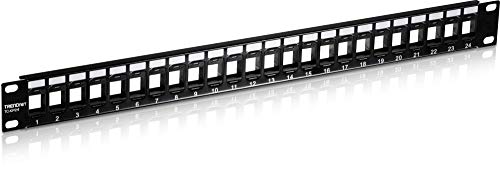
- 24 openings for standard keystone jacks
- Sturdy 1U SPCC steel rack design
- Includes numbered ports and labels
Best For: Customizable rack installations using selected keystone modules
Best Shielded Option
Cable Matters Cat6A 24-Port Patch Panel

- Shielded Cat6A design for 10Gbps networks
- Individual EMI/RFI protection per port
- Includes cable bar, ties, screws, and nuts
Best For: High-speed rack networks in electrically noisy environments
Best Toolless Design
Rapink 24-Port Cat6 Pass-Through Panel

- Preloaded RJ45 couplers need no punch-down tool
- Supports Cat6 and stated 10Gbps networking
- Removable back bar helps manage cable strain
Best For: Fast DIY installations and easily replaceable connections
Most Flexible

- Supports diverse keystone connector types
- Fits 19-inch racks and wall mounts
- Includes removable cable support bar
Best For: Mixed-media structured cabling installations
Best for Compact 10G Wiring

- Compact 10-inch, 1U form factor
- Supports Cat6, Cat5e, and Cat5
- Rated for connections up to 10 Gb/s
Best For: Small home networks and 10-inch enclosures
Easiest Installation
24-Port Cat6A Passthrough Panel

- Tool-free installation with 24 included couplers
- Fits standard 19-inch, 1U racks
- Reusable cable management needs no ties
Best For: Fast, expandable Ethernet rack installations
Best High-Capacity Pick
Cable Matters 48-Port Cat6 Patch Panel

- 48 RJ45 ports in a 2U rack-mount design
- Supports up to 10Gbps and PoE technologies
- Includes labeling diagrams and cable-management hardware
Best For: Large, dense rack-mounted network installations
Best Tool-Free Value
Sokqovt 24-Port Cat6 Coupler Panel

- No punch-down tools required
- Supports 24 ports and up to 10Gbps
- Modular keystones and removable back bar
Best For: Fast home or office rack installations
Best Shielded 10G Option

- Shielded 1U design for 19-inch racks
- Toolless couplers support quick installation
- Cat6A ports support up to 10Gbps
Best For: Modular, shielded 10Gbps network builds
Best Overall – Cable Matters 24-Port Cat6 Patch Panel
For network patch panels that balance capacity, rack compatibility, and broad Ethernet support, this Cable Matters model is a practical choice. Its 24 numbered RJ45 ports support Cat6 cabling, 10Gbps networking, PoE applications, and installation in standard 19-inch racks.
Best For: Home offices, structured wiring projects, and larger networks needing a UL-listed 24-port panel with straightforward cable management.
Pros:
- Supports Cat6, Cat5e, and Cat5 cabling, along with 10Gbps Ethernet.
- Compatible with PoE, PoE+, and PoE++ devices such as cameras and access points.
- Includes numbered ports, T568A/T568B diagrams, D-rings, and cable ties.
- Fits standard 1U, 19-inch racks, cabinets, and wall-mount brackets.
Cons:
- Uses an unshielded design, so it may be less suitable for high-interference environments.
- It is a punch-down-style panel rather than a preloaded coupler panel.
This is a well-rounded network patch panel for installations where reliability, rack flexibility, and future 10Gbps and PoE support matter. Its UL listing and included organization accessories add useful practical value.
Best Blank Panel – TRENDnet 24-Port Keystone Patch Panel
This TRENDnet option is one of the more flexible network patch panels because its 24 openings accept standard-sized keystone jacks. That lets you build a customized copper, audio, video, or data layout instead of committing to fixed ports.
Best For: Installers who want a blank 1U panel and the ability to select or replace keystone jacks for different networking requirements.
Pros:
- Accepts standard-sized Cat6 keystone jacks for customizable installations.
- Sturdy SPCC steel construction is designed for 19-inch, 1U rack mounting.
- Pre-numbered ports and supplementary labels simplify cable identification.
- NDAA compliant and backed by two years of manufacturer protection.
Cons:
- Keystone jacks are sold separately, so it is not ready to connect out of the box.
- Its listed 1Gbps data rate is less ambitious than dedicated 10Gbps panels.
The TC-KP24 makes sense when customization is more important than convenience. Budget for compatible keystone jacks, particularly if you are building a complete Cat6 or 10G copper solution.
Best Shielded Option – Cable Matters Cat6A 24-Port Patch Panel
Among network patch panels, this Cable Matters Cat6A model stands out for shielded 10Gbps connectivity and more organized rack installation. Individual port shielding helps address electromagnetic and radio-frequency interference, while the included cable-management bar keeps connections orderly.
Best For: High-speed rack networks that need Cat6A performance, interference protection, and support for PoE devices.
Pros:
- Supports up to 10Gbps and PoE, PoE+, and PoE++.
- Individual foil or mesh shielding helps protect against EMI and RFI.
- Standard keystone sockets allow the included couplers to be replaced with alternatives.
- Includes a cable-management bar, ties, rack screws, and cage nuts.
Cons:
- Its 1.9-pound metal construction may be more than needed for a basic home setup.
- Shielded cabling and compatible components may be necessary to fully benefit from the design.
This is a strong fit for performance-focused installations where 10Gbps throughput and cleaner signal conditions justify a more feature-rich panel. The lifetime warranty and included mounting accessories further support long-term deployment.
Best Toolless Design – Rapink 24-Port Cat6 Pass-Through Panel
This Rapink model takes a different approach to network patch panels by using preloaded RJ45 couplers and pass-through connections. The toolless design can shorten installation time, while the removable back bar helps support and organize incoming cables.
Best For: DIY and home-network installations where fast setup, easy port replacement, and flexible coupler options are priorities.
Pros:
- Preloaded couplers provide a toolless, pass-through installation.
- Supports Cat6, Cat5e, and Cat5 cabling with stated 10Gbps capability.
- Removable back bar helps reduce cable strain and connector movement.
- Couplers can be replaced with other connector types for future expansion.
Cons:
- Its included RJ45 couplers may be less suitable than punch-down termination for some structured-wiring preferences.
- The notes specify indoor use as the recommended application, despite an indoor/outdoor listing.
Choose this panel when installation speed and serviceability matter more than traditional punch-down termination. The replaceable coupler layout also gives it useful flexibility for future repairs or connector changes.
Most Flexible – 24-Port Keystone Patch Panel
For network patch panels that need to handle more than Ethernet, the Cable Matters 1U blank keystone panel offers a versatile foundation. It fits standard 19-inch racks, cabinets, and wall-mount brackets while accepting a broad range of interchangeable keystone jacks.
Best For: Structured cabling installations combining Ethernet, coax, HDMI, fiber, voice, and other connections.
Pros:
- Accepts many standard keystone formats, including RJ45, coaxial, HDMI, USB, and fiber.
- Supports rackmount or wall-mount installation in a standard 1U, 19-inch format.
- Removable rear cable support bar includes sequential labels and 24 cable-tie keyholes.
- Heavy-duty, flame-retardant powder-coated steel construction.
Cons:
- Blank design requires separately purchased keystone jacks.
- May be more versatile than needed for a basic Ethernet-only installation.
This is a strong choice when flexibility and future expansion matter. Its blank, modular layout lets you change connector types without replacing the entire panel.
Best for Compact 10G Wiring – 12-Port Cat6 Punch-Down Panel
Among network patch panels for smaller installations, the Rapink 12-port Cat6 panel stands out with a compact 10-inch, 1U format. Its punch-down design supports Cat6, Cat5e, and Cat5 cabling, making it suitable for home networks and compact wall-mounted setups.
Best For: Home networking and small installations using compatible 10-inch racks or wall mounts.
Pros:
- Supports Ethernet connections up to 10 Gb/s according to the supplied specifications.
- Compatible with Cat6, Cat5e, and Cat5 cabling.
- Gold-plated 8P8C contacts and 568B labeling help with termination.
- Includes screws and zip ties for installation and cable support.
Cons:
- Its 10-inch width is not intended for standard 19-inch rack layouts.
- Punch-down installation requires terminating the cables rather than simply plugging them in.
The compact footprint makes this panel practical where a full-size rack is unnecessary. Verify your enclosure size before buying, then use the labeled punch-down block for a tidy Cat cabling installation.
Easiest Installation – 24-Port Cat6A Passthrough Panel
For network patch panels that prioritize quick setup, this 24-port Cat6A passthrough model uses included inline couplers instead of punch-down termination. Its 1U design fits 19-inch racks and supports a range of Ethernet cable categories, while the cable-management system is designed for reusable organization without cable ties.
Best For: Installers who want a tool-free, expandable 24-port Ethernet panel for a standard 19-inch rack.
Pros:
- Includes 24 Cat6A keystone inline couplers for tool-free termination.
- Compatible with Cat6A, Cat6, Cat5e, and Cat5 cables.
- Reusable smart cable management avoids the need for cable ties.
- Individual couplers can be replaced or swapped for other connector types.
Cons:
- Designed for indoor installation only, according to the supplied details.
- Unshielded construction may not suit installations requiring shielded connectivity.
This panel is particularly convenient for upgrades and repairs because its couplers can be replaced individually. Choose it when minimizing termination time and preserving future connector flexibility are higher priorities than a traditional punch-down layout.
Best High-Capacity Pick – Cable Matters 48-Port Cat6 Patch Panel
For large installations, this 48-port Cable Matters panel is one of the more practical network patch panels to consider. Its 2U steel design supports Cat6, Cat5e, and Cat5 cabling, with up to 10Gbps performance and compatibility with PoE technologies.
Best For: Large home, office, or enterprise networks that need high port density and rack-mounted cable organization.
Pros:
- Provides 48 RJ45 ports in a 2U rack-mount design.
- Supports up to 10Gbps Ethernet plus PoE, PoE+, and PoE++.
- Includes numbered ports, T568A/T568B diagrams, D-rings, and cable ties.
- UL listed and built with a steel outer material.
Cons:
- The 2U footprint takes more rack space than a 1U panel.
- Its unshielded design may be less suitable for environments requiring shielded connections.
This is a strong choice when capacity and straightforward rack installation matter most. The main tradeoff is the larger 2U size, but the 48-port layout can simplify dense network builds.
Best Tool-Free Value – Sokqovt 24-Port Cat6 Coupler Panel
This Sokqovt model stands out among network patch panels for its no-punch-down installation. The preloaded RJ45 couplers accept terminated cables from both sides, making it a convenient option for home or office racks where fast setup and easy cable changes are priorities.
Best For: Installers who want a 1U panel with quick, tool-free connections and replaceable keystone modules.
Pros:
- Eliminates punch-down termination and can save installation time.
- Supports Cat6 Ethernet connections and up to 10Gbps transmission.
- Keystone design allows individual jacks to be replaced or changed.
- Includes a sturdy steel frame and removable cable-management back bar.
Cons:
- Provides 24 ports rather than the capacity of a 48-port panel.
- Coupler-based installation requires RJ45-terminated cables on both sides.
Choose this panel if convenience is more important than traditional punch-down termination. Its modular layout is especially useful for repairs, reorganizing connections, or mixing compatible keystone types.
Best Shielded 10G Option – Rapink 24-Port Cat6A Panel
For higher-spec network patch panels, the Rapink 24-port Cat6A model combines tool-free inline couplers with a shielded steel construction. It supports Cat6A, Cat6, Cat5e, and Cat7 cabling, while its gold-plated contacts are rated for 10Gbps network connections.
Best For: 10Gbps installations that benefit from shielded connectivity, modular repairs, and future expansion.
Pros:
- Offers 24 Cat6A ports with support for up to 10Gbps Ethernet.
- Toolless coupler design simplifies installation and port replacement.
- Shielded 1U steel construction fits standard 19-inch racks.
- Includes a detachable back bar, screws, and tie wraps for cable support.
Cons:
- Has fewer ports than a 48-port patch panel.
- Shielded construction may be unnecessary for simpler home networks.
This panel is a good fit for users planning around 10Gbps performance and modular maintenance. Its removable couplers also leave room to adapt individual ports for other supported connector types later.
How We Picked These Network Patch Panels
We focused on the factors that matter during installation and long-term maintenance: port count, cable category, rated performance, mounting format, termination method, cable management, and compatibility with common 19-inch racks. The selection includes traditional punch-down panels, blank keystone panels, and coupler-based designs so you can match the panel to your cabling workflow.
We also considered whether each panel suits permanent in-wall runs, short equipment-room connections, home labs, or larger office installations. Features such as removable rear bars, inline couplers, shielding, UL listing, and wall-mount hardware can make a meaningful difference depending on the project.
Quick Comparison
- Best for standard rack installations: A 24-port Cat6 or Cat6A 1U panel offers a practical balance of density and accessibility.
- Best for expansion: A 48-port, 2U panel provides more termination capacity without adding another rack unit later.
- Best for flexible layouts: Blank keystone panels let you mix connector types and replace individual modules.
- Best for faster setup: Pass-through or coupler panels avoid punch-down termination, though they may use more individual modules or connectors.
- Best for smaller spaces: A 12-port wall-mount panel fits compact network closets, offices, and home labs.
Key Buying Factors for Network Patch Panels
Port Count and Rack Space
Choose enough ports for current connections plus reasonable growth. Twenty-four ports is the common 1U standard, while 48 ports suit dense installations. Confirm the panel’s rack-unit height and mounting depth before ordering.
Cat6 Versus Cat6A
Cat6 panels are appropriate for many gigabit networks and selected 10Gbps runs, provided the complete cabling system meets the required specifications. Cat6A is the safer choice for new 10Gbps installations and longer-term upgrades. The panel should match the cable category rather than relying on a higher-rated switch alone.
Punch-Down, Keystone, or Pass-Through
Punch-down panels create a conventional permanent termination and generally keep the rear wiring tidy. Keystone and pass-through designs are easier to reconfigure or replace, making them useful in test environments and frequently changing racks. Check whether modules, couplers, or termination tools are included.
Shielding and Cable Management
Use shielded hardware only when the rest of the installation supports a properly grounded shielded system. Rear support bars, strain relief, labeling areas, and cable guides help prevent excessive bend or pull on terminations.
Who Should Buy Which Network Patch Panels?
Home lab and small-office users should generally choose a compact 12- or 24-port panel with simple installation and clear labeling. Structured-cabling installers may prefer punch-down Cat6A hardware for durable permanent runs. Growing businesses should consider 24 ports with spare capacity or a 48-port panel for dense deployments. Administrators who frequently change equipment will appreciate keystone or coupler-based panels because individual connections are easier to replace and rearrange.
