
If you’re looking to boost your productivity in 2026, multi-monitor docks with USB ports are essential tools. They offer seamless connectivity for multiple devices while supporting high-resolution displays and fast data transfer speeds. With various models available, each designed to meet different needs, it’s important to reflect on key features before making a choice. Want to know which docks stand out this year? Let’s explore the top options available.
Anker Prime Docking Station, 14-Port with 160W Max Output

If you’re a professional looking to enhance your productivity with multiple displays, the Anker Prime Docking Station is an ideal choice. With 14 ports and a 160W max output, it supports USB-C, USB4, and Thunderbolt connections, making it compatible with Windows 10, 11, and ChromeOS. Enjoy lightning-fast data transfer speeds up to 10Gbps through 11 ports, and connect dual 4K displays effortlessly via HDMI. Plus, you can charge up to four devices simultaneously, thanks to three 100W USB-C ports. The package includes the docking station, a USB-C cable, and friendly customer support, ensuring a seamless experience.
Best For: Professionals seeking to enhance productivity with multiple displays and high-speed data transfer capabilities.
Pros:
- Supports dual 4K displays, ideal for multitasking.
- High charging capacity with 160W total output to power multiple devices.
- Fast data transfer speeds up to 10Gbps through 11 ports.
Cons:
- Not compatible with Linux operating systems.
- External monitors on macOS display identical images, limiting versatility.
- Does not support 5120*1440 monitor resolution.
Acer 11-in-1 USB C Laptop Docking Station
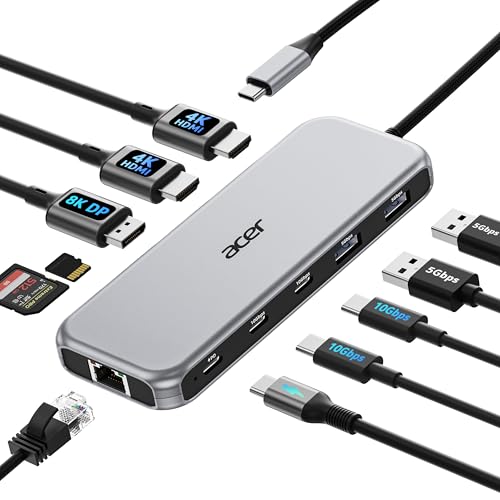
The Acer 11-in-1 USB C Laptop Docking Station is ideal for professionals who demand high-resolution displays and versatile connectivity options. With support for up to three monitors, you can enjoy stunning visuals at 4K@60Hz or even 8K@30Hz. This dock features multiple ports, including two USB-C and two USB-A, allowing for fast data transfer rates up to 10Gbps. Plus, the 1000Mbps Ethernet port guarantees a stable connection. Compatible with various brands including Dell and Lenovo, it’s perfect for your workflow. Backed by a one-year warranty, this docking station offers the reliability you need for enhanced productivity.
Best For: Professionals who require high-resolution displays and versatile connectivity for enhanced productivity.
Pros:
- Supports up to three monitors with high resolutions (up to 8K@30Hz and 4K@60Hz).
- Fast data transfer rates of up to 10Gbps via USB-C and 5Gbps via USB-A.
- Stable network connection with a 1000Mbps RJ45 Ethernet port.
Cons:
- Limited compatibility with laptops that do not support DisplayPort Alt Mode.
- Power delivery may not fully charge all laptops, delivering only 85W to the device.
- Higher price point compared to simpler docking stations with fewer features.
Acer USB C Docking Station Dual Monitor (9-in-1)

For professionals seeking to enhance their productivity, the Acer USB-C Docking Station‘s dual HDMI ports stand out as a game-changer. With support for dual monitors at 4K@60Hz, you can effortlessly multitask. The 9-in-1 design includes three USB-A ports, a USB-C port, and SD/MicroSD slots for fast data transfers. Plus, it delivers up to 90W to your laptop, ensuring you stay powered throughout your workday. Its sleek aluminum alloy body and built-in cable make it a stylish addition to your setup. Compatible with various laptops, setup is seamless with both Windows and Mac systems.
Best For: Professionals seeking to enhance productivity with dual monitor support and fast data transfer capabilities.
Pros:
- Dual HDMI ports supporting 4K@60Hz, ideal for multitasking with multiple displays.
- Fast data transfer with multiple USB-A and USB-C ports, plus SD/MicroSD slots.
- Sleek design made from aluminum alloy, featuring a built-in cable for convenience.
Cons:
- Limited macOS support for external monitors, only one can be used in Extended mode.
- Power adapter not included, requiring a separate purchase for optimal charging.
- Compatibility issues may arise with non-full-featured USB-C ports on some devices.
Anker 13-in-1 USB-C Laptop Docking Station

Elevate your productivity with the Anker 13-in-1 USB-C Laptop Docking Station, perfect for professionals who rely on multiple displays. This dock supports triple display configurations via 2x HDMI and 1x DisplayPort, allowing you to multitask effortlessly. With a total of 13 ports, including 4 USB ports and a 85W USB-C charging option, you’ll have everything you need at your fingertips. Enjoy fast data transfer speeds of 10 Gbps and 5 Gbps, alongside Ethernet and audio options. Compatible with various operating systems, this sleek gray dock is a versatile addition to your workspace, backed by an 18-month warranty for peace of mind.
Best For: Professionals who need to connect multiple displays and require versatile connectivity options in their workspace.
Pros:
- Supports triple display configurations for enhanced multitasking capabilities.
- Fast data transfer speeds with multiple USB ports for quick and efficient file transfers.
- Backed by an 18-month warranty and friendly customer support for peace of mind.
Cons:
- Limited macOS/iPadOS support with only Single-Stream Transport for external monitors.
- May require a power adapter for full functionality, adding to the setup complexity.
- Slightly heavy and bulky design may not be ideal for portable use.
Acer Premium 13-in-1 Docking Station

Looking to boost your productivity with seamless multi-monitor setups? The Acer Premium 13-in-1 Docking Station is your perfect solution. With support for triple displays and dual 4K outputs via HDMI and DisplayPort, you can elevate your workspace like never before. It features 13 ports including USB-C, USB-A, and Gigabit Ethernet, ensuring all your devices connect effortlessly. Plus, the sleek aluminum design enhances heat dissipation. Enjoy the convenience of a 110W power delivery that charges your laptop while you work. With a 1-year warranty and responsive customer support, this dock has everything you need for enhanced efficiency.
Best For: Professionals who need a versatile docking solution for multi-monitor setups and seamless connectivity with various devices.
Pros:
- Supports triple display setup with dual 4K outputs, enhancing productivity for multitasking.
- Sleek aluminum design promotes efficient heat dissipation while offering a modern aesthetic.
- Comprehensive connectivity options with 13 ports including USB-C, USB-A, and Gigabit Ethernet.
Cons:
- MacOS limitations restrict triple display functionality to mirroring only, which may not suit all users.
- Requires compatible laptop/GPU for optimal triple 4K output, potentially limiting use with some devices.
- Security lock feature may require additional accessories for effective use.
Plugable USB C Triple Display Docking Station

The Plugable USB C Triple Display Docking Station is ideal for professionals who need to maximize productivity with multiple monitors. With its 12-in-1 design, you can connect up to three displays, including one 4K at 30Hz and two 1080p at 60Hz. The six USB 5Gbps ports offer ample connectivity for peripherals. Plus, the 100W Power Delivery feature keeps your devices charged. It’s compatible with Windows, macOS, and ChromeOS, making it versatile for various setups. Weighing just 332 grams, it’s a portable powerhouse, perfect for data analysis, presentations, and conferencing—helping you stay efficient in any work environment.
Best For: Professionals seeking to enhance productivity with multiple displays and efficient connectivity options.
Pros:
- Versatile Connectivity: Supports up to three monitors and multiple USB devices, catering to a variety of work needs.
- High Performance: Integrated DisplayLink technology provides smooth multi-display support, ideal for data-intensive tasks.
- Universal Compatibility: Works seamlessly with Windows, macOS, and ChromeOS devices, making it suitable for diverse setups.
Cons:
- Limited 4K Output: Only one HDMI port supports 4K resolution at 30Hz, which may be a limitation for some users.
- Weight: At 332 grams, it may be slightly heavier compared to other portable docking stations.
- Potential Driver Issues: Some users may experience complications with drivers, particularly on non-Windows operating systems.
Anker Laptop Docking Station Dual Monitor (8-in-1 USB C Hub)

For professionals who rely on dual monitors to enhance their workflow, the Anker Laptop Docking Station Dual Monitor (8-in-1 USB C Hub) is an ideal solution. It supports 4K dual monitors with two HDMI ports, allowing you to stream or mirror content seamlessly. With an impressive 85W Power Delivery, you can charge your laptop while enjoying high-speed connections. The dock features two USB-A data ports, an Ethernet port, and an SD/microSD card reader, all from a single USB-C connection. Compatible with Windows and ChromeOS, this hub simplifies your setup, enhancing productivity without compatibility issues.
Best For: Professionals who need a reliable docking station to connect dual monitors and enhance their productivity.
Pros:
- Supports 4K dual monitors with two HDMI ports for seamless streaming and mirroring.
- Features 85W Power Delivery for high-speed charging while in use.
- Offers multiple connectivity options including USB-A data ports, Ethernet, and SD/microSD card reader.
Cons:
- Requires a separate 100W PD wall charger and USB-C to C cable, not included in the package.
- macOS users may experience identical displays on external monitors instead of extended displays.
- Not compatible with Linux operating systems.
Anker Nano Laptop Docking Station (13-in-1 USB-C Triple Display)

Boost your productivity with the Anker Nano Laptop Docking Station, a powerhouse designed for professionals who thrive in multi-screen environments. This 13-in-1 USB-C triple display dock features a detachable 6-in-1 hub, perfect for mobile access. You’ll enjoy a seamless triple-screen setup with ports for every need—USB-C, HDMI, DisplayPort, and more. It supports up to 4K resolution, ensuring crisp visuals on external displays. With fast data transfer at 10 Gbps and power delivery up to 100W, your devices stay charged and connected. Rated 4.2 stars, it’s backed by a solid warranty and customer support.
Best For: Professionals and creatives who require a versatile docking station for a multi-screen workstation setup.
Pros:
- Versatile Connectivity: Offers 13 ports including USB-C, HDMI, and DisplayPort for extensive device compatibility.
- High Resolution Support: Capable of supporting up to 4K resolution on external displays for sharp and clear visuals.
- Fast Data Transfer: Provides rapid data transfer speeds of up to 10 Gbps via USB-C, ensuring efficient workflow.
Cons:
- Limited macOS Functionality: External display support on macOS may only mirror content instead of extending it.
- Size Consideration: The compact design may not accommodate larger setups or additional peripherals easily.
- Price Point: It may be considered pricier compared to simpler docking station options.
USB C Laptop Docking Station Dual Monitor Hub (14 in 1)

A remarkable feature of the USB C Laptop Docking Station Dual Monitor Hub (14 in 1) is its ability to support dual and triple displays, making it perfect for professionals who need to enhance their productivity. With ports for 2 HDMI and a DisplayPort, you can enjoy stunning 4K resolutions. It boasts rapid data transfers via USB A 3.1 and USB C ports. Plus, the 100W Power Delivery keeps your laptop charged while you work. It’s compatible with various laptops, ensuring seamless integration into your setup. With stable Ethernet and audio support, this hub truly elevates your multitasking capabilities.
Best For: Professionals and multitaskers who require multiple displays and high-speed connectivity for enhanced productivity.
Pros:
- Supports dual and triple display configurations, allowing for seamless multitasking with impressive 4K resolutions.
- Rapid data transfer capabilities with USB A 3.1 and USB C ports, ensuring quick file access and management.
- 100W Power Delivery keeps your laptop charged while using multiple peripherals, enhancing overall efficiency.
Cons:
- Not compatible with devices that require converters, limiting its use with some laptops.
- Charging cable/adapter not included, which may require an additional purchase for full functionality.
- Maximum output limited to 87W, which may not meet charging needs for all laptops during heavy use.
Plugable 12-in-1 USB C Triple Monitor Docking Station

Professionals who need to maximize their workspace will find the Plugable 12-in-1 USB C Triple Monitor Docking Station an invaluable asset. This dock supports triple 4K displays through 3 HDMI or DisplayPort connections, giving you flexibility with various monitor setups. You’ll appreciate the six USB 3.0 ports, Ethernet, and 3.5mm audio jack, providing extensive connectivity. Plus, with up to 100W power delivery, your laptop stays charged throughout the day. Compatible with USB-C, Thunderbolt, Windows, macOS, and ChromeOS, it’s designed for seamless integration. Backed by a 2-year warranty and lifetime support, this dock enhances your productivity like never before.
Best For: Professionals seeking to enhance their workspace with multiple high-resolution displays and extensive connectivity options.
Pros:
- Supports triple 4K displays via HDMI or DisplayPort for an expansive visual experience.
- Offers 100W power delivery to keep laptops charged throughout the day.
- Compatible with a variety of systems, including USB-C, Thunderbolt, Windows, macOS, and ChromeOS.
Cons:
- May require additional adapters for certain monitor setups, depending on the system.
- The size and weight may limit portability for users who travel frequently.
- Some users may experience limited functionality with certain older hardware configurations.
Factors to Consider When Choosing Multi Monitor Docks With USB Ports
When you’re choosing a multi-monitor dock with USB ports, consider the number of ports you’ll need for your devices. You’ll also want to think about display resolution support and compatibility with your current setup. Don’t forget to check the power delivery capability and data transfer speed to guarantee peak performance.
Number of Ports
Choosing the right multi-monitor dock involves considering the number of ports it offers, which can range from 8 to 14. This variety provides essential connectivity options for your peripherals. Look for a combination of USB-C and USB-A ports, along with data transfer speeds of up to 10Gbps for USB 3.1 and 5Gbps for USB 3.0, ensuring compatibility with various devices. Additionally, make sure the dock includes multiple video output ports like HDMI and DisplayPort to support dual or triple monitor setups. Ports for Ethernet and SD/MicroSD card readers can enhance functionality by providing stable network connections and quick data access. Finally, verify the dock’s power delivery capabilities to charge devices while transferring data, typically ranging from 85W to 100W.
Display Resolution Support
Selecting a multi-monitor dock requires careful attention to the display resolution it supports, as this can greatly impact your productivity. Look for docks that support high resolutions, like 4K at 60Hz or 8K at 30Hz, to guarantee compatibility with your monitors. Some docks may allow dual monitors at 4K, while others might limit you to 1080p when using multiple displays. Check the specifications for each output type—HDMI and DisplayPort—since they can differ in refresh rates and resolutions. Also, consider the dock’s display output technology, like MST or SST, to match your desired setup for peak performance. Finally, be aware that macOS may limit external monitors to mirrored displays, unlike Windows systems.
Power Delivery Capability
Power delivery capability is essential for ensuring your devices stay charged while you multitask across multiple screens. It refers to the maximum wattage a docking station can provide, typically ranging from 60W to 100W or more. Many multi-monitor docks utilize USB-C for power delivery, allowing you to charge your laptop while handling video and data transfer simultaneously. The total output power matters too; for instance, a dock with 160W can charge multiple devices at once without slowing down. To fully benefit from these capabilities, make sure your laptop’s USB-C port supports Power Delivery. Additionally, some docks require specific power adapters for peak performance, so using an incompatible charger could lead to insufficient power delivery.
Compatibility With Devices
When it comes to compatibility with devices, several key factors play an essential role in finding the right multi-monitor dock with USB ports. First, confirm the dock works with your operating system; some models only support Windows or macOS, while others exclude Linux. Next, check the compatibility with your laptop’s USB-C port, specifically if it supports DisplayPort Alternate Mode for video output. Think about how many external monitors you want to connect, as some docks support triple displays, while others may only enable dual or single connections. Finally, verify the power delivery specifications to confirm the dock can charge your laptop efficiently during use. These considerations will help you choose the best dock for your needs.
Data Transfer Speed
Understanding data transfer speeds is crucial for maximizing the efficiency of your multi-monitor dock. USB-C ports usually offer speeds up to 10Gbps, while USB-A ports can provide 5Gbps or lower, depending on their version. It’s essential to choose docks with USB 3.1 ports, as they enable faster data transfers compared to the slower USB 2.0 ports, limited to 480Mbps. Many docks combine different USB ports, allowing you to connect multiple devices simultaneously and enhance productivity. When selecting a docking station, verify it supports DisplayPort Alternate Mode for ideal compatibility with high-speed data transfer and video output. The total number of USB ports and their speeds will considerably influence how effectively you can connect peripherals and transfer data.
Design and Portability
Choosing the right multi-monitor dock involves considering its design and portability, especially if you’re often on the move. Opt for a compact and lightweight dock that’s easy to carry between workspaces. Docks made from aluminum alloy not only enhance durability but also help with heat dissipation during long usage periods. Look for models with built-in cables to streamline your setup and reduce clutter, making transport a breeze. If you’re working in shared or public environments, security features like integrated locks can protect your dock and connected devices. Finally, confirm the design accommodates multiple display outputs to maintain compatibility with various monitor types and configurations, offering versatility for your different setups.
Cooling and Ventilation
Effective cooling and ventilation are essential features in multi-monitor docks, especially since they can generate considerable heat during prolonged use. Look for docks that come with built-in cooling mechanisms like fans or heat sinks to help dissipate heat and maintain ideal temperatures. A well-designed airflow system guarantees efficient heat dissipation, reducing the risk of thermal throttling that can slow down data transfer speeds and processing capabilities. Additionally, pay attention to the dock’s physical layout to guarantee vents aren’t obstructed, as this can hinder cooling efficiency and lead to overheating. Keeping an eye on the docking station’s temperature during use will help you spot potential overheating issues, allowing for timely adjustments in placement or usage patterns.
Warranty and Support Options
When selecting a multi-monitor dock, warranty and support options play an essential role in ensuring your investment is protected. Warranty coverage can vary, with some docks offering only a 1-year warranty while others extend up to 2 years against defects. Additionally, many brands provide a 30-day return policy, allowing you to return the dock if it doesn’t meet your expectations. Customer support is vital too; look for manufacturers that offer responsive assistance, often resolving inquiries within 18 hours. Checking for lifetime support availability for technical help, especially regarding setup and compatibility, is also wise. By thoroughly reviewing these details, you can better assess the long-term reliability and service you can expect from your chosen docking station.
