
The best workstation for AI depends less on its label than on the models you plan to run. Memory capacity, GPU compatibility, storage, and portability can matter more than peak CPU speed.
These nine HP Z options range from compact Ryzen AI desktops and ZBook laptops to expandable towers. Use the comparisons below to narrow the field, then verify the exact configuration before buying.
Best 9 Hp Z Workstations for AI Picks for 2026
Compact Windows Pick

- Windows 11 Pro mini workstation
- Ryzen AI Max PRO 380 with 32GB memory
- Resealed for seller SSD upgrade
Best For: Windows users combining local AI experiments with CAD or creative work
Large-Model HP Pick

- NVIDIA GB10 AI-focused system
- 128GB unified memory and 4TB SSD
- DGX OS on ARM architecture
Best For: Developers prototyping and running large AI models locally
Linux Developer Alternative

- 128GB unified memory for local AI
- Linux platform with AMD ROCm support
- Not an HP Z workstation
Best For: Linux developers building local AI workflows with AMD tools
Compact Desktop Pick

- 24-core Intel Core Ultra 9 285
- Dedicated NVIDIA graphics; model unspecified
- 32GB DDR5 and 1TB NVMe SSD
Best For: Space-conscious desktop development
High-Memory Tower Pick

- Dual Xeon Gold 6143 processors
- 256GB DDR4 and six listed SSDs
- Dual Quadro P5000 cards; VRAM listing conflicts
Best For: Memory- and storage-heavy tower workflows
Mobile AI Pick
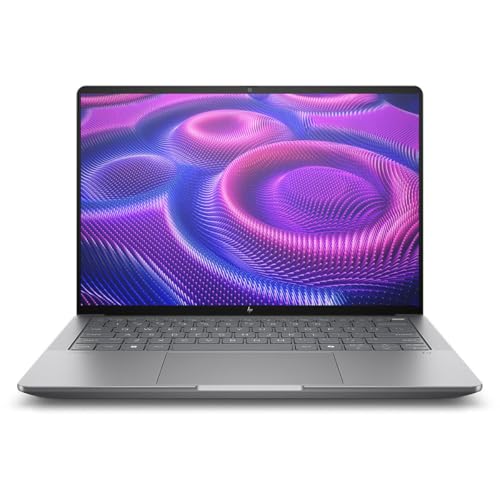
- 12-core Ryzen AI MAX PRO 390
- 64GB LPDDR5X memory
- 14-inch 2.8K touchscreen; storage listing conflicts
Best For: Portable, memory-rich workstation use
Best Compact Desktop with Dedicated Graphics

- RTX A1000 with 8GB dedicated memory
- 20-core Core Ultra 7 and 32GB DDR5
- Eleven USB ports and Ethernet
Best For: Desk-based work needing discrete graphics and ample ports
Best Mini Workstation for Local AI

- Ryzen AI Max PRO 380 with listed 50 TOPS
- 32GB DDR5 and 1TB SSD
- Mini chassis with Thunderbolt 4 and Wi-Fi 7
Best For: Space-saving local AI experimentation and design work
Best Mobile Workstation

- 14-inch mobile workstation
- 12-core Ryzen AI MAX PRO 390
- 32GB memory and 1TB SSD
Best For: Portable professional work on Windows 11 Pro
Compact Windows Pick – HP Z2 Mini G1a
For shoppers comparing hp z workstations for ai, the HP Z2 Mini G1a offers a compact Windows 11 Pro setup for local AI work alongside CAD and creative applications. Its Ryzen AI Max PRO 380, 32GB of LPDDR5X memory, and Radeon 8040S graphics suit users who also need a small desktop for everyday professional work.
Best For: Windows-based professionals balancing local LLM experiments with design, engineering, or content-creation tasks.
Pros:
- Compact chassis measures 7.87 × 6.61 × 3.37 inches.
- Includes a 50-TOPS NPU, 32GB LPDDR5X memory, and 1TB or 2TB SSD options.
- Offers Thunderbolt 4, Mini DisplayPort, Ethernet, and Wi-Fi 7 connectivity.
Cons:
- 32GB of memory is less than the 128GB supplied with the other two systems here.
- The seller discloses that the new computer was resealed for an SSD upgrade; the stated one-year warranty is from Issaquash Highlands Tech.
This is the practical space-saving choice if Windows compatibility and professional-app support matter as much as local AI. Check the selected SSD capacity and seller warranty terms before ordering.
Large-Model HP Pick – HP ZGX G1n
Among hp z workstations for ai, the HP ZGX G1n is the more specialized option for substantial local model work. Its NVIDIA GB10 Grace Blackwell Superchip, 128GB of coherent unified memory, and 4TB SSD are specified for prototyping, fine-tuning, and inference on models up to 200B parameters.
Best For: AI developers seeking a compact, DGX OS-based machine for large-model experimentation without relying on cloud compute.
Pros:
- 128GB unified memory and 4TB SSD provide room for demanding local workflows.
- Specified at 1,000 TOPS of FP4 AI performance with NVIDIA GB10.
- Includes 10 Gigabit Ethernet and 200 Gigabit networking capabilities.
Cons:
- DGX OS and ARM-based processing make it a specialized choice rather than a conventional Windows workstation.
- The listed 240W power consumption is worth accounting for in a compact setup.
Choose this model for its AI-focused hardware and networking, not general Windows desktop compatibility. The up-to-200B-model figure is a stated capability; practical workflows will depend on the model and configuration.
Linux Developer Alternative – AMD Ryzen AI Halo
AMD Ryzen™ AI Halo - Personal AI Desktop Computer - Developer Platform - Linux OS
Check Price On AmazonIf your search for hp z workstations for ai extends to non-HP alternatives, the AMD Ryzen AI Halo is a compact Linux developer platform built for local inference and development. It pairs a 16-core Ryzen AI Max+ 395 with 128GB of unified memory, Radeon 8060S graphics, and an NPU rated up to 50 TOPS.
Best For: Linux developers who want a local AI platform with AMD ROCm support and a large shared memory pool.
Pros:
- 128GB of unified memory is specified at 8000 MT/s with 256 GB/s bandwidth.
- Includes Linux, AMD ROCm support, and preloaded AI tools, models, and workflows.
- Compact 6 × 6 × 2-inch design includes a 2TB SSD, 10GbE LAN, and Wi-Fi 7.
Cons:
- It is an AMD product, not an HP Z workstation.
- Linux may not fit buyers who require Windows-specific workstation software.
This is a strong fit on paper for AMD-centered local AI development, especially when shared memory and Linux tooling are priorities. Its stated support for up to 200B-parameter models should be assessed against the requirements of your particular model and workflow.
Compact Desktop Pick – HP Z2 G1i SFF Workstation
Among HP Z workstations for AI, the Z2 G1i is a compact desktop option with a 24-core Intel Core Ultra 9 285, 32GB of DDR5 memory, and dedicated NVIDIA graphics listed with 16GB of graphics memory.
Best For: Buyers who want a small-form-factor workstation for local development and graphics-heavy work without a full-size tower.
Pros:
- 24-core Core Ultra 9 processor and dedicated NVIDIA graphics.
- 1TB PCIe NVMe SSD and Windows 11 Pro.
- Small-form-factor chassis with Ethernet, USB-C, and DisplayPort connectivity.
Cons:
- The supplied listing does not identify the NVIDIA GPU model.
- Memory is listed at 32GB installed and 32GB maximum, limiting the stated upgrade path.
The Z2 suits a space-conscious desk, but confirm the exact GPU before choosing it for software with specific graphics requirements.
High-Memory Tower Pick – HP Z8 G4 Renewed Workstation
For shoppers comparing HP Z workstations for AI, this renewed Z8 G4 emphasizes capacity: the listing pairs two Xeon Gold 6143 processors with 256GB of DDR4 memory, multiple SSDs, and two Quadro P5000 graphics cards.
Best For: Buyers who prioritize large system memory, substantial local storage, and a tower with expansion slots.
Pros:
- 256GB of installed DDR4 memory.
- Two 1TB NVMe drives plus four 1TB SSDs are listed.
- Dual Quadro P5000 cards and eight expansion slots.
Cons:
- Renewed unit rather than a new workstation.
- Supplied specifications conflict on GPU memory: the title lists 16GB per card, while a detail field says 8GB.
- Large 21.7-by-8.5-by-17.5-inch tower with listed 1,450W power consumption.
Its memory and storage make it worth considering for capacity-heavy work, but verify the exact graphics configuration and condition before purchase.
Mobile AI Pick – HP ZBook Ultra G1a 14-Inch
Among portable HP Z workstations for AI, the ZBook Ultra G1a combines a 12-core AMD Ryzen AI MAX PRO 390, 64GB of LPDDR5X memory, and Radeon 8050S graphics in a 14-inch mobile workstation.
Best For: Buyers who need a portable workstation with substantial installed memory and a high-resolution touchscreen.
Pros:
- Ryzen AI MAX PRO 390 processor and 64GB of installed memory.
- 14-inch 2880 x 1800 touchscreen with a listed 120Hz refresh rate.
- Wi-Fi, Bluetooth, HDMI, USB, and two listed Thunderbolt ports.
Cons:
- Memory is listed at 64GB installed and 64GB maximum.
- Storage fields conflict: one lists a 2TB drive, while another lists 64GB capacity.
This is the portable choice of the three, especially if memory and display quality matter. Confirm the storage configuration before ordering.
Best Compact Desktop with Dedicated Graphics – HP Z2 G1i SFF
Among hp z workstations for ai, the HP Z2 G1i is a small-form-factor desktop for buyers who want a dedicated NVIDIA RTX A1000 alongside a 20-core Intel Core Ultra 7 265. Its 32GB of DDR5 memory and 1TB SSD provide a practical starting configuration for professional workloads.
Best For: Desk-based professionals who need dedicated graphics, substantial connectivity, and room to expand memory.
Pros:
- RTX A1000 graphics with 8GB of dedicated GDDR6 memory.
- 20-core processor, 32GB DDR5 RAM, and 1TB PCIe 4.0 SSD.
- Eleven USB ports, including two USB-C ports, plus Ethernet.
Cons:
- Small-form-factor desktop is less portable than a mini PC or laptop.
- Supplied specifications conflict on maximum RAM: 128GB in the details versus 256GB in the bullets.
The dedicated GPU makes this the clearest pick here for buyers who specifically want discrete graphics. Check the supported memory ceiling before planning an upgrade.
Best Mini Workstation for Local AI – HP Z2 Mini G1a
If you’re comparing hp z workstations for ai but have limited desk space, the HP Z2 Mini G1a pairs an AMD Ryzen AI Max PRO 380 with 32GB of DDR5 memory and a 1TB SSD. Its listed 50-TOPS AI capability makes it a compact option for exploring local AI workflows.
Best For: Buyers who want a space-saving Windows workstation for local AI experimentation, design applications, and multiple displays.
Pros:
- Compact mini-PC chassis measures 7.87 x 6.61 x 3.37 inches.
- Listed 50-TOPS AI capability and 32GB of DDR5 memory.
- Two Thunderbolt 4 ports, Wi-Fi 7, Ethernet, and support for up to four monitors.
Cons:
- Radeon 8040S graphics are integrated rather than a dedicated graphics card.
- Listed maximum RAM is 32GB, the same as the installed amount.
This is the space-conscious choice when its processor, AI capability, and connections fit your workflow. If dedicated GPU memory or a RAM upgrade is essential, compare configurations carefully.
Best Mobile Workstation – HP ZBook Ultra G1a 14-inch
For buyers considering hp z workstations for ai who need a laptop rather than a desktop, the HP ZBook Ultra G1a offers an AMD Ryzen AI MAX PRO 390, 32GB of memory, and a 1TB SSD in a 14-inch mobile workstation.
Best For: Professionals who need a portable Windows workstation with a 12-core AMD processor.
Pros:
- 14-inch mobile form factor for work away from a desk.
- 12-core Ryzen AI MAX PRO 390 processor.
- 32GB memory, 1TB SSD, and 1920 x 1200 display.
Cons:
- Supplied notes do not specify AI performance figures or supported model sizes.
- No memory upgrade limit or port selection is provided in the supplied notes.
The ZBook is the portable option in this group. Before choosing it for a particular AI workload, verify the performance and connectivity specifications the listing does not provide.
How We Picked These Hp Z Workstations for AI
We compared the nine listed configurations by form factor, stated processor and graphics hardware, memory, and likely fit for local AI development. We gave particular weight to whether a system can accommodate the memory demands of a buyer’s intended models and whether its graphics platform works with their software. Listing titles do not establish measured AI performance, so check current specifications and independent benchmarks for your actual workload.
Quick Comparison
The two Z2 Mini G1a listings suit buyers prioritizing a small desktop and AMD Ryzen AI Max PRO 380 with Radeon 8040S graphics; compare their complete specifications and seller terms before treating them as different configurations. The Z2 G1i small-form-factor listings offer Intel Core Ultra processors and advertised NVIDIA graphics, with 8 GB listed for the Core Ultra 7 version and an incomplete graphics description for the Core Ultra 9 version. The ZBook Ultra G1a listings put Ryzen AI Max PRO 390 in a 14-inch mobile workstation: one lists 64 GB and a 2.8K touchscreen, while the other lists 32 GB and a WUXGA display.
The ZGX G1n is listed as a mini workstation, but its title does not provide enough detail to judge memory or accelerator capability. The AMD Ryzen AI Halo developer desktop lists Linux, making software-environment requirements especially important to check. The older Z8 G4 listing offers 256 GB of DDR4 and dual Xeon processors, but its advertised title does not identify a GPU.
Key Buying Factors for Hp Z Workstations for AI
Memory and Model Size
Start with the models, context lengths, and datasets you intend to use. A 32 GB system may be a practical entry point for smaller local experiments; 64 GB provides more headroom. Large system RAM is useful, but it is not a substitute for sufficient GPU memory when software runs primarily on a discrete GPU. Confirm whether memory is upgradeable: compact systems and laptops may have tighter limits than towers.
GPU and Software Compatibility
Check the exact GPU model and memory capacity, not just a broad “AI PC” claim. If your tools require CUDA, confirm that the specific NVIDIA-equipped configuration meets their requirements. If you prefer an AMD-based workflow, verify support for your operating system and chosen frameworks. An NPU can help with supported on-device features, but it should not be assumed to replace GPU acceleration for model development.
Storage, Expansion, and Condition
Model files and datasets can fill a 1 TB SSD quickly, so check available drive slots and external-storage options. For a mini PC, inspect ports and cooling constraints; for a tower, confirm power, GPU clearance, and upgrade support. The Z8 G4’s older platform warrants extra attention to condition, warranty, and the cost of adding a suitable accelerator.
Who Should Buy Which Hp Z Workstations for AI?
Choose a ZBook Ultra G1a if work must travel, favoring the 64 GB listing when memory headroom matters more than the lower-memory configuration’s potential price advantage. Consider a Z2 Mini G1a for a space-saving AMD desktop, or a Z2 G1i when a verified NVIDIA configuration matches your software. Evaluate the Linux developer desktop if its environment fits your tools. Look at the ZGX G1n only after obtaining its full specifications, and consider the Z8 G4 chiefly if you need its listed RAM capacity and have a clear plan for GPU and platform compatibility.
