
High-performance powered USB hubs make it easier to connect multiple peripherals without overloading a computer’s built-in ports. External power also helps provide more consistent operation for storage devices, cameras, controllers, and other power-hungry accessories.
We compared 10 powered hubs across port count, USB speed, charging support, switching controls, power adapters, and connection types to help you choose the right fit for your workspace.
Best 10 High-Performance Powered USB Hubs Picks for 2026
Most Versatile
VANGREE 17-Port USB 3.2 Powered Hub

- 17 ports with USB-A, USB-C, QC charging, and SD/TF readers
- Up to 10Gbps data transfer on 10 USB-A 3.2 ports
- Includes a 96W UL-certified power adapter
Best For: Power users and workstations needing maximum connectivity
Best for Port Management

- 16 USB-A ports with speeds up to 5Gbps
- Individual switches and LEDs for every port
- 90W adapter with aluminum, mountable housing
Best For: USB-A-heavy desktops needing per-port control
Best USB-C Mix

- Four USB-C and three USB-A ports
- Up to 10Gbps transfer on every port
- Detachable cable and individual port switches
Best For: USB-C laptops needing fast mixed connectivity
Best Compact Value

- 10 USB 3.0 Type-A ports at up to 5Gbps
- Individual switches and LEDs simplify control
- Includes a 60W powered adapter
Best For: Everyday USB-A peripheral expansion
Reliable 7-Port Performer

- Seven USB 3.0 data ports at up to 5Gbps
- Two dedicated 5V/2.4A smart-charging ports
- Protection features and two-year warranty
Best For: Desktop users needing reliable USB-A expansion and charging
Hybrid 10Gbps Workstation Hub

- USB-C and USB-A data ports, including 10Gbps connections
- Two USB-C PD charging ports up to 45W
- 65W adapter and angled aluminum desktop design
Best For: USB-C users managing mixed peripherals and fast transfers
Maximum-Port Control Center
Zeroffi 14-Port Powered USB Hub

- Four charging ports plus ten data ports
- Seven individual LED on/off switches
- 60W power supply with space-saving flat plug
Best For: Power users with many peripherals and a need for individual control
Best for Maximum Expansion

- 16 USB 3.2 ports with up to 10Gbps transfers
- 96W adapter with surge protection
- Individual switches and aluminum housing
Best For: High-density workstations and professional setups
Best for Controlled Everyday Expansion
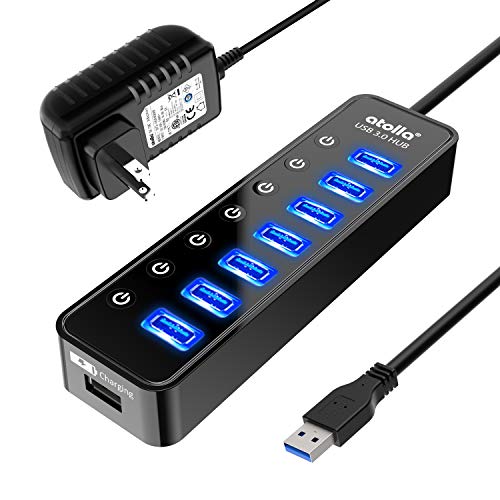
- Seven USB 3.0 data ports plus charging port
- Up to 5Gbps syncing and 2.4A charging
- Individual switches with broad OS compatibility
Best For: Everyday home-office peripherals and mobile charging
Best for Balanced Multi-Device Setups

- Ten data ports plus one smart charging port
- 36W powered design with 5Gbps transfers
- Individual LED switches and three-year warranty
Best For: Busy home and office workspaces with many peripherals
Most Versatile – VANGREE 17-Port USB 3.2 Powered Hub
For users who need high-performance powered USB hubs with abundant connectivity, the VANGREE combines 10Gbps USB-A and USB-C data ports, dedicated QC charging, and built-in SD/TF card readers. Its 96W UL-certified adapter is suited to a busy desktop setup with multiple peripherals.
Best For: Power users, content creators, and desktop workstations needing many ports, card readers, and separate fast-charging connections.
Pros:
- Offers 17 total ports, including 10 USB-A 3.2, two USB-C 3.2, three QC 3.0 charging ports, and SD/TF readers.
- Provides up to 10Gbps data transfer through the USB-A 3.2 ports.
- Includes a 96W UL-certified external power adapter and two host cables.
- Can read SD and TF cards simultaneously.
Cons:
- The three QC charging ports do not support data transmission.
- The USB-C ports are not specified as supporting video output or USB Power Delivery.
The VANGREE is the most feature-rich option here, especially if card access and dedicated charging matter as much as port count. Check the port specifications carefully if your setup relies on USB-C data or display connectivity.
Best for Port Management – SABRENT 16-Port USB 3.0 Hub
The SABRENT HB-PU16 is a practical choice among high-performance powered USB hubs when you need many USB-A connections and independent control over each device. Its 90W adapter supports a broad peripheral setup, while individual switches make it easy to disable ports without unplugging cables.
Best For: Offices, labs, and desktop users with numerous USB-A peripherals such as keyboards, mice, flash drives, and card readers.
Pros:
- Provides 16 USB 3.0 Type-A ports with transfer rates up to 5Gbps.
- Individual power switches and blue LEDs provide convenient port-by-port control.
- Includes a 90W adapter, aluminum housing, mounting brackets, and screws.
- Works with Windows, Mac, and Linux without additional drivers.
Cons:
- It has no USB-C ports and does not support USB 3.2 10Gbps or 20Gbps speeds.
- The 1.1A-per-port budget is intended for peripherals and light charging, not multiple bus-powered hard drives.
This hub prioritizes capacity and control over newer connector standards. It is a strong fit for a USB-A-centered workstation, but users with USB-C devices or demanding external-drive setups should choose a different model.
Best USB-C Mix – Rosonway 7-Port USB 3.2 Hub
The Rosonway is a compact option for high-performance powered USB hubs, offering four USB-C and three USB-A 3.2 ports with up to 10Gbps transfer speeds on every port. Its detachable host cable, individual switches, and 36W adapter make it convenient for a controlled home-office or portable workstation setup.
Best For: USB-C laptop users who need fast data connectivity alongside a few USB-A peripherals.
Pros:
- Combines four USB-C 3.2 ports and three USB-A 3.2 ports.
- Supports up to 10Gbps data transfer on every port.
- Includes independent electronic switches and blue status LEDs.
- Has a detachable 3.3-foot USB-C host cable and aluminum enclosure.
Cons:
- The USB-C ports support data and standard 1.5A charging, but not PD charging or video output.
- The 36W adapter offers less total power than the larger hubs in this roundup.
The Rosonway balances modern USB-C connectivity with a compact design and useful port controls. It is best for fast data access rather than charging a laptop or driving a display through USB-C.
Best Compact Value – SABRENT 10-Port USB 3.0 Hub
The SABRENT HB-BU10 keeps things straightforward for users seeking high-performance powered USB hubs without moving to USB-C. It offers 10 USB 3.0 Type-A ports, individual switches and LEDs, and a 60W adapter for organizing keyboards, phones, card readers, drives, and other compatible peripherals.
Best For: Home and office users who want an affordable, compact USB-A expansion hub with straightforward power control.
Pros:
- Expands one USB connection into 10 USB 3.0 ports with speeds up to 5Gbps.
- Provides a separate power switch and blue LED for each port.
- Includes a 60W, 12V/5A power adapter and USB 3.0 cable.
- Supports Windows, Mac, and Linux and is backward compatible with USB 2.0 and 1.1 devices.
Cons:
- It uses USB-A ports only and does not provide USB-C connectivity.
- Its 60W power adapter is smaller than those supplied with the 16- and 17-port models.
This SABRENT is a sensible everyday expansion hub when 10 USB-A ports are enough. Its individual switches are particularly useful for managing frequently connected accessories, though newer USB-C setups will need adapters or another hub.
Reliable 7-Port Performer – TP-Link UH720
The TP-Link UH720 is a practical choice among high-performance powered USB hubs when you need several USB 3.0 data connections plus dedicated charging ports. Its external 12V/4A adapter supports stable operation, while the seven data ports reach up to 5Gbps for drives, printers, keyboards, mice, and other peripherals.
Best For: Desktop users who need dependable USB 3.0 expansion and separate smartphone or tablet charging.
Pros:
- Seven USB 3.0 data ports support transfers up to 5Gbps.
- Two dedicated 5V/2.4A smart-charging ports can charge compatible devices at full speed.
- Includes overheat, overload, overvoltage, short-circuit, and surge protection.
- Supports plug-and-play use across Windows, Mac, Chrome, and Linux, with a two-year warranty.
Cons:
- The charging ports are intended for charging rather than data transfer.
- The plastic enclosure and relatively large footprint may take noticeable desk space.
Choose the UH720 if broad operating-system compatibility, straightforward controls, and established USB 3.0 performance matter more than newer USB-C connectivity. Its dedicated charging ports make it especially convenient for a mixed desktop setup.
Hybrid 10Gbps Workstation Hub – intpw 9-Port USB 3.2 Hub
The intpw hub stands out among high-performance powered USB hubs for combining USB-C and USB-A connectivity with faster 10Gbps ports. Its 65W adapter helps stabilize the hub under load, while two USB-C PD ports provide up to 45W charging for compatible phones, tablets, and other Type-C devices.
Best For: USB-C laptop and desktop users who need mixed-generation ports, fast file transfers, and dedicated Type-C charging.
Pros:
- Offers USB-C and USB-A data ports, including 10Gbps USB 3.2 connections.
- Includes two USB-C PD charging ports rated up to 45W each.
- The angled aluminum design provides a stable, accessible desktop layout.
- Includes a 65W power adapter, USB-C cable, surge protection, and 18-month coverage.
Cons:
- The two PD charging ports do not support data transfer.
- It does not provide video output.
- The manufacturer advises against using multiple SSDs simultaneously and does not recommend it for charging computers.
This model is a strong fit for a mixed USB-C/USB-A workflow, particularly when fast transfers and mobile-device charging are priorities. Confirm your port layout and workload expectations before buying, especially if you plan to connect several SSDs or need display connectivity.
Maximum-Port Control Center – Zeroffi 14-Port Powered USB Hub
The Zeroffi 14-port hub is built for power users who want high-performance powered USB hubs with extensive connectivity and hands-on port control. It combines ten data ports with four fast-charge ports, a 60W power supply, and seven individual LED switches for managing connected equipment without unplugging cables.
Best For: Gamers, creators, and professionals who regularly connect many peripherals and want independent port switching.
Pros:
- Provides 14 total ports, including six USB 3.0 ports rated up to 5Gbps.
- Four charging ports include two USB-A and two USB-C ports rated at 18W.
- Seven individual LED switches make it easy to isolate or disable selected devices.
- Flat-plug 60W power design saves space around crowded outlets.
Cons:
- Data transfer is limited to 5Gbps, with some ports using USB 2.0.
- The charging and data-port layout may require careful planning for a busy setup.
- Listed operating-system support is limited to Windows 10 and macOS 12 Monterey or later.
If your priority is maximum port count and convenient device-by-device control, the Zeroffi offers more flexibility than a basic hub. It is particularly useful for a permanent workstation where switching peripherals off individually can reduce clutter and simplify troubleshooting.
Best for Maximum Expansion – AGEEN 16-Port USB 3.2 Hub
For demanding workspaces, the AGEEN is a high-performance powered USB hub with 16 USB 3.2 Gen 2 ports and advertised transfer speeds up to 10Gbps. Its 96W adapter, aluminum housing, surge protection, and individual port switches make it well suited to setups with many connected peripherals.
Best For: Professional studios, server rooms, creators handling large files, and home offices that need extensive USB expansion.
Pros:
- Sixteen USB 3.2 ports support data transfer speeds up to 10Gbps.
- Includes a 96W power adapter and built-in surge protection.
- Individual on/off switches and dimmable LED indicators simplify port management.
- Aluminum housing helps with heat dissipation, while the weighted base improves stability.
Cons:
- Its large 16-port design may be more capacity than a basic desk setup needs.
- It requires access to a power outlet and may take up more space than compact hubs.
The AGEEN stands out when port count, fast data movement, and controlled power management matter more than portability. It is the strongest fit here for a high-density, performance-focused workstation.
Best for Controlled Everyday Expansion – Atolla 8-Port USB 3.0 Hub
The Atolla is a practical high-performance powered USB hub for adding seven USB 3.0 data ports plus a dedicated smart charging port. With up to 5Gbps syncing, individual switches, and a 5V/4A adapter, it balances everyday connectivity with straightforward power control.
Best For: Home offices and Mac or Windows users connecting keyboards, mice, printers, drives, and mobile devices.
Pros:
- Provides seven USB 3.0 data ports plus one dedicated charging port.
- Supports data syncing speeds up to 5Gbps.
- Individual on/off switches reduce the need to unplug peripherals.
- Plug-and-play compatibility supports Windows, macOS, and Linux systems.
Cons:
- Data ports use USB 3.0 speeds rather than the 10Gbps performance of newer USB 3.2 hubs.
- The enclosure is plastic rather than aluminum.
- The dedicated charging port is limited to up to 2.4A.
The Atolla is a sensible choice if you want several switched USB ports without moving to an oversized hub. Its dedicated charging port is useful for mobile devices, while the 5Gbps data rate suits routine peripherals and file transfers.
Best for Balanced Multi-Device Setups – JESWO 11-Port USB 3.0 Hub
The JESWO offers a balanced high-performance powered USB hub design with 10 USB 3.0 data ports and one smart charging port. Its 36W adapter, independent LED switches, and included 100cm USB cable make it a flexible option for connecting many peripherals at up to 5Gbps.
Best For: Home and office users managing keyboards, cameras, card readers, flash drives, and other USB accessories from one hub.
Pros:
- Includes 10 USB 3.0 data ports and one smart charging port.
- Supports data transfer speeds up to 5Gbps and charging up to 2.4A.
- Independent on/off switches with LED indicators provide convenient control.
- Works with Windows, macOS, and Linux and includes a three-year warranty.
Cons:
- The hub must be connected to its power adapter for full functionality.
- Its USB 3.0 ports are slower than USB 3.2 Gen 2 hubs rated for 10Gbps.
- The plastic enclosure may be less robust than aluminum alternatives.
The JESWO is a strong middle-ground pick for users who need more than a basic seven-port hub but do not require 16 ultra-high-speed ports. Its port switches and clear power requirement make it easy to manage in a busy workspace.
How We Picked the Best High-Performance Powered USB Hubs
We focused on practical specifications that affect everyday use: the number and type of ports, advertised data-transfer speeds, included power-adapter capacity, charging features, cable length, and individual port controls. We also separated hubs designed mainly for data from models that include dedicated smart-charging ports.
USB 3.2 and USB 3.0 labels describe maximum interface capabilities, not guaranteed real-world speeds. Actual performance depends on the computer, connected device, cable, file transfers, and whether several ports are active at once.
Quick Comparison
- Most ports: The VANGREE and AGEEN models offer 16 or 17 ports for large desktop setups.
- Many USB-C ports: The Rosonway model provides four USB-C data ports alongside three USB-A ports.
- High advertised power: VANGREE and AGEEN include 96W adapters, while SABRENT’s 16-port model includes a 90W adapter.
- Balanced mid-size options: Seven- to 11-port models can suit typical office, creative, and home workstation setups.
- Individual controls: Several options include switches and LEDs, useful for disabling peripherals without unplugging them.
Key Buying Factors for High-Performance Powered USB Hubs
Port Type and Layout
Count the devices you use now and leave room for expansion. USB-A remains common for keyboards, mice, printers, and older drives, while USB-C ports are more convenient for newer accessories. Check the layout if bulky plugs or short cables could block neighboring ports.
Speed and Bandwidth
For external SSDs, media transfers, and backups, prioritize hubs advertising 10Gbps USB 3.2 connectivity. A large number of ports does not mean every port can operate at its maximum speed simultaneously, so demanding users should consider how often multiple drives will run together.
Power Delivery and Charging
Compare the included adapter’s wattage and the hub’s stated charging functions. A powered hub can improve stability, but dedicated charging ports may behave differently from data ports and may not provide laptop-style USB Power Delivery. Verify compatibility with your devices before relying on a hub as a charger.
Controls, Compatibility, and Placement
Individual switches and status LEDs are valuable for reducing cable clutter and controlling idle devices. Confirm host compatibility with your computer and operating system, and measure the included cable before placing the hub behind a monitor or under a desk.
Who Should Buy Which High-Performance Powered USB Hubs?
Choose a 16- or 17-port hub if you connect numerous fixed peripherals, drives, or charging accessories to one workstation. Choose a USB-C-heavy model if most of your newer devices use USB-C. Choose a 7- to 11-port hub for a cleaner everyday office or home setup with moderate expansion needs. Choose a model with individual switches if you frequently disconnect storage, lights, cameras, or other accessories without removing cables.
