
The best high-performance hard drive docking stations make it easier to read, clone, back up, and repurpose bare SATA drives without installing them inside a computer. The right model can also add useful USB connectivity, support multiple drive sizes, or handle larger storage capacities.
We compared 10 docking stations across transfer speed, bay configuration, drive compatibility, cloning features, capacity support, and everyday usability to help you choose the right setup for your workflow.
Best 10 High-Performance Hard Drive Docking Stations Picks for 2026
Best Dual-Bay Cloner
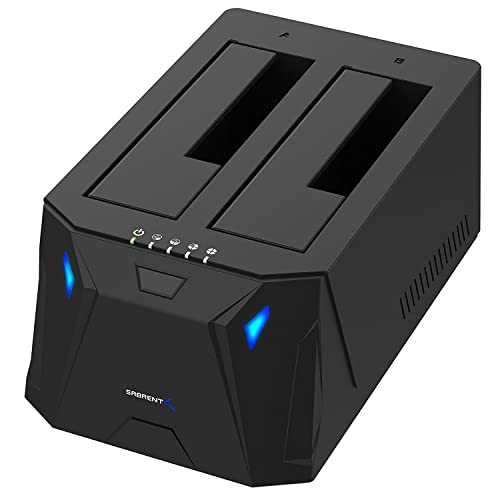
- Dual-bay SATA HDD/SSD support
- USB 3.0 transfers up to 5Gbps
- Offline cloning without a computer
Best For: Home users and technicians handling standard SATA drives
Best NVMe/SATA Hybrid

- Supports M.2 NVMe and SATA drives
- USB 3.2 Gen 2 up to 10Gbps
- Cross-type offline cloning
Best For: Storage migration and large-file workflows
Best Four-Bay Dock

- Four-bay SATA drive capacity
- Trayless tool-free insertion
- Offline cloning with LED progress
Best For: Multi-drive backups and technician workflows
Best Hub-Equipped Dock

- 48TB total dual-bay capacity
- Offline cloning with progress LEDs
- Three USB 3.0 hub ports
Best For: SATA backups with extra peripheral connectivity
Fast Single-Drive Pick
SABRENT USB-C 10Gbps SATA Dock

- 10Gbps USB-C connection
- Supports 2.5/3.5-inch SATA drives
- Tool-free hot-swap design
Best For: Fast single-drive backups and transfers
Cloning Specialist

- Offline cloning without a computer
- Dual 2.5/3.5-inch SATA bays
- Up to 32TB per drive
Best For: Drive cloning and two-drive workflows
Budget SATA Workhorse
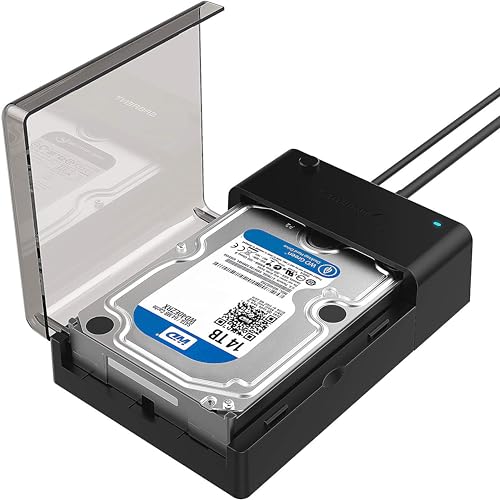
- Supports 2.5/3.5-inch SATA drives
- Tool-free hot-swap operation
- Includes 12V adapter for 3.5-inch drives
Best For: Basic SATA access on USB-A computers
Best with Extra Features

- Offline cloning without a computer
- Reads and writes two SATA drives
- USB-C connectivity up to 5Gbps
Best For: Two-drive transfers and standalone SATA cloning
Best Budget Dual-Bay Clone Dock

- Offline cloning with two drive bays
- Supports 2.5-inch and 3.5-inch SATA drives
- USB 3.0 with UASP up to 5Gbps
Best For: Affordable dual-drive access and SATA cloning
Best Dual-Bay Cloner – Sabrent EC-HD2B
The SABRENT EC-HD2B is a practical choice among high-performance hard drive docking stations when you need to access or duplicate two standard SATA drives. Its USB 3.0 connection, plug-and-play setup, and offline cloning make it useful for routine upgrades and backups.
Best For: Home users and technicians working with 2.5-inch or 3.5-inch SATA HDDs and SSDs.
Pros:
- Supports two 2.5-inch or 3.5-inch SATA HDDs or SSDs.
- Offers USB 3.0 transfer speeds up to 5Gbps.
- Clones drives offline without requiring a computer.
- Supports drives up to 10TB and requires no drivers.
Cons:
- Limited to SATA drives rather than NVMe storage.
- Offline cloning is rated up to 60Mbps, below the USB connection’s maximum transfer rate.
With broad SATA compatibility and a straightforward offline duplicator mode, the EC-HD2B is a solid general-purpose dock for drive access, migration, and backup tasks.
Best NVMe/SATA Hybrid – Wavlink RapidFire U2C
The WAVLINK RapidFire U2C stands out among high-performance hard drive docking stations by combining M.2 NVMe and 2.5-inch/3.5-inch SATA support. Its USB 3.2 Gen 2 interface reaches up to 10Gbps, while the offline clone function supports direct duplication between supported drive types.
Best For: Users migrating between NVMe and SATA storage or moving large files such as video projects and game libraries.
Pros:
- Supports M.2 NVMe drives in 2230, 2242, 2260, and 2280 sizes.
- Also accommodates 2.5-inch and 3.5-inch SATA HDDs and SSDs.
- Provides USB 3.2 Gen 2 speeds up to 10Gbps.
- Enables offline cloning between NVMe and SATA drives.
Cons:
- Its hybrid compatibility may be more than needed for users with SATA-only drives.
- The supplied specifications do not identify a maximum supported drive capacity.
The aluminum enclosure adds durability and heat dissipation, making this a flexible high-speed option for mixed-drive workflows on Windows, Mac, and Linux systems.
Best Four-Bay Dock – Sabrent DS-U3B4
The SABRENT DS-U3B4 is designed for users who need several drives available at once. As one of the high-performance hard drive docking stations with four bays, it supports trayless access to 2.5-inch and 3.5-inch SATA storage and includes offline cloning for direct drive duplication.
Best For: Technicians, power users, and backup workflows involving multiple SATA drives.
Pros:
- Holds up to four 2.5-inch or 3.5-inch SATA HDDs or SSDs.
- Provides a trayless, tool-free drive insertion design.
- Supports USB 3.0 transfers up to 5Gbps.
- Includes offline cloning with LED progress indicators.
Cons:
- Supports SATA drives only, not M.2 NVMe drives.
- Its larger four-bay design may be unnecessary for single-drive tasks.
For multi-drive management, the DS-U3B4 offers more capacity and flexibility than a dual-bay dock while retaining plug-and-play operation and an included power adapter.
Best Hub-Equipped Dock – Maiwo K3082H
The MAIWO K3082H combines a dual-bay SATA dock with three USB 3.0 hub ports, giving it a useful role among high-performance hard drive docking stations for backup, file transfers, and accessory connectivity. It supports up to 48TB total across two drives and can clone without a computer.
Best For: Users who want SATA drive duplication plus extra USB ports for flash drives and mobile-device charging.
Pros:
- Supports two 2.5-inch or 3.5-inch SATA HDDs or SSDs.
- Accepts up to 24TB per bay, for 48TB total capacity.
- Offers offline cloning with 25%, 50%, 75%, and 100% progress indicators.
- Includes three USB 3.0 hub ports, with one supporting 2.4A charging.
Cons:
- Uses USB 3.0 with transfers up to 5Gbps rather than a newer 10Gbps interface.
- Does not support M.2 NVMe drives according to the supplied compatibility details.
Stable 12V/3A independent power and the integrated hub make the K3082H a versatile desk accessory for SATA storage management and connected peripherals.
Fast Single-Drive Pick – SABRENT USB-C 10Gbps SATA Dock
For shoppers comparing high-performance hard drive docking stations, the SABRENT DS-UC1B is a practical single-bay option with a 10Gbps USB-C connection. It supports bare 2.5-inch and 3.5-inch SATA SSDs and HDDs, includes both USB-A and USB-C cables, and requires no drivers.
Best For: Users who want fast, tool-free access to one SATA drive at a time for backups, transfers, or drive swapping.
Pros:
- 10Gbps USB 3.2 Gen 2×1 connectivity for higher transfer potential than 5Gbps docks.
- Supports 2.5-inch and 3.5-inch SATA SSDs and HDDs, including drives of 20TB and larger.
- Tool-less, hot-swappable design with USB-A and USB-C cables included.
- Includes a power adapter for reliable 3.5-inch drive operation.
Cons:
- Single-drive bay limits simultaneous drive work.
- Designed for SATA drives; it does not provide a stated solution for NVMe or IDE drives.
The DS-UC1B stands out when interface speed and broad SATA compatibility matter more than cloning or multi-drive capacity. Its single-bay format keeps the workflow simple while supporting both modern USB-C systems and USB-A connections.
Cloning Specialist – UGREEN Dual-Bay SATA Dock
The UGREEN CM198 is a useful choice among high-performance hard drive docking stations when you need to handle two drives or clone one drive to another without a computer. Its dual bays accept 2.5-inch and 3.5-inch SATA drives and support up to 32TB per bay.
Best For: Users who need offline drive cloning, dual-drive access, or high total storage capacity.
Pros:
- Offline cloning mode can copy one drive to another without connecting to a computer.
- Dual bays support simultaneous use of two 2.5-inch or 3.5-inch SATA drives.
- Supports up to 32TB per drive and is backward compatible with SATA II and SATA I.
- Includes cooling features, a dust cover, anti-slip pads, and a USB-C data cable.
Cons:
- Its USB 3.0 connection is rated at up to 5Gbps, slower than 10Gbps docks.
- Offline cloning requires the destination drive to have capacity at least equal to the source drive.
- Cloning and dual-bay operation add more hardware than a basic single-drive dock.
Choose the UGREEN dock if drive duplication and capacity are priorities. It is less focused on maximum USB interface speed, but its two bays and computer-free cloning mode make it more versatile for migrations and storage maintenance.
Budget SATA Workhorse – SABRENT USB 3.0 Lay-Flat Dock
The SABRENT EC-DFLT is a straightforward option for high-performance hard drive docking stations when you need dependable access to a bare SATA drive without paying for a newer USB-C interface. It supports 2.5-inch and 3.5-inch SATA drives, uses UASP, and offers tool-free hot swapping.
Best For: Users with USB-A computers who need an affordable single-bay dock for SATA HDDs or SSDs.
Pros:
- Works with SATA I, SATA II, and SATA III 2.5-inch and 3.5-inch drives.
- Tool-free, plug-and-play design with hot swapping and activity indication.
- Includes the required 12V/2A adapter for 3.5-inch drive operation.
- UASP support can help compatible hosts make better use of the USB 3.0 connection.
Cons:
- Uses a USB-A host connection rather than a built-in USB-C port.
- USB 3.0 is rated at up to 5Gbps, below newer 10Gbps options.
- Supports SATA drives only and does not support IDE/PATA, M.2, NVMe, or SAS drives.
The EC-DFLT is best viewed as a practical SATA utility dock rather than a cutting-edge interface upgrade. It makes routine drive access simple, but buyers should confirm they have a USB-A port or a suitable adapter and the correct SATA drive type.
Best with Extra Features – SABRENT USB-C Dual-Bay Dock
The SABRENT EC-CH2B is a practical choice among high-performance hard drive docking stations when you need two-drive access and offline cloning. It handles bare 2.5-inch and 3.5-inch SATA HDDs and SSDs, with USB-C connectivity and transfer rates up to 5Gbps.
Best For: Users who regularly clone or move data between two SATA drives without keeping a computer connected.
Pros:
- Offline 1-to-1 cloning works without a computer.
- Mounts two SATA drives as separate computer-connected drives.
- Supports tool-free, hot-swappable 2.5-inch and 3.5-inch SATA drives.
- Includes a USB-C cable and power adapter.
Cons:
- Supports SATA only; it does not support IDE/PATA, M.2, or NVMe drives.
- Offline cloning runs at up to 60MBps, while drive performance determines computer-connected speeds.
- The included cable requires a computer with USB-C, unless you provide a USB-C-to-USB-A cable.
Choose this model if dual-drive workflows and standalone cloning matter more than broad interface compatibility. Confirm your drives are SATA and that the target drive is at least as large as the source before ordering.
Best Single-Drive Value – SABRENT USB 3.0 SATA Dock
The SABRENT EC-UBLB keeps a single SATA drive accessible through USB 3.0, making it a straightforward option among high-performance hard drive docking stations. It supports 2.5-inch and 3.5-inch SATA HDDs and SSDs, UASP, hot-swapping, and speeds up to 5Gbps.
Best For: Users who need a simple one-drive dock for backups, file access, or occasional drive upgrades.
Pros:
- Supports standard 2.5-inch and 3.5-inch SATA HDDs and SSDs up to 20TB.
- USB 3.0 with UASP offers transfer rates up to 5Gbps.
- Includes the required AC adapter and USB 3.0 cable.
- Auto-sleep activates after 30 minutes of idle time.
Cons:
- Only one drive can be connected at a time.
- It requires the supplied AC adapter rather than USB bus power.
- New or blank drives must be initialized in Windows Disk Management or macOS Disk Utility.
This is a sensible pick when you want uncomplicated access to one SATA drive and do not need cloning or dual-bay functionality. Its automatic sleep behavior is useful for a dock that may remain connected between transfers.
Best Budget Dual-Bay Clone Dock – FIDECO YPZ04-S2 SATA Dock
The FIDECO YPZ04-S2 combines two-bay access with offline cloning, giving it a useful feature set for high-performance hard drive docking stations at the USB 3.0 level. It supports two 2.5-inch or 3.5-inch SATA HDDs or SSDs simultaneously, with UASP and transfer rates up to 5Gbps.
Best For: Home users and technicians who need dual-drive access, broad operating-system compatibility, and computer-free SATA cloning.
Pros:
- Offline cloning starts from the dock without a computer.
- Two bays support simultaneous 2.5-inch or 3.5-inch SATA drives.
- USB 3.0, UASP, and up to 5Gbps transfer rates support quick file access.
- Works with Windows, Mac OS, and Linux systems without driver installation.
Cons:
- Supports SATA HDDs and SSDs only.
- New drives must be initialized before the computer can recognize them.
- Cloning requires inserting both drives and holding the Clone button for five seconds.
FIDECO is a strong fit if you want a dual-bay dock with offline cloning and flexible operating-system support. As with the other SATA docks here, verify that your drives use SATA rather than NVMe or another interface.
How We Picked the Best High-Performance Hard Drive Docking Stations
We focused on the features that matter most when working with bare internal drives: SATA compatibility, USB connection speed, independent drive access, cloning support, power delivery, and ease of use. The lineup includes single-bay and dual-bay models, a four-bay option, USB 3.0 and USB-C connections, and a model designed to work with both NVMe M.2 and SATA storage.
We also considered practical details such as support for 2.5-inch and 3.5-inch drives, stated capacity limits, integrated USB hubs, offline cloning capability, and whether a dock is better suited to occasional recovery work or frequent high-volume transfers.
Quick Comparison
| Best For | Look For |
|---|---|
| Simple single-drive access | Single-bay SATA dock with USB 3.0 |
| Faster modern connections | USB-C with up to 10Gbps support |
| Drive-to-drive cloning | Dual-bay dock with standalone clone mode |
| Multiple drives | Four-bay enclosure or docking station |
| Mixed storage types | NVMe M.2 and SATA compatibility |
Key Buying Factors for High-Performance Hard Drive Docking Stations
Drive Compatibility
Check whether the dock accepts 2.5-inch and 3.5-inch SATA HDDs and SSDs. A SATA-only dock will not read NVMe M.2 drives, so users with newer solid-state storage should choose a model that explicitly supports the required M.2 interface and key type.
Connection Speed
USB 3.0 is suitable for many hard drives, while USB-C models with 10Gbps support can provide more bandwidth for fast SATA SSDs. Actual performance also depends on the drive, computer port, cable, and file-transfer workload.
Cloning and Backup Features
For disk upgrades or direct duplication, choose a dual-bay model with offline cloning. This can copy one drive to another without running cloning software, but the destination drive generally must be equal to or larger than the source.
Bay Count and Capacity
A single bay keeps the setup compact and affordable. Dual-bay designs are more versatile for cloning and disk-to-disk transfers, while four-bay models are better for technicians, media work, and users managing several drives at once. Confirm the stated maximum capacity before buying high-capacity disks.
Power and Stability
3.5-inch desktop hard drives require dedicated power, so use the included adapter and place the dock on a stable, ventilated surface. Safely eject drives before removing them, especially during writes or cloning operations.
Who Should Buy Which High-Performance Hard Drive Docking Stations?
Choose a single-bay SATA dock if you mainly need occasional access to an old laptop or desktop drive. A dual-bay cloner is the better choice for upgrading disks, maintaining backups, or transferring data between two drives. Select a USB-C 10Gbps model when your computer supports USB-C and you regularly work with fast SSDs.
Users managing several disks should consider the four-bay station, while mixed-storage owners should prioritize the NVMe-and-SATA-compatible option. For general home backup and recovery, a dual-bay USB 3.0 model offers a strong balance of price, flexibility, and ease of use.
