
The best high-performance drawing display tablets combine responsive pen technology, accurate color, low-latency performance, and a screen that feels natural to draw on. The right model depends on whether you prioritize a large desktop canvas, portable standalone work, or value for a growing setup.
This roundup compares 10 leading pen displays and standalone drawing tablets across screen quality, pressure sensitivity, connectivity, ergonomics, and operating-system compatibility.
Best 10 High-Performance Drawing Display Tablets Picks for 2026
Best for Color-Critical Studio Work

- 4K UHD display with 18.4-inch workspace
- Calman-verified wide-gamut color
- Dual styluses and wireless shortcut dial
Best For: Professional illustration, design, and color-sensitive work
Best Standalone Drawing Pad

- Standalone Android 14 operation
- 16,384-pressure stylus with tilt support
- Up to 13 hours of stated battery life
Best For: Mobile creation, students, and travel
Best Compact Connected Display

- 16K battery-free stylus with digital eraser
- Fully laminated FHD screen with wide gamut
- Red dial, eight keys, and included stand
Best For: Portable computer-connected drawing and animation
Best Shortcut-Control Value
- 15.6-inch laminated anti-glare display
- 120% sRGB and 92% AdobeRGB gamut volume
- Six keys, touch bar, and adjustable stand
Best For: Desktop artists prioritizing workflow controls
Best Portable Pick

- Standalone Android 14 tablet
- Paper-like matte etched-glass display
- Lightweight 1.3-pound design
Best For: Mobile sketching and computer-free creation
Best Color Accuracy
- 16,384-pressure-level PenTech 4.0 stylus
- Factory-calibrated ΔE<1.5 color accuracy
- Dual dials and five shortcut keys
Best For: Color-conscious computer-based artists
Best Ergonomic Setup

- 14-inch 16:10 laminated display
- 16,384-pressure-level battery-free stylus
- Stand, remote, and wrist rest included
Best For: Extended desktop drawing and 3D work
Best Standalone Pick
- Standalone Android 16 tablet with 8GB RAM and 256GB storage
- 2K+ 12.2-inch display with 99% sRGB coverage
- 16K-pressure stylus and portable all-day design
Best For: Mobile artists and students who want a self-contained drawing setup
Best for Color-Critical Work
- Calman Verified display with ΔE<1 color accuracy
- 21.5-inch 2.5K screen with wide color coverage
- Includes wireless 40-key keydial and physical dial
Best For: Professional creators working on color-sensitive desktop projects
Best Compact Budget Option

- 11.6-inch fully laminated anti-glare display
- Battery-free 8,192-pressure stylus with 60° tilt
- Red dial and eight customizable shortcut keys
Best For: Beginners and teachers using a compact computer-connected display
Best for Color-Critical Studio Work – XPPen Artist Pro 19 Gen2
For artists seeking high-performance drawing display tablets with a large, detailed workspace, the XPPen Artist Pro 19 Gen2 combines 4K UHD resolution, wide color coverage, and a paper-like laminated surface. Its 18.4-inch display is particularly suited to detailed illustration, photo work, and other projects where color and fine lines matter.
Best For: Professional illustrators, photographers, designers, and color-focused creative workflows.
Pros:
- 4K UHD resolution on a spacious 18.4-inch display.
- Calman-verified color accuracy with 99.8% sRGB, 96% Adobe RGB, and 98% Display P3 coverage.
- Includes two 16,384-pressure styluses, a shortcut dial keyboard, and VESA mounting support.
Cons:
- Its large screen and professional feature set may be more than casual artists need.
- Requires a compatible computer or tablet connection rather than operating as a standalone device.
The Artist Pro 19 Gen2 is a strong choice when display size, resolution, and color consistency take priority. Dual USB-C connections, HDMI support, and the included shortcut controller add flexibility to a studio setup.
Best Standalone Drawing Pad – XPPen Magic Drawing Pad
The XPPen Magic Drawing Pad stands apart from many high-performance drawing display tablets because it does not need a computer. With Android 14, built-in storage, a 12.2-inch paper-like screen, and an 8,000 mAh battery, it is designed for creating on the go.
Best For: Mobile artists, students, travelers, and creators who want an all-in-one drawing device.
Pros:
- Standalone Android 14 tablet with 8GB RAM and 256GB storage, expandable by microSD.
- 16,384-pressure stylus with tilt support and no charging or pairing requirement.
- Portable 599g design with up to 13 hours of stated battery life.
Cons:
- The 12.2-inch display is smaller than the desktop-oriented options in this roundup.
- Its 2160 × 1440 resolution and 97% sRGB coverage are less specialized than the 4K, wide-gamut studio display listed above.
Choose the Magic Drawing Pad for mobility and convenience rather than a fixed workstation. Its cameras, app support, split-window multitasking, and long battery life make it useful beyond drawing.
Best Compact Connected Display – XP-PEN Artist 13.3 Pro V2
For creators who want high-performance drawing display tablets in a more compact format, the XP-PEN Artist 13.3 Pro V2 offers a 13.3-inch fully laminated screen and a battery-free 16K stylus. It connects to compatible computers, Chromebooks, or Android devices and includes a stand for a ready-to-use setup.
Best For: Students, animators, manga artists, and creators who need a portable pen display for a computer-based workflow.
Pros:
- 16,384 pressure levels, tilt support, low initial activation force, and a digital eraser.
- Fully laminated FHD display with 99% sRGB, 89% Adobe RGB, and 95% P3 coverage.
- Customizable dial and eight shortcut keys, plus included foldable stand and replacement nibs.
Cons:
- It is not standalone and must connect to a computer or laptop.
- The 1920 × 1080 resolution provides less workspace detail than the 4K model in this roundup.
The Artist 13.3 Pro V2 balances portability, shortcut controls, and responsive pen performance. Its pen-display and pen-tablet modes also provide flexibility when you want to conserve laptop battery or change your posture.
Best Shortcut-Control Value – HUION Kamvas Pro 16
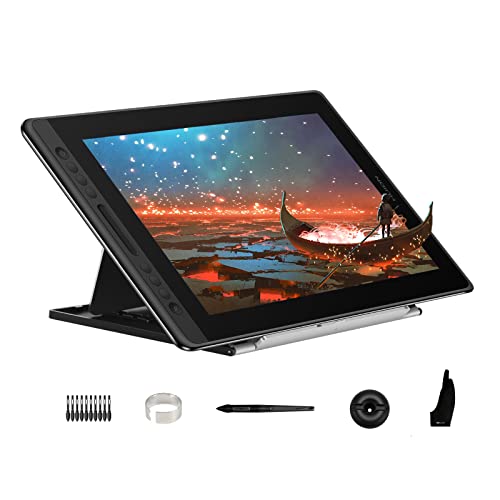
The HUION Kamvas Pro 16 is a practical option among high-performance drawing display tablets for artists who value shortcut access and an adjustable working angle. Its 15.6-inch fully laminated display pairs with a touch bar, six express keys, and a battery-free pen for a streamlined desktop workflow.
Best For: Digital artists and designers who want built-in controls and a comfortable adjustable stand.
Pros:
- 15.6-inch full-laminated, anti-glare display with 120% sRGB and 92% AdobeRGB color gamut volume.
- Six customizable express keys and a touch bar for zooming, brush adjustment, and shortcuts.
- Includes an adjustable stand with viewing angles from 20 to 60 degrees and a tilt-support pen.
Cons:
- It is not a standalone tablet and requires a computer or laptop.
- Its 16.7-million-color 8-bit display is less color-capable than the 1.07-billion-color XPPen Artist Pro 19 Gen2.
The Kamvas Pro 16 makes a sensible choice for established desktop setups, especially if physical controls and ergonomic positioning are important. It also supports Windows, macOS, Linux Ubuntu, and popular creative applications.
Best Portable Pick – Wacom MovinkPad 11
For artists who want high-performance drawing display tablets without carrying a computer, the Wacom MovinkPad 11 is the most self-contained option here. Its Android 14 platform, built-in apps, paper-like matte display, and portable design make it ready for sketching almost anywhere.
Best For: Mobile sketching, note-taking, and creators who want an all-in-one drawing tablet.
Pros:
- Standalone Android 14 design with 8 GB memory and 128 GB storage
- Battery-free Pro Pen 3 offers 8,192 pressure levels and three buttons
- Matte etched glass provides a subtle paper-like texture while reducing glare and fingerprints
- Lightweight 1.3-pound build fits easily into a bag
Cons:
- Its 11.45-inch display is smaller than the other options
- Uses 8,192 pressure levels rather than the 16K levels offered by the other tablets
The MovinkPad 11 prioritizes portability and immediate access over a large workstation display. Tap-and-hold launch access to Wacom Canvas and included creative software make it particularly convenient for capturing ideas on the go.
Best Color Accuracy – HUION Kamvas 13 Gen 3
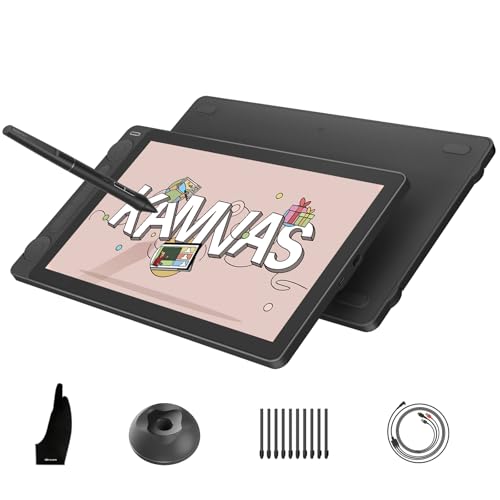
The HUION Kamvas 13 Gen 3 is a strong choice among high-performance drawing display tablets for creators who work at a computer and need precise pen input and dependable color. Its factory-calibrated display, Canvas Glass 2.0 surface, and configurable controls suit detailed illustration, animation, and design work.
Best For: Computer-based artists, designers, and animators who prioritize color fidelity and shortcut controls.
Pros:
- PenTech 4.0 stylus provides 16,384 pressure levels, 2g initial activation force, and tilt alignment
- Factory calibration reaches ΔE<1.5, with 99% sRGB/Rec.709 and 90% Adobe RGB coverage
- Full-laminated, nano-etched Canvas Glass 2.0 reduces glare and sparkle
- Two dials and five press keys provide customizable workflow controls
Cons:
- It is not standalone and must connect to a compatible computer or laptop
- The 13.3-inch screen is less spacious than larger desktop displays
At 865 grams and 11.7mm thick, the Kamvas 13 Gen 3 balances portability with professional-oriented display and input specifications. Its broad operating-system compatibility and dual-interface connection add flexibility for different setups.
Best Ergonomic Setup – XPPen Artist Pro 14 Gen2
The XPPen Artist Pro 14 Gen2 combines high-performance drawing display tablet features with a wider 14-inch workspace and a more complete ergonomic setup. Its 16K stylus, full-laminated anti-glare display, foldable stand, wireless shortcut remote, and wrist rest are well suited to extended computer-based sessions.
Best For: Digital artists and 3D creators who want a comfortable, feature-rich desktop drawing setup.
Pros:
- X3 Pro battery-free stylus delivers 16,384 pressure levels and 60-degree tilt support
- 14-inch 16:10 full-laminated etched-glass display helps reduce parallax
- 99% sRGB coverage, 123% sRGB area ratio, and ΔE<2.2 color accuracy
- Includes a foldable stand, wireless shortcut remote, and X-Edge wrist rest
Cons:
- It is not standalone and requires a computer or laptop
- Its included 3-in-1 cable uses a separate package box, which may be easy to overlook
The Artist Pro 14 Gen2 stands out for balancing detailed pen response with workspace comfort. It also supports a display-off drawing-tablet mode, giving users an alternative way to work when they do not need the screen active.
Best Standalone Pick – HUION KAMVAS Pad 12
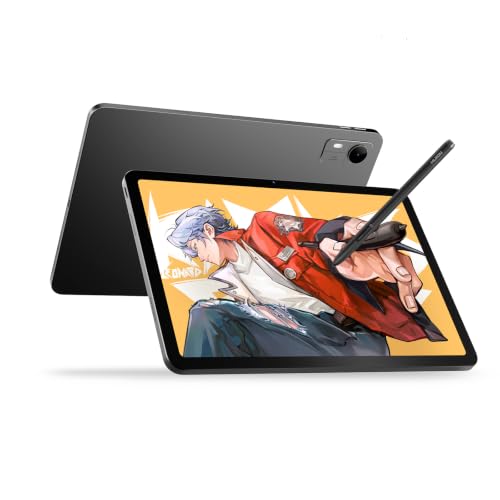
The HUION KAMVAS Pad 12 is a strong choice among high-performance drawing display tablets for artists who want a portable, self-contained setup. Its 12.2-inch 2K+ display, 90Hz refresh rate, accurate color coverage, and Android 16 software support make it suitable for drawing away from a computer.
Best For: Mobile artists, students, and creators who want a standalone drawing tablet with substantial storage and broad app access.
Pros:
- Standalone Android 16 design with 8GB RAM, 256GB storage, and expansion up to 1TB
- 2K+ 236 PPI display with 99% sRGB coverage and factory calibration of ΔE<1.8
- PenTech 4.0 stylus offers 16,384 pressure levels, 60° tilt, and 2g initial activation force
- Portable 1.47-pound body with an 8000mAh battery rated for up to a full day of use
Cons:
- Its 12.2-inch screen provides less workspace than larger desktop pen displays
- Android app availability and workflows may differ from a full desktop setup
The KAMVAS Pad 12 stands out when portability and independence matter as much as pen performance. It combines a sharp, color-accurate screen with useful tablet features, making it a flexible option for creating, studying, and reviewing work on the go.
Best for Color-Critical Work – XPPen Artist Pro 22 Gen 2
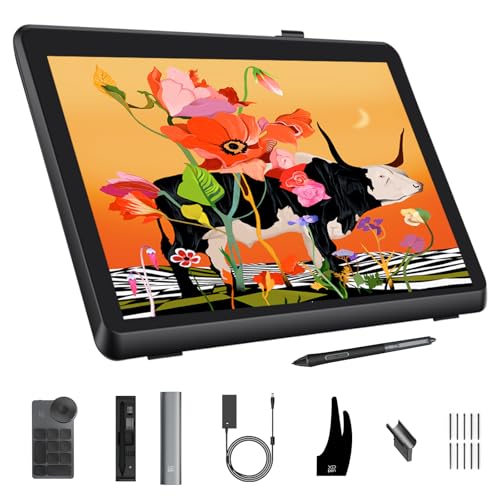
The XPPen Artist Pro 22 Gen 2 is built for creators who need a large, detailed canvas and dependable color reproduction. As one of the high-performance drawing display tablets aimed at professional workflows, it combines a 21.5-inch 2.5K screen, Calman verification, and a workflow-focused wireless keydial.
Best For: Professional illustrators, photographers, and graphic designers who prioritize screen size, wide color coverage, and shortcut control.
Pros:
- Calman Verified color accuracy with ΔE<1 and coverage of 99% Adobe RGB, 99% sRGB, and 94% Display P3
- Large 21.5-inch 2560 × 1440 display with 137 PPI and a 178° viewing angle
- 16,384-pressure stylus with 60° tilt, felt nibs, digital eraser, and ±0.4mm accuracy
- Includes a wireless ACK05 keydial with 40 customizable keys and a physical dial
Cons:
- Its large desktop format is less convenient for travel than a standalone tablet
- The optional ACS15 height-adjustable stand is not included
For color-sensitive projects and extended desktop sessions, the Artist Pro 22 Gen 2 offers a particularly complete setup. The generous display, accurate color specifications, adjustable stand, and included keydial support efficient professional work.
Best Compact Budget Option – XPPen Artist12 Pro
The XPPen Artist12 Pro is a compact pen display for shoppers seeking high-performance drawing display tablets without moving to a large desktop screen. Its fully laminated 11.6-inch display, battery-free stylus, red dial, and shortcut keys provide a focused computer-connected drawing workflow.
Best For: Beginners, teachers, and digital artists who need a compact monitor-style tablet for drawing, annotation, and online instruction.
Pros:
- Fully laminated anti-glare display helps reduce parallax and reflections
- Battery-free stylus provides 8,192 pressure levels and 60° tilt support
- Red dial and eight customizable shortcut keys can speed up common commands
- Works with Windows, macOS, ChromeOS, and Linux, plus major creative software
Cons:
- Requires connection to a computer or other host device; it is not standalone
- Its 1920 × 1080 resolution and 72% NTSC coverage are more modest than newer professional displays
- The 11.6-inch screen offers limited canvas space for detailed projects
The Artist12 Pro remains a practical entry point for computer-based drawing and teaching. Its zero-parallax design and physical controls make it approachable, while broad compatibility supports a variety of existing creative and conferencing setups.
How We Picked the Best High-Performance Drawing Display Tablets
We focused on the features that most affect real-world digital art: pen responsiveness, pressure-level resolution, color coverage, screen size and resolution, surface treatment, shortcut controls, portability, and compatibility. We also separated standard pen displays, which require a computer or compatible host device, from standalone tablets that run drawing apps directly.
Specifications such as 16K pressure sensitivity can indicate fine input detection, but they do not determine the entire drawing experience. Pen calibration, parallax, driver stability, display lamination, viewing angles, and software support matter just as much.
Quick Comparison
For the largest workspace, consider the XPPen Artist Pro 22 Gen 2 or Artist Pro 19 Gen2. The HUION Kamvas Pro 16 and Kamvas 13 Gen 3 offer a practical balance of screen size and desk space. Smaller models such as the XPPen Artist Pro 14 Gen2, Artist 13.3 Pro V2, and Artist12 Pro suit compact workstations and students.
If you want to draw without a computer, compare the XPPen Magic Drawing Pad, HUION KAMVAS Pad 12, and Wacom MovinkPad 11. These standalone options are better for travel, sketching away from the desk, and mobile workflows, though desktop systems generally provide broader app compatibility and more upgrade flexibility.
Key Buying Factors for High-Performance Drawing Display Tablets
Screen Size, Resolution, and Surface
A larger display provides more room for detailed illustrations, timelines, and interface panels. Higher resolutions improve edge clarity, while anti-glare and fully laminated surfaces can reduce reflections and make the cursor feel closer to the pen tip.
Pen Performance
Look for a battery-free stylus, tilt support, reliable pressure recognition, and low initial activation force. Pressure sensitivity is useful for expressive linework, but comfortable grip, consistent calibration, and dependable drivers are equally important.
Color and Connectivity
Artists working for print, photography, or professional illustration should prioritize broad color coverage and dependable calibration. Check whether the tablet connects through USB-C, HDMI, or a proprietary power arrangement, and confirm that your computer, Chromebook, Android device, or Mac supports the required drivers.
Ergonomics and Controls
Built-in shortcut keys, touch bars, adjustable stands, and a manageable weight can improve long sessions. A larger tablet may be more comfortable for detailed work but needs more desk depth and a stronger stand.
Who Should Buy Which High-Performance Drawing Display Tablets?
Choose a large XPPen Artist Pro model if you want a spacious primary workstation for illustration, animation, or design. Pick a mid-size HUION Kamvas or XPPen Artist model for a capable everyday display without the footprint of a 19- or 22-inch unit. Compact pen displays are a sensible choice for students, beginners, and creators with limited desk space.
Choose a standalone XPPen, HUION, or Wacom tablet if mobility and computer-free sketching matter most. Before buying, verify application support, storage capacity, accessories, and battery expectations. For any model, budget for a stable stand and confirm that the included cables and operating-system support fit your existing setup.
