
The best electronic writing tablets make it easier to capture ideas, practice handwriting, sketch, plan, and reduce paper clutter. The right choice depends on whether you need a simple erasable LCD pad, a connected digital notebook, or a full tablet for reading and productivity.
We’ve selected 10 options across those categories, including affordable multi-packs, pressure-sensitive drawing tablets, and advanced note-taking devices. Use the guide below to match features, size, connectivity, and price with the way you plan to write.
Best 10 Electronic Writing Tablets Picks for 2026
Simple Reusable Notes
Boogie Board Basics Writing Pad

- Instant LCD erasing with one button
- No software, cords, or charger required
- Bright, durable writing surface
Best For: Quick household notes, lists, and reminders
Smart Paper-to-Phone Notes
XPPen Note Plus Digital Notebook

- Syncs real A5 handwriting via Bluetooth 5.3
- Supports offline storage and phone editing
- Exports notes as PNG or PDF
Best For: Students, meetings, and digitized handwritten notes
Shared LCD Value Pack
TIQUS 9.25-Inch Writing Tablets

- Two 9.25-inch LCD pads included
- Brighter display and thicker handwriting
- Lock button helps preserve notes
Best For: Shared household, school, or office reminders
Creative Computer Control
Wacom Intuos Small Drawing Tablet
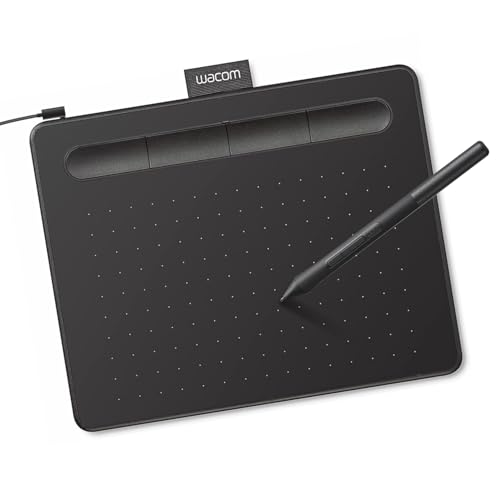
- Battery-free EMR pen feels like pen on paper
- Works with creative and editing software
- Four ExpressKeys provide shortcuts
Best For: Digital art, design, photo editing, and markup
Best for Paper-Free Everyday Notes
10.5-Inch Double-Sided LCD Tablet

- Double-sided 10.5-inch writing surface
- Very thin and lightweight design
- Rated for 50,000–100,000 uses
Best For: Students, offices, messages, and reusable scratch notes
Best Premium Writing-and-Reading Device
Kindle Scribe with Premium Pen

- 16GB digital notebook and e-reader
- AI handwriting conversion and summaries
- 10.2-inch glare-free front-lit display
Best For: Reading, PDF markup, and organized digital notes
Best Multi-Pack Value
TIQUS 8.5-Inch LCD Writing Tablets

- Three tablets included in one pack
- Slim, portable pressure-sensitive screens
- Reusable option for lists and reminders
Best For: Shared household, kitchen, office, and communication notes
Best Student Tablet
Lenovo Idea Tab with Pen and Case
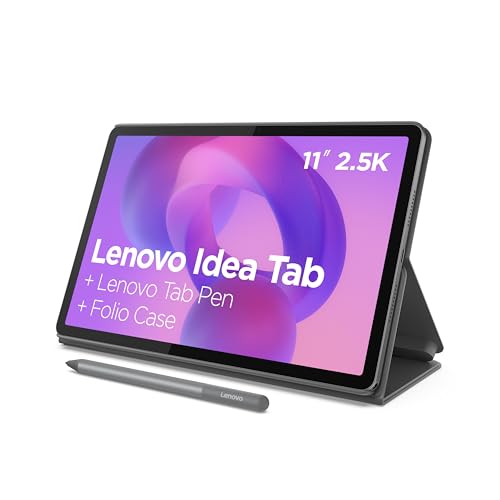
- 11-inch 2.5K 90Hz display
- Pen, folio case, and study apps included
- 8GB RAM and 256GB storage
Best For: Students needing handwriting plus full Android tablet functions
Best Simple Writing Board

- Reusable 10-inch LCD writing surface
- Cover doubles as a stable stand
- Standalone operation with lock and erase controls
Best For: Quick notes, reminders, drafts, and paper-free practice
Best Digital Note-Taking Tablet

- 16K-pressure battery-free stylus
- 90Hz anti-glare color LCD display
- Note app supports PDFs and handwriting conversion
Best For: Study, meetings, reading, and structured digital note-taking
Simple Reusable Notes – Boogie Board Basics Writing Pad
The Boogie Board Basics is a straightforward choice among electronic writing tablets for quick notes, lists, reminders, and casual sketches. Its bright LCD writing surface needs no software or charger, and the included stylus can be replaced with another scratch-free stylus or a convenient household writing tool.
Best For: Around-the-house notes, teachers, and anyone who wants a low-maintenance reusable writing pad.
Pros:
- Erases instantly with the push of a button.
- Works without software, cords, or regular charging.
- Bright, high-contrast LCD is designed for easy reading.
- UV protection and durability testing support long-term use.
Cons:
- Designed for writing and erasing rather than saving or syncing notes.
- Uses a replaceable battery, not a rechargeable power system.
Choose this model when simplicity matters more than digital file management. It is a practical electronic writing tablet for disposable-style reminders without paper waste, apps, or setup.
Smart Paper-to-Phone Notes – XPPen Note Plus Digital Notebook
The XPPen Note Plus stands out among electronic writing tablets because it combines real A5 paper with digital syncing. Handwritten notes and sketches can appear on an Android or iOS phone through Bluetooth 5.3, while offline storage, editing tools, and PNG or PDF export make it more useful than a basic erase-only pad.
Best For: Students, meeting notes, lectures, sketching, and users who want familiar paper with searchable digital copies.
Pros:
- Captures handwriting from real A5 paper and syncs it to a phone.
- Works offline and syncs when reconnected.
- Supports page management, tags, search, brushes, highlighters, and colors.
- Offers 14 hours of writing, 50-day standby, and 2.5-hour charging.
Cons:
- Requires the exclusive matching ink pen for writing capture.
- Phone compatibility is limited to Android 10 or later and iOS 14 or later.
- It uses paper rather than an electronic writing screen.
This is the strongest fit for buyers who want handwritten notes to become shareable digital files without scanning. Its extra features and phone dependency make it more capable, but less immediate than a simple LCD pad.
Shared LCD Value Pack – TIQUS 9.25-Inch Writing Tablets
This two-pack gives households, classrooms, or offices a pair of large LCD electronic writing tablets for basic writing and drawing. The upgraded version is described as brighter with thicker handwriting, and a lock button can preserve content until you choose to remove it.
Best For: Adults and users over 15 who need separate pads for homework, messages, reminders, or simple sketches.
Pros:
- Includes two 9.25-inch LCD writing pads.
- Updated screen is brighter with thicker handwriting.
- Lock button helps prevent accidental erasure.
- Supports writing with the stylus or even a finger.
Cons:
- Not applicable to children under 15, according to the supplied warning.
- Standalone design does not provide phone syncing or file export.
- Product details do not specify battery life or charging information.
The TIQUS pack is a sensible value-oriented option when two people need simple reusable writing surfaces. Pick it for quantity and a relatively large writing area, not for connected note-taking or advanced digital artwork.
Creative Computer Control – Wacom Intuos Small Drawing Tablet
The Wacom Intuos Small is a computer-connected option among electronic writing tablets, built for digital drawing, photo editing, design, and document markup rather than standalone notes. Its battery-free EMR pen provides a pen-on-paper feel, while four ExpressKeys offer shortcuts during creative work.
Best For: Digital artists, designers, photo editors, students, and teachers working with compatible computers or software.
Pros:
- Battery-free pen uses Wacom EMR technology.
- Works with software for drawing, painting, editing, design, and markup.
- Includes four ExpressKeys for convenient shortcuts.
- Compatible with Windows, Mac, Android, and Chromebook use as specified.
Cons:
- Requires a USB-A wired connection rather than standalone operation.
- Has a smaller 6-by-3.7-inch active surface.
- It does not have a built-in LCD display.
Choose the Intuos Small when precision creative control matters more than writing directly on a screen. It is a more capable tool for computer-based creation, but less convenient for quick paper-replacement notes.
Best for Paper-Free Everyday Notes – 10.5-Inch Double-Sided LCD Tablet
For shoppers comparing electronic writing tablets, this Ksequ model offers a lightweight, reusable surface for quick notes, schoolwork, messages, and sketches. Its double-sided full-screen design provides a large writing area, but the manufacturer notes that handwriting can be difficult to see in weak light.
Best For: Students, office users, teachers, and adults who need a portable scratch-paper replacement or communication board.
Pros:
- Double-sided full-screen LCD design with a 10.5-inch active surface.
- Thin, lightweight construction at approximately 0.2 inches and 6.8 ounces.
- Reusable writing surface rated for 50,000–100,000 writing cycles.
- One-click erase button and included pen support quick notes and lists.
Cons:
- Brightness is poor in weak light, according to the product notes.
- It does not list connectivity, an operating system, or compatible devices.
This is a straightforward electronic writing tablet for reducing paper waste and keeping disposable notes organized. Choose it when portability and writing capacity matter more than smart-device features or low-light visibility.
Best Premium Writing-and-Reading Device – Kindle Scribe with Premium Pen
Among electronic writing tablets, the 16GB Amazon Kindle Scribe is designed for users who want a more capable digital notebook alongside reading features. Its Premium Pen supports handwriting, while built-in AI tools can convert, summarize, and adjust notes.
Best For: Readers, professionals, and students who want to write on documents, manage notebooks, and read on a front-lit display.
Pros:
- Combines digital notebooks, document markup, and Kindle reading in one device.
- Built-in AI tools can convert handwriting, summarize notes, and adjust length and tone.
- 10.2-inch glare-free, 300 ppi front-lit display works indoors and outdoors.
- Premium Pen is designed for a pen-on-paper feel and requires no setup or charging.
Cons:
- It is a premium multifunction device rather than a simple erasable LCD pad.
- The listed battery guidance is weeks of writing and months of reading, rather than unlimited use.
Kindle Scribe is the strongest choice here for a connected reading and writing workflow, especially if you annotate PDFs or books. Its added tools and display make it more versatile than basic electronic writing tablets, though they may be unnecessary for simple lists.
Best Multi-Pack Value – TIQUS 8.5-Inch LCD Writing Tablets
These TIQUS electronic writing tablets are a practical multi-pack option for households, offices, kitchens, or shared communication needs. The slim, pressure-sensitive LCD pads are designed for lists, reminders, and writing without paper, though the supplied notes specify use for adults and children over 15.
Best For: Families, shared workspaces, kitchens, and adults who want several lightweight tablets for checklists or communication.
Pros:
- Three 8.5-inch LCD writing tablets provide shared-use value.
- Thin, lightweight design is easy to carry and use in different locations.
- Pressure-sensitive screen is described as free from glare, blue light, and harmful radiation.
- Reusable design helps reduce paper and pen consumption.
Cons:
- The product warning says it is not applicable to children under 15.
- The 8.5-inch screen is smaller than the 10.5-inch Ksequ tablet and Kindle Scribe.
- The supplied notes identify writing as the specific use and do not mention smart features or connectivity.
This TIQUS pack makes sense when you need multiple basic writing surfaces rather than one advanced notebook. It is well suited to recurring lists and messages, provided the age restriction fits your household or workplace.
Best Student Tablet – Lenovo Idea Tab with Pen and Case
If you need electronic writing tablets for class notes, research, and everyday media, the Lenovo Idea Tab is a versatile Android option. Its included Tab Pen, 11-inch 2.5K 90Hz touchscreen, and bundled folio case make it ready for handwriting, sketching, and organized study sessions.
Best For: Students who want a full-featured tablet for handwritten notes, apps, streaming, and multitasking.
Pros:
- Includes a Lenovo Tab Pen and folio case.
- Sharp 11-inch 2.5K IPS display with a smooth 90Hz refresh rate.
- 8GB memory, 256GB storage, and Android 15 support productive multitasking.
- Includes Lenovo AI Note, Squid, Nebo, and MyScript Calculator for study workflows.
Cons:
- It is a general-purpose Android tablet rather than a single-purpose writing board.
- Its feature set may be more than needed for simple paper-replacement notes.
The Lenovo Idea Tab is the strongest all-around choice here for users who want handwriting alongside apps, cloud-connected tasks, entertainment, and schoolwork. Its included accessories and student-focused software reduce the need for separate purchases.
Best Simple Writing Board – JSJGETYI 10-Inch LCD Tablet
For straightforward electronic writing tablets, the JSJGETYI LCD Writing Tablet keeps the experience simple: write with the stylus, erase with one button, and protect the board with its folding cover. It works independently without a phone, computer, or app setup.
Best For: Families, classrooms, offices, and anyone who needs a reusable board for quick notes, drafts, arithmetic, or reminders.
Pros:
- 10-inch pressure-sensitive LCD provides a paper-saving writing surface.
- Protective PU cover folds into a stand for viewing and writing.
- Lock function helps prevent accidental erasure.
- Standalone design requires no connectivity or compatible device.
Cons:
- It cannot connect to phones or computers or digitally save notes.
- Notes must be photographed or scanned for preservation.
- The display is recommended for use in a well-lit area and does not work as a dark-room screen.
This is a practical low-complexity option when immediate writing matters more than file storage or synchronization. Choose it for disposable drafts and messages, not for searchable digital notebooks or saved class notes.
Best Digital Note-Taking Tablet – XPPen Magic Note Pad
The XPPen Magic Note Pad is an electronic writing tablet for users who want handwriting tools inside a full Android device. Its pressure-sensitive X3 Pro Pencil 2, 90Hz color display, native note app, and PDF features support more involved study, meeting, and reading workflows.
Best For: Students and professionals who want handwritten notes, annotations, handwriting conversion, and Android tablet functionality in one device.
Pros:
- X3 Pro Pencil 2 offers 16,384 pressure levels and requires no battery.
- 10.95-inch AG nano-etched display supports 90Hz refresh and reduced glare.
- XPPen Notes supports handwriting-to-text, audio recording, PDF editing, and automatic saving.
- Includes a magnetic folio and offers monochrome, light-color, and nature-color display modes.
Cons:
- It uses a normal Android LCD rather than an e-ink display.
- Some newer AI Notes and preinstalled MyScript features require a system upgrade to 1PAE.
- The broader feature set may be unnecessary for users seeking only a basic erase-and-rewrite board.
The Magic Note Pad is the most capable dedicated note-taking choice of the three, especially for PDF work and converting handwriting into text. Its LCD screen delivers color and smooth motion, but shoppers specifically seeking an e-ink reading experience should look elsewhere.
How We Picked the Best Electronic Writing Tablets
We compared these Electronic Writing Tablets by looking at their writing surface, included pen or stylus, erase method, portability, connectivity, storage, display quality, and intended use. Simple LCD boards are judged primarily on visibility, battery convenience, durability, and value. Connected notebooks and full tablets receive closer consideration for file handling, synchronization, pressure sensitivity, software support, and reading or productivity features.
The selection covers several use cases rather than treating every device as interchangeable. A reusable memo board is useful for quick reminders, while a Wacom drawing tablet or XPPen notebook is better suited to digital artwork and organized notes. Devices such as the Kindle Scribe and Lenovo tablet offer broader capabilities but typically cost more and require more setup.
Quick Comparison
| Type | Best For | Main Advantage | Key Limitation |
|---|---|---|---|
| Basic LCD writing pad | Lists, reminders, and practice | Simple, lightweight, and inexpensive | Limited storage and sharing |
| Multi-pack LCD pads | Families, classrooms, and offices | Good value for multiple users | Basic display and erase functions |
| Graphic drawing tablet | Digital art and design | Precise pressure-sensitive input | Usually needs a computer |
| Digital notebook | Handwritten notes and sketches | Synchronization and file organization | Higher cost and charging needs |
| Full tablet or e-reader | Reading, documents, and productivity | Broad software and storage options | More expensive and complex |
Key Buying Factors for Electronic Writing Tablets
Writing Surface and Display
LCD writing pads are excellent for quick handwriting but generally do not provide app support or permanent local storage. For drawing, check active-area size and pressure sensitivity. For reading or detailed documents, a higher-resolution touchscreen is more comfortable than a basic monochrome writing surface.
Connectivity and File Storage
If you need to preserve notes, choose a model that syncs with a phone, computer, cloud service, or document library. A standalone pad is better for temporary notes, while a connected notebook is more appropriate for searchable archives and sharing.
Pen, Power, and Erasing
Confirm whether the stylus is included, battery-free, rechargeable, or replaceable. Also check whether erasing clears the entire screen or supports selective editing. Battery life and the cost of replacement pens matter for frequent users.
Size and Intended Environment
Compact tablets travel easily and work well for shopping lists, while larger surfaces are more comfortable for diagrams, long notes, and artwork. A protective cover is especially useful for students and commuters.
Who Should Buy Which Electronic Writing Tablets?
Choose a basic LCD writing pad if you want an inexpensive screen for reminders, children’s drawing, home organization, or temporary office notes. Multi-packs make the most sense for classrooms, families, kitchens, and shared workspaces.
Choose the Wacom Intuos or an XPPen drawing-focused model for illustration, photo editing, lettering, and creative software. Choose the XPPen Note Plus or color digital notebook when handwritten notes need to sync or remain organized. The Kindle Scribe is the better fit for people who want reading and document annotation alongside notebooks.
Finally, choose the Lenovo Idea Tab if you need a general-purpose Android-style tablet for apps, media, documents, and browsing rather than a dedicated writing surface. Before buying, prioritize the workflow you use most: quick erase, accurate drawing, synchronized notes, or full tablet productivity.
