
The best electronic writing tablets for professionals make handwritten notes easier to organize, search, edit, and share without filling your desk with notebooks. The right model can also support sketching, document markup, reading, or creative work.
This roundup compares ten options across e-paper notebooks, standalone color tablets, phone-synced writing devices, and computer-connected pen displays. Use the guide below to match features such as pressure sensitivity, lighting, portability, and workflow compatibility to the way you work.
Best 10 Electronic Writing Tablets for Professionals Picks for 2026
Color Android Note-Taking Pick

- Android 14 tablet with 6GB RAM and 128GB storage
- Three display modes and a 90Hz anti-glare LCD
- Battery-free stylus with 16,384 pressure levels
Best For: Professionals needing color notes, Android apps, and PDF tools
Distraction-Free Reading Pick

- 11-inch glare-free display with adaptive front lighting
- Paper-like writing surface and battery-free pen
- AI note tools plus cloud document import and PDF export
Best For: Professionals focused on reading, annotation, and handwritten notes
Creative Android Tablet Pick
XPPen Magic Note Pad for Drawing

- 10.95-inch color LCD with AG nano-etching and 90Hz refresh
- Battery-free stylus with 16,384 pressure levels and tilt support
- Android 14, Google Play access, and three color modes
Best For: Professionals combining handwritten notes with sketching and drawing
Premium E Ink Writing Pick

- 11.8-inch color E Ink display with adjustable reading light
- Marker Plus includes an eraser and six spare tips
- Folders, tags, PDF markup, and handwriting conversion
Best For: Professionals seeking focused, paper-like color writing
Best Overall

- 10.2-inch glare-free display for reading and writing
- AI handwriting conversion and note summarization
- Imports and marks up documents and PDFs
Best For: Professionals who read, annotate, and take handwritten notes
Best for Focused Work

- Low-latency 10.3-inch black-and-white E Ink display
- Templates, folders, tags, and handwriting conversion
- Integrates with major document and collaboration tools
Best For: Distraction-free meetings, note-taking, and document review
Best Feature-Rich Option

- Color 10.3-inch Kaleido 3 E Ink display
- AI voice-to-text and meeting summarization
- 128GB storage with Android 14 and broad file support
Best For: Multitasking professionals who need color, audio, and AI tools
Portable Focus
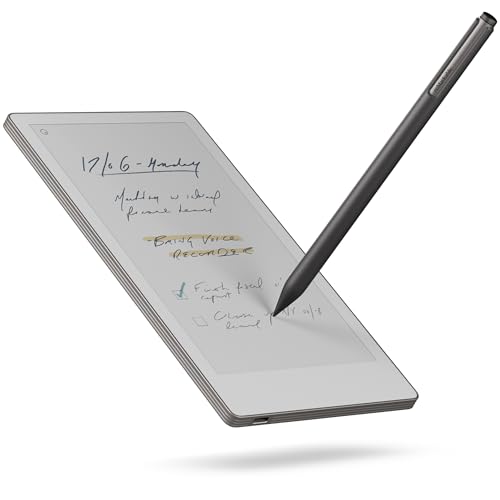
- 7.3-inch color paper-like display
- Handwriting conversion and cloud sync
- Compact 248.4 g distraction-free design
Best For: Focused note-taking and portable professional work
Creative Control
XPPen Deco 01 V3 Drawing Tablet

- 10-by-6.25-inch drawing area
- 16K pressure levels with 60-degree tilt
- Eight customizable shortcut keys
Best For: Digital art and design on compatible computers or Android devices
Paper-to-Cloud Notes
XPPen Note Plus Digital Notebook

- Writes on real A5 paper
- Bluetooth 5.3 phone synchronization
- Offline storage with PDF and PNG sharing
Best For: Digitizing handwritten notes and sketches from meetings or travel
Color Android Note-Taking Pick – XPPen Magic Note Pad 10.95"
For professionals seeking electronic writing tablets for professionals with flexible note-taking tools, the XPPen Magic Note Pad combines a full Android 14 tablet with a pressure-sensitive, battery-free stylus. Its color LCD, multiple display modes, native note app, and generous 6GB/128GB configuration make it suited to meetings, reading, document markup, and study.
Best For: Professionals who want Android apps, color notes, PDF annotation, and handwriting tools in one device.
Pros:
- Offers monochrome, light-color, and natural-color modes through a dedicated X-key.
- 90Hz AG nano-etched LCD supports smooth viewing with reduced glare and ambient-light interference.
- Battery-free X3 Pro Pencil 2 provides 16,384 pressure levels, tilt support, and a shortcut key.
- XPPen Notes supports handwriting-to-text, audio recording, PDF editing, cloud uploads, and AI note features after the stated system update.
Cons:
- This is a conventional Android LCD tablet, not an E Ink device.
- AI Notes and the included MyScript features require upgrading the system to 1PAE.
The Magic Note Pad is the most versatile option here for users who need a tablet ecosystem rather than a single-purpose digital notebook. Choose it when app access and color productivity matter more than an authentic E Ink appearance.
Distraction-Free Reading Pick – Kindle Scribe 64GB
The Kindle Scribe is a focused choice among electronic writing tablets for professionals who prioritize reading, handwritten notes, and document review without typical tablet distractions. Its 11-inch glare-free display, adjustable front light, included battery-free pen, and long battery life support extended work sessions.
Best For: Professionals who read extensively, annotate documents, and want a dedicated writing environment.
Pros:
- 11-inch glare-free display has adaptive brightness and adjustable warmth for comfortable reading.
- Textured screen and responsive writing surface provide a paper-like feel.
- AI tools can search notes, generate summaries, clean up handwriting, and convert it to text.
- Supports importing files from Google Drive and Microsoft OneDrive, with PDF export and OneNote sending.
Cons:
- It is purpose-built for reading and writing rather than general tablet apps.
- Its feature set is more specialized than a full Android tablet.
Choose the Kindle Scribe when concentration, reading comfort, and straightforward document markup are more important than broad app access or color drawing. It is a strong fit for professionals building a paper-replacement workflow around Kindle content and cloud documents.
Creative Android Tablet Pick – XPPen Magic Note Pad for Drawing
For professionals who need electronic writing tablets for professionals that also handle sketching, the standalone XPPen Magic Note Pad pairs Android 14 with a 10.95-inch color display and a 16,384-level battery-free stylus. Its anti-glare surface, 90Hz refresh rate, and three color modes support notes, annotations, and light creative work.
Best For: Creative professionals, educators, and mobile users who want one tablet for handwritten notes, drawing, and Android apps.
Pros:
- AG nano-etched X-Paper display is designed to provide friction for natural pencil-like strokes.
- Natural, light-color, and black-and-white modes accommodate drawing, annotation, and reading.
- Battery-free X3 Pro Pencil 2 offers 16,384 pressure levels for shading and line control.
- Runs Android 14, includes XPPen Notes, and supports Google Play apps.
Cons:
- The listed weight is 1.61 kg, which may reduce portability compared with its 7mm thickness.
- It uses an LCD display rather than E Ink.
This model makes the most sense when writing is only part of the workflow and sketching or drawing is equally important. Its Android platform adds flexibility, while the stylus and display are tailored to pressure-sensitive creative input.
Premium E Ink Writing Pick – reMarkable Paper Pro
The reMarkable Paper Pro is a premium option among electronic writing tablets for professionals who want a dedicated paper replacement for writing, reading, and document organization. Its 11.8-inch color E Ink display, adjustable reading light, Marker Plus stylus, and low-glare surface are designed for focused work in and out of the office.
Best For: Professionals who value a paper-like writing experience, organized documents, color markup, and distraction-free use.
Pros:
- 11.8-inch Canvas Color E Ink display supports color writing, sketching, and reading.
- Marker Plus includes a built-in eraser, with six spare tips included.
- Folders and tags help organize notes and documents, while handwriting can be converted to typed text.
- Low-glare display and adjustable reading light support daytime and nighttime reading.
Cons:
- Runs Linux and is designed as a focused digital notebook rather than a general-purpose tablet.
- The supplied specifications list only one USB-C port.
- Its feature set may be more specialized for users who need broad app compatibility.
The Paper Pro stands out for professionals who want the closest dedicated paper-notebook workflow in a color display. Select it for focused writing and document management, especially when low glare and a natural stylus feel take priority over a conventional tablet ecosystem.
Best Overall – Kindle Scribe
The Kindle Scribe is a practical choice among electronic writing tablets for professionals who want one distraction-free device for reading, note-taking, and document markup. Its 10.2-inch, 300 ppi glare-free display and included Premium Pen support comfortable writing in varied lighting.
Best For: Professionals who combine handwritten notes, Kindle reading, and PDF or document review.
Pros:
- Built-in AI can convert handwriting to text, summarize notes, and adjust length or tone.
- Imports and marks up documents and PDFs through Send to Kindle.
- Paper-like writing experience with a pen that does not require setup or charging.
- No notifications or social media, helping maintain focus.
Cons:
- Designed primarily around writing and reading rather than broad app-based workflows.
- AI notebook tools may be less useful to professionals who prefer manual organization.
Choose the Kindle Scribe if reading is as important to your workflow as writing. It offers a focused workspace with useful AI assistance and long battery life, while keeping distractions to a minimum.
Best for Focused Work – reMarkable Paper Pure
The reMarkable Paper Pure is built for professionals who want electronic writing tablets for professionals with a deliberately uncluttered experience. Its 10.3-inch black-and-white E Ink display, low-latency digital ink, and organization tools suit meetings, document review, and uninterrupted thinking.
Best For: Professionals who prioritize distraction-free handwriting, document markup, and organized project notes.
Pros:
- Third-generation 10.3-inch display offers improved whiteness and contrast.
- Digital ink appears in 21 ms for responsive handwriting and sketching.
- Tags, folders, templates, and handwriting-to-text tools support organized work.
- Apps and plugins connect with Google Drive, Dropbox, Microsoft Word, Slack, and Miro.
Cons:
- Black-and-white display is less suitable for color-heavy documents.
- Some additional features, including unlimited cloud storage, require a Connect subscription.
- It runs reMarkable OS rather than a general-purpose tablet operating system.
The reMarkable Paper Pure is a strong fit when focus and handwriting quality matter more than entertainment or broad app access. Consider the Connect subscription if cloud-based search, editing, and storage are central to your workflow.
Best Feature-Rich Option – Penstar eNote Pro C
The Penstar eNote Pro C is a feature-rich option among electronic writing tablets for professionals, combining a 10.3-inch Kaleido 3 color E Ink display with AI workflow tools. Its voice-to-text, meeting summaries, split-screen multitasking, Android 14 platform, and generous storage make it suited to varied business and creative tasks.
Best For: Professionals who need color E Ink, voice capture, AI-assisted organization, and support for many file formats.
Pros:
- Color E Ink display provides 300 ppi black-and-white and 150 ppi color resolution.
- AI features include voice-to-text, handwriting recognition, and note summarization.
- Split-screen mode supports reading and note-taking at the same time.
- 128GB storage, Android 14, third-party app support, and broad file compatibility add flexibility.
Cons:
- E Ink is not optimized for fast scrolling or video playback.
- Color resolution is lower than the display’s black-and-white resolution.
- The larger feature set may require more setup than a minimalist paper tablet.
Choose the eNote Pro C if your workflow extends beyond basic handwriting. It offers an unusually broad set of professional tools, though its E Ink display remains best suited to focused reading, writing, and document work rather than multimedia.
Portable Focus – reMarkable Paper Pro Move
For professionals seeking electronic writing tablets for professionals that minimize digital distractions, the reMarkable Paper Pro Move offers a compact, paper-like writing experience. Its 7.3-inch color display, reading light, included Marker Plus, handwriting conversion, and cloud syncing make it practical for capturing and organizing ideas on the move.
Best For: Professionals who want an ultraportable, distraction-free digital notebook for handwritten notes, documents, and creative work.
Pros:
- Compact 248.4 g design fits in a bag or jacket pocket.
- 7.3-inch color display is designed to look and feel like paper.
- Converts handwriting to typed text and supports cloud syncing.
- Folders, tags, and search help organize notes and documents.
Cons:
- Handwritten-note search requires a Connect subscription.
- Its 7.3-inch screen offers less workspace than larger tablets.
- It runs reMarkable OS rather than a general-purpose desktop operating system.
The Paper Pro Move is a strong fit when portability and concentration matter more than app versatility. It is especially appealing for meetings, travel, and focused writing sessions where a lightweight digital notebook can replace stacks of paper.
Creative Control – XPPen Deco 01 V3 Drawing Tablet
The XPPen Deco 01 V3 is a practical choice among electronic writing tablets for professionals who create on a connected computer, Android device, or compatible operating system. Its 10-by-6.25-inch active area, battery-free pressure-sensitive stylus, and eight customizable keys support drawing, editing, and digital design workflows.
Best For: Digital artists, designers, and beginners who need a spacious graphics tablet for compatible creative software.
Pros:
- 16,384 pressure levels and up to 60-degree tilt support smooth lines and shading.
- Battery-free stylus requires no charging.
- Eight customizable shortcut keys support right- and left-handed users.
- Works with Windows, macOS, Android, Chrome OS, Linux, and major design software.
Cons:
- It is a pen tablet that requires a connected compatible device rather than functioning as a standalone screen tablet.
- Software and operating-system compatibility may require updates or setup.
- The large drawing surface is less pocketable than a compact note-taking tablet.
Choose the Deco 01 V3 when drawing precision, shortcut access, and software compatibility are priorities. It provides a generous workspace and capable stylus for professional creative tasks while remaining approachable for newer digital artists.
Paper-to-Cloud Notes – XPPen Note Plus Digital Notebook
The XPPen Note Plus combines familiar paper writing with digital capture, making it a useful option among electronic writing tablets for professionals who prefer handwriting in meetings or while traveling. It uses real A5 paper and a dedicated pen to sync strokes to a phone through Bluetooth 5.3, with offline storage and sharing tools for follow-up work.
Best For: Professionals who want handwritten meeting notes, sketches, and ideas digitized on Android or iOS without writing on a screen.
Pros:
- Writes on real A5 paper with instant phone synchronization.
- 8192 pressure levels capture handwriting and sketches accurately.
- Supports offline writing, automatic syncing, tagging, search, and PDF or PNG sharing.
- Accepts any A5 notebook core up to 8 mm thick.
Cons:
- The electronic capture system requires the included matching ink pen.
- Phone compatibility is limited to Android 10.0 or later and iOS 14.0 or later.
- It has a 14-hour continuous writing battery rating and requires charging.
The Note Plus is a good middle ground for users who want the tactile feel of paper and the convenience of searchable, shareable digital records. Its replaceable A5 core and offline capability make it particularly practical for meetings, classes, and mobile note-taking.
How We Picked the Best Electronic Writing Tablets for Professionals
We evaluated these Electronic Writing Tablets for Professionals by focusing on the factors that most affect daily work: writing feel, pen responsiveness, screen size, portability, battery expectations, file handling, and compatibility with existing devices. We also considered whether each tablet is designed primarily for distraction-free notes, reading and document work, digital art, or a combination of tasks.
Product specifications can vary by configuration, so check the included pen, storage capacity, folio, lighting, and software features before buying.
Quick Comparison
| Best For | Look For |
|---|---|
| Focused notes and reading | E-ink display, front light, long battery life |
| Handwriting with color | Color screen, low-latency pen, tilt support |
| Professional illustration | High pressure sensitivity, shortcut keys, computer compatibility |
| Mobile note capture | Phone synchronization and reliable export tools |
| Organized business documents | Large storage, PDF support, search, and sharing options |
Key Buying Factors for Electronic Writing Tablets for Professionals
Display and Writing Experience
E-ink screens are comfortable for extended reading and help limit distractions, while LCD-style color displays are better for diagrams, highlighting, visual planning, and creative work. Consider whether a paper-like surface or bright, responsive color matters more to your workflow.
Stylus Performance
Pressure sensitivity is important for drawing and expressive handwriting, but it is less decisive for ordinary meeting notes. Battery-free pens reduce charging interruptions. Tilt support benefits shading and natural pen angles, while shortcut buttons can speed up professional illustration and editing.
Software and File Workflow
Check how easily the tablet exports PDF, image, or text files and whether notes can sync with your phone, computer, or cloud services. Built-in transcription, search, AI summaries, and document annotation can save time, but only if they work with the formats and applications you already use.
Portability, Storage, and Accessories
A compact model is easier to carry between meetings, but a larger screen may be more comfortable for documents and detailed sketches. Confirm internal storage, battery claims, folio protection, included pen accessories, and whether replacement nibs are easy to obtain.
Who Should Buy Which Electronic Writing Tablets for Professionals?
Choose an e-paper model such as a Kindle Scribe, reMarkable device, or comparable e-note tablet if your priority is handwriting, reading, document review, and fewer digital distractions. These are especially suitable for writers, researchers, consultants, students, and executives who value a paper-like workflow.
Choose an XPPen color tablet if you need visual notes, sketching, diagrams, or illustration alongside handwriting. Standalone color models suit mobile work, while a computer-connected Deco tablet is a better fit for users who already work in desktop creative software.
A phone-synced digital notebook is a practical choice for professionals who want to preserve familiar handwritten notes while keeping them accessible on a mobile device. Before purchasing, verify the companion app, export options, and operating-system support.
