
Choosing your first screen-based drawing tablet can feel complicated, especially when specifications, software compatibility, and standalone features vary so widely.
We selected 10 drawing display tablets for beginners that cover affordable computer-connected models, larger creative workspaces, and portable tablets that work without a computer.
Best 10 Drawing Display Tablets for Beginners Picks for 2026
Precision Starter

- Fully laminated 11.6-inch anti-glare display
- 8192 pressure levels with 60° tilt support
- Red dial plus eight customizable shortcut keys
Best For: Beginners seeking precise computer-connected drawing
Learn Anywhere
PicassoTab A10 Standalone Tablet

- Standalone Android tablet needs no computer
- Includes creative apps and lifetime beginner tutorials
- 10-inch laminated display with 4096-level pen
Best For: Students and beginners wanting guided, portable drawing
Compact Classic
XP-Pen Artist12 Drawing Monitor

- 11.6-inch Full HD display with 100% sRGB coverage
- Battery-free 8192-level pen with built-in eraser
- Six shortcut keys and programmable touch bar
Best For: Students and hobbyists using a computer for creative work
Color-Focused Upgrade

- 13.3-inch laminated Canvas Glass 2.0 display
- 16384 pressure levels with PenTech 4.0
- 99% sRGB, factory calibration, stand, and dual dials
Best For: Developing artists who want color accuracy and room to grow
Best Standalone Pick

- Works independently without a computer
- 14.1-inch Full HD display
- Includes drawing apps, tutorials, pen, and stand case
Best For: Beginners and students seeking a portable all-in-one drawing tablet
Best Connected Display
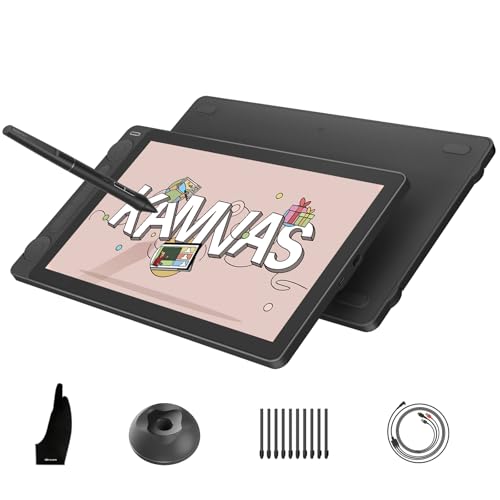
- Full-laminated 13.3-inch anti-glare display
- 16,384-pressure-level PenTech 4.0 pen
- Dual dials and five shortcut keys
Best For: Beginners with a compatible computer who want room to develop
Best Compact Standalone Option

- No computer needed for drawing
- Compact 10.1-inch Full HD display
- Includes apps, tutorials, pen accessories, and stand case
Best For: Portable beginner drawing, classroom work, and note-taking
Beginner-Friendly Precision Pick

- Paper-feel, full-laminated display
- 16K pressure-sensitive magnetic stylus
- Eight shortcuts and one-cable USB-C setup
Best For: New artists seeking a compact, easy-to-use pen display
Color-Focused Learning Station
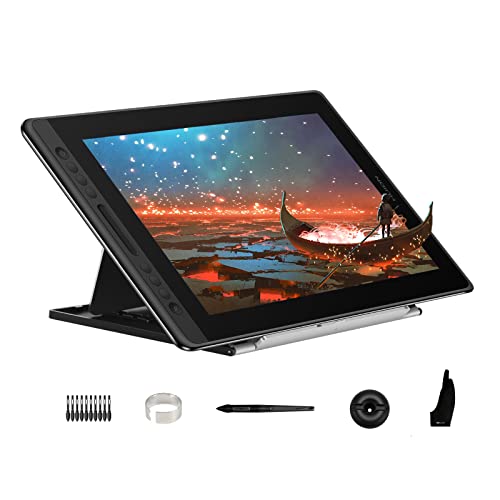
- 15.6-inch full-laminated anti-glare screen
- 120% sRGB color gamut and 1080p resolution
- Six shortcut keys, touch bar, and adjustable stand
Best For: Learners who want a larger canvas and vivid color
Value Starter Display

- Compact 11.6-inch 1080p display
- Battery-free pen with tilt and 8K pressure
- Two pens, 28 nibs, and six shortcut keys
Best For: Students wanting a simple starter tablet with extra accessories
Precision Starter – XP-Pen Artist12 Pro
For beginners comparing drawing display tablets for beginners, the XP-Pen Artist12 Pro offers a compact screen, accurate pen tracking, and controls designed to reduce reliance on a keyboard. Its 11.6-inch fully laminated display helps keep the cursor aligned with the stylus, while the battery-free pen requires no charging.
Best For: Beginners who want a computer-connected drawing display with customizable controls and a paper-like drawing feel.
Pros:
- Fully laminated, anti-glare display minimizes visual gaps and reflections.
- 8192 pressure levels and 60-degree tilt support enable expressive strokes and shading.
- Red dial and eight customizable shortcut keys can speed up common tasks.
- Works with Windows, macOS, ChromeOS, Linux, and major creative software.
Cons:
- It is a pen display, not a standalone tablet, so it must connect to a host device.
- The 11.6-inch workspace may feel compact for users who prefer a larger canvas.
- Connection uses the included 3-in-1 cable rather than standalone operation.
The Artist12 Pro is a practical beginner choice when precise on-screen drawing and dedicated workflow controls matter more than portability. Confirm that your computer and preferred software meet the compatibility requirements before buying.
Learn Anywhere – PicassoTab A10 Standalone Tablet
Among drawing display tablets for beginners, the PicassoTab A10 stands out because it works without a computer. This portable Android tablet includes creative apps, guided tutorials, and a pressure-sensitive pen, making it suitable for learners who want to start drawing immediately and practice in different locations.
Best For: Beginners, students, and travelers who want an all-in-one drawing tablet with built-in lessons.
Pros:
- Standalone design runs drawing and learning apps without a separate computer.
- Preloaded creative apps and lifetime tutorial access support guided practice.
- Laminated 10-inch display is designed to reduce glare and parallax.
- Includes a case, glove, power adapter, screen protector, and app upgrades.
Cons:
- The 4096-level pen offers less pressure sensitivity than several computer-connected alternatives.
- Its 10-inch screen provides a smaller workspace than larger pen displays.
- At approximately 1.5 kg, it may be less convenient to carry than its compact screen size suggests.
The PicassoTab A10 is especially approachable for beginners who do not already own a suitable laptop or desktop. Its standalone Android setup and tutorial bundle make the learning path simpler, though advanced artists may eventually want a larger or more specialized system.
Compact Classic – XP-Pen Artist12 Drawing Monitor
The XP-Pen Artist12 is a straightforward option for beginners shopping for drawing display tablets for beginners and wanting a compact Full HD screen. It pairs an 11.6-inch display with a battery-free pen, programmable controls, and broad compatibility with popular illustration, editing, and animation software.
Best For: Beginners who want an affordable-feeling, computer-connected display for drawing, editing, or online teaching.
Pros:
- 1920×1080 IPS display offers 72% NTSC and 100% sRGB color coverage.
- Battery-free stylus includes an eraser and supports 8192 pressure levels.
- Six customizable shortcut keys and a programmable touch bar support efficient workflows.
- Supports Windows, macOS, Linux, and numerous creative and conferencing applications.
Cons:
- It must connect to a computer and requires available HDMI and USB-A ports or suitable adapters.
- The 11.6-inch display may feel limited for detailed or spacious compositions.
- Its control layout is less extensive than models with more shortcut keys or a dial.
The Artist12 keeps the setup familiar and focused: connect it to a computer, install the driver, and draw directly on the screen. It is a sensible starting point for students, hobbyists, and teachers who value broad software support and a lightweight display.
Color-Focused Upgrade – Huion Kamvas 13 Gen 3
For beginners who want room to grow, the Huion Kamvas 13 Gen 3 combines a 13.3-inch laminated display with advanced pen performance and strong color coverage. It remains a computer-connected pen display, but its dual dials, included stand, and broad device compatibility make it a flexible choice for drawing, painting, and animation.
Best For: Beginners and developing artists who prioritize color accuracy, a larger workspace, and upgrade-friendly controls.
Pros:
- 13.3-inch fully laminated Canvas Glass 2.0 display helps reduce glare and parallax.
- PenTech 4.0 provides 16384 pressure levels and 2g initial activation force.
- 99% sRGB coverage, Rec.709 support, and factory calibration support consistent color work.
- Includes an adjustable stand, five shortcut keys, and dual dial buttons.
Cons:
- It is not standalone and must connect to a computer or compatible Android device.
- The full-featured USB-C cable is sold separately; the included connection options should be checked for your setup.
- Its advanced features may be more than a casual beginner needs.
The Kamvas 13 Gen 3 is a strong long-term pick for a beginner who expects to take digital art seriously. Its larger screen, accurate color presentation, adjustable stand, and high-resolution pressure response offer useful headroom as skills develop.
Best Standalone Pick – RubensTab T14
For beginners comparing drawing display tablets for beginners, the RubensTab T14 is a flexible option that works without a computer. Its 14.1-inch Full HD display, pre-installed drawing apps, and included stand case make it suitable for learning, sketching, and everyday creative work.
Best For: Beginners, students, and artists who want a self-contained tablet for drawing, notes, and portable use.
Pros:
- Standalone design requires no computer or laptop.
- 14.1-inch 1920×1200 display provides a spacious drawing area.
- Includes pre-installed drawing apps, tutorials, a pressure-sensitive pen, and adjustable stand case.
- 10,000mAh battery provides up to five hours of continuous use.
Cons:
- Its listed weight is approximately 3 pounds, making it less compact than smaller tablets.
- Battery life is rated for up to five hours, so longer sessions may require charging.
The T14 stands out for beginners who want to draw immediately without managing a separate computer. It also doubles as a practical device for studying, meetings, and accessing online tutorials.
Best Connected Display – HUION Kamvas 13 (Gen 3)
For beginners who already have a compatible computer, the HUION Kamvas 13 (Gen 3) is a focused choice among drawing display tablets for beginners. It connects to a computer or laptop and combines a full-laminated 13.3-inch display with a high-pressure-sensitivity pen and customizable controls.
Best For: New digital artists who want a computer-connected display with a natural drawing surface and room to grow.
Pros:
- Canvas Glass 2.0 uses a paper-textured, anti-glare surface for a more natural feel.
- PenTech 4.0 offers 16,384 pressure levels, tilt auto-alignment, and three pen buttons.
- Includes two dials and five press keys for shortcuts and adjustments.
- Supports Windows, macOS, Android devices meeting the listed requirements, and Linux.
Cons:
- Not standalone; it must be connected to a compatible computer or laptop.
- Setup requires cables and supported drawing software.
The Kamvas 13 (Gen 3) is the better fit for beginners who want a dedicated pen display rather than an independent tablet. Its color coverage, calibration, shortcut controls, and lightweight 865g design also support more advanced creative work.
Best Compact Standalone Option – RubensTab T11 Pro
The RubensTab T11 Pro is a compact alternative for beginners shopping for drawing display tablets for beginners without wanting a computer-dependent setup. It has a 10.1-inch Full HD display, Android 12, built-in drawing apps, and a battery designed for up to five hours of use.
Best For: Students, teachers, and beginners who prioritize portability and standalone drawing for lessons, notes, and casual creative work.
Pros:
- Standalone tablet lets you draw without a computer.
- 10.1-inch 1920×1200 display is portable while retaining Full HD resolution.
- Comes with pre-installed drawing apps, beginner tutorials, pen accessories, and an adjustable stand case.
- Supports USB-C charging and can be extended with a mobile power bank.
Cons:
- Its 1,024 pressure levels are lower than the other listed options.
- The smaller display offers less workspace than the T14 and Kamvas 13.
- Android 12 may provide a different app experience than a desktop operating system.
The T11 Pro makes sense when portability matters more than a large canvas or advanced pen specifications. Its standalone operation and included learning tools lower the barrier for beginners, while the stand case supports both travel and desk use.
Beginner-Friendly Precision Pick – XP-Pen Artist 12 3rd
For beginners comparing drawing display tablets for beginners, the XP-Pen Artist 12 3rd combines an approachable control layout with a paper-like drawing surface. Its 11.9-inch full-laminated display, 16,384 pressure levels, customizable shortcut keys, and one-cable USB-C setup are designed to reduce friction while learning.
Best For: New digital artists, students, and users who want a compact tablet with strong pen sensitivity and simple connectivity.
Pros:
- Paper-feel nano-etched glass helps reduce glare and smudges while adding drawing resistance.
- 16,384 pressure levels, 60-degree tilt support, and a 0.3 mm nib travel support responsive line control.
- Eight customizable shortcut keys and included S20 foldable stand support a beginner-friendly workflow.
- One-cable USB-C connection works with compatible Windows, Mac, Android, and other listed systems.
Cons:
- The display is listed with a 1920×1080 resolution and a compact 11.9-inch size.
- It is a pen display that requires connection to a compatible device rather than functioning as a standalone computer.
The Artist 12 3rd is a practical starting point when tactile screen feel, shortcut access, and streamlined setup matter more than a larger canvas.
Color-Focused Learning Station – HUION Kamvas Pro 16
The HUION Kamvas Pro 16 is a strong option for shoppers evaluating drawing display tablets for beginners who want a larger workspace and color-focused screen. Its 15.6-inch full-laminated display, 120% sRGB gamut, shortcut keys, touch bar, and adjustable stand provide room to learn and refine a workflow.
Best For: Beginners and students who prefer a larger drawing area, built-in workflow controls, and an adjustable desktop setup.
Pros:
- 15.6-inch 1920×1080 full-laminated screen with anti-glare glass and slight drawing texture.
- 120% sRGB coverage, 92% AdobeRGB, and a 1000:1 contrast ratio support vivid, detailed visuals.
- Six programmable express keys and a touch bar provide quick access to shortcuts and zoom controls.
- Included ST200 stand adjusts from 20 to 60 degrees, while the battery-free pen supports tilt recognition.
Cons:
- It is not standalone and must be connected to a computer or laptop.
- The larger 15.6-inch format and included stand may require more desk space than compact models.
Choose the Kamvas Pro 16 if a spacious canvas, broad color gamut, and adjustable viewing angle are priorities for your learning setup.
Value Starter Display – VEIKK VK1200
For beginners looking at drawing display tablets for beginners, the VEIKK VK1200 offers a straightforward feature set in an 11.6-inch format. It includes a 1920×1080 IPS display, battery-free pen support with tilt, six shortcut keys, and extra nibs for practicing different drawing techniques.
Best For: Students and first-time artists who want an affordable-looking starter configuration with useful accessories and a compact display.
Pros:
- 11.6-inch 1920×1080 LED display provides a compact drawing workspace.
- Battery-free pen technology offers 8,192 pressure levels and 60-degree tilt support.
- Six shortcut keys cover common actions such as undo, redo, zoom, and brush selection.
- Includes two pens, 28 pen nibs, a pen holder, and an artist glove.
Cons:
- The listed 72% NTSC color gamut is more modest than the wider-gamut option in this roundup.
- Connectivity is listed through HDMI and USB, which may require more than one cable.
- The supplied compatibility details list desktop use, so buyers should verify their specific device setup.
The VK1200 makes sense for learners who value a simple screen tablet, physical shortcuts, and generous pen accessories over advanced color coverage.
How We Picked the Best Drawing Display Tablets for Beginners
We compared these tablets by focusing on the features that matter most when learning digital art: screen size, display quality, pen performance, connection requirements, software support, portability, and ease of use. We also separated conventional pen displays from standalone drawing tablets because they suit different workflows.
Beginner-friendly design was equally important. A responsive battery-free stylus, a laminated or low-parallax display, useful shortcut controls, and a stable stand can make practice more comfortable. However, advanced specifications do not automatically make a tablet easier to learn on, so we considered the overall balance rather than choosing solely by pressure-level numbers.
Quick Comparison
- Best for a traditional computer setup: XPPen Artist and HUION Kamvas models offer screen-based drawing with a connected computer.
- Best for portability: PicassoTab and RubensTab standalone models can run drawing apps without a separate computer.
- Best for a larger workspace: HUION Kamvas Pro 16 provides more room for detailed illustration and multitasking.
- Best for modern pen technology: The XPPen Artist 12 3rd and HUION Kamvas 13 Gen 3 models emphasize newer stylus and pressure features.
- Best for simple controls: Models with shortcut keys, dials, or touch bars can reduce reliance on keyboard commands.
Key Buying Factors for Drawing Display Tablets for Beginners
Standalone or Computer-Connected?
A standalone tablet includes its own operating system and can be used without a laptop or desktop. It is convenient for travel and casual sketching, but app selection, storage, battery life, and performance become important. A conventional pen display usually requires a computer, yet it may offer better software compatibility and value for a dedicated home setup.
Screen Size and Viewing Comfort
Displays around 11 to 13 inches are easier to fit on a small desk and generally cost less. A 15.6-inch screen gives your hand more room and can be more comfortable for detailed work, but it needs more desk space. Look for a laminated display, good viewing angles, and an adjustable stand when possible.
Pen Feel and Drawing Accuracy
Pressure sensitivity, tilt support, low latency, and a battery-free stylus all contribute to a natural drawing experience. Beginners should prioritize consistent tracking and comfortable pen shape over the highest advertised pressure count. Replacement nib availability is also worth checking.
Compatibility and Connections
Confirm support for your operating system and preferred apps before buying. Check whether the tablet connects through USB-C, HDMI, or a proprietary cable, and whether an adapter is required. A computer-connected display also needs enough desk space for both the tablet and keyboard.
Who Should Buy Which Drawing Display Tablets for Beginners?
Choose a compact XPPen, HUION, XP-PEN, or VEIKK pen display if you are learning at a desk and already own a compatible computer. Choose a larger Kamvas Pro 16 if comfort and workspace matter more than portability. Pick the PicassoTab or a RubensTab standalone model if you want to draw away from a computer or prefer an all-in-one setup. For buyers interested in newer pen responsiveness and shortcut controls, the latest Artist 12 3rd and Kamvas 13 Gen 3 options are strong places to start.
